పరిచయం
This manual provides essential information for the safe and efficient operation of your Pioneer VSX-834 7.2-Channel AV Receiver. Please read these instructions thoroughly before use and retain them for future reference.
భద్రతా సమాచారం
హెచ్చరిక: క్యాన్సర్ మరియు పుట్టుకతో వచ్చే లోపాలు లేదా ఇతర పునరుత్పత్తికి హాని కలిగించేలా కాలిఫోర్నియా రాష్ట్రానికి తెలిసిన లెడ్తో సహా రసాయనాలకు ఈ ఉత్పత్తి మిమ్మల్ని బహిర్గతం చేస్తుంది. మరింత సమాచారం కోసం వెళ్ళండి www.P65Warnings.ca.gov.
- ఈ ఉపకరణాన్ని వర్షం లేదా తేమకు బహిర్గతం చేయవద్దు.
- వెంటిలేషన్ ఓపెనింగ్లను నిరోధించవద్దు. తయారీదారు సూచనలకు అనుగుణంగా ఇన్స్టాల్ చేయండి.
- రేడియేటర్లు, హీట్ రిజిస్టర్లు, స్టవ్లు లేదా ఇతర ఉపకరణాలు (సహా ampలిఫైయర్లు) వేడిని ఉత్పత్తి చేస్తాయి.
- తయారీదారు పేర్కొన్న జోడింపులు/యాక్సెసరీలను మాత్రమే ఉపయోగించండి.
- అన్ని సేవలను అర్హత కలిగిన సేవా సిబ్బందికి సూచించండి.
ఉత్పత్తి ముగిసిందిview
The Pioneer VSX-834 is a 7.2-channel AV receiver designed to deliver an immersive home theater experience. It supports the latest audio and video formats, offering versatile connectivity and advanced sound calibration features.
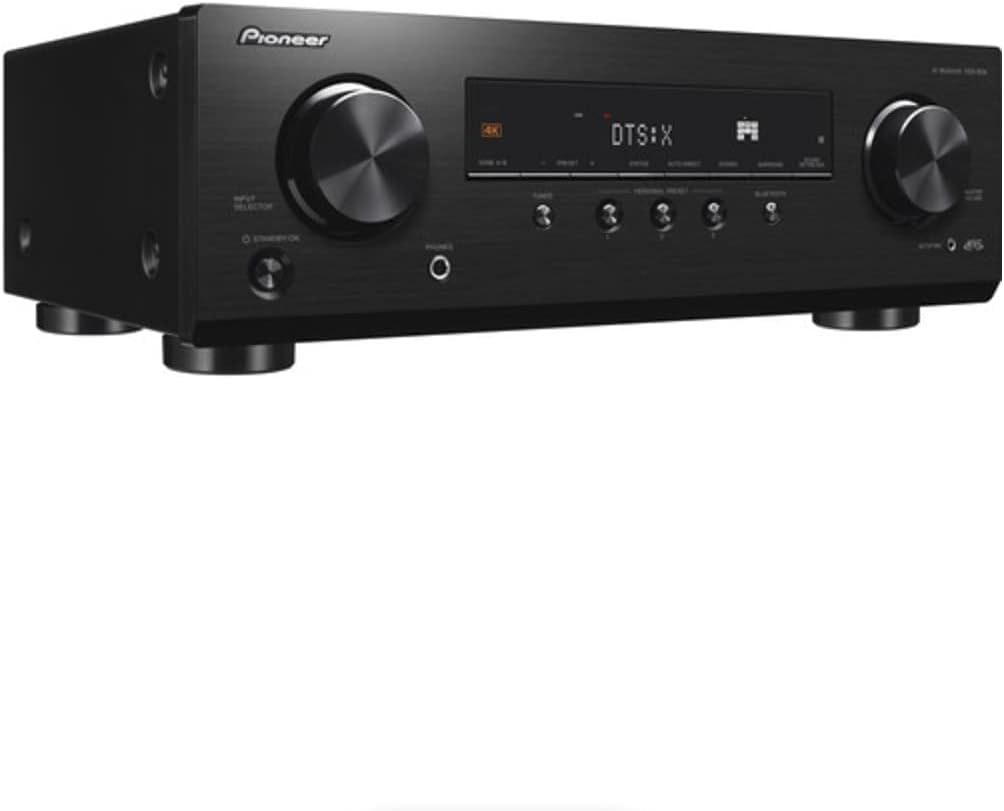
మూర్తి 1: ముందు view of the Pioneer VSX-834 AV Receiver.
కీ ఫీచర్లు
- 4K Video Support: Supports pass-through for HDR10, HLG (Hybrid Log-Gamma), and Dolby Vision signals. All HDMI terminals support 4K (60p/4:4:4/24-bit), wide color gamut (BT.2020), and HDCP 2.2.
- లీనమయ్యే ఆడియో: Compatible with Dolby Atmos and DTS:X audio formats, including Dolby Atmos Height Virtualizer and DTS Virtual:X for virtual surround effects without physical height or surround speakers.
- MCACC (Multi-Channel Acoustic Calibration System): Pioneer's proprietary system automatically compensates for differences in speaker size, level, and distance, and equalizes response for optimal acoustic environment.
- Zone B Audio Output: Expand main zone sound by connecting wireless headphones, allowing music playback in another room.
- అంతర్నిర్మిత బ్లూటూత్: Stream audio wirelessly from compatible devices (Ver. 4.2 + LE) with A2DP/AVRCP profiles and SBC/AAC codecs.
- Personal Preset: Save up to three preferred settings (volume, listening mode) for quick recall via the front panel button or remote control.
సెటప్
1. అన్ప్యాకింగ్
Carefully remove the AV Receiver and all accessories from the packaging. The box should contain the AC Receiver, remote control, setup microphone, and FM/AM antennas.
2. కనెక్షన్లు
Ensure the receiver is powered off and unplugged before making any connections.

Figure 2: Rear panel connections for the Pioneer VSX-834 AV Receiver.
- HDMI కనెక్షన్లు: Connect your source devices (Blu-ray player, game console, streaming device) to the HDMI IN ports. Connect your TV or projector to the HDMI OUT port.
- స్పీకర్ కనెక్షన్లు: Connect your speakers to the corresponding terminals on the rear panel. Pay attention to polarity (+/-) for each speaker. The receiver supports 5.1ch or 7.1/5.1.2ch configurations.
- యాంటెన్నా కనెక్షన్లు: Connect the supplied FM and AM antennas for radio reception.
- శక్తి: Once all connections are made, plug the power cord into an AC outlet.
3. Initial Configuration (MCACC)
Use the supplied setup microphone and the MCACC system to automatically calibrate your speakers for optimal sound performance in your listening environment. Follow the on-screen instructions displayed on your connected TV.
ఆపరేటింగ్ సూచనలు
1. ప్రాథమిక ఆపరేషన్
- పవర్ ఆన్/ఆఫ్: నొక్కండి స్టాండ్బై/ఆన్ ముందు ప్యానెల్ లేదా రిమోట్ కంట్రోల్లోని బటన్.
- ఇన్పుట్ ఎంపిక: ఉపయోగించండి ఇన్పుట్ సెలెక్టర్ knob on the front panel or the input buttons on the remote control to choose your desired source (e.g., BD/DVD, GAME, CBL/SAT).
- వాల్యూమ్ నియంత్రణ: సర్దుబాటు చేయండి మాస్టర్ వాల్యూమ్ ముందు ప్యానెల్లోని నాబ్ లేదా వాల్యూమ్ +/- రిమోట్ కంట్రోల్లో బటన్లు.
2. అధునాతన ఫీచర్లు
- బ్లూటూత్ స్ట్రీమింగ్: నొక్కండి బ్లూటూత్ను button on the front panel to activate Bluetooth mode. Pair your device with the receiver to stream audio.
- Personal Presets: To save current settings, press and hold the PERSONAL PRESET button for three seconds. To recall, press the button briefly. Up to three presets can be stored.
- జోన్ B ఆడియో: Connect wireless headphones to the Zone B audio output terminals to enjoy audio from the main zone in a separate location.
నిర్వహణ
- శుభ్రపరచడం: మెత్తటి, పొడి గుడ్డతో యూనిట్ను తుడవండి. రాపిడి క్లీనర్లు లేదా ద్రావకాలను ఉపయోగించవద్దు.
- వెంటిలేషన్: Ensure adequate ventilation around the receiver to prevent overheating. Do not block any vents.
- పవర్ కార్డ్: ఏదైనా నష్టం జరిగిందా అని పవర్ కార్డ్ను క్రమం తప్పకుండా తనిఖీ చేయండి.
ట్రబుల్షూటింగ్
- శక్తి లేదు: పవర్ కార్డ్ సురక్షితంగా ప్లగ్ చేయబడిందో లేదో మరియు అవుట్లెట్ పనిచేస్తుందో లేదో తనిఖీ చేయండి.
- ధ్వని లేదు: Verify speaker connections, input selection, and volume level. Ensure the mute function is not active.
- వీడియో లేదు: Check HDMI cable connections between the source, receiver, and TV. Confirm correct input selection on both the receiver and TV.
- బ్లూటూత్ కనెక్షన్ సమస్యలు: Ensure the receiver is in Bluetooth mode and your device is in pairing mode. Check for interference from other wireless devices.
For more detailed troubleshooting, refer to the comprehensive online manual available on the Pioneer support webసైట్.
స్పెసిఫికేషన్లు
| ఉత్పత్తి కొలతలు | 17.1 x 12.6 x 6.8 అంగుళాలు |
| వస్తువు బరువు | 19 పౌండ్లు |
| మోడల్ సంఖ్య | VSX834 |
| కనెక్టివిటీ టెక్నాలజీ | బ్లూటూత్ |
| మొత్తం HDMI పోర్ట్లు | 5 |
| ఆడియో ఎన్కోడింగ్ | DTS |
| ఆడియో అవుట్పుట్ మోడ్ | చుట్టుముట్టండి |
| సరౌండ్ సౌండ్ ఛానెల్ కాన్ఫిగరేషన్ | 7.2 ఛానెల్ |
| తయారీదారు | మార్గదర్శకుడు |
వారంటీ మరియు మద్దతు
For warranty information and customer support, please visit the official Pioneer webసైట్ లేదా మీ స్థానిక డీలర్ను సంప్రదించండి. వారంటీ క్లెయిమ్ల కోసం కొనుగోలు రుజువుగా మీ కొనుగోలు రసీదును ఉంచండి.
Online resources and additional support can be found at: పయనీర్ మద్దతు


