1. పరిచయం
This manual provides detailed instructions for the safe and efficient installation, operation, and maintenance of your RAGGIE RG-PT30 MPPT Solar Charge Controller. Please read this manual thoroughly before attempting any installation or operation to ensure optimal performance and longevity of the device.
2. భద్రతా సూచనలు
- Ensure all connections are correct and secure before applying power. Incorrect wiring can damage the controller and connected devices.
- ఎల్లప్పుడూ ముందుగా బ్యాటరీని, తర్వాత సోలార్ ప్యానెల్ను, చివరకు లోడ్ను కనెక్ట్ చేయండి. రివర్స్ ఆర్డర్లో డిస్కనెక్ట్ చేయండి: లోడ్, తర్వాత సోలార్ ప్యానెల్, తర్వాత బ్యాటరీ.
- Do not disassemble or attempt to repair the controller yourself. Refer to qualified personnel for service.
- కంట్రోలర్ను ప్రత్యక్ష సూర్యకాంతి, అధిక ఉష్ణోగ్రతలు మరియు తేమ నుండి దూరంగా, బాగా వెంటిలేషన్ ఉన్న ప్రదేశంలో ఇన్స్టాల్ చేయండి.
- Use appropriate circuit breakers or fuses for the battery and solar panel circuits.
- Wear protective eyewear when working with batteries.
3. ఉత్పత్తి ముగిసిందిview
The RAGGIE RG-PT30 is an advanced Maximum Power Point Tracking (MPPT) solar charge controller designed to optimize the power harvest from your solar panels and efficiently charge your battery bank. It supports 12V and 24V battery systems and features a 30A charging capacity, an intuitive LED display, and multiple USB output ports for charging external devices.
3.1 ముఖ్య లక్షణాలు
- MPPT (Maximum Power Point Tracking) Technology for enhanced charging efficiency.
- Automatic 12V/24V system voltagఇ గుర్తింపు.
- 30A maximum charge current.
- LED screen display for real-time monitoring of input, battery, and output status.
- Four 5V 2A USB output ports for device charging.
- Comprehensive electronic protection functions.
3.2 కాంపోనెంట్ ఐడెంటిఫికేషన్

మూర్తి 1: ముందు View of the RAGGIE RG-PT30 Controller. This image shows the front panel of the solar charge controller, featuring the LED display at the top, two control buttons (MENU and POWER) below the display, and four 5V 2A USB output ports at the bottom right. The main terminals for solar input, battery, and load are located at the very bottom.
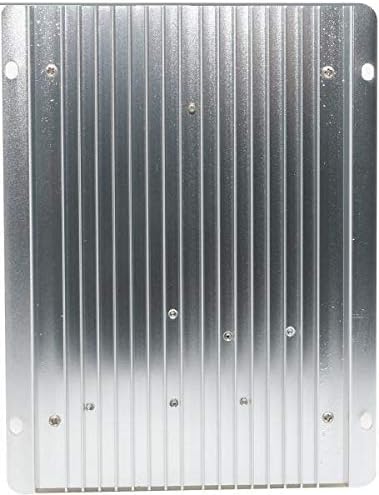
మూర్తి 2: వెనుకకు View of the RAGGIE RG-PT30 Controller. This image displays the rear side of the solar charge controller, characterized by its metallic heat sink fins. These fins are designed to dissipate heat generated during operation, ensuring the controller maintains optimal temperature and performance.
4. సెటప్ మరియు ఇన్స్టాలేషన్
4.1 కంట్రోలర్ను మౌంట్ చేయడం
- ప్రత్యక్ష సూర్యకాంతి మరియు తేమ నుండి రక్షించబడిన, పొడి, బాగా వెంటిలేషన్ ఉన్న ప్రదేశాన్ని ఎంచుకోండి.
- Mount the controller vertically on a non-flammable surface to allow for proper heat dissipation.
- గాలి ప్రసరణ కోసం కంట్రోలర్ చుట్టూ తగినంత క్లియరెన్స్ ఉందని నిర్ధారించుకోండి.
4.2 వైరింగ్ కనెక్షన్లు
Follow the connection order strictly to prevent damage to the controller or system components. Use appropriate wire gauges for your system's current and distance.
- బ్యాటరీని కనెక్ట్ చేయండి: Connect the positive and negative terminals of the battery to the corresponding battery terminals on the controller. The controller will automatically detect the system voltagఇ (12V లేదా 24V).
- సోలార్ ప్యానెల్ను కనెక్ట్ చేయండి: Connect the positive and negative terminals of the solar panel(s) to the corresponding solar input terminals on the controller.
- DC లోడ్ను కనెక్ట్ చేయండి (ఐచ్ఛికం): Connect the positive and negative terminals of your DC load to the corresponding load terminals on the controller.
Important: Ensure correct polarity for all connections. Reverse polarity can cause permanent damage.
5. ఆపరేటింగ్ సూచనలు
5.1 LED డిస్ప్లే
The LED screen provides real-time information about your solar system:
- ఇన్పుట్: వాల్యూమ్ని ప్రదర్శిస్తుందిtage and current from the solar panel.
- బ్యాటరీ: బ్యాటరీ వాల్యూమ్ను చూపుతుందిtagఇ మరియు ఛార్జింగ్ కరెంట్.
- అవుట్పుట్: Indicates the load voltagఇ మరియు ప్రస్తుత.
5.2 బటన్ విధులు
- మెనూ బటన్: Press to cycle through different display parameters or enter settings mode.
- పవర్ బటన్: Press to turn the DC load output ON/OFF. Long press may enter or exit certain settings.
5.3 USB అవుట్పుట్
The four 5V 2A USB ports can be used to charge compatible electronic devices. These ports are active when the controller is powered and the battery has sufficient charge.
6. నిర్వహణ
- సాధారణ తనిఖీ: బిగుతు మరియు తుప్పు కోసం అన్ని వైరింగ్ కనెక్షన్లను కాలానుగుణంగా తనిఖీ చేయండి.
- శుభ్రపరచడం: కంట్రోలర్ను శుభ్రంగా మరియు దుమ్ము మరియు చెత్త లేకుండా ఉంచండి. శుభ్రం చేయడానికి పొడి గుడ్డను ఉపయోగించండి.
- వెంటిలేషన్: Ensure that the ventilation openings and heat sink fins are not obstructed.
- బ్యాటరీ తనిఖీ: Regularly check the battery's state of charge and electrolyte level (for flooded batteries).
7. ట్రబుల్షూటింగ్
| సమస్య | సాధ్యమైన కారణం | పరిష్కారం |
|---|---|---|
| డిస్ప్లే/కంట్రోలర్ ఆన్ కావడం లేదు | బ్యాటరీ కనెక్ట్ కాలేదు లేదా తక్కువ వాల్యూమ్ ఉందిtage; రివర్స్ ధ్రువణత. | బ్యాటరీ కనెక్షన్లు మరియు వాల్యూమ్ను తనిఖీ చేయండిtage. Ensure correct polarity. |
| బ్యాటరీ ఛార్జ్ కావడం లేదు | Solar panel not connected; low solar input; faulty panel/wiring. | Check solar panel connections. Verify solar panel output voltage. Ensure sufficient sunlight. |
| లోడ్ పనిచేయడం లేదు | Load output turned off; overload; faulty load. | Press POWER button to turn on load. Reduce load. Check load device. |
| USB పోర్ట్లు పని చేయడం లేదు | బ్యాటరీ వాల్యూమ్tage too low; controller fault. | Ensure battery is adequately charged. If problem persists, contact support. |
8. స్పెసిఫికేషన్లు
| పరామితి | విలువ |
|---|---|
| మోడల్ | RG-PT30 |
| బ్రాండ్ | రాగీ |
| ఛార్జ్ మోడ్ | MPPT (Maximum Power Point Tracking) |
| సిస్టమ్ వాల్యూమ్tage | 12V / 24V Auto Recognition |
| గరిష్ట ఛార్జ్ కరెంట్ | 30A |
| ప్రదర్శన రకం | LED స్క్రీన్ |
| USB అవుట్పుట్ | 4 x 5V / 2A |
| ASIN | B07PC3TNCB |
| మొదటి తేదీ అందుబాటులో ఉంది | 3 మార్చి 2019 |
9. వారంటీ మరియు మద్దతు
For warranty information or technical support, please refer to the documentation provided with your purchase or contact your retailer. Keep your purchase receipt as proof of purchase.


