1. పరిచయం
This manual provides essential information for the safe and efficient operation of your EASUN POWER PWM Solar Charge Controller. This device is designed to manage the power flow from your solar panels to your battery bank, ensuring optimal charging and protecting your batteries from overcharge and over-discharge. It is compatible with 12V/24V lead-acid battery systems (OPEN, AGM, GEL types) and features an adjustable LCD display and dual USB ports for convenience.

మూర్తి 1: ముందు view of the EASUN POWER 30A PWM Solar Charge Controller, showing the LCD display, control buttons, and USB ports.
2 కీ ఫీచర్లు
- ఆటోమేటిక్ వాల్యూమ్tagఇ గుర్తింపు: 12V లేదా 24V బ్యాటరీ వ్యవస్థలను స్వయంచాలకంగా గుర్తిస్తుంది.
- PWM Charge Management: పూర్తిగా 4-సెtage PWM charge management for efficient battery charging.
- LCD డిస్ప్లే: Large LCD display showing all adjustable parameters and system status.
- ద్వంద్వ USB పోర్ట్ లు: 5V/2.5A (max) USB output for charging mobile devices.
- సమగ్ర రక్షణలు: Built-in short-circuit protection, open-circuit protection, reverse protection, over-load protection, dual MOSFET reverse current protection, and low heat production.
- బ్యాటరీ అనుకూలత: Specifically designed for lead-acid batteries (OPEN, AGM, GEL).

చిత్రం 2: పైగాview of the intelligent protection features including over-discharging, overcharging, overload, short circuit, reverse polarity, reverse current, and temperature compensation.
3. భద్రతా జాగ్రత్తలు
దయచేసి ఇన్స్టాలేషన్ మరియు ఆపరేషన్కు ముందు అన్ని సూచనలను జాగ్రత్తగా చదవండి. ఈ సూచనలను పాటించడంలో విఫలమైతే యూనిట్కు నష్టం, వ్యక్తిగత గాయం లేదా ఆస్తి నష్టం సంభవించవచ్చు.
- బ్యాటరీ వాల్యూమ్ని నిర్ధారించుకోండిtage is sufficient for the controller to recognize the battery type before first installation.
- The charge controller is only suitable for lead-acid batteries (OPEN, AGM, GEL). Do not connect other types of batteries (e.g., nickel hydride, lithium-ion).
- Install the controller indoors, away from direct sunlight, high temperatures, and humid environments.
- The controller will heat up during operation; ensure good ventilation.
- నష్టాన్ని తగ్గించడానికి బ్యాటరీ కేబుల్ వీలైనంత తక్కువగా ఉండాలి.
- Always connect the battery to the controller first, then the solar panel, and finally the load. Disconnect in the reverse order.
- Ensure all connections are tight and secure to avoid loose connections that can cause excessive heat.
- కంట్రోలర్ను మీరే విడదీయడానికి లేదా మరమ్మతు చేయడానికి ప్రయత్నించవద్దు. సేవ కోసం అర్హత కలిగిన సిబ్బందిని సంప్రదించండి.
4. సెటప్ మరియు ఇన్స్టాలేషన్
Follow these steps for proper installation of your solar charge controller:
- కేబుల్స్ సిద్ధం చేయండి: Ensure you have appropriate gauge cables for your solar panel, battery, and load connections.
- బ్యాటరీని కనెక్ట్ చేయండి: Connect the battery to the charge controller first. Ensure correct polarity (+ to + and - to -). The controller will automatically detect 12V or 24V.
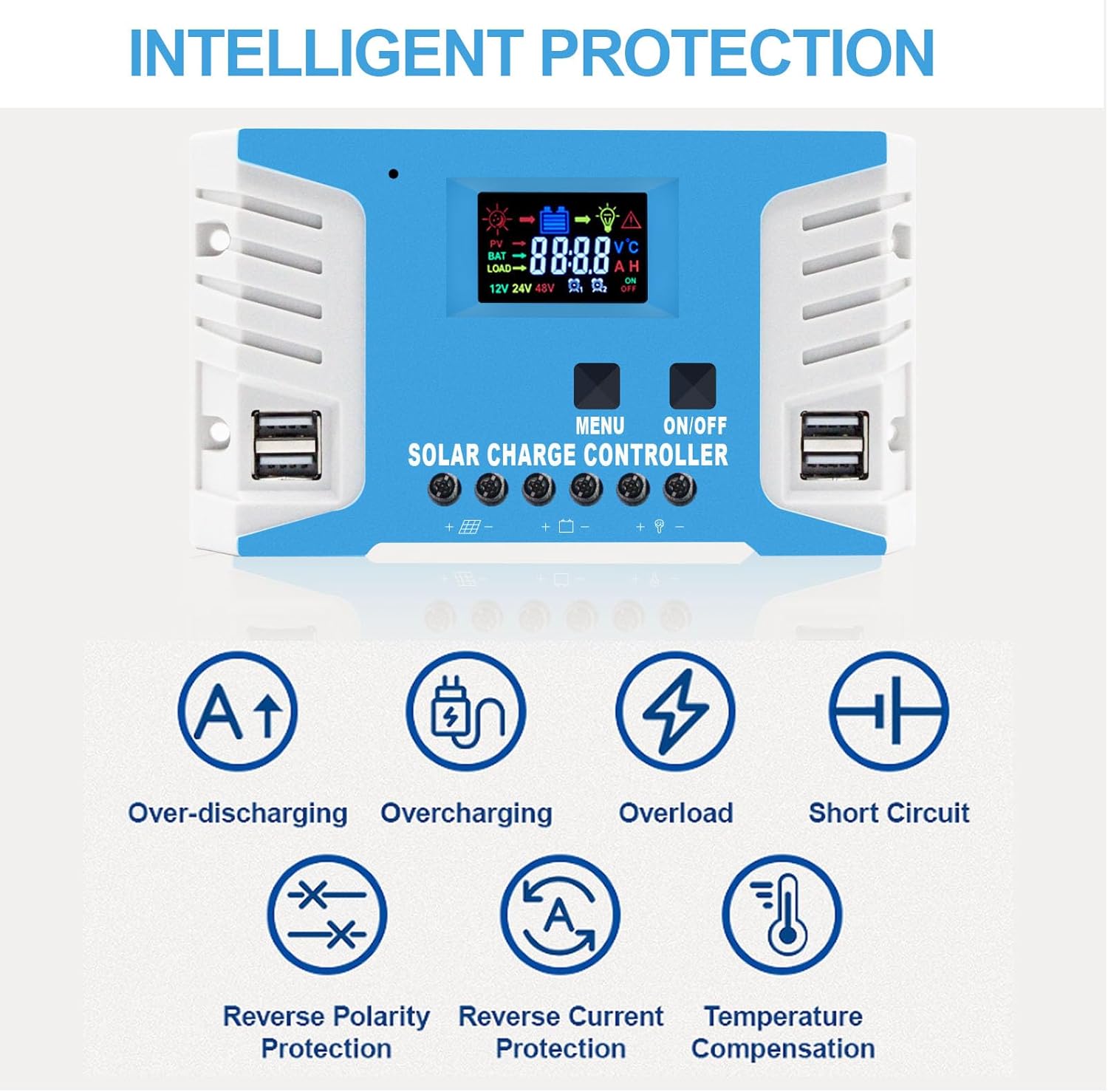
Figure 3: The controller is compatible with various lead-acid battery types including AGM, GEL, and FLD. Lithium batteries are not supported by this model.
- సోలార్ ప్యానెల్ను కనెక్ట్ చేయండి: Connect the solar panel to the charge controller. Again, observe correct polarity. The maximum solar input voltage is 25V for a 12V battery system and 50V for a 24V battery system.
- కనెక్ట్ లోడ్: Connect your DC load to the charge controller. Ensure the load current does not exceed the controller's rated current.
Figure 4: Connection diagram showing the sequence: Battery first, then PV panel, then DC load. Disconnect in reverse order.
ముఖ్యమైన గమనిక: Always connect the battery first, then the solar panel, and then the load. When disconnecting, disconnect the solar panel first, then the battery.
5. ఆపరేటింగ్ సూచనలు
5.1 LCD డిస్ప్లే మరియు బటన్లు
The controller features a large LCD display for monitoring system status and two buttons for navigation and settings.

Figure 5: The LCD screen displays real-time data, and the dual USB ports provide 5V output for charging devices.
- మెనూ బటన్: Used to cycle through display screens and enter/exit parameter setting mode.
- ఆన్/ఆఫ్ బటన్: Used to turn the load output on or off. In parameter setting mode, it's used to adjust values.
5.2 ఛార్జింగ్ Stages (PWM)
కంట్రోలర్ 4-సెకన్లను ఉపయోగిస్తుందిtage PWM charging algorithm to optimize battery life and performance:
- బల్క్ ఛార్జ్: Charges the battery at maximum current until voltage rises to the absorption level.
- శోషణ ఛార్జ్: Charges at constant voltage to ensure the battery is fully charged.
- ఫ్లోట్ ఛార్జ్: బ్యాటరీని స్థిరమైన వోల్టేజ్లో ఉంచుతుందిtage, compensating for self-discharge and keeping the battery topped off.
- Equalization Charge (Optional): Periodically overcharges the battery to balance cell voltages and prevent sulfation (for certain battery types).

Figure 6: Visual representation of the PWM three-stagఇ ఛార్జింగ్ ప్రక్రియ.
6. నిర్వహణ
క్రమం తప్పకుండా నిర్వహణ మీ సోలార్ ఛార్జ్ కంట్రోలర్ యొక్క దీర్ఘాయువు మరియు సరైన పనితీరును నిర్ధారిస్తుంది:
- కనెక్షన్లను తనిఖీ చేయండి: Periodically inspect all wiring connections to the controller, battery, solar panel, and load. Ensure they are tight, secure, and free from corrosion.
- క్లీన్ కంట్రోలర్: కంట్రోలర్ను శుభ్రంగా మరియు దుమ్ము మరియు చెత్త లేకుండా ఉంచండి. ఉపరితలాన్ని తుడవడానికి పొడి గుడ్డను ఉపయోగించండి. ద్రవ క్లీనర్లను ఉపయోగించవద్దు.
- వెంటిలేషన్: Ensure the area around the controller is well-ventilated to prevent overheating.
- బ్యాటరీ తనిఖీ: Regularly check the battery terminals for corrosion and clean them if necessary. Ensure the battery is in good condition.
7. ట్రబుల్షూటింగ్
ఈ విభాగం మీరు ఎదుర్కొనే సాధారణ సమస్యలకు పరిష్కారాలను అందిస్తుంది.
| సమస్య | సాధ్యమైన కారణం | పరిష్కారం |
|---|---|---|
| Controller not turning on / No display | బ్యాటరీ కనెక్ట్ చేయబడలేదు లేదా రివర్స్ ధ్రువణత; బ్యాటరీ వాల్యూమ్tagఇ చాలా తక్కువ. | బ్యాటరీ కనెక్షన్లు మరియు ధ్రువణతను తనిఖీ చేయండి. బ్యాటరీ వాల్యూమ్ను నిర్ధారించుకోండి.tage కనీస ఆపరేటింగ్ వాల్యూమ్ కంటే ఎక్కువగా ఉందిtage. |
| బ్యాటరీ ఛార్జ్ కావడం లేదు | Solar panel not connected or reverse polarity; Insufficient sunlight; Damaged solar panel or cable. | Check solar panel connections and polarity. Ensure panels are in direct sunlight. Inspect panels and cables for damage. |
| లోడ్ పనిచేయడం లేదు | Load output turned off; Overload protection activated; Short circuit in load. | Press the ON/OFF button to activate load. Reduce load. Check load wiring for short circuits. |
| Overcharge/Over-discharge warning | Incorrect battery type setting; Battery nearing end of life. | Ensure correct battery type is selected (if adjustable). Consider replacing old battery. |
8. స్పెసిఫికేషన్లు
| పరామితి | విలువ |
|---|---|
| మోడల్ | 30A |
| సిస్టమ్ వాల్యూమ్tage | 12V/24V ఆటో |
| గరిష్ట సోలార్ ఇన్పుట్ వాల్యూమ్tage (12V battery) | 25V |
| గరిష్ట సోలార్ ఇన్పుట్ వాల్యూమ్tage (24V battery) | 50V |
| Max Solar Panel Power (12V battery) | 360W |
| Max Solar Panel Power (24V battery) | 720W |
| USB అవుట్పుట్ | 5V/2.5A (గరిష్టంగా) |
| ప్రదర్శన రకం | LCD |
| మెటీరియల్ | మెటల్ |
| కొలతలు | 20.7 x 10.79 x 4.9 సెం.మీ |
| బరువు | 422 గ్రా |
| తయారీదారు | EASUN POWER |
| UPC | 742500941734 |
Figure 7: The controller's dimensions (161mm x 91mm) and examples of suitable applications such as RVs, residential solar, marine, and off-grid setups.
9. వారంటీ మరియు మద్దతు
EASUN POWER provides a 12 నెలల వారంటీ for this product, covering failures under normal usage. Accidental damage due to environmental causes or incorrect usage and installation is not covered but may be serviceable.
We also offer జీవితకాల సాంకేతిక మద్దతు. For any warranty issues, technical assistance, or questions, please contact the seller directly.
The product is CE certified and undergoes 100% QC before shipment, ensuring high quality and reliability.


