పరిచయం
This manual provides comprehensive instructions for the VTRONIX Q-380EW Universal Mini Split WiFi Compatible Remote. It covers setup, operation, and troubleshooting to ensure optimal performance and control of your mini split unit.
The Q-380EW remote offers advanced features including a display for SET temperature in Fahrenheit or Celsius, a wall-mounting bracket option, easy Wi-Fi setup for remote control via a smartphone app, and full weekly programming capabilities for your mini split unit.
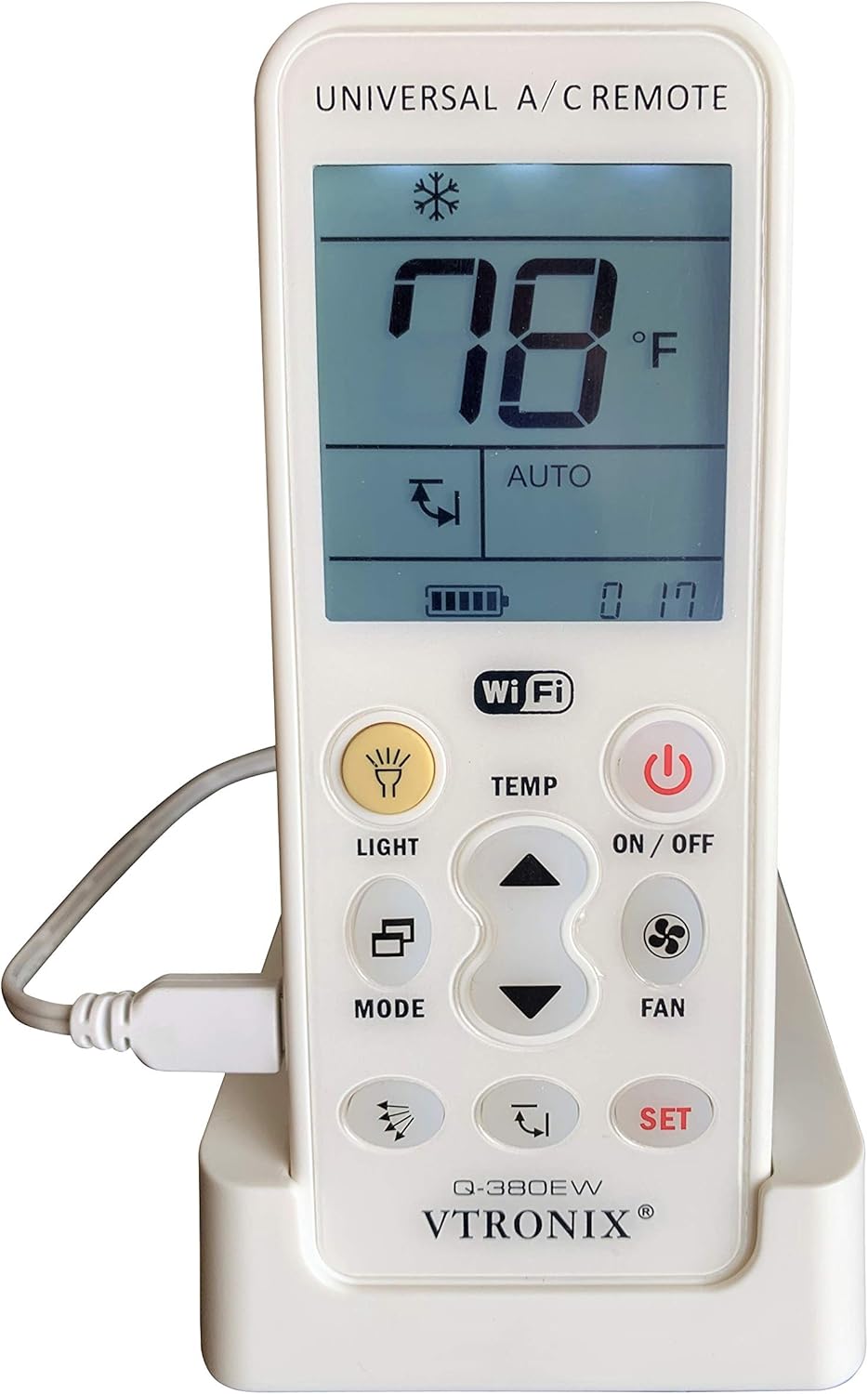
Image: The VTRONIX Q-380EW Universal Mini Split WiFi Remote shown in its charging base, displaying a temperature of 78°F.
సెటప్
ప్రారంభ తయారీ
- Download the companion app to your iPhone or Android phone. కోసం వెతకండి the official VTRONIX app in your device's app store.
- Ensure the remote control is connected to a power supply, either via the charging base or directly plugged in using the provided adapter. The Wi-Fi functionality requires continuous power.
- Verify that the Wi-Fi network your phone is connected to, and on which you intend to add the device, is a 2.4GHz band. This device does not operate on 5GHz networks.
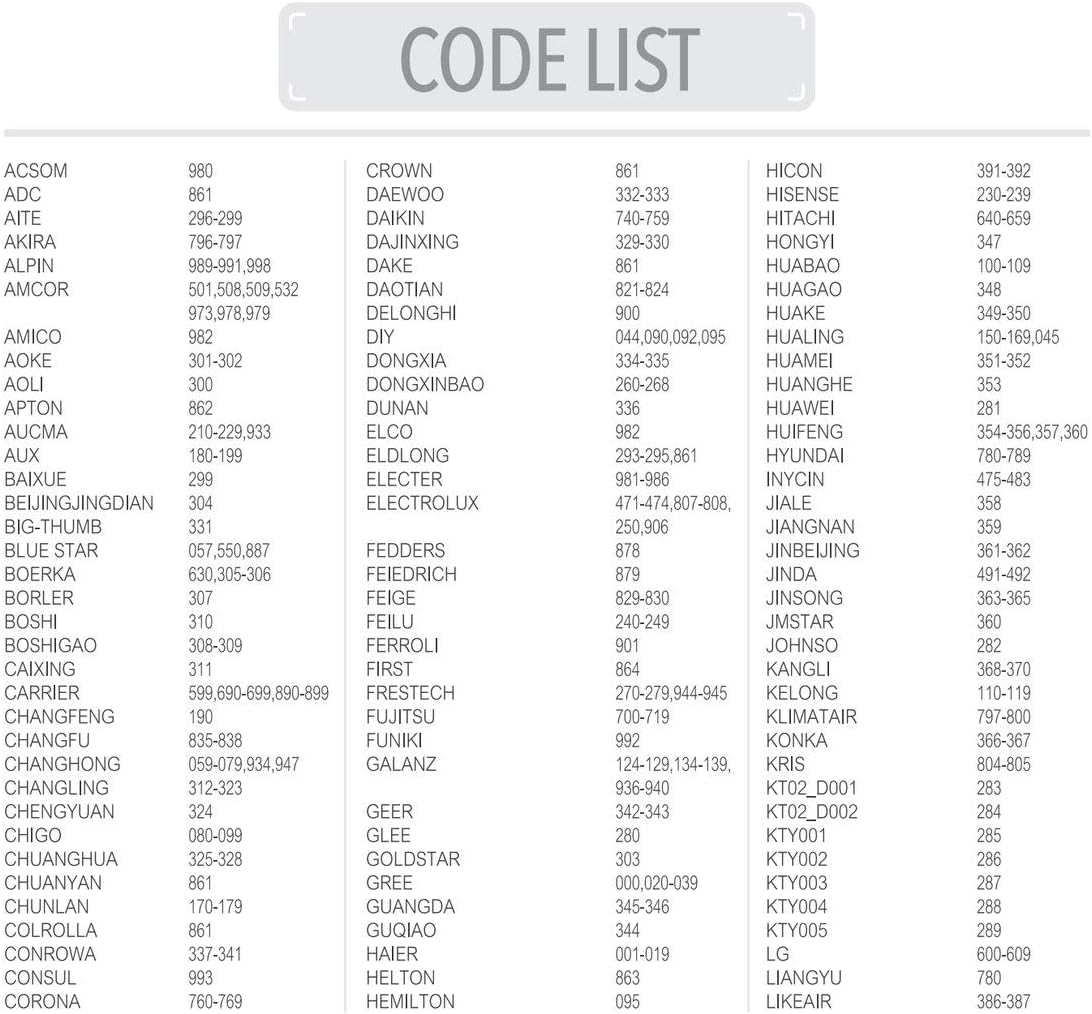
Image: The VTRONIX Q-380EW remote shown connected to its power adapter, illustrating the required continuous power supply for Wi-Fi operation.
App Connection Procedure
If you encounter difficulties connecting the remote to the app, follow these detailed steps:
- Open the app on your device and sign in. The first screen should display "Device List." Tap "Add Device."
- The next screen, "Configure Device," offers three choices. Select "AC Remote Controller."
- The subsequent screen will show connection instructions outlined in the manual. Ignore these for now and tap "Next."
- On the next "Configure Device" screen, select your Wi-Fi router and enter the password. DO NOT TAP THE "CONFIGURATE" BUTTON AT THIS TIME!
- WITHOUT CLOSING THE APP, navigate to the WLAN settings on your phone (where you view available networks).
- Now, go to the remote control and simultaneously press the LIGHT and SET Buttons until "02" flashes on the screen.
- Release the buttons. After a few seconds, a Wi-Fi symbol should start flashing on the bottom left of the control's screen. If it does not, repeat the previous step until it does.
- Return to your phone and, under available networks, locate and connect to the one named "Chunghop_XXXX."
- If you receive a message indicating that "Internet is not available on this hotspot," disregard it. If asked whether you want to switch to another network that has internet, decline and remain connected to "Chunghop_XXXX."
- Go back to the app on your phone and tap the "CONFIGURATE" button. You should receive a "Successful Connection" message. Initially, the device will briefly appear as "Offline," and then transition to "Online" after a few seconds.
- You can now control your A/C unit using the app.

Image: A visual representation of the step-by-step instructions for connecting the remote to the mobile application, highlighting the Wi-Fi setup process.
ఆపరేటింగ్ సూచనలు
ప్రాథమిక విధులు
The Q-380EW remote provides comprehensive control over your mini split unit. Key buttons and their functions include:
- ఆన్/ఆఫ్ బటన్: Powers the mini split unit on or off.
- లైట్ బటన్: Activates or deactivates the remote's backlight.
- మోడ్ బటన్: ఆపరేటింగ్ మోడ్ల ద్వారా చక్రాలు (ఉదా., కూల్, హీట్, ఫ్యాన్, డ్రై, ఆటో).
- ఫ్యాన్ బటన్: ఫ్యాన్ వేగాన్ని సర్దుబాటు చేస్తుంది (ఉదా., తక్కువ, మధ్యస్థం, ఎక్కువ, ఆటో).
- TEMP Buttons (Up/Down Arrows): సెట్ ఉష్ణోగ్రతను పెంచుతుంది లేదా తగ్గిస్తుంది.
- సెట్ బటన్: Confirms selections or enters programming modes.

చిత్రం: స్పష్టమైన ముందు భాగం view of the VTRONIX Q-380EW remote, showing the display and all control buttons.
Temperature Display and Programming
- The remote displays the ఉష్ణోగ్రత సెట్ చేయండి, not the current room temperature.
- The display defaults to Fahrenheit degrees. To switch to Celsius, locate and slide the physical switch positioned to the right of the temperature display on the remote.
- The Q-380EW allows for full weekly programming of your mini split unit, providing advanced scheduling capabilities beyond typical one-time timer functions found on standard AC remotes. Refer to the app's interface for detailed weekly programming setup.
వాల్ మౌంటు ఎంపిక
The remote includes a bracket for wall mounting, offering an alternative to the included table stand for secure placement.

Image: The VTRONIX Q-380EW remote shown with its optional wall mount bracket, providing a secure installation alternative.
నిర్వహణ
To ensure the longevity and proper function of your VTRONIX Q-380EW remote, follow these general maintenance guidelines:
- Keep the remote clean and dry. Use a soft, dry cloth to wipe down the surface. Avoid abrasive cleaners or solvents.
- Avoid exposing the remote to extreme temperatures, high humidity, or direct sunlight for extended periods.
- Ensure the remote remains connected to its power source for continuous Wi-Fi functionality.
- If the remote uses replaceable batteries (in addition to the main power source), refer to the manufacturer's guidelines for battery type and replacement procedures.
ట్రబుల్షూటింగ్
- Remote not connecting to Wi-Fi:
- Ensure your phone and the remote are connected to a 2.4GHz Wi-Fi network. The device is not compatible with 5GHz networks.
- Verify that the remote is continuously powered by the charging base or direct plug-in. Wi-Fi functionality requires constant power.
- Carefully re-follow the "App Connection Procedure" steps outlined in the Setup section, paying close attention to connecting to the "Chunghop_XXXX" network during the pairing process.
- Temperature display issues:
- The remote displays the ఉష్ణోగ్రత సెట్ చేయండి, not the current room temperature. This is by design.
- If the temperature unit is incorrect (Fahrenheit vs. Celsius), check the physical switch located to the right of the temperature display on the remote and adjust it as needed.
- Buttons unresponsive or sluggish:
- Ensure the remote has a stable power supply.
- If issues persist, try restarting the remote by disconnecting and reconnecting its power source.
- App shows device as "Offline":
- Confirm the remote is powered on and connected to your 2.4GHz Wi-Fi network.
- Check your home Wi-Fi network's stability and internet connection.
- Restart the app or the remote.
స్పెసిఫికేషన్లు
| ఫీచర్ | వివరాలు |
|---|---|
| ఉత్పత్తి కొలతలు | 2 x 1 x 6 అంగుళాలు |
| వస్తువు బరువు | 10.5 ఔన్సులు |
| మోడల్ సంఖ్య | Q-380EW |
| బ్యాటరీలు | 1 లిథియం అయాన్ బ్యాటరీ అవసరం (చేర్చబడింది) |
| అనుకూల పరికరాలు | Mini Split (Ductless) Air Conditioner or Heat Pump |
| మద్దతు ఉన్న పరికరాల గరిష్ట సంఖ్య | 1 |
| రంగు | తెలుపు |
| ప్రత్యేక ఫీచర్ | Backlit, Can be used as a flashlight |
| తయారీదారు | Vtronix |
| మూలం దేశం | చైనా |
Reference: AC Unit Code List
While the primary setup method involves the mobile app, the remote also supports direct code entry for various AC unit brands. The following images provide a comprehensive list of compatible AC unit codes. These codes are typically used for manual pairing if the app-based setup is not preferred or successful for specific older models.

Image: The first page of the universal AC unit code list, showing brands from ACSOM to GUQIAO and their corresponding codes.

Image: The second page of the universal AC unit code list, showing brands from LITTLESWAN to ZHONGYI and their corresponding codes.
వారంటీ మరియు మద్దతు
For detailed warranty information regarding your VTRONIX Q-380EW Universal Mini Split WiFi Remote, please refer to the warranty card or documentation included with your original purchase. Warranty terms and conditions may vary.
For technical support, troubleshooting assistance, or to inquire about product updates and additional resources, please visit the official VTRONIX website or contact VTRONIX customer service directly through the contact information provided on their webసైట్ లేదా ఉత్పత్తి ప్యాకేజింగ్.


