1. పరిచయం
ధన్యవాదాలు, ధన్యవాదాలు.asing the Homtime C1 Digital Alarm Clock. This device combines a digital alarm clock with dual USB charging ports, offering convenience and functionality for your bedside or office. Its user-friendly design, featuring a rotary button and dimmable LCD screen, ensures ease of use for all ages. Please read this manual thoroughly before operation to ensure proper use and maintenance.

Image: The Homtime C1 Digital Alarm Clock, turquoise in color, displayed on a wooden surface with a succulent plant in the background. The clock shows the time 20:08 and an alarm set for 15:00.
2. భద్రతా సమాచారం
సురక్షితమైన ఆపరేషన్ను నిర్ధారించడానికి మరియు నష్టాన్ని నివారించడానికి, దయచేసి ఈ క్రింది జాగ్రత్తలను గమనించండి:
- పరికరాన్ని నీరు లేదా అధిక తేమకు గురిచేయవద్దు.
- రేడియేటర్లు, హీట్ రిజిస్టర్లు, స్టవ్లు లేదా ఇతర ఉపకరణాలు (సహా) వంటి ఉష్ణ వనరుల దగ్గర పరికరాన్ని ఉంచకుండా ఉండండి. ampలిఫైయర్లు) వేడిని ఉత్పత్తి చేస్తాయి.
- Use only the power adapter and charging cable provided or recommended by Homtime.
- పరికరాన్ని మీరే విడదీయడానికి, మరమ్మతు చేయడానికి లేదా సవరించడానికి ప్రయత్నించవద్దు. అన్ని సర్వీసింగ్లను అర్హత కలిగిన సేవా సిబ్బందికి సూచించండి.
- బలమైన అయస్కాంత క్షేత్రాల నుండి పరికరాన్ని దూరంగా ఉంచండి.
- పొడి గుడ్డతో మాత్రమే శుభ్రం చేయండి.
3. ప్యాకేజీ విషయాలు
దయచేసి ఈ క్రింది అంశాల కోసం ప్యాకేజీని తనిఖీ చేయండి:
- Homtime C1 Digital Alarm Clock
- పవర్ అడాప్టర్
- Charging Cable (Multi-connector for various mobile phones)
- వినియోగదారు మాన్యువల్

Image: A gold-colored multi-connector charging cable with USB-A, Micro USB, Lightning, and USB-C connectors, indicating its versatility for various mobile devices.
4. ఉత్పత్తి ముగిసిందిview
Familiarize yourself with the different parts of your Homtime C1 alarm clock:
- ముందు: Large LCD display for time and alarm.
- టాప్: Rotary button for setting time/alarm, snooze/dimmer button, alarm ON/OFF button.
- వెనుకకు: పవర్ ఇన్పుట్ పోర్ట్.
- Side (Right): ద్వంద్వ USB ఛార్జింగ్ పోర్ట్లు.

Image: A composite image showing various angles of the Homtime C1 Digital Alarm Clock, including front, top, side, and bottom views, highlighting its compact design and port locations.
5. సెటప్
- పవర్ కనెక్ట్ చేయండి: Plug the provided power adapter into the DC input port on the back of the alarm clock, then plug the adapter into a standard wall outlet. The display will light up.
- ప్రారంభ సమయ సెట్టింగ్: The clock will typically display a default time. To set the correct time, proceed to the 'Setting Time' section under Operating Instructions.
6. ఆపరేటింగ్ సూచనలు
6.1 సెట్టింగు సమయం
- Press and hold the rotary button on top of the clock until the hour digits start blinking.
- Rotate the button clockwise or counter-clockwise to adjust the hour.
- Press the rotary button once to switch to minute adjustment.
- Rotate the button to adjust the minutes.
- Press the rotary button again to confirm the time and exit time setting mode.
6.2 అలారం సెట్ చేయడం
- Press and hold the alarm setting button (bell icon) on top of the clock until the alarm hour digits start blinking.
- Rotate the rotary button to adjust the alarm hour.
- Press the alarm setting button once to switch to alarm minute adjustment.
- Rotate the rotary button to adjust the alarm minutes.
- Press the alarm setting button again to confirm the alarm time.
- To activate or deactivate the alarm, press the alarm ON/OFF button (next to the rotary button). An alarm icon will appear on the display when activated.

Image: A person's hand with green nail polish is shown pressing the large circular button on top of a white Homtime C1 alarm clock, demonstrating the interaction for setting time or alarm.
6.3 స్నూజ్ ఫంక్షన్
When the alarm sounds, press the large rotary button on top of the clock to activate the snooze function. The alarm will pause for a few minutes (default snooze time is typically 9 minutes) and then sound again. To turn off the alarm completely, press the alarm ON/OFF button.
6.4 Display Brightness (Dimmable)
The Homtime C1 features an auto-dimmable display. The brightness adjusts automatically based on ambient light conditions. You can also manually adjust the brightness by briefly pressing the snooze/dimmer button (usually the large rotary button or a dedicated button next to it) to cycle through different brightness levels.
6.5 USB ఛార్జింగ్ పోర్ట్లు
The Homtime C1 is equipped with dual USB charging ports (5V/2.1A) on its side, allowing you to charge your mobile devices directly from the clock. Simply connect your device's USB charging cable to one of the ports. These ports are compatible with most smartphones and tablets, including iPhone and Android devices.
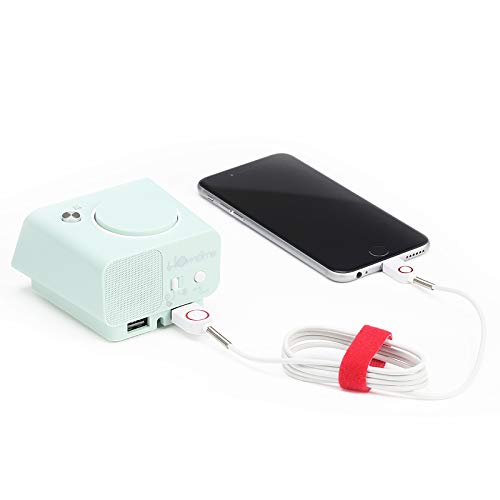
Image: The Homtime C1 alarm clock, turquoise in color, with a white charging cable connected to its side USB port, actively charging a black smartphone. This illustrates the dual USB charging capability.
7. నిర్వహణ
- శుభ్రపరచడం: Use a soft, dry cloth to clean the surface of the clock. Do not use liquid cleaners or aerosol sprays.
- నిల్వ: If storing the device for an extended period, unplug it from the power outlet and store it in a cool, dry place.
- ప్రభావాన్ని నివారించండి: Do not drop or subject the clock to strong impacts, as this may damage internal components.
8. ట్రబుల్షూటింగ్
| సమస్య | సాధ్యమైన కారణం | పరిష్కారం |
|---|---|---|
| గడియార ప్రదర్శన ఆఫ్లో ఉంది. | విద్యుత్ కనెక్షన్ లేదు. | Ensure the power adapter is securely plugged into the clock and the wall outlet. |
| అలారం మోగడం లేదు. | అలారం సక్రియం చేయబడలేదు లేదా తప్పుగా సెట్ చేయబడలేదు. | Check if the alarm icon is displayed. Re-set the alarm time. |
| USB ఛార్జింగ్ పనిచేయడం లేదు. | కేబుల్ సమస్య లేదా పరికరం అననుకూలత. | Try a different USB cable. Ensure your device is compatible with 5V/2.1A charging. |
| Display too dim/bright. | Auto-dimming or manual setting. | Briefly press the snooze/dimmer button to cycle through brightness levels. |
9. స్పెసిఫికేషన్లు
- బ్రాండ్: హోమ్టైమ్
- మోడల్: C1
- రంగు: Turquoise (Green)
- ప్రదర్శన రకం: డిజిటల్ ఎల్సిడి
- ప్రత్యేక లక్షణాలు: Alarm, Auto Dimmable, Snooze, Dual USB Charging Ports
- శక్తి మూలం: కార్డెడ్ ఎలక్ట్రిక్
- మెటీరియల్: అక్రిలోనిట్రైల్ బుటాడిన్ స్టైరిన్, ప్లాస్టిక్
- మౌంటు రకం: టాబ్లెట్ టాప్
- USB అవుట్పుట్: 5V/2.1A (Total for both ports)
- కొలతలు: (Refer to product packaging for exact dimensions)
- మూలం దేశం: చైనా
10. వారంటీ & సపోర్ట్
Homtime products are designed and manufactured to the highest quality standards. For information regarding warranty coverage, please refer to the warranty card included with your product or visit the official Homtime website. For technical support or service inquiries, please contact Homtime customer service through the contact information provided on the product packaging or webసైట్.
దయచేసి వారంటీ ప్రయోజనాల కోసం కొనుగోలు రుజువుగా మీ కొనుగోలు రసీదును ఉంచుకోండి.


