పరిచయం
This manual provides instructions for the setup, operation, and maintenance of your PDP Gaming Faceoff Deluxe+ Wired Switch Pro Controller. This controller is officially licensed by Nintendo and designed for use with Nintendo Switch, Switch Lite, and Switch OLED consoles. It features customizable buttons, audio capabilities, and a wired connection for reliable performance.

Image: The PDP Gaming Faceoff Deluxe+ Wired Switch Pro Controller, highlighting its official Nintendo licensing.
ప్యాకేజీ విషయాలు
- PDP Gaming Faceoff Deluxe+ Wired Switch Pro Controller
- 10-foot Detachable USB Cable
సెటప్
నింటెండో స్విచ్కి కనెక్ట్ అవుతోంది
- Ensure your Nintendo Switch console is docked or connected to a power source.
- Connect the USB-A end of the detachable USB cable to an available USB port on the Nintendo Switch dock.
- Connect the micro-USB end of the cable to the port on the top of the PDP Gaming Faceoff Deluxe+ Controller.
- The controller will automatically be recognized by the Nintendo Switch system.

చిత్రం: పై నుండి క్రిందికి view of the PDP Gaming Faceoff Deluxe+ Wired Switch Pro Controller, showing its buttons and analog sticks.
ఆపరేటింగ్ సూచనలు
ఆడియో ఫీచర్లు
The controller includes a 3.5mm audio jack located at the bottom. Plug your headset into this jack to enable in-game audio for all compatible games and USB chat for supported titles. This allows for private listening and communication during gameplay.
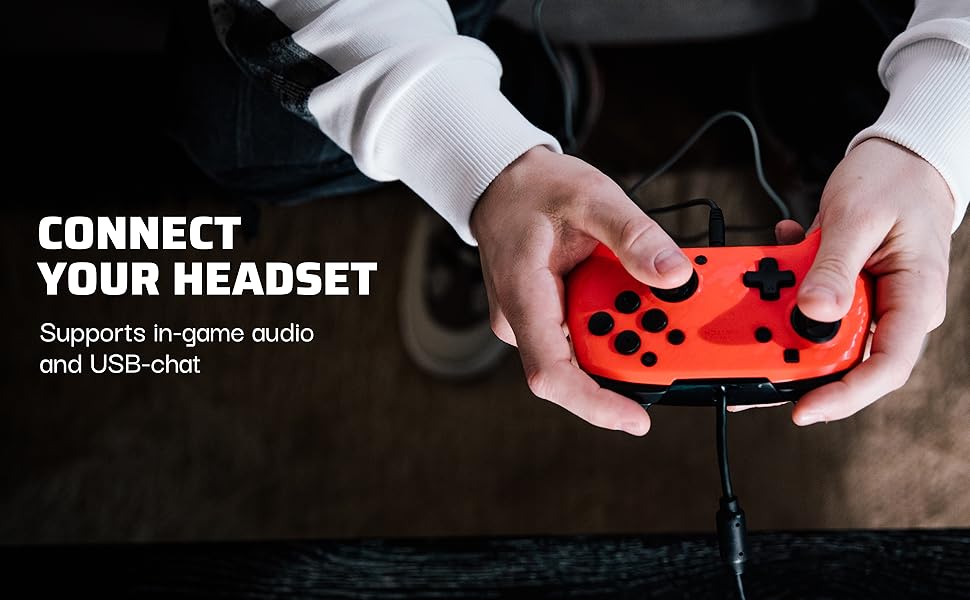
Image: A user connecting a headset to the 3.5mm audio jack on the controller.
ఆడియో వాల్యూమ్ని సర్దుబాటు చేస్తోంది
You can adjust the audio volume directly from the controller. While holding the Function button (located below the right analog stick), press the Up or Down directions on the D-pad to increase or decrease the headset volume independently from the Switch system volume.

Image: Detail of the D-pad and Function button, indicating their use for audio control.
Customizable Paddle Buttons
The controller features dual programmable paddle-style buttons on the back. These buttons can be remapped to other controller inputs to enhance gameplay and provide quicker reactions. Refer to the controller's specific programming instructions for detailed remapping steps.

Image: The back of the controller, highlighting the two programmable paddle buttons.
మార్చుకోగల ఫేస్ప్లేట్లు
The controller features an interchangeable design, allowing you to swap out and snap in different Faceoff faceplates (sold separately) to customize its appearance.
ద్వంద్వ వైబ్రేషన్
The controller provides dual vibration feedback, enhancing immersion during gameplay by providing tactile responses to in-game events.
నిర్వహణ
- To clean the controller, use a soft, dry cloth. Do not use liquid cleaners or solvents.
- Avoid exposing the controller to extreme temperatures or direct sunlight.
- ఉపయోగంలో లేనప్పుడు నియంత్రికను శుభ్రమైన, పొడి ప్రదేశంలో నిల్వ చేయండి.
- కంట్రోలర్ను విడదీయడానికి ప్రయత్నించవద్దు, ఎందుకంటే ఇది వారంటీని రద్దు చేయవచ్చు.
ట్రబుల్షూటింగ్
- Controller not recognized by Switch: Ensure the USB cable is securely connected to both the controller and the Nintendo Switch dock. Try a different USB port on the dock.
- No audio through headset: Verify that your headset is fully plugged into the 3.5mm jack. Check the volume settings on the controller using the D-pad and the overall audio settings on your Nintendo Switch. Some games or applications may have specific audio chat configurations.
- మైక్రోఫోన్ పనిచేయడం లేదు: Confirm your headset's microphone is functional. Check in-game or system settings for microphone input and ensure it is enabled. Note that some games may have specific requirements or limitations for USB chat.
- Accidental paddle button presses: If you are accidentally pressing the back paddle buttons, you can remap them to an unused input or effectively disable them by mapping them to themselves, if the controller's software allows.
- Controller feels unresponsive: Ensure the USB cable is not damaged and is securely connected. A wired connection minimizes latency.
స్పెసిఫికేషన్లు
| మోడల్ సంఖ్య | 500-134-NA-CM04 |
| ASIN | B07RQVNPMK |
| ఉత్పత్తి కొలతలు | 0.35 x 0.12 x 0.83 అంగుళాలు |
| వస్తువు బరువు | 5.3 ఔన్సులు |
| కనెక్టివిటీ | వైర్డు USB |
| ఆడియో జాక్ | 3.5మి.మీ |
| అనుకూలత | Nintendo Switch, Switch Lite, Switch OLED |
| విడుదల తేదీ | జూలై 15, 2019 |
వారంటీ మరియు మద్దతు
For warranty information or technical support, please refer to the official PDP website or contact PDP customer service directly. Keep your proof of purchase for warranty claims.


