పరిచయం
The Amazon Echo Show 8 (1st Gen, 2019 release) is a smart display designed to enhance your daily life with Alexa. Featuring an 8-inch HD screen and stereo sound, it allows you to manage your day, connect with loved ones through video calls, enjoy entertainment, control smart home devices, and personalize your experience. This manual provides detailed instructions to help you get the most out of your device.
పెట్టెలో ఏముంది
Upon unboxing your Echo Show 8, ensure all components are present:
- Echo Show 8 device
- Power adapter (30W) with cable (4.9 ft.)
- త్వరిత ప్రారంభ గైడ్
సెటప్
Setting up your Echo Show 8 is a straightforward process, often simplified by Amazon Wi-Fi simple setup technology.
- పవర్ ఆన్: Connect the power adapter to your Echo Show 8 and plug it into a wall outlet. The device will power on automatically.
- భాష ఎంపిక: మీకు నచ్చిన భాషను ఎంచుకోవడానికి స్క్రీన్పై కనిపించే ప్రాంప్ట్లను అనుసరించండి.
- Wi-Fi కనెక్షన్: Select your Wi-Fi network from the list and enter the password. The Echo Show 8 supports dual-band Wi-Fi (802.11a/b/g/n/ac).
- Amazon Account Login: Log in with your Amazon account credentials. If you don't have one, you will be prompted to create one.
- పరికర నమోదు: Your device will register to your Amazon account.
- Time Zone and Location: Confirm your time zone and location settings.
- ట్యుటోరియల్: The device may offer a brief tutorial on how to navigate and use its features.
The Alexa app is compatible with Fire OS, Android, and iOS devices and is also accessible via your web browser for further management and customization.
Operating Your Echo Show 8
The Echo Show 8 can be operated using voice commands with Alexa or through its touch screen interface.
Voice Commands (Alexa)
"Alexa" అని చెప్పి, ఆ తర్వాత మీ కమాండ్ చెప్పండి. Examples ఉన్నాయి:
- "అలెక్సా, వాతావరణం ఎలా ఉంది?"
- "అలెక్సా, సంగీతం ప్లే చేయి."
- "Alexa, call [contact name]."
- "Alexa, show me my photos."
- "Alexa, turn off the lights."

Image: Echo Show 8 displaying current weather conditions, demonstrating its ability to provide glanceable information.
టచ్ స్క్రీన్ నావిగేషన్
Swipe down from the top of the screen to access quick settings and the home menu. Swipe left from the right edge to view cards with suggestions and information. Tap on icons and options to interact with the device.
ఫీచర్లు
The Echo Show 8 offers a wide range of features to simplify and enrich your daily routines:
- Video Calling & Messaging: Connect with friends and family who have the Alexa app or an Echo device with a screen. Make announcements to other devices in your home.

Image: A user making a video call on the Echo Show 8, highlighting its communication capabilities.
- వినోదం: Ask Alexa to show you movie trailers, TV shows, movies, or the news. Listen to radio stations, podcasts, and audiobooks.
- స్మార్ట్ హోమ్ కంట్రోల్: Voice control compatible devices or manage them on the easy-to-use display. Ask Alexa to show you security cameras, control lights, and adjust thermostats.

Image: The Echo Show 8 displaying a live feed from a nursery camera, illustrating its smart home monitoring feature.
- వ్యక్తిగతీకరణ: Show off your albums from Amazon Photos. Customize your home screen. Create morning routines to start your day.
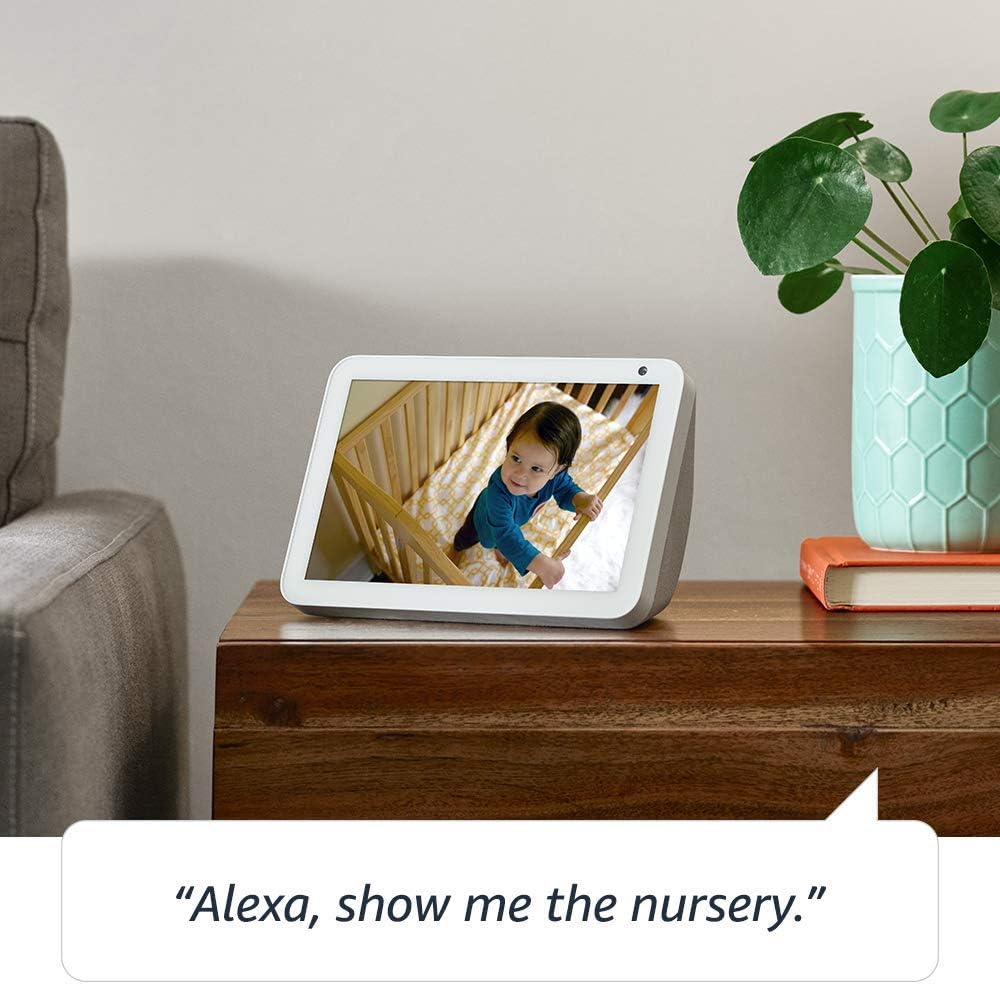
Image: The Echo Show 8 displaying a scenic photo from a user's Amazon Photos album, demonstrating its personalization options.
- Daily Assistance: Cook along to step-by-step recipes. Easily update to-do lists and calendars. Glance at weather and traffic on your way out.
గోప్యతా లక్షణాలు
The Echo Show 8 is designed with privacy in mind, offering several controls:
- మైక్రోఫోన్/కెమెరా ఆఫ్ బటన్: Electronically disconnect the microphones and camera with one press of a button.
- Built-in Camera Shutter: Slide the built-in shutter to physically cover the camera lens.

Image: A finger activating the physical camera shutter on the Echo Show 8, demonstrating a privacy control feature.
- వేక్ వర్డ్ టెక్నాలజీ: Alexa devices are designed to detect only your chosen wake word (e.g., "Alexa").
- స్ట్రీమింగ్ సూచికలు: Visual indicators show when Alexa is streaming your request to the cloud.
- వాయిస్ రికార్డింగ్ నిర్వహణ: సామర్థ్యం view and delete your voice recordings through the Alexa app or Alexa Privacy Hub.
For more information, visit the Alexa Privacy Hub.
నిర్వహణ
మీ ఎకో షో 8 యొక్క దీర్ఘాయువు మరియు సరైన పనితీరును నిర్ధారించడానికి, ఈ నిర్వహణ మార్గదర్శకాలను అనుసరించండి:
- శుభ్రపరచడం: Use a soft, lint-free cloth to clean the screen and exterior. Avoid abrasive cleaners or sprays directly on the device.
- ప్లేస్మెంట్: Place the device on a stable, flat surface away from direct sunlight, heat sources, and moisture. Ensure proper ventilation.
- సాఫ్ట్వేర్ అప్డేట్లు: The device automatically receives software updates. Ensure it is connected to Wi-Fi to receive these updates, which improve performance and add new features.
ట్రబుల్షూటింగ్
మీ ఎకో షో 8 తో మీకు సమస్యలు ఎదురైతే, ఈ క్రింది దశలను ప్రయత్నించండి:
- శక్తి లేదు:
- పవర్ అడాప్టర్ పరికరం మరియు పనిచేసే పవర్ అవుట్లెట్ రెండింటికీ సురక్షితంగా కనెక్ట్ చేయబడిందని నిర్ధారించుకోండి.
- వేరే పవర్ అవుట్లెట్ని ప్రయత్నించండి.
- Wi-Fi కనెక్షన్ సమస్యలు:
- మీ Wi-Fi పాస్వర్డ్ సరైనదేనని ధృవీకరించండి.
- మీ Wi-Fi రౌటర్ మరియు మోడెమ్ను పునఃప్రారంభించండి.
- Move the Echo Show 8 closer to your Wi-Fi router.
- అలెక్సా స్పందించడం లేదు:
- Ensure the microphone is not muted (check the microphone/camera off button).
- స్పష్టంగా మరియు సాధారణ వాల్యూమ్లో మాట్లాడండి.
- Try restarting the device by unplugging it for a few seconds and plugging it back in.
- స్క్రీన్ సమస్యలు:
- స్క్రీన్ స్పందించకపోతే, పరికరాన్ని పునఃప్రారంభించి ప్రయత్నించండి.
- Ensure the screen is clean and free of smudges.
- ఫ్యాక్టరీ రీసెట్: As a last resort, you can perform a factory reset. This will erase all your personal data and settings. To do this, go to Settings > Device Options > Reset to Factory Defaults.
స్పెసిఫికేషన్లు
| ఫీచర్ | వివరాలు |
|---|---|
| పరిమాణం | 7.9”x 5.4”x 3.9” (200mm x 135mm x 99mm) |
| బరువు | 36.6 oz (1037 గ్రాములు) |
| ప్రదర్శించు | 8.0 ”టచ్ స్క్రీన్ |
| కెమెరా | 1MP camera with built-in shutter |
| Wi-Fi కనెక్టివిటీ | Dual-band Wi-Fi supports 802.11a/b/g/n/ac Wi-Fi networks. Does not support connecting to ad-hoc (or peer-to-peer) Wi-Fi networks. |
| బ్లూటూత్ కనెక్టివిటీ | అధునాతన ఆడియో పంపిణీ ప్రోfile (A2DP) support for audio streaming from your mobile device to Echo Show 8 or from Echo Show 8 to your Bluetooth speaker. Audio/Video Remote Control Profile (AVRCP) for voice control of connected mobile devices. Hands-free voice control is not supported for Mac OS X devices. Bluetooth speakers requiring PIN codes are not supported. |
| ఆడియో | 2.0” (52 mm) neodymium speakers with passive bass radiator |
| సిస్టమ్ అవసరాలు | Echo Show 8 comes ready to connect to your WiFi. The Alexa app is compatible with Fire OS, Android, and iOS devices and also accessible via your web browser. Supported operating systems. Certain skills and services may require subscription or other fees. |
| ప్రాసెసర్ | MediaTek MT 8163 |
| భాష | అలెక్సా ఇంగ్లీష్ మరియు స్పానిష్ మాట్లాడుతుంది |
యాక్సెసిబిలిటీ ఫీచర్లు
The Echo Show 8 includes various accessibility features to personalize Alexa to your abilities:
- అలెక్సాకు నొక్కండి: Access Alexa via touch through on-screen tiles or a keyboard.
- అనుకూల శ్రవణం: అలెక్సా స్పందించే ముందు మాట్లాడటం ముగించడానికి ఎక్కువ సమయాన్ని అందిస్తుంది.
- ఇష్టపడే మాట్లాడే రేటు: అలెక్సా ఎంత వేగంగా లేదా నెమ్మదిగా మాట్లాడుతుందో నియంత్రించండి.
- అలెక్సా క్యాప్షనింగ్, కాల్ క్యాప్షనింగ్, క్లోజ్డ్ క్యాప్షనింగ్: మద్దతు ఉన్న కంటెంట్ కోసం టెక్స్ట్ క్యాప్షన్లను అందించండి.
- Show and Tell: Helps customers who are blind or visually impaired identify products by saying “Alexa, what am I holding.”
- వాయిస్View స్క్రీన్ రీడర్: Enables access for customers who are blind or visually impaired.
- స్క్రీన్ మాగ్నిఫైయర్: Enables zooming in/out and panning around the screen.
- సమీపంలో ఉన్నప్పుడు తెలియజేయండి: Plays notification sounds when you’re detected near your Echo device.
- కిండిల్ బిగ్గరగా చదవండి: అలెక్సా మీ కిండిల్ పుస్తకాలను బిగ్గరగా చదవగలదు.
- రియల్ టైమ్ టెక్స్ట్: Enables typing live text in a video call.
- అదనపు సెట్టింగ్లలో కలర్ ఇన్వర్షన్, కలర్ కరెక్షన్, రిక్వెస్ట్ సౌండ్ మరియు మరిన్ని ఉన్నాయి.
To enable these features, go to Settings → Accessibility on your Echo Show 8.
వారంటీ మరియు మద్దతు
Your Certified Refurbished Echo Show 8 comes with a 1-year limited warranty and service, similar to a new device. Use of Echo Show 8 is subject to Amazon's terms and conditions.
For further assistance, visit the Amazon Device Support page or contact Amazon Customer Service.


