పరిచయం
Thank you for choosing the Nanlite LumiPad 25 LED Panel. This manual provides essential information for the safe and effective operation of your device. Please read it thoroughly before use and retain it for future reference.
భద్రతా జాగ్రత్తలు
- పరికరాన్ని నీటికి లేదా అధిక తేమకు గురిచేయవద్దు.
- LED లైట్ నేరుగా మీ కళ్ళకు గురికాకుండా ఉండండి.
- ఆమోదించబడిన పవర్ అడాప్టర్లు మరియు బ్యాటరీలను మాత్రమే ఉపయోగించండి.
- యూనిట్ను విడదీయడానికి లేదా సవరించడానికి ప్రయత్నించవద్దు.
- పిల్లలకు దూరంగా ఉంచండి.
ప్యాకేజీ విషయాలు
దయచేసి మీ ప్యాకేజీలో అన్ని అంశాలు ఉన్నాయని ధృవీకరించండి:
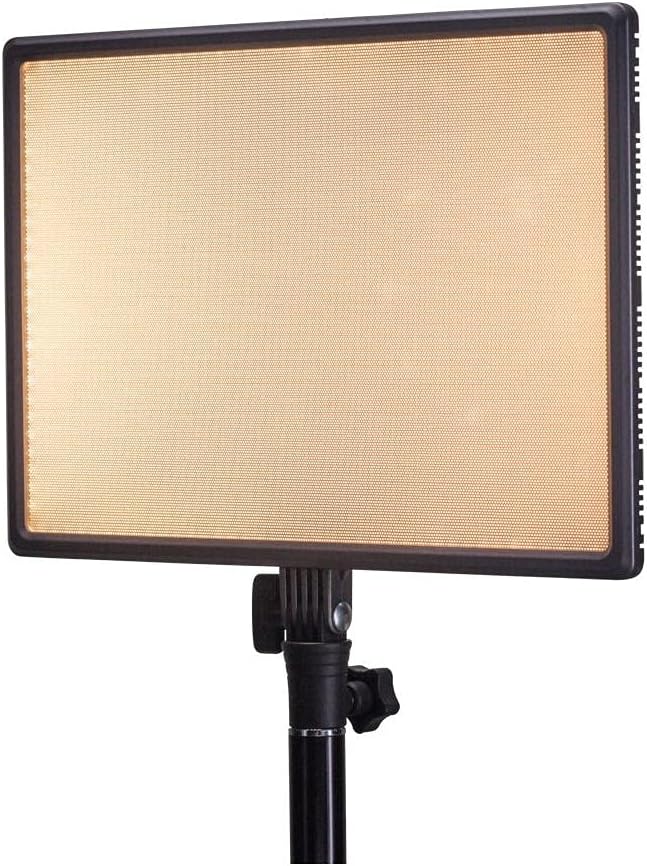
- Nanlite LumiPad 25 LED Panel
- మౌంటు అడాప్టర్
- AC Power Adapter (may be sold separately)
- వినియోగదారు మాన్యువల్
సెటప్
1. లైట్ ప్యానెల్ మౌంట్ చేయడం
- Attach the included mounting adapter to the 1/4-inch screw thread located at the bottom of the LumiPad 25.
- Secure the mounting adapter to a compatible light stand or tripod.
- Adjust the angle of the LED panel using the tilt mechanism on the mounting adapter.

2. పరికరాన్ని శక్తివంతం చేయడం
The LumiPad 25 offers multiple power options:
- AC పవర్: Connect the AC power adapter to the DC IN port on the back of the panel, then plug the adapter into a wall outlet.
- బ్యాటరీ శక్తి: Insert two compatible NP-F style batteries (sold separately) into the battery slots on the back of the panel. Ensure correct polarity.


ఆపరేషన్
1. పవర్ ఆన్/ఆఫ్
Locate the power switch on the back of the panel. Flip the switch to the 'ON' position to power on the light. Flip it to 'OFF' to power off.
2. ప్రకాశం సర్దుబాటు
Use the 'DIMMER' control knob on the back of the panel to adjust the light output from 0% to 100% brightness. Rotate clockwise to increase brightness and counter-clockwise to decrease.
3. రంగు ఉష్ణోగ్రత సర్దుబాటు
Use the '5600K' control knob on the back of the panel to adjust the color temperature from warm (3200K) to cool (5600K). Rotate clockwise for cooler temperatures and counter-clockwise for warmer temperatures.

నిర్వహణ
క్లీనింగ్
To clean the LED panel, use a soft, dry cloth. For stubborn marks, a slightly damp తేలికపాటి డిటర్జెంట్ ఉన్న వస్త్రాన్ని ఉపయోగించవచ్చు, తద్వారా పరికరంలోకి ద్రవం ప్రవేశించదు. రాపిడి క్లీనర్లు లేదా ద్రావకాలను ఉపయోగించవద్దు.
నిల్వ
When not in use, store the LumiPad 25 in a cool, dry place, away from direct sunlight and extreme temperatures. If storing for extended periods, remove batteries.
ట్రబుల్షూటింగ్
| సమస్య | సాధ్యమైన కారణం | పరిష్కారం |
|---|---|---|
| లైట్ ఆన్ చేయదు. | No power, faulty connection, or depleted batteries. | Check power adapter connection or replace/recharge batteries. Ensure power switch is ON. |
| Brightness not adjusting. | Dimmer knob not functioning or at minimum/maximum setting. | Rotate the dimmer knob fully in both directions. If issue persists, contact support. |
| Color temperature not changing. | Color temperature knob not functioning or at minimum/maximum setting. | Rotate the color temperature knob fully in both directions. If issue persists, contact support. |
స్పెసిఫికేషన్లు
| ఫీచర్ | వివరాలు |
|---|---|
| మోడల్ సంఖ్య | 11-2002 |
| ఉత్పత్తి కొలతలు | 13.58 x 37 x 9 inches (overall packaging) / 1.2"L x 1.2"W x 1.2"H (unit) |
| వస్తువు బరువు | 7.1 ఔన్సులు |
| ప్రకాశం | 2140 lumens (max) |
| రంగు ఉష్ణోగ్రత | 3200 కె - 5600 కె |
| పవర్ ఎంపికలు | AC Adapter, NP-F style batteries, DC via D-tap cable |
వారంటీ మరియు మద్దతు
Nanlite products are covered by a limited warranty. For detailed warranty information, technical support, or service inquiries, please visit the official Nanlite webసైట్ లేదా మీ స్థానిక పంపిణీదారుని సంప్రదించండి.
Official Nanlite Webసైట్: www.nanlite.com


