ఉత్పత్తి ముగిసిందిview
The ASRock X570 Steel Legend motherboard is designed to support AMD AM4 Socket Ryzen 2000 and 3000 Series processors. It features a Hyper M.2 socket for next-generation PCIe Gen4 x4 M.2 SSDs, complemented by a full-coverage M.2 heatsink for efficient heat dissipation. This ensures optimal performance for high-speed M.2 SSDs. The motherboard is built with a 10 Power Phase Design and supports DDR4 4666+ (OC) memory, providing a stable and high-performance foundation for your system.

Image: ASRock X570 Steel Legend Motherboard and its retail packaging.
కీ ఫీచర్లు
- ప్రాసెసర్ మద్దతు: Compatible with AMD AM4 Socket Ryzen 2000 and 3000 Series processors.
- పవర్ డిజైన్: Features a 10 Power Phase Design for stable power delivery.
- మెమరీ: Supports DDR4 memory up to 4666+ (OC) speeds.
- విస్తరణ స్లాట్లు: Includes 2 PCIe 4.0 x16 slots, 3 PCIe 4.0 x1 slots, and 1 M.2 (Key E) slot for Wi-Fi modules.
- బహుళ-GPU మద్దతు: Supports AMD Quad CrossFireX and CrossFireX technologies.
- గ్రాఫిక్స్ అవుట్పుట్: Equipped with HDMI and DisplayPort for video output.
- ఆడియో: Features 7.1 CH HD Audio (Realtek ALC1220 Audio Codec) with Nichicon Audio Caps for high-quality sound.
- నిల్వ: Provides 8 SATA3 ports, 1 Hyper M.2 (PCIe Gen4 x4 & SATA3) slot, and 1 Hyper M.2 (PCIe Gen4 x4) slot.
- USB కనెక్టివిటీ: Offers 2 USB 3.2 Gen2 ports (Rear Type A+C) and 10 USB 3.2 Gen1 ports (4 Front, 6 Rear).
- నెట్వర్కింగ్: Integrated Intel Gigabit LAN for reliable network connectivity.
- RGB లైటింగ్: Supports ASRock Polychrome SYNC for customizable RGB lighting.

చిత్రం: వివరణాత్మకం view of the motherboard's power delivery components, M.2 heatsink, and gold-plated contacts in critical slots.
స్పెసిఫికేషన్లు
| ఫీచర్ | వివరాలు |
|---|---|
| బ్రాండ్ | ASRock |
| మోడల్ పేరు | X570 స్టీల్ లెజెండ్ |
| CPU సాకెట్ | సాకెట్ AM4 |
| అనుకూల ప్రాసెసర్లు | AMD Ryzen 2000 Series, AMD Ryzen 3000 Series |
| చిప్సెట్ రకం | AMD X570 |
| RAM మెమరీ టెక్నాలజీ | DDR4 |
| మెమరీ వేగం | 2400 MHz (up to 4666+ MHz OC) |
| గరిష్ట ర్యామ్ | 128GB (4 DIMM slots) |
| గ్రాఫిక్స్ అవుట్పుట్ | HDMI, డిస్ప్లేపోర్ట్ |
| USB 3.2 Gen2 పోర్ట్లు | 2 (Rear Type A+C) |
| USB 3.2 Gen1 పోర్ట్లు | 10 (4 Front, 6 Rear) |
| LAN | Intel Gigabit LAN |
| ఆడియో | 7.1 CH HD Audio (Realtek ALC1220) |
| కొలతలు (LxWxH) | 15.1 x 3.4 x 13.1 అంగుళాలు |
| వస్తువు బరువు | 2.86 పౌండ్లు |
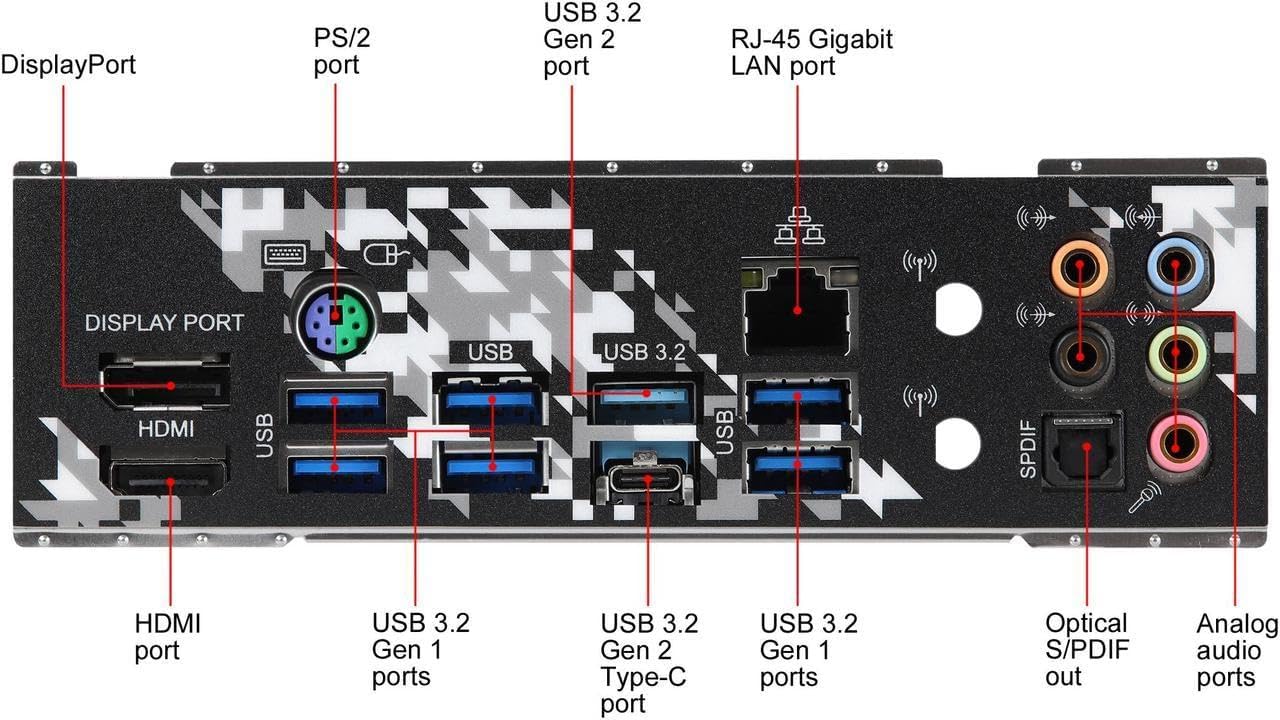
చిత్రం: పైగాview of the motherboard's layout with key components such as the CPU socket, RAM slots, and various expansion slots clearly marked.
సెటప్ మరియు ఇన్స్టాలేషన్
Proper installation of your ASRock X570 Steel Legend motherboard is crucial for system stability and performance. Always ensure your system is powered off and unplugged before handling any components. Refer to the detailed diagrams below for component placement.
1. CPU సంస్థాపన
Carefully open the CPU socket lever. Align the triangular marker on your AMD AM4 processor with the corresponding marker on the motherboard's socket. Gently place the CPU into the socket without forcing it, then close the lever to secure it.
2. మెమరీ (RAM) సంస్థాపన
Unlock the clips on the DDR4 DIMM slots. Align the notch on your RAM module with the key in the DIMM slot. Press down firmly on both ends of the RAM module until the clips snap into place. For optimal dual-channel performance, consult your motherboard manual for recommended slot configurations.
3. M.2 SSD ఇన్స్టాలేషన్
The motherboard features Hyper M.2 slots. Remove the M.2 heatsink if present. Insert your M.2 SSD into the slot at an angle, then gently push it down and secure it with the provided screw. Reattach the M.2 heatsink for optimal thermal performance.
4. పెరిఫెరల్స్ మరియు పవర్ కనెక్ట్ చేయడం
Connect the 24-pin ATX power connector and the 8-pin CPU power connector from your power supply to the motherboard. Attach your storage devices to the SATA3 ports and connect front panel headers (USB, audio, power buttons, LEDs) according to the motherboard's pin layout.
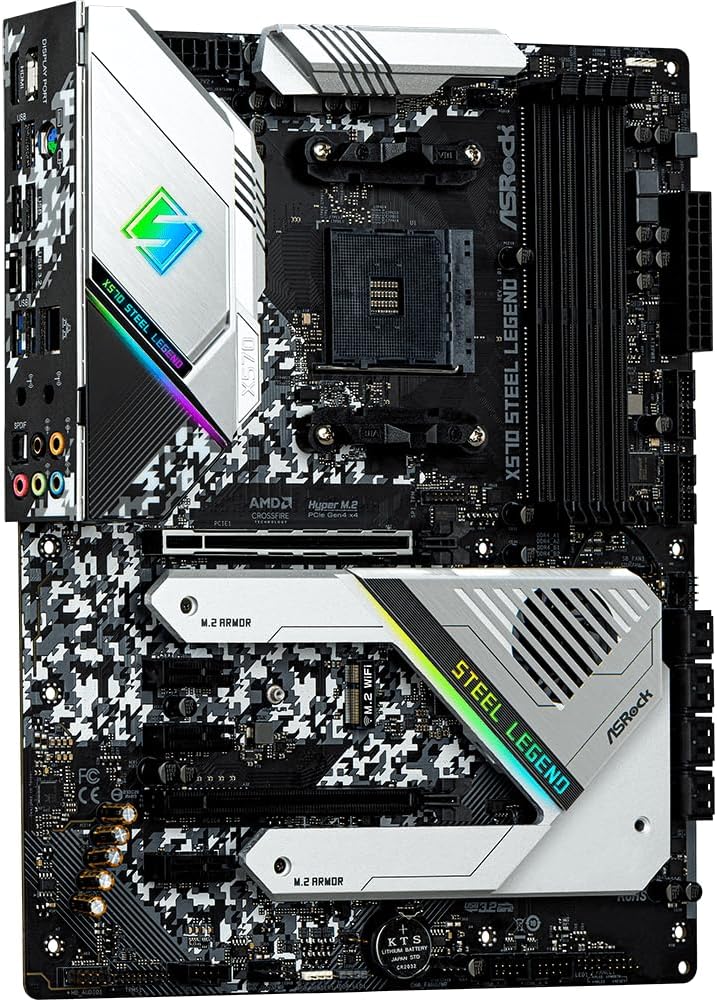
Image: The rear I/O panel, featuring HDMI, DisplayPort, USB 3.2 Gen2 Type-A and Type-C, USB 3.2 Gen1, Intel Gigabit LAN, and 7.1 channel audio jacks.
ఆపరేటింగ్ మార్గదర్శకాలు
Once all components are installed and connected, power on your system. The motherboard's UEFI BIOS provides extensive options for system configuration, including memory profiles, fan control, and boot device selection. Utilize the ASRock Polychrome SYNC software to customize the integrated RGB lighting effects.
- BIOS/UEFI యాక్సెస్: నొక్కండి డెల్ or F2 during system startup to enter the UEFI setup utility.
- డ్రైవర్ ఇన్స్టాలేషన్: Install all necessary drivers from the ASRock support website or the included driver CD for optimal performance and functionality.
- సాఫ్ట్వేర్ యుటిలిటీస్: Use ASRock's utility software for system monitoring, fan tuning, and RGB lighting customization.
నిర్వహణ
Regular maintenance helps prolong the lifespan of your motherboard and ensures consistent performance.
- దుమ్ము తొలగింపు: Periodically clean dust from the motherboard and components using compressed air. Ensure fans and heatsinks are free from obstructions.
- BIOS నవీకరణలు: ASRock ని తనిఖీ చేయండి website for the latest BIOS updates. Updating the BIOS can improve compatibility, stability, and performance. Follow the instructions carefully to avoid system damage.
- కేబుల్ నిర్వహణ: Ensure all cables are neatly routed and secured to promote good airflow within your PC case.
ట్రబుల్షూటింగ్
మీ మదర్బోర్డుతో మీకు సమస్యలు ఎదురైతే, ఈ క్రింది సాధారణ ట్రబుల్షూటింగ్ దశలను పరిగణించండి:
- పవర్ లేదు/బూట్ లేదు:
- అన్ని పవర్ కేబుల్స్ (24-పిన్ ATX, 8-పిన్ CPU) సురక్షితంగా కనెక్ట్ చేయబడ్డాయని ధృవీకరించండి.
- విద్యుత్ సరఫరా సరిగ్గా పనిచేస్తుందో లేదో తనిఖీ చేయండి.
- Ensure the CPU, RAM, and graphics card are properly seated.
- ప్రదర్శన సమస్యలు:
- Confirm your monitor is connected to the graphics card (if dedicated) or the motherboard's video output (if using an APU).
- Try a different video cable or monitor.
- సిస్టమ్ అస్థిరత/క్రాష్లు:
- అన్ని డ్రైవర్లు తాజాగా ఉన్నారని నిర్ధారించుకోండి.
- Test RAM modules individually or run a memory diagnostic tool.
- వేడెక్కకుండా నిరోధించడానికి CPU మరియు GPU ఉష్ణోగ్రతలను పర్యవేక్షించండి.
- పరిధీయ గుర్తించబడలేదు:
- పరిధీయ పరికరాన్ని వేరే USB పోర్ట్కి కనెక్ట్ చేయడానికి ప్రయత్నించండి.
- డ్రైవర్ సమస్యల కోసం పరికర నిర్వాహికిని తనిఖీ చేయండి.
For more detailed troubleshooting, refer to the official ASRock support webసైట్ లేదా వారి కస్టమర్ సేవను సంప్రదించండి.
వారంటీ మరియు మద్దతు
ASRock దాని మదర్బోర్డులకు పరిమిత వారంటీని అందిస్తుంది. వారంటీ యొక్క నిర్దిష్ట నిబంధనలు మరియు వ్యవధి ప్రాంతం మరియు రిటైలర్ను బట్టి మారవచ్చు. వారంటీ క్లెయిమ్ల కోసం దయచేసి మీ కొనుగోలు రుజువును ఉంచుకోండి.
- వారంటీ సమాచారం: For detailed warranty terms and conditions, please visit the official ASRock website or consult your product documentation.
- సాంకేతిక మద్దతు: If you require technical assistance, drivers, or BIOS updates, visit the ASRock support page at www.asrock.com/support/ ద్వారా.


