1. ఉత్పత్తి ముగిసిందిview
The Benss Portable Digital Radio (Model BRBD05) is a compact and versatile multi-band receiver designed for clear reception and ease of use. It supports AM, FM, and SW bands, features a digital LCD display with backlight, an alarm clock, and a sleep timer. Its portable design makes it ideal for both indoor and outdoor use.

మూర్తి 1.1: ముందు view of the Benss Portable Digital Radio.
This radio is equipped with a built-in loudspeaker for clear audio and a 3.5mm earphone jack for private listening. The telescopic antenna ensures optimal signal reception, and the device is powered by two AA batteries, making it highly portable.
2. భద్రతా సమాచారం
- రేడియోను తీవ్రమైన ఉష్ణోగ్రతలు, ప్రత్యక్ష సూర్యకాంతి లేదా అధిక తేమకు గురిచేయవద్దు.
- రేడియోను పడవేయడం లేదా బలమైన ప్రభావాలకు గురిచేయడం మానుకోండి.
- రేడియోను విడదీయడానికి లేదా సవరించడానికి ప్రయత్నించవద్దు. ఇది వారంటీని రద్దు చేస్తుంది మరియు నష్టాన్ని కలిగించవచ్చు.
- Use only the specified battery type (2 x AA batteries). Ensure correct polarity when inserting batteries.
- లీకేజీని నివారించడానికి రేడియోను ఎక్కువ కాలం ఉపయోగించకపోతే బ్యాటరీలను తీసివేయండి.
- రేడియోను నీరు మరియు ఇతర ద్రవాలకు దూరంగా ఉంచండి.
- రేడియోను మృదువైన, పొడి వస్త్రంతో శుభ్రం చేయండి. రాపిడి క్లీనర్లు లేదా ద్రావకాలను ఉపయోగించవద్దు.
3. ప్యాకేజీ విషయాలు
దయచేసి ఈ క్రింది అంశాల కోసం ప్యాకేజీని తనిఖీ చేయండి:
- 1 x Benss Pocket Radio
- 1 x వినియోగదారు మాన్యువల్
- గమనిక: బ్యాటరీలు చేర్చబడలేదు మరియు విడిగా కొనుగోలు చేయాలి.
4. సెటప్
4.1 బ్యాటరీ ఇన్స్టాలేషన్
- రేడియో వెనుక భాగంలో బ్యాటరీ కంపార్ట్మెంట్ కవర్ను గుర్తించండి.
- కంపార్ట్మెంట్ తెరవడానికి కవర్ను క్రిందికి జారండి.
- Insert two AA size batteries, ensuring the correct positive (+) and negative (-) polarity as indicated inside the compartment.
- బ్యాటరీ కంపార్ట్మెంట్ కవర్ను అది స్థానంలో క్లిక్ అయ్యే వరకు పైకి జారడం ద్వారా మూసివేయండి.

Figure 4.1: Battery installation process for the Benss radio.
4.2 యాంటెన్నా సర్దుబాటు
For optimal reception, especially for FM and SW bands, extend the telescopic antenna fully. The antenna can be rotated 360 degrees to find the best signal direction.

Figure 4.2: The radio's telescopic antenna can be rotated for optimal signal.
5. ఆపరేటింగ్ సూచనలు
5.1 పవర్ ఆన్/ఆఫ్
నొక్కండి ఆన్/ఆఫ్ button located on the front panel to turn the radio on or off. The LCD display will illuminate when the radio is powered on.
5.2 సమయం మరియు అలారం సెట్ చేయడం
- సెట్టింగు సమయం: నొక్కండి TIME.SET బటన్. ఉపయోగించండి P- మరియు P+ గంట మరియు నిమిషాన్ని సర్దుబాటు చేయడానికి బటన్లు. నొక్కండి TIME.SET again to confirm. You can switch between 12-hour and 24-hour display formats.
- అలారం సెట్ చేస్తోంది: నొక్కండి AL.SET బటన్. ఉపయోగించండి P- మరియు P+ buttons to set the desired alarm time. Press AL.SET again to confirm. The alarm sound will gradually increase in volume.

Figure 5.1: The radio supports both 12-hour and 24-hour time display.
5.3 Tuning Radio Stations (AM/FM/SW)
- బ్యాండ్ ఎంపిక: Use the slide switch on the front panel to select between FM, AM, or SW (Shortwave) bands.
- ఆటోమేటిక్ స్కాన్: నొక్కండి స్కాన్ అందుబాటులో ఉన్న స్టేషన్లను స్వయంచాలకంగా శోధించడానికి మరియు నిల్వ చేయడానికి బటన్.
- మాన్యువల్ ట్యూనింగ్: ఉపయోగించండి P- మరియు P+ నిర్దిష్ట ఫ్రీక్వెన్సీకి మాన్యువల్గా ట్యూన్ చేయడానికి బటన్లు.
- Shortwave (SW) Reception: The radio supports multiple shortwave bands (SW1-SW7), allowing reception of international broadcasts.
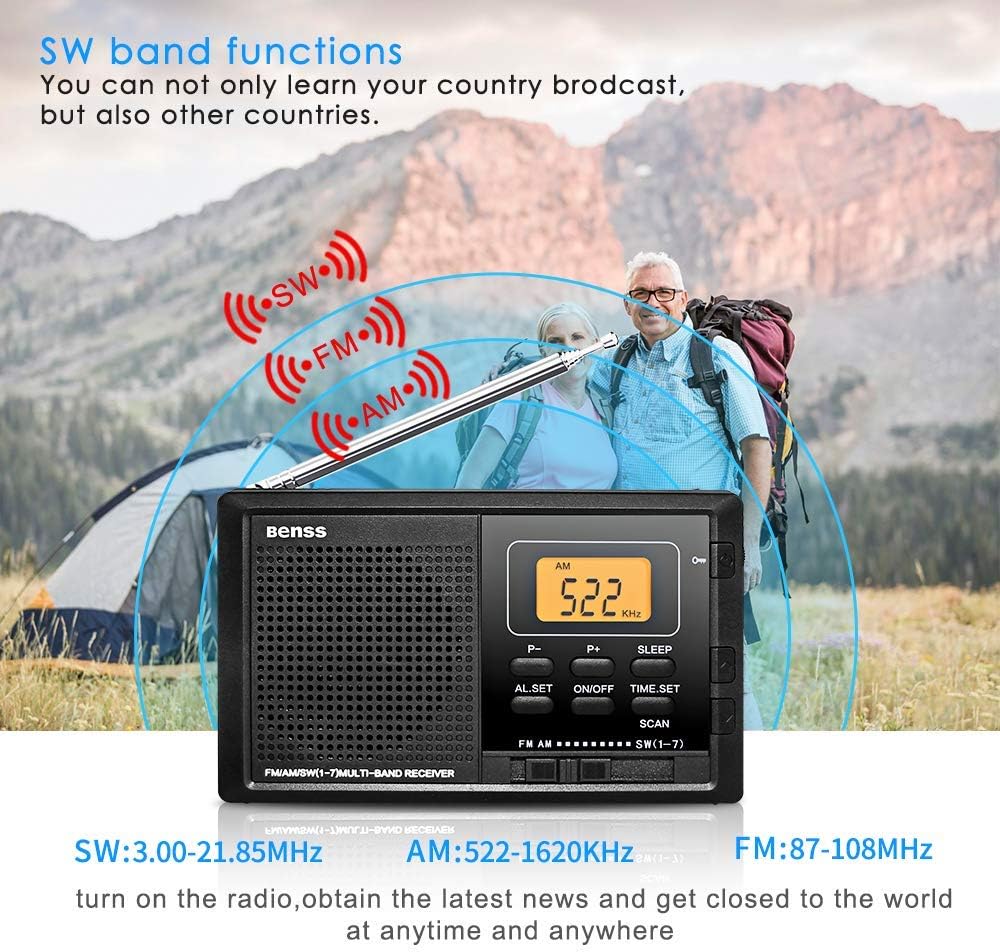
Figure 5.2: The radio supports AM, FM, and SW bands for diverse listening options.
5.4 వాల్యూమ్ నియంత్రణ
Adjust the volume using the rotary knob located on the right side of the radio. Rotate upwards to increase volume and downwards to decrease.
5.5 స్లీప్ టైమర్ ఫంక్షన్
నొక్కండి నిద్రించు button to activate the sleep timer. You can set the radio to automatically turn off after a specified duration (e.g., 10-90 minutes), allowing you to fall asleep to your favorite station without wasting battery power.

Figure 5.3: The sleep timer allows the radio to turn off automatically.
5.6 లాక్ బటన్
The lock button prevents accidental button presses. Slide the లాక్ switch (usually on the side or top) to the locked position to disable all buttons. Slide it back to unlock.
5.7 ఇయర్ఫోన్ జాక్
Connect standard 3.5mm earphones to the earphone jack on the side of the radio for private listening. The built-in speaker will automatically mute when earphones are connected.
6. నిర్వహణ
- శుభ్రపరచడం: Wipe the radio's surface with a soft, dry cloth. Do not use liquid cleaners or aerosols.
- బ్యాటరీ భర్తీ: Replace batteries when the display dims or audio quality deteriorates. Always replace both batteries at the same time.
- నిల్వ: రేడియోను ఎక్కువసేపు నిల్వ చేస్తే, తుప్పు పట్టకుండా ఉండటానికి బ్యాటరీలను తొలగించండి. చల్లని, పొడి ప్రదేశంలో నిల్వ చేయండి.
7. ట్రబుల్షూటింగ్
| సమస్య | సాధ్యమైన కారణం | పరిష్కారం |
|---|---|---|
| రేడియో ఆన్ అవ్వదు. | బ్యాటరీలు డెడ్ అయ్యాయి లేదా తప్పుగా చొప్పించబడ్డాయి. | బ్యాటరీలను కొత్త వాటితో భర్తీ చేయండి, సరైన ధ్రువణతను నిర్ధారించండి. |
| పేలవమైన స్వీకరణ/స్థిరత. | యాంటెన్నా పొడిగించబడలేదు లేదా సరిగ్గా ఉంచబడలేదు; బలహీనమైన సిగ్నల్ ప్రాంతం. | Fully extend and rotate the telescopic antenna. Try moving to a different location. |
| అలారం మోగడం లేదు. | అలారం సెట్ చేయలేదు లేదా వాల్యూమ్ చాలా తక్కువగా ఉంది. | Ensure alarm time is set correctly. Increase the volume. |
| బటన్లు స్పందించడం లేదు. | లాక్ ఫంక్షన్ సక్రియం చేయబడింది. | Slide the LOCK switch to the unlocked position. |
8. స్పెసిఫికేషన్లు
| ఫీచర్ | వివరాలు |
|---|---|
| మోడల్ సంఖ్య | BRBD05 |
| ఫ్రీక్వెన్సీ రేంజ్ FM | 87-108 MHz |
| ఫ్రీక్వెన్సీ పరిధి AM | 522-1620 KHz |
| ఫ్రీక్వెన్సీ పరిధి SW | 3.00-21.85 MHz |
| విద్యుత్ సరఫరా | DC 3V (2 x AA Batteries) |
| కొలతలు (L x W x H) | 122 x 69 x 22 మిమీ (4.7 x 2.7 x 0.8 అంగుళాలు) |
| బరువు (బ్యాటరీ లేకుండా) | 142 గ్రా |
| కనెక్టివిటీ టెక్నాలజీ | వై-ఫై (Note: This seems to be an error in the source data, as typical portable radios do not have Wi-Fi. The radio functions via radio waves.) |
| ప్రత్యేక ఫీచర్ | పోర్టబుల్ |
| చేర్చబడిన భాగాలు | యజమాని మాన్యువల్ |
9. వారంటీ మరియు మద్దతు
This Benss product is manufactured with high-quality standards. For any issues or support inquiries, please refer to the contact information provided at the point of purchase or visit the official Benss webసైట్.
వారంటీ క్లెయిమ్ల కోసం దయచేసి మీ కొనుగోలు రుజువును ఉంచుకోండి. నిర్దిష్ట వారంటీ నిబంధనలు మరియు షరతులు ప్రాంతం మరియు రిటైలర్ను బట్టి మారవచ్చు.
