పరిచయం
Welcome to the world of smart lighting with your new Feit Electric Smart Wi-Fi LED Bulbs. These bulbs offer advanced features including RGB color changing, tunable white light, dimming capabilities, and seamless control via the Feit Electric app, Alexa, or Google Assistant. This manual will guide you through the setup process and help you maximize your smart lighting experience.
ఉత్పత్తి ముగిసిందిview
కీ ఫీచర్లు
- Wi-Fi ప్రారంభించబడింది: Control your bulbs from anywhere using the Feit Electric app (2.4 GHz Wi-Fi network required).
- వాయిస్ నియంత్రణ: Compatible with Alexa and Google Home Assistant for hands-free operation.
- Color Changing & Tunable White: Choose from millions of colors and adjust white light from soft white to daylight.
- మసకబారిన: Adjust brightness levels to suit any mood or activity.
- Scheduling & Grouping: Set routines, create groups for multiple bulbs, and customize scenes.
- శక్తి సామర్థ్యం: 9W LED (60W equivalent) with a long lifespan of 25,000 hours.
ప్యాకేజీ విషయాలు
- Feit Electric Smart Wi-Fi LED Bulbs (3-pack)
- ఇన్స్ట్రక్షన్ మాన్యువల్

Image: The Feit Electric Smart Wi-Fi LED Bulb 3-pack, showing the product packaging and an illuminated bulb demonstrating its color-changing capabilities.
ముఖ్యమైన భద్రతా సమాచారం
Please read and understand all safety instructions before installing or using your Feit Electric Smart Wi-Fi LED Bulbs. Failure to do so may result in fire, electric shock, or other hazards.
- విద్యుత్ షాక్ ప్రమాదం: Do not use with wet hands or in wet locations.
- ఇండోర్ ఉపయోగం మాత్రమే: These bulbs are designed for indoor use in dry locations.
- అత్యవసర నిష్క్రమణల కోసం కాదు: ఎమర్జెన్సీ ఎగ్జిట్ ఫిక్చర్లు లేదా ఎమర్జెన్సీ లైట్లతో ఉపయోగించడం కోసం ఉద్దేశించబడలేదు.
- డిమ్మర్ అనుకూలత: Not for use with standard dimmers. Dimmable only via the Feit Electric app or compatible voice assistants.
- ఆపరేటింగ్ ఉష్ణోగ్రత: Ensure the operating environment is within the specified temperature range.
- ఇన్స్టాలేషన్ ముందు పవర్ ఆఫ్ చేయండి: Always turn off the power to the fixture before installing or removing the bulb.
- సరైన పారవేయడం: స్థానిక నిబంధనల ప్రకారం బల్బులను పారవేయండి.
సంస్థాపన మరియు సెటప్
Step 1: Physical Installation
- లైట్ ఫిక్చర్కు పవర్ ఆన్ చేయబడిందని నిర్ధారించుకోండి ఆఫ్ at the switch before installation.
- Carefully screw the Feit Electric Smart Wi-Fi LED Bulb into a standard E26 medium base socket.
- శక్తిని తిరగండి ON at the switch. The bulb should blink rapidly, indicating it is in pairing mode. If it does not blink, turn the bulb off for 1 second and on for 2 seconds, repeating this 3 times.
Step 2: Download the Feit Electric App
Download the Feit Electric app on your smartphone or tablet. కోసం వెతకండి "Feit Electric" in the Apple App Store or Google Play Store, or scan the QR code on the product packaging.
Follow the in-app instructions to create an account or log in.
దశ 3: Wi-Fiకి కనెక్ట్ చేయండి
- Open the Feit Electric app and tap the + icon in the top right corner to add a device.
- "లైటింగ్" ఎంచుకుని, ఆపై "లైట్ సోర్స్ (Wi-Fi)" ఎంచుకోండి.
- Confirm that your bulb is blinking rapidly. If not, reset it by turning it off for 1 second and on for 2 seconds, repeating 3 times.
- మీ 2.4 GHz Wi-Fi నెట్వర్క్ పేరు మరియు పాస్వర్డ్ను నమోదు చేయండి. Note: The bulbs only support 2.4 GHz Wi-Fi networks.
- The app will begin pairing with your bulb. Once connected, you can rename your bulb for easier control.
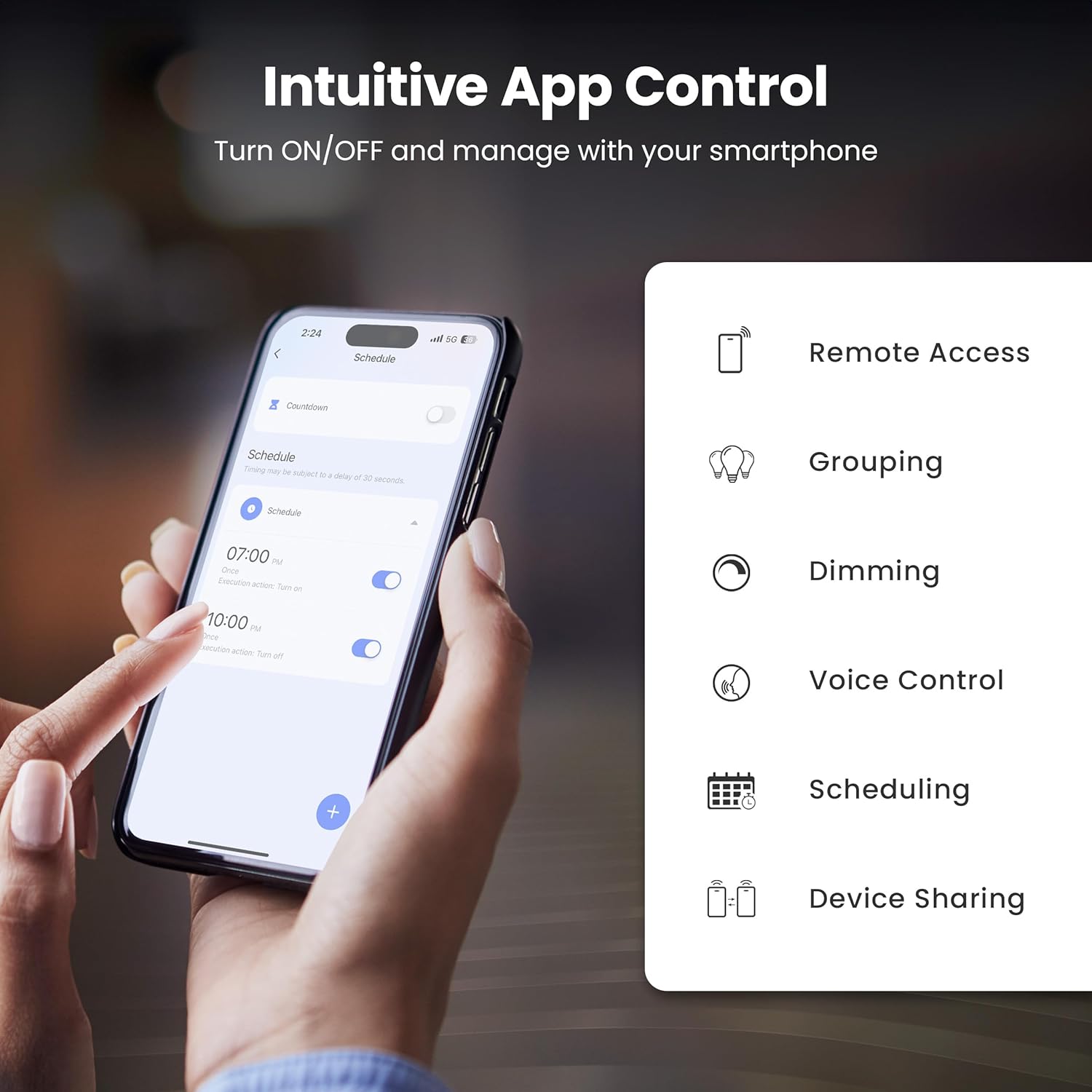
Image: A smartphone screen showing the Feit Electric app interface, demonstrating scheduling features for smart bulbs.

Image: A smartphone screen showing the Feit Electric app with a color wheel, allowing users to select from millions of colors for their smart bulb.
Operating Your Smart Bulb
Basic Controls (App)
- ఆన్/ఆఫ్: యాప్లోని బల్బ్ చిహ్నాన్ని నొక్కి దాన్ని ఆన్ లేదా ఆఫ్ చేయండి.
- అస్పష్టత: కాంతి తీవ్రతను 1% నుండి 100% వరకు సర్దుబాటు చేయడానికి యాప్లోని బ్రైట్నెస్ స్లయిడర్ను ఉపయోగించండి.
Color Changing and Tunable White
- రంగు ఎంపిక: In the app, navigate to the color section to choose from a spectrum of millions of colors.
- ట్యూనబుల్ వైట్: Adjust the white light temperature from warm soft white (2700K) to cool daylight (6500K) to suit your preference.

Image: A smartphone displaying the Feit Electric app with options for dimming and scheduling, positioned next to a wall-mounted lamp.

Image: A room interior bathed in a vibrant blue light from a smart bulb, demonstrating the color-changing capability.
వాయిస్ కంట్రోల్
Integrate your Feit Electric Smart Bulbs with Amazon Alexa or Google Assistant for convenient voice control.
- Ensure your smart bulb is connected to the Feit Electric app.
- Open the Alexa or Google Home app and enable the "Feit Electric" skill/service.
- ప్రాంప్ట్ చేయబడినప్పుడు మీ Feit Electric ఖాతాను లింక్ చేయండి.
- Discover devices. Once discovered, you can use voice commands such as:
- "అలెక్సా, లివింగ్ రూమ్ లైట్ వెలిగించు."
- "హే గూగుల్, బెడ్ రూమ్ లైట్ ని 50% డిమ్ చేయి."
- "Alexa, change the kitchen light to blue."

Image: An Amazon Echo Dot device alongside logos for Feit Electric and Google Home, illustrating compatibility with voice assistants.
Scheduling and Grouping
- షెడ్యూల్లు: Set specific times for your lights to turn on/off, dim, or change color. Access this feature in the Feit Electric app's "Schedule" section.
- గుంపులు: Combine multiple bulbs into a single group (e.g., "Living Room Lights") to control them simultaneously. This is managed in the app's "Groups" section.
- దృశ్యాలు: Create custom lighting presets for different activities or moods (e.g., "Movie Night," "Reading").

Image: A smartphone screen showing the Feit Electric app's scheduling interface, allowing users to set automated routines for their smart lights.

Image: The Feit Electric app interface demonstrating how multiple smart bulbs can be grouped and controlled by specific areas or rooms, such as the Kitchen, Dining Room, and Living Room.
సంరక్షణ మరియు నిర్వహణ
- శుభ్రపరచడం: శుభ్రపరిచే ముందు బల్బ్ ఆఫ్ చేయబడి చల్లబరచబడిందని నిర్ధారించుకోండి. మృదువైన, పొడి గుడ్డతో తుడవండి. ద్రవ లేదా రాపిడి క్లీనర్లను ఉపయోగించవద్దు.
- భర్తీ: These LED bulbs have a long lifespan. When replacement is necessary, ensure power is off before unscrewing the old bulb and installing a new one.
- నిల్వ: బల్బులను నిల్వ చేస్తుంటే, వాటిని ప్రత్యక్ష సూర్యకాంతి మరియు తీవ్రమైన ఉష్ణోగ్రతలు లేకుండా చల్లని, పొడి ప్రదేశంలో ఉంచండి.
ట్రబుల్షూటింగ్
| సమస్య | పరిష్కారం |
|---|---|
| బల్బ్ Wi-Fi కి కనెక్ట్ కావడం లేదు. |
|
| Bulb frequently disconnects from Wi-Fi. |
|
| వాయిస్ కంట్రోల్ పనిచేయడం లేదు. |
|
| Bulb is unresponsive in the app. |
|
సాంకేతిక లక్షణాలు
| స్పెసిఫికేషన్ | విలువ |
|---|---|
| మోడల్ సంఖ్య | OM60/RGBW/CA/AG/3 |
| కాంతి రకం | LED |
| వాట్tage | 9 వాట్స్ (60W సమానం) |
| ప్రకాశం | 800 ల్యూమెన్స్ |
| రంగు ఉష్ణోగ్రత | 2700K - 6500K (Tunable White) + RGB Color Changing |
| బల్బ్ ఆకార పరిమాణం | A19 |
| బల్బ్ బేస్ | E26 మీడియం |
| వాల్యూమ్tage | 120 వోల్ట్లు |
| నియంత్రణ పద్ధతి | App, Voice (2.4 GHz Wi-Fi) |
| సగటు జీవితం | 25,000 గంటలు |
| ఇండోర్/అవుట్డోర్ వినియోగం | ఇండోర్ |
| ఉత్పత్తి కొలతలు | 2.4"అడుగు x 4.3"అడుగు |

Image: A visual representation of the bulb's specifications, including physical dimensions and electrical characteristics.
వారంటీ మరియు కస్టమర్ మద్దతు
వారంటీ సమాచారం
This Feit Electric Smart Wi-Fi LED Bulb comes with a one-year warranty. For warranty claims or assistance, please contact Feit Electric customer service.
కస్టమర్ మద్దతు
24/7 కస్టమర్ మద్దతు కోసం, Feit Electric సహాయ కేంద్రాన్ని సందర్శించండి లేదా వారిని నేరుగా సంప్రదించండి:
- Webసైట్: హెల్ప్.ఫీట్.కామ్
- ఇమెయిల్: info@feit.com
- టోల్-ఫ్రీ ఫోన్: 1-866-326-బల్బ్

Image: Feit Electric customer support information, including a QR code and website link for 24/7 assistance.


