1. పరిచయం
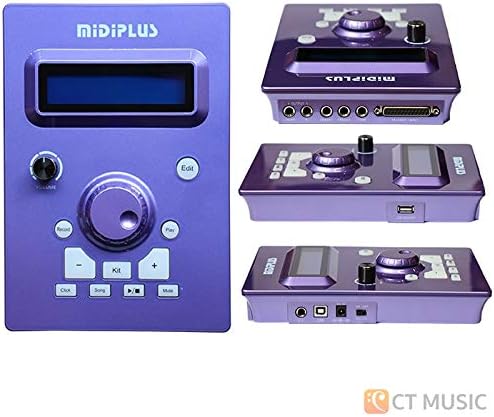
Thank you for choosing the Midiplus ED-9 Pro MKII Electronic Drum Kit. This advanced electronic drum set is designed to provide a realistic and versatile drumming experience for musicians of all levels. Featuring a new Z12K drum sound module, the ED-9 Pro MKII includes 20 group preset drum kits and allows for 10 user-editable groups, utilizing true multi-sampled drum lossless studio recordings. It also incorporates a built-in metronome, 10 demo songs, and an easy-to-use fast recording function. The kit is expandable with an additional second Crash cymbal (Crash2) and a fourth Tom drum (Tom4). This manual provides essential information for setup, operation, maintenance, and troubleshooting to ensure you get the most out of your ED-9 Pro MKII.
3. ప్యాకేజీ విషయాలు
Carefully unpack all items and ensure all components are present before beginning assembly.
- Z12K Drum Sound Module
- 10" Dual-trigger Mesh Head Snare Pad
- 8" Dual-trigger Mesh Head Tom Pads (x4)
- 12" Rubber Dual-trigger Hi-Hat Cymbal Pad with Choke
- 12" Rubber Dual-trigger Crash Cymbal Pads with Choke (x2)
- 12" Rubber 3-trigger Ride Cymbal Pad with Choke
- హై-హాట్ కంట్రోల్ పెడల్
- కిక్ ప్యాడ్
- కిక్ పెడల్
- Drum Rack System (Frame)
- Cymbal Arms and Tom Holders
- Multi-cable Snake for Pad Connections
- పవర్ అడాప్టర్
- వినియోగదారు మాన్యువల్ (ఈ పత్రం)

Image: All components of the Midiplus ED-9 Pro MKII Electronic Drum Kit, including the drum module, mesh head pads, rubber cymbals, pedals, and the drum rack frame.
6. ప్రాథమిక ఆపరేషన్
6.1 పవర్ ఆన్ మరియు ఆఫ్
- పవర్ ఆన్: Ensure all connections are secure. Press the POWER button on the module. The display will light up.
- పవర్ ఆఫ్: Press and hold the POWER button until the display turns off.
6.2 డ్రమ్ కిట్లను ఎంచుకోవడం
The ED-9 Pro MKII comes with 20 preset drum kits and allows for 10 user-editable kits.
- నొక్కండి KIT బటన్.
- Use the navigation buttons (e.g., Up/Down arrows) to scroll through the available drum kits.
- The selected kit will be active immediately.
6.3 Using the Metronome
The built-in metronome is essential for practicing with accurate timing.
- నొక్కండి మెట్రోనొమ్ దాన్ని ఆన్/ఆఫ్ చేయడానికి బటన్.
- While the metronome is active, use the navigation buttons to adjust the tempo (BPM).
6.4 డెమో పాటలను ప్లే చేయడం
The module includes 10 demo songs for practice and enjoyment.
- నొక్కండి పాట బటన్.
- Use the navigation buttons to select a demo song.
- నొక్కండి ఆడండి button to start the song. Press again to stop.
6.5 మీ పనితీరును రికార్డ్ చేయడం
The ED-9 Pro MKII allows for easy recording of your drumming.
- నొక్కండి రికార్డ్ చేయండి button once to arm recording (the record indicator will flash).
- Start playing. Recording will begin automatically when you hit a pad.
- నొక్కండి రికార్డ్ చేయండి రికార్డింగ్ ఆపివేయడానికి మళ్లీ బటన్.
- To play back your recording, press the ఆడండి బటన్.
6.6 Editing Drum Kits
You can customize and save your own drum kits. Refer to the full Midiplus ED-9 Pro MKII advanced manual for detailed editing instructions.
- Select a user kit (1-10) or a preset kit you wish to modify.
- నొక్కండి సవరించు బటన్.
- Use the navigation buttons to select the parameter you wish to edit (e.g., instrument sound, volume, pitch, reverb for a specific pad).
- Adjust the value using the appropriate buttons.
- To save your changes, follow the on-screen prompts or refer to the module's specific save procedure (usually involves pressing and holding a button or navigating to a save option).
7. నిర్వహణ మరియు సంరక్షణ
Proper care will extend the life and performance of your electronic drum kit.
- శుభ్రపరచడం:
Wipe the drum module, pads, and cymbals with a soft, dry cloth. For stubborn dirt, use a slightly damp cloth and then dry thoroughly. Do not use abrasive cleaners, waxes, or solvents, as they can damage the surfaces.
- నిల్వ:
When not in use for extended periods, store the drum kit in a cool, dry place, away from direct sunlight and extreme temperatures. If disassembling, pack components carefully to prevent damage.
- కేబుల్ నిర్వహణ:
Periodically check all cables for wear and tear. Ensure they are not kinked or pinched. Proper cable management can prevent damage and ensure reliable performance.
- మెష్ హెడ్ టెన్షన్:
The mesh heads can be adjusted for tension using a standard drum key (not included). Adjusting tension affects rebound feel but does not change the sound, as the sound is produced by the module's sensors. Do not overtighten.
10. వారంటీ మరియు మద్దతు
Midiplus products are manufactured to high quality standards. For specific warranty information, please refer to the warranty card included with your product or visit the official Midiplus webసైట్.
If you require technical assistance or have questions not covered in this manual, please contact Midiplus customer support through their official channels. Keep your purchase receipt as proof of purchase for warranty claims.
ఆన్లైన్ వనరులు: For the latest drivers, firmware updates, and additional support documentation, please visit the Midiplus official webసైట్.