Wilson Electronics Cell LinQ (910055) Pro Meter User Manual
మోడల్: 910055
పరిచయం
The Cell LinQ Meter + App is a sophisticated cellular survey tool designed for professional integrators, installers, and designers of passive DAS, M2M, cellular networking, or IoT systems. This device facilitates site surveys by connecting to the Cell LinQ app via Bluetooth on compatible iOS or Android smartphones or cellular-connected tablets. It enables mobile surveys, network analysis, and data collection in the field, streamlining site design, reducing on-site visits, and providing valuable data for system optimization.
సెటప్
Before operating your Cell LinQ Pro Meter, ensure all components are present and properly connected. The device is designed for ease of use, linking wirelessly to your mobile device.
ప్యాకేజీ విషయాలు

Image: The complete Cell LinQ Pro Meter kit, including the hard case, meter, external antenna, various connectors, jumper cable, extension cable, and charging accessories.
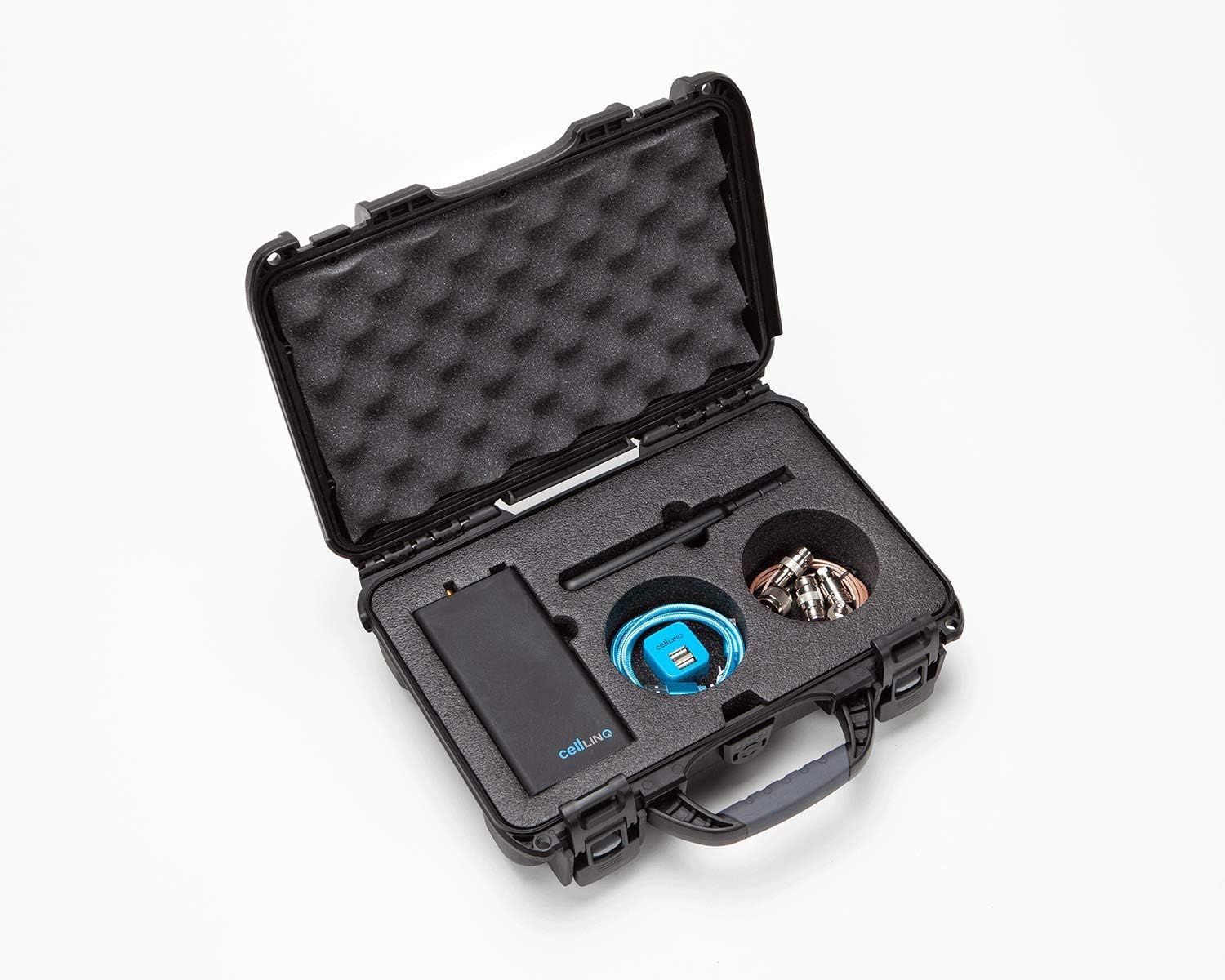
Image: The Cell LinQ Pro Meter and its accessories securely stored within the custom-fitted hard case, demonstrating its portability and protection.
మీ ప్యాకేజీ కింది అంశాలను కలిగి ఉందని ధృవీకరించండి:
- Cell LinQ Pro Meter
- బాహ్య యాంటెన్నా
- హార్డ్ కేసు
- Mini USB Charger and power cord
- కనెక్టర్లు (x4)
- జంపర్ కేబుల్
- 2' Extension Cable
ప్రారంభ ఛార్జింగ్
Before first use, fully charge the Cell LinQ Pro Meter using the provided Mini USB Charger and power cord. Connect the charger to the meter's USB port. The charging indicator light will provide status.
యాప్ ఇన్స్టాలేషన్
The Cell LinQ Pro Meter operates in conjunction with the Cell LinQ app. Download and install the official Cell LinQ app from your device's app store (available for iOS and Android). Ensure your smartphone or tablet meets the minimum system requirements for the app.
Connecting the External Antenna

Image: The Cell LinQ Pro Meter unit positioned next to its detachable external antenna, ready for connection.

Image: The Cell LinQ Pro Meter with the external antenna securely screwed into its port, demonstrating the assembled unit.
Carefully screw the external antenna into the designated antenna port on the Cell LinQ Pro Meter. Ensure it is finger-tight to establish a secure connection for optimal signal reception.
ఆపరేటింగ్ సూచనలు
The Cell LinQ Pro Meter is designed for intuitive operation through its Bluetooth connection to the dedicated mobile application.
పవర్ ఆన్ మరియు బ్లూటూత్ జత చేయడం

చిత్రం: క్లోజప్ view of the top of the Cell LinQ Pro Meter, highlighting the blue power button, indicator lights, antenna port, and mini USB charging port.
- Press and hold the power button (typically blue) on the Cell LinQ Pro Meter until the indicator lights illuminate.
- మీ స్మార్ట్ఫోన్ లేదా టాబ్లెట్లో బ్లూటూత్ను ప్రారంభించండి.
- Open the Cell LinQ app. The app will automatically search for and connect to the Pro Meter. Follow any on-screen prompts within the app to complete the pairing process.
Conducting Site Surveys
Once connected, the Cell LinQ app provides a comprehensive interface for conducting cellular surveys.
- Multi-band Scanning: The meter offers scanning across LTE, cellular, AWS, and PCS frequency bands. Select the desired bands within the app interface.
- Carrier and Tower Identification: The device identifies individual carriers and towers using 3G and 4G/LTE technology. This data is displayed within the app.
- వివరణాత్మక సమాచారం: The app provides details such as location, tower ID, and distance to the tower.
- Active Carrier Pinpointing: Pinpoint active carriers and geo-map any active cells within range directly on the app's map interface.
- డేటా క్యాప్చర్: All scan results, including time stamps, are captured, allowing for A/B comparisons and historical data analysis.
- Carrier Independence: The meter scans all carriers regardless of the carrier associated with the phone running the app.
Refer to the Cell LinQ app's in-app help or user guide for detailed instructions on specific survey modes and data interpretation.
నిర్వహణ
Proper maintenance ensures the longevity and optimal performance of your Cell LinQ Pro Meter.
- శుభ్రపరచడం: Use a soft, dry cloth to clean the exterior of the meter and case. Avoid abrasive cleaners or solvents.
- నిల్వ: When not in use, store the meter and all accessories in the provided hard case to protect them from dust, moisture, and physical damage. Store in a cool, dry place.
- బ్యాటరీ సంరక్షణ: బ్యాటరీ ఆరోగ్యాన్ని కాపాడుకోవడానికి, బ్యాటరీని తరచుగా పూర్తిగా డిశ్చార్జ్ చేయడాన్ని నివారించండి. ఎక్కువసేపు నిల్వ చేస్తే, ప్రతి కొన్ని నెలలకు బ్యాటరీని దాదాపు 50% వరకు ఛార్జ్ చేయండి.
- సాఫ్ట్వేర్ అప్డేట్లు: Regularly check for updates to the Cell LinQ app through your device's app store. App updates often include performance improvements, bug fixes, and new features.
ట్రబుల్షూటింగ్
If you encounter issues with your Cell LinQ Pro Meter, refer to the following common troubleshooting steps:
| సమస్య | సాధ్యమైన కారణం | పరిష్కారం |
|---|---|---|
| మీటర్ పవర్ ఆన్ అవ్వదు. | బ్యాటరీ ఛార్జ్ తక్కువగా ఉంది లేదా లేదు. | Charge the meter using the provided USB charger. Ensure the charger is connected to a working power source. |
| Cannot connect to the Cell LinQ app via Bluetooth. | Bluetooth is off on mobile device; meter is out of range; app not updated; meter not in pairing mode. |
|
| Inaccurate or no signal readings. | Antenna not properly connected; environmental interference; incorrect app settings. |
|
ఈ దశలను ప్రయత్నించిన తర్వాత కూడా సమస్య కొనసాగితే, దయచేసి కస్టమర్ సపోర్ట్ను సంప్రదించండి.
స్పెసిఫికేషన్లు
| ఫీచర్ | వివరాలు |
|---|---|
| మోడల్ సంఖ్య | 910055 |
| అనుకూలమైన ఆపరేటింగ్ సిస్టమ్స్ | iOS, Android (via Cell LinQ App) |
| కనెక్టివిటీ | బ్లూటూత్ |
| ఉత్పత్తి కొలతలు (L x W x H) | 16.79 x 1.8 x 0.38 సెం.మీ |
| వస్తువు బరువు | 1.5 కిలోలు |
| మెటీరియల్ | Plastic (Case) |
| తయారీదారు | Signal TeQ Inc. |
| ఉపకరణాలు చేర్చబడ్డాయి | Mini USB Charger and power cord, Connectors (x4), Jumper cable, 2' Extension Cable, Hard Case, External Antenna |
వారంటీ సమాచారం
Specific warranty details for the Cell LinQ Pro Meter are typically provided with the product packaging or can be found on the manufacturer's official website. Please retain your proof of purchase for warranty claims. The warranty generally covers defects in materials and workmanship under normal use.
For detailed warranty terms and conditions, please refer to the documentation included with your product or visit the weBoost official webసైట్.
కస్టమర్ మద్దతు
For technical assistance, troubleshooting beyond this manual, or warranty inquiries, please contact weBoost కస్టమర్ మద్దతు.
- ఆన్లైన్ మద్దతు: అధికారిని సందర్శించండి weBఊస్ట్ webతరచుగా అడిగే ప్రశ్నలు, మద్దతు కథనాలు మరియు సంప్రదింపు ఫారమ్ల కోసం సైట్.
- ఫోన్ మద్దతు: Refer to the contact information provided in your product packaging or on the weBఊస్ట్ website for phone support hours and numbers.
When contacting support, please have your product model number (910055) and purchase information ready.


