1. పరిచయం
Thank you for choosing the WorkPro LED Desk Lamp. ఈ బహుముఖ ఎల్amp is designed to enhance your workspace with adjustable illumination, convenient wireless charging, and a USB charging port. Please read this manual thoroughly to ensure proper setup, operation, and maintenance of your new desk lamp.

Image 1.1: The WorkPro LED Desk Lamp, featuring a modern brushed metal finish and adjustable arm.
2. ఉత్పత్తి లక్షణాలు
- సర్దుబాటు ప్రకాశం: 5 color temperatures and 6 brightness levels for customized lighting.
- వైర్లెస్ ఛార్జింగ్: Integrated wireless charging pad on the base for compatible mobile devices.
- USB ఛార్జింగ్ పోర్ట్: A 2.4-amp USB port located at the back of the base for additional device charging.
- ఫ్లెక్సిబుల్ డిజైన్: Adjustable arm, head, and rotatable base for precise light positioning.
- టచ్ నియంత్రణలు: Intuitive touch control panel with memory function.
- టైమర్ ఫంక్షన్: Built-in 1-hour timer for automatic shut-off.
- రాత్రి కాంతి: Integrated night light feature.
- శక్తి-సమర్థవంతమైన LED: Pre-wired 10-watt LEDs with an average life of approximately 50,000 hours.
- మన్నికైన నిర్మాణం: Brushed metal body with a modern design.

Image 2.1: The WorkPro LED Desk Lamp integrated into a modern workspace, highlighting its functional design.
3. ప్యాకేజీ విషయాలు
దయచేసి ఈ క్రింది అంశాల కోసం ప్యాకేజీని తనిఖీ చేయండి:
- WorkPro LED Desk Lamp యూనిట్
- పవర్ అడాప్టర్
- వినియోగదారు మాన్యువల్ (ఈ పత్రం)
4. భద్రతా సమాచారం
అగ్ని ప్రమాదం, విద్యుత్ షాక్ లేదా గాయం ప్రమాదాన్ని తగ్గించడానికి, దయచేసి ఈ క్రింది భద్రతా జాగ్రత్తలను గమనించండి:
- L ఆపరేట్ చేయవద్దుamp దెబ్బతిన్న త్రాడు లేదా ప్లగ్తో.
- l ఉపయోగించవద్దుamp తడిలో లేదా డిamp పరిస్థితులు.
- పవర్ అడాప్టర్ మీ స్థానిక విద్యుత్ సరఫరాకు అనుకూలంగా ఉందని నిర్ధారించుకోండి.
- lని విడదీయడానికి లేదా మరమ్మతు చేయడానికి ప్రయత్నించవద్దుamp. Contact qualified service personnel for assistance.
- ఎల్ ఉంచండిamp వేడి మూలాలు మరియు ప్రత్యక్ష సూర్యకాంతి నుండి దూరంగా.
- The LED light source is not replaceable. Do not attempt to replace the LEDs.
- ఎల్ ఉంచండిamp మలుపు తిరగకుండా ఉండటానికి స్థిరమైన, చదునైన ఉపరితలంపై.
5. సెటప్
Follow these steps to set up your WorkPro LED Desk Lamp:
- అన్ప్యాక్: ప్యాకేజింగ్ నుండి అన్ని భాగాలను జాగ్రత్తగా తొలగించండి.
- స్థానం: ఎల్ ఉంచండిamp స్థిరమైన, చదునైన ఉపరితలంపై ఆధారం.
- పవర్ కనెక్ట్ చేయండి: Insert the power adapter cable into the power input port on the back of the lamp బేస్. పవర్ అడాప్టర్ను ప్రామాణిక ఎలక్ట్రికల్ అవుట్లెట్లోకి ప్లగ్ చేయండి.
- సర్దుబాటు: Gently adjust the lamp arm and head to your desired position. The lamp features multiple pivot points for flexibility.

చిత్రం 5.1: ఎల్amp adjustability, showing 90-degree head rotation, 120-degree arm articulation, 90-degree base rotation, and 145-degree head tilt.
6. ఆపరేటింగ్ సూచనలు
6.1. Touch Control Panel Overview
ది ఎల్amp is operated via a touch-sensitive control panel located on the base. The icons represent various functions:
- పవర్ బటన్: lని మారుస్తుందిamp ఆన్/ఆఫ్.
- ప్రకాశం సర్దుబాటు: Adjusts light intensity (6 levels).
- రంగు ఉష్ణోగ్రత సర్దుబాటు: Changes light color (5 modes).
- టైమర్ బటన్: Activates the 1-hour timer.
- రాత్రి కాంతి బటన్: Activates the night light feature.
6.2. ఆన్/ఆఫ్ చేయడం
నొక్కండి పవర్ బటన్ once to turn the lamp on. Tap it again to turn the lamp off. The lamp will remember your last brightness and color temperature settings.
6.3. ప్రకాశం సర్దుబాటు
ఎల్ తోamp on, tap the ప్రకాశం సర్దుబాటు icons ( /
/  ) to cycle through the 6 available brightness levels.
6.4. రంగు ఉష్ణోగ్రత సర్దుబాటు
ఎల్ తోamp on, tap the రంగు ఉష్ణోగ్రత సర్దుబాటు చిహ్నం ( ) to cycle through the 5 available color temperature modes (e.g., warm white to cool white).

Image 6.1: Visual representation of the 5 color temperature modes and 6 brightness levels.
6.5. టైమర్ ఉపయోగించడం
నొక్కండి టైమర్ బటన్ ( ) to activate the 1-hour timer. The lamp will automatically turn off after 60 minutes. Tap again to deactivate.
6.6. Activating the Night Light
నొక్కండి రాత్రి కాంతి బటన్ ( ) to turn on the integrated night light. Tap again to turn it off.
6.7. వైర్లెస్ ఛార్జింగ్
Place your Qi-compatible mobile device directly onto the wireless charging pad on the lamp base. Ensure the device is centered for optimal charging. A charging indicator (if present on your device) will confirm charging has begun.

Image 6.2: A smartphone being charged wirelessly on the lampయొక్క బేస్.
6.8. USB ఛార్జింగ్
Connect your mobile device's USB charging cable to the 2.4-amp USB port located on the back of the lamp base. Plug the other end into your device to begin charging.
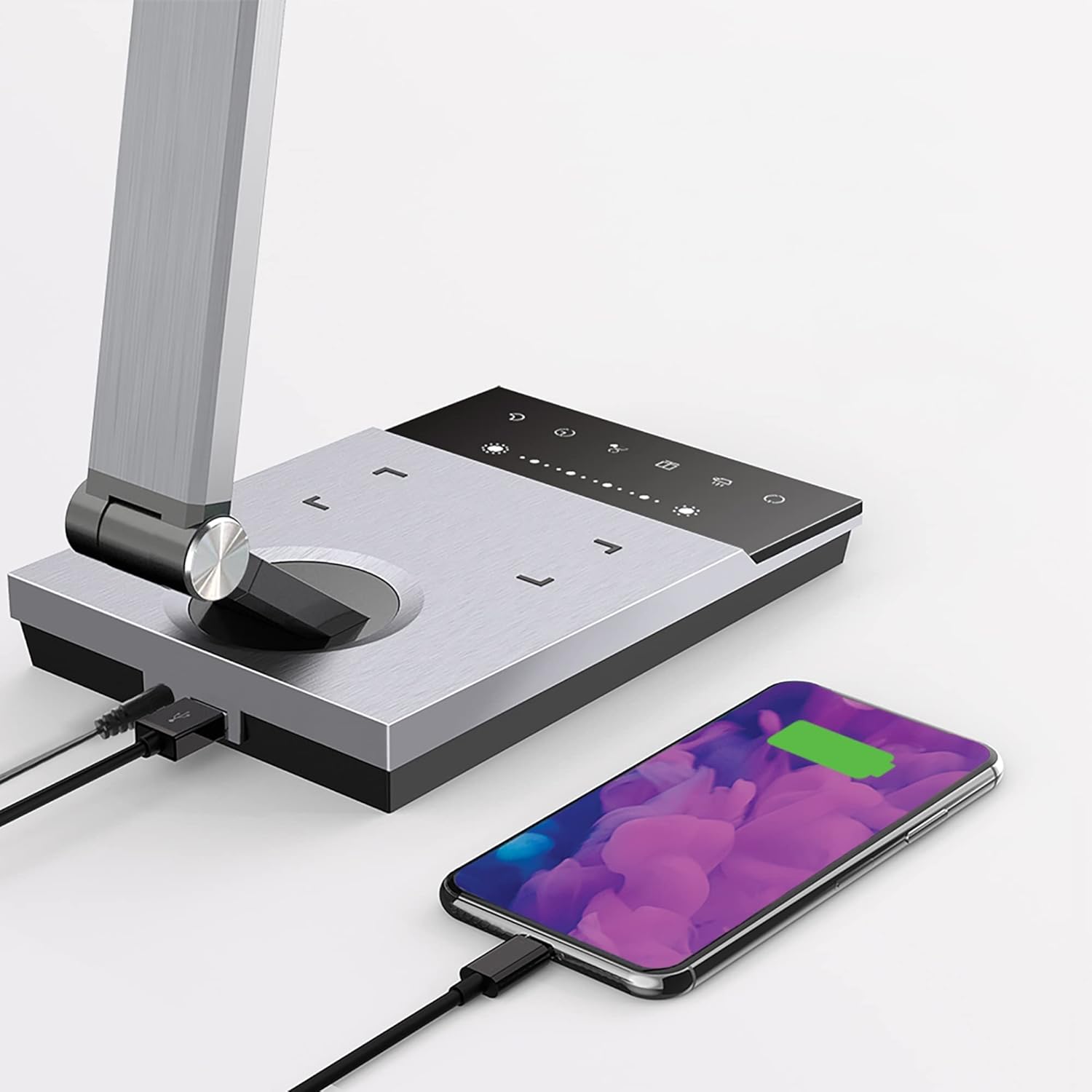
Image 6.3: Simultaneous charging of devices via the USB port and wireless charging pad.
7. నిర్వహణ
To keep your WorkPro LED Desk Lamp సరైన స్థితిలో:
- శుభ్రపరచడం: శుభ్రపరిచే ముందు విద్యుత్తును డిస్కనెక్ట్ చేయండి.amp with a soft, dry cloth. Do not use abrasive cleaners, solvents, or harsh chemicals.
- నిల్వ: l నిల్వ చేస్తేamp ఎక్కువ కాలం పాటు, దానిని పవర్ నుండి డిస్కనెక్ట్ చేసి, చల్లని, పొడి ప్రదేశంలో నిల్వ చేయండి.
- LED సంరక్షణ: The integrated LED light source is designed for long-term use and does not require replacement.
8. ట్రబుల్షూటింగ్
| సమస్య | సాధ్యమైన కారణం | పరిష్కారం |
|---|---|---|
| Lamp ఆన్ చేయదు. | విద్యుత్ కనెక్షన్ లేదు. | పవర్ అడాప్టర్ l కి సురక్షితంగా ప్లగ్ చేయబడిందని నిర్ధారించుకోండిamp మరియు గోడ అవుట్లెట్. |
| వైర్లెస్ ఛార్జింగ్ పనిచేయడం లేదు. | Device not Qi-compatible or not positioned correctly. | Verify your device supports Qi wireless charging. Reposition the device on the charging pad to ensure proper alignment. Remove any thick phone cases. |
| USB ఛార్జింగ్ పనిచేయడం లేదు. | USB cable or device issue. | Try a different USB cable or device to isolate the problem. Ensure the lamp పవర్ ఆన్ చేయబడింది. |
| కాంతి మిణుకుమిణుకుమంటుంది లేదా మసకగా ఉంటుంది. | అస్థిర విద్యుత్ సరఫరా లేదా అంతర్గత సమస్య. | l ని ప్లగ్ చేయడానికి ప్రయత్నించండిamp వేరే అవుట్లెట్లోకి. సమస్య కొనసాగితే, కస్టమర్ సపోర్ట్ను సంప్రదించండి. |
9. స్పెసిఫికేషన్లు
| మోడల్ సంఖ్య | WP3000S |
| కాంతి మూలం | ఇంటిగ్రేటెడ్ LED |
| వాట్tage | 10 వాట్స్ |
| ల్యూమన్ అవుట్పుట్ | 600 ల్యూమెన్స్ |
| రంగు ఉష్ణోగ్రతలు | 5 స్థాయిలు |
| ప్రకాశం స్థాయిలు | 6 స్థాయిలు |
| USB అవుట్పుట్ | 2.4 Amp |
| మెటీరియల్ | బ్రష్డ్ మెటల్ |
| కొలతలు (L x W x H) | 17.5 x 6.5 x 4 అంగుళాలు |
| వస్తువు బరువు | 5.45 పౌండ్లు |
| శక్తి మూలం | కార్డెడ్ ఎలక్ట్రిక్ |
| నియంత్రణ పద్ధతి | టచ్ |
10. వారంటీ మరియు మద్దతు
WorkPro products are manufactured to high-quality standards. For warranty information or technical support, please refer to the warranty card included with your purchase or visit the official WorkPro webవారంటీ క్లెయిమ్ల కోసం దయచేసి మీ కొనుగోలు రుజువును మీ వద్ద ఉంచుకోండి.
For further assistance, you may contact the retailer or manufacturer directly.


