పరిచయం
The 1010music Blackbox is a next-generation compact sampling studio designed for music creation without a computer. It allows users to record, edit, and sequence audio, integrate external hardware, and perform compositions live. Its intuitive touchscreen interface and robust design make it suitable for various music production environments.
పెట్టెలో ఏముంది
Upon unboxing your Blackbox Compact Sampling Studio, please verify that all the following items are included:
- One Blackbox Compact Sampling Studio unit
- One microSD card (pre-loaded with Blackbox firmware, approximately 60 presets, and 900 WAV files)
- ఒక USB పవర్ కేబుల్
- One USB wall adapter with 3 international adapters
- Two MIDI Adapters (Male 3.5mm TRS to Female 5-pin DIN, MIDI Class B standard)
- త్వరిత ప్రారంభ గైడ్

మూర్తి 1: Contents of the Blackbox retail packaging, including the Blackbox unit, power supply, USB cable, MIDI adapters, and microSD card.
సెటప్
1. పవర్ చేయడం
- Insert the provided microSD card into the microSD slot on the side of the Blackbox unit. Ensure it clicks into place.
- Connect the USB power cable to the "POWER" port on the rear of the Blackbox.
- Attach the appropriate international adapter to the USB wall wart and plug it into a power outlet.
- The Blackbox will automatically power on and begin its boot sequence.

మూర్తి 2: Rear panel of the Blackbox, highlighting the Power, Device, Clock, MIDI, and Audio ports for connection.
2. Connecting Audio and MIDI Devices
- ఆడియో ఇన్పుట్: Connect your audio sources (synths, drum machines, etc.) to the "AUDIO IN" jacks (1, 2, 3) using 3.5mm TRS cables.
- ఆడియో అవుట్పుట్: Connect headphones to the "PHONES" jack for monitoring, or connect to an external mixer/interface via the main audio outputs.
- MIDI: Use the provided MIDI adapters to connect external MIDI controllers or other MIDI devices to the "MIDI IN" and "MIDI OUT" ports.
- USB పరికరం: The "DEVICE" USB port can be used to connect USB MIDI controllers or other compatible USB devices.
Operating the Blackbox
The Blackbox features a responsive touchscreen interface complemented by physical buttons and knobs for intuitive control.

మూర్తి 3: ముందు view of the Blackbox, showing the touchscreen display, control knobs, and function buttons.
1. ప్రాథమిక నావిగేషన్
- టచ్స్క్రీన్: Tap icons and elements to select them. Swipe to scroll through lists or waveforms.
- గుబ్బలు: Use the four rotary encoders to adjust parameters displayed on the screen. Press a knob to confirm a selection or reset a parameter.
- ఫంక్షన్ బటన్లు: The buttons (PADS, KEYS, SEQS, SONG, FX, MIX, PSET, TOOLS) switch between different operational modes.
- రవాణా నియంత్రణలు: REC, STOP, and PLAY buttons control recording and playback.
2. ఎస్ampling and Editing
The Blackbox excels at capturing and manipulating audio. To record a new sampలే:
- నొక్కండి ప్యాడ్లు button to enter Pad mode.
- Select an empty pad by tapping it on the screen.
- నొక్కండి REC button. The screen will show recording options.
- Adjust input levels and recording length as needed.
- నొక్కండి REC again to start recording. Press ఆపు ముగించడానికి.
- After recording, you can edit the sample directly on the touchscreen, including trimming, normalizing, and applying effects.
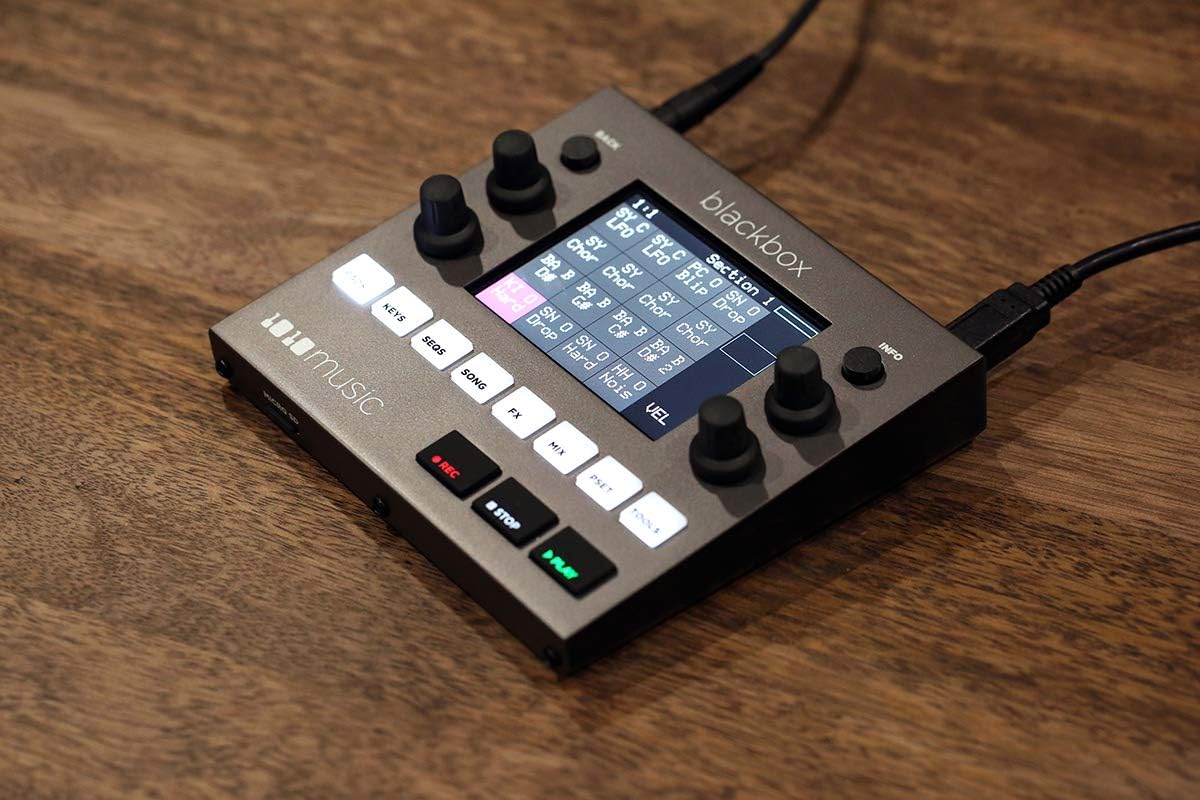
మూర్తి 4: The Blackbox display showing a waveform being edited, demonstrating the visual feedback for sample manipulation.
3. Sequencing and Song Creation
Sequences are the building blocks of your songs. The Blackbox allows for flexible arrangement:
- నొక్కండి SEQS button to access the sequencer. Here you can create and edit patterns using your sampలెస్.
- నొక్కండి పాట button to arrange multiple sequences into a complete song structure. You can chain sequences, add pauses, and define loop points.
4. Effects and Mixing
- ది FX button provides access to various built-in effects that can be applied to individual samples or the master output.
- ది మిక్స్ button opens the mixer view, allowing you to adjust volume levels, panning, and routing for each track and sample.
5. Performance and External Control
The Blackbox is designed for live performance and integration with other gear:
- ట్రిగ్గర్ లుamples and sequences live using the pads or an external MIDI controller.
- Synchronize with other devices using the Clock In/Out ports.
- Connect USB MIDI controllers (like the Korg NanoPAD2 shown below) to expand your control options.

మూర్తి 5: The Blackbox connected to an external Korg NanoPAD2 MIDI controller and headphones, demonstrating its expandability for performance.
నిర్వహణ
- శుభ్రపరచడం: Use a soft, dry cloth to clean the unit. For stubborn marks, a slightly damp cloth can be used, but ensure no liquid enters the ports or buttons. Avoid abrasive cleaners.
- నిల్వ: Store the Blackbox in a cool, dry place away from direct sunlight and extreme temperatures.
- ఫర్మ్వేర్ నవీకరణలు: Periodically check the 1010music website for firmware updates. Instructions for updating are typically provided with the firmware download.
- మైక్రో SD కార్డ్: Regularly back up the contents of your microSD card to a computer to prevent data loss.
ట్రబుల్షూటింగ్
| సమస్య | సాధ్యమైన కారణం | పరిష్కారం |
|---|---|---|
| యూనిట్ పవర్ ఆన్ చేయదు. | Power cable not connected properly; faulty power adapter; microSD card issue. | Ensure power cable is securely connected. Try a different USB power source if available. Re-insert or try a different microSD card. |
| ఆడియో అవుట్పుట్ లేదు. | Volume too low; incorrect audio routing; faulty cables/headphones. | Check master volume and individual track volumes in the MIX section. Ensure headphones/speakers are connected correctly. Test with different cables/headphones. |
| Samples not recording. | Input level too low; incorrect input source selected; storage full. | Adjust input gain. Verify the correct audio input is selected. Check available space on the microSD card. |
| టచ్స్క్రీన్ స్పందించలేదు. | తాత్కాలిక సాఫ్ట్వేర్ లోపం. | Perform a soft reset by holding the INFO button for 10 seconds. If issue persists, power cycle the unit. |
స్పెసిఫికేషన్లు
- వస్తువు బరువు: 2.25 పౌండ్లు
- ఉత్పత్తి కొలతలు: 11 x 7 x 3 అంగుళాలు
- అంశం మోడల్ సంఖ్య: నల్ల పెట్టి
- అనుకూల పరికరాలు: Tablet (referring to the touchscreen interface)
- హార్డ్వేర్ ఇంటర్ఫేస్: USB
- కనెక్టివిటీ టెక్నాలజీ: USB
- ఛానెల్ల సంఖ్య: 8
- మొదట అందుబాటులో ఉన్న తేదీ: మే 31, 2019
వారంటీ మరియు మద్దతు
For detailed warranty information and technical support, please visit the official 1010music webసైట్ లేదా వారి కస్టమర్ సర్వీస్ విభాగాన్ని సంప్రదించండి. వారంటీ క్లెయిమ్ల కోసం మీ కొనుగోలు రుజువును ఉంచండి.
అధికారిక Webసైట్: www.1010 మ్యూజిక్.కామ్


