పరిచయం
This manual provides detailed instructions for the setup, operation, maintenance, and troubleshooting of your La Crosse Technology BBB86088 Atomic Digital Wall Clock. This clock features self-setting atomic time, automatic Daylight Saving Time resets, and displays both indoor and outdoor temperatures with trending indicators.
ఉత్పత్తి లక్షణాలు
- Atomic time and date (manual set option) with Automatic updates for Daylight Saving Time (ON/OFF option).
- Calendar: Month/Date with Full Weekday view.
- 7 Time zones: AST, EST, CST, MST, PST, AKT, HAT and 12/24 Hour display option with 10 minute snooze time alarm.
- Indoor/outdoor temperature (°F/°C) with trend indicators and sensor signal strength icon.
- Battery operation: Clock requires 2 AA alkaline; Sensor requires 2 AA (batteries not included); 2 year battery life.
ప్యాకేజీ విషయాలు
- 1 x Atomic Digital Wall Clock (Model: BBB86088)
- 1 x Wireless Outdoor Temperature Sensor (TX141THv3)
- 1 x త్వరిత సెటప్ గైడ్
Note: 4 AA batteries (2 for clock, 2 for sensor) are required and not included.
సెటప్
బ్యాటరీ సంస్థాపన
- Install 2 AA batteries into your Outdoor Sensor.
- Install 2 AA batteries into your Atomic Clock.
For best performance, use fresh brand-name alkaline batteries with an expiration date no more than 6 years in advance of the current year, or registering at least 1.48 volts per battery. Lithium batteries may be used in the outdoor sensor.
ప్రారంభ సెటప్
- After installing batteries, let the sensor and clock sit within 10 feet of each other for several minutes to allow the sensor signals to lock to the display.
- The clock will search for the Atomic Time Signal at power up and at UTC 7:00, 8:00, 9:00, 10:00, and 11:00. The Atomic Time Signal icon will flash while searching and be solid when it has connected.
- Enter the Settings Menu to adjust your time and date manually if needed.
అవుట్డోర్ సెన్సార్ ప్లేస్ మెంట్
Proper placement of the outdoor sensor is crucial for accurate temperature readings:
- Place your temperature sensor at least 6 feet off the ground.
- ఖచ్చితమైన ఉష్ణోగ్రత రీడింగ్ల కోసం, మీ సెన్సార్ను బాగా వెండిన ప్రదేశంలో సూర్యుని నుండి షేడ్ చేయాలి.
- తేమ దిగువన బయటకు వెళ్లేలా చేయడానికి మీ సెన్సార్ను నిలువుగా మౌంట్ చేయండి.
- Preferred location is on a north-facing wall under an eave or deck rail.
- ఎండ రోజులలో ఎక్కువగా చదవడానికి కారణమయ్యే మెటల్ పైకప్పు దగ్గర ఉంచడం మానుకోండి.
- సోఫిట్ వెంట్లు మరియు విండో లేదా డోర్ ఫ్రేమ్లు వంటి ఇతర వేడి వనరులను నివారించండి.
- ఖచ్చితమైన తేమ రీడింగ్ల కోసం, సాధ్యమైనప్పుడు వృక్షసంపద మరియు సరస్సులు లేదా ఇతర నీటి వనరుల సమీపంలో ఉంచడం నివారించండి.
- Maximum transmission distance from your thermo-hygro sensor to your clock, in open air, is 300 feet (91 meters).
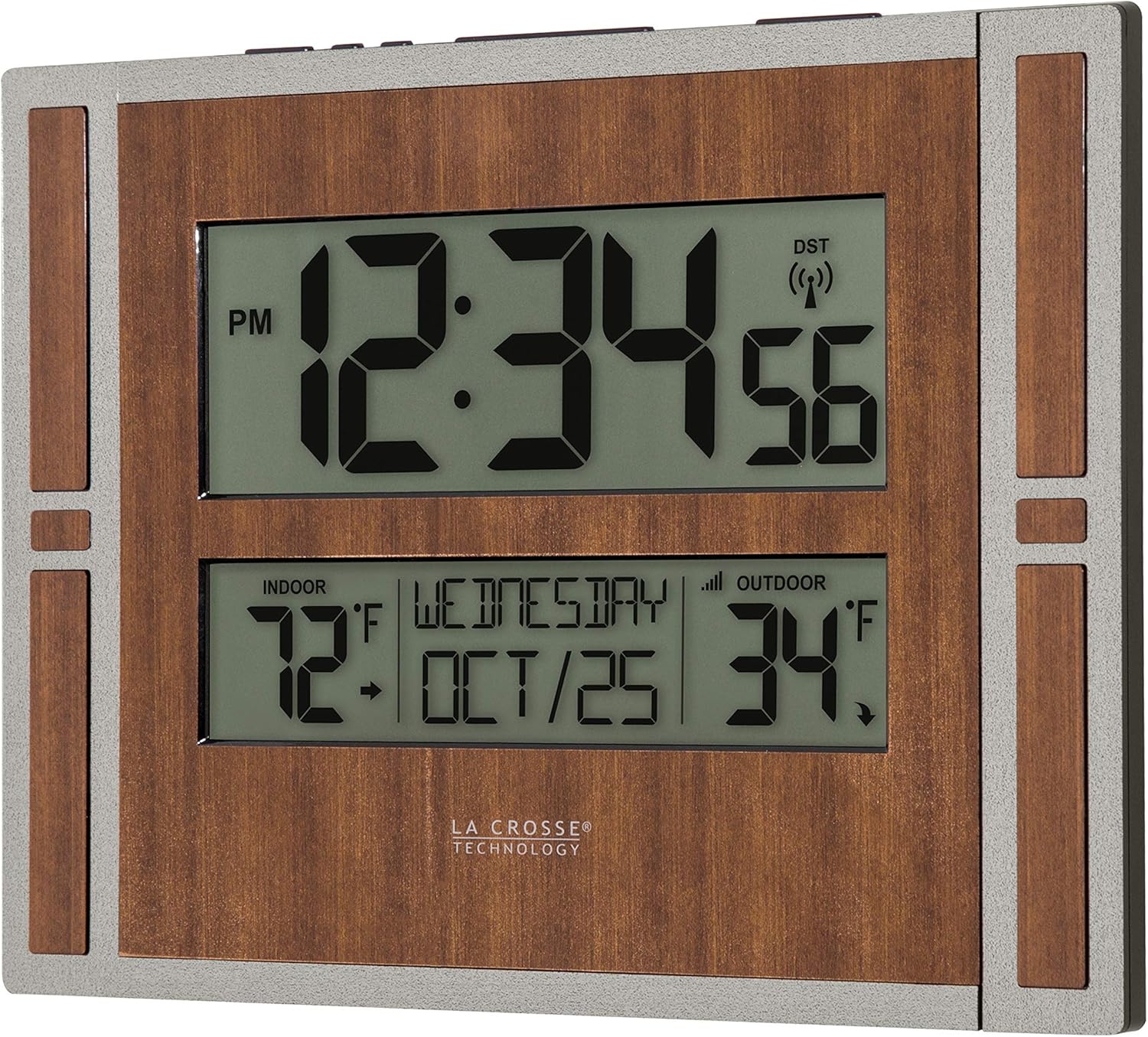
Image: La Crosse Technology Atomic Digital Wall Clock with its remote outdoor temperature sensor.

చిత్రం: క్లోజప్ view of the wireless outdoor temperature sensor mounted vertically on a wooden post.
Video: A demonstration of the battery-powered atomic wall clock, highlighting its features and ease of setup.
ఆపరేటింగ్ సూచనలు
సెట్టింగుల మెను
సెట్టింగ్ల మెనుని యాక్సెస్ చేయడానికి:
- పట్టుకోండి సెట్ సెట్టింగుల మెనుని నమోదు చేయడానికి ప్రదర్శన మారే వరకు బటన్.
- నొక్కండి మరియు విడుదల చేయండి + or - buttons to adjust values. Hold to adjust quickly.
- నొక్కండి మరియు విడుదల చేయండి సెట్ button to confirm values and move to the next setting or exit the menu.
సెట్టింగ్ల మెను ఆర్డర్:
- అటామిక్ సమయం ఆన్/ఆఫ్
- Time Zone (AST, EST, CST, MST, PST, AKT, HAT)
- డేలైట్ సేవింగ్ సమయం ఆన్/ఆఫ్
- 12/24 గంటల సమయం ఫార్మాట్
- గంట
- నిమిషాలు
- సంవత్సరం
- నెల
- తేదీ
గమనికలు:
- అణు సమయం: అటామిక్ ఆఫ్ ఎంపిక చేయబడితే, మెను DST మరియు టైమ్ జోన్ సెట్టింగ్లను దాటవేసి, నేరుగా 12/24-గంటల టైమ్ ఫార్మాట్ సెట్టింగ్కి తరలించబడుతుంది.
- డేలైట్ సేవింగ్ సమయం: మీరు DSTని అనుసరించే ప్రాంతంలో నివసిస్తుంటే, ఈ సెట్టింగ్ని ఆన్లో ఉంచండి. మీ ప్రాంతం DSTని అనుసరించకపోతే, ఈ సెట్టింగ్ని ఆఫ్ చేయండి.
- వారపు రోజు: మీరు మీ సంవత్సరం, నెల మరియు తేదీ సెట్టింగ్లను సరిగ్గా సెట్ చేసిన తర్వాత మీ వారాంతపు ప్రదర్శన స్వయంచాలకంగా సర్దుబాటు చేయబడుతుంది.
సమయం అలారం
అలారం సెట్ చేయడానికి:
- పట్టుకోండి అలారం button until the letters "AL" show in the weekday area.
- నొక్కండి మరియు విడుదల చేయండి + or - విలువలను సర్దుబాటు చేయడానికి బటన్. త్వరగా సర్దుబాటు చేయడానికి పట్టుకోండి.
- నొక్కండి మరియు విడుదల చేయండి అలారం button to confirm and move to the next item or exit.
అలారం యాక్టివేట్/డియాక్టివేట్:
- నొక్కండి మరియు విడుదల చేయండి అలారం బటన్ view అలారం సమయం. అలారంను యాక్టివేట్ చేయడానికి లేదా డియాక్టివేట్ చేయడానికి మళ్లీ నొక్కి, విడుదల చేయండి.
- The Alarm icon will show when alarm is active.
ఆగే: When the alarm is active, press the స్నూజ్ button to silence the alarm for 10 minutes. "Zz" will show.
Note: The alarm will sound with increasing ఫ్రీక్వెన్సీని రెండు నిమిషాలు నొక్కి, ఆపై నిశ్శబ్దం చేయకపోతే స్వయంచాలకంగా ఆపివేయబడుతుంది.
Temperature Display (°F/°C)
నొక్కండి మరియు విడుదల చేయండి సెట్ button to switch between Fahrenheit or Celsius Temperature Display. Your clock will stay on the selection.
Forecast Icons and Trend Arrows
The forecast icons use the clock's internal barometer to predict conditions to come within the next 12 hours. Allow 7-10 days for station calibration for most accurate forecasts.
Forecast Trend Arrows indicate the rising and falling of atmospheric pressure in your area over the past 3 hours:
- ↑ Pressure has risen over the past 3 hours.
- → Pressure has been steady over the past 3 hours.
- ↓ Pressure has fallen over the past 3 hours.
నిర్వహణ
బ్యాటరీ సంరక్షణ
- ఎల్లప్పుడూ సరైన పరిమాణం మరియు బ్యాటరీ యొక్క ఉద్దేశించిన వినియోగానికి అత్యంత అనుకూలమైన గ్రేడ్ను కొనుగోలు చేయండి.
- పాత మరియు కొత్తవి లేదా వివిధ రకాల బ్యాటరీలను కలపకుండా జాగ్రత్తలు తీసుకుంటూ, ఒకే సమయంలో మొత్తం బ్యాటరీలను ఎల్లప్పుడూ భర్తీ చేయండి.
- బ్యాటరీ ఇన్స్టాలేషన్కు ముందు బ్యాటరీ పరిచయాలను మరియు పరికరంలోని వాటిని కూడా శుభ్రం చేయండి.
- ధ్రువణత (+ మరియు -)కి సంబంధించి బ్యాటరీలు సరిగ్గా ఇన్స్టాల్ చేయబడిందని నిర్ధారించుకోండి.
- ఉపయోగించని కాలంలో ఉత్పత్తి నుండి బ్యాటరీలను తీసివేయండి. బ్యాటరీ లీకేజ్ ఈ ఉత్పత్తికి తుప్పు మరియు నష్టం కలిగించవచ్చు.
- ఉపయోగించిన బ్యాటరీలను వెంటనే తొలగించండి.
శుభ్రపరచడం మరియు నిల్వ చేయడం
- గడియారం మరియు సెన్సార్ను మృదువైన, d తో శుభ్రం చేయండి.amp గుడ్డ. రాపిడి క్లీనర్లను నివారించండి.
- ఎక్కువ కాలం ఉపయోగంలో లేనప్పుడు పరికరాన్ని చల్లని, పొడి ప్రదేశంలో నిల్వ చేయండి.
ట్రబుల్షూటింగ్
తక్కువ బ్యాటరీ సూచిక
- Low Battery Icon by Outdoor Temperature: Replace batteries in the Outdoor Sensor.
- Low Battery Icon by Indoor Temperature: Replace batteries in the Clock.
కోసం వెతకండి Outdoor Sensor (Dashes for Outdoor Temperature)
If you are seeing dashes for your outdoor readings, try the following steps:
- పట్టుకోండి ప్లస్ button to search for your outdoor sensor. The Reception Indicator will begin to animate.
- If after 3 minutes the sensor still isn't connected, bring the sensor inside next to the display and remove power from both the sensor and clock.
- గడియారంలో ఏదైనా బటన్ను 20 సార్లు నొక్కండి మరియు పవర్ ఆఫ్తో భాగాలను కొన్ని క్షణాల పాటు అలాగే ఉంచండి.
- ఆల్కలీన్ బ్యాటరీల యొక్క కొత్త సెట్ను సెన్సార్లోకి, ఆపై మీ గడియారంలోకి ఇన్స్టాల్ చేయండి.
- ఈ దశల తర్వాత కూడా మీ బాహ్య డేటా కనిపించకుంటే, దయచేసి దిగువ లింక్ల ద్వారా మా మద్దతు సిబ్బందిని సంప్రదించండి.
Clock Keeps Losing Transmission with Sensor
కింది కారకాలను పరిగణించండి:
- దూరం: The maximum transmitting range in open air is over 330 feet (100 meters) between your sensor and your clock. Consider the signal path from your clock to your sensor as a straight line.
- ప్రతిఘటన: Each obstacle (walls, windows, vegetation, stucco, concrete, and large metal objects) will reduce the effective signal range by about one-half. Mounting your sensor on a metal fence can significantly reduce the effective signal range.
- జోక్యం: Consider electronics in the signal path between the sensor and your clock. Simple relocation of the sensor or your clock may correct an interference issue. Windows can reflect the radio signal. Metal will absorb the RF (radio frequency) signal. Stucco held to the wall by a metal mesh will cause interference. Transmitting antennas from ham radios, emergency dispatch centers, airports, military bases, etc., may cause interference. Electrical wires, utilities, cables, etc., may create interference if too close.
ఫ్యాక్టరీ రీసెట్
- Remove batteries from clock and sensor. Place both units within several feet of each other without anything in-between to avoid interference.
- PRESS ANY BUTTON 20 times on clock (without any batteries) to discharge residual electricity.
- Wait 15 minutes before installing fresh, brand-name alkaline batteries.
స్పెసిఫికేషన్లు
| ఫీచర్ | వివరాలు |
|---|---|
| మోడల్ సంఖ్య | BBB86088 |
| బ్రాండ్ | లా క్రాస్ టెక్నాలజీ |
| ప్రదర్శన రకం | డిజిటల్ |
| శక్తి మూలం | బ్యాటరీ పవర్డ్ (4 AA బ్యాటరీలు అవసరం, చేర్చబడలేదు) |
| Atomic Clock Temperature Range | 32°F నుండి 122°F (0°C నుండి 50°C) |
| Outdoor Sensor Temperature Range | -40°F నుండి 140°F (-40°C నుండి 60°C) |
| Outdoor Sensor Transmission Range | Over 330 feet (100 meters) RF 433MHz in open air |
| విరామం అప్డేట్ చేయండి | దాదాపు ప్రతి 51 సెకన్లు |
| బ్యాటరీ లైఫ్ | 12 నెలలకు పైగా |
| ఉత్పత్తి కొలతలు | 11.00"L x 1.10"W x 8.54"H (27.9 సెం.మీ L x 2.8 సెం.మీ W x 21.7 సెం.మీ H) |
| మెటీరియల్ | ప్లాస్టిక్ |
| మౌంటు రకం | వాల్ మౌంట్ |
| వస్తువు బరువు | 1.2 పౌండ్లు |
వారంటీ మరియు మద్దతు
La Crosse Technology, Ltd. provides a 1-year limited time warranty (from date of purchase) on this product relating to manufacturing defects in materials & workmanship. For full warranty details, visit: www.lacrossetechnology.com/pages/warranty
For additional help and support, you can use the following resources:
- స్వయం-సహాయం: bit.ly/512-1422gry_support
- ఆన్లైన్ మద్దతు: bit.ly/contact_techsupport
- Phone: 608-782-1610 (Available Mon-Fri, 9am-6pm CST)
YouTube, Twitter, Facebook మరియు Insలో లా క్రాస్ టెక్నాలజీని అనుసరించండిtagram for setup videos and product feedback.
FCC ప్రకటన
ఈ పరికరాలు పరీక్షించబడ్డాయి మరియు FCC నియమాలలోని 15వ భాగం ప్రకారం క్లాస్ B డిజిటల్ పరికరం కోసం పరిమితులకు అనుగుణంగా ఉన్నట్లు కనుగొనబడింది. రెసిడెన్షియల్ ఇన్స్టాలేషన్లో హానికరమైన జోక్యానికి వ్యతిరేకంగా సహేతుకమైన రక్షణను అందించడానికి ఈ పరిమితులు రూపొందించబడ్డాయి. ఈ పరికరం రేడియో ఫ్రీక్వెన్సీ శక్తిని ఉత్పత్తి చేస్తుంది, ఉపయోగిస్తుంది మరియు ప్రసరిస్తుంది మరియు ఇన్స్టాల్ చేయకపోతే మరియు సూచనలకు అనుగుణంగా ఉపయోగించకపోతే, రేడియో కమ్యూనికేషన్లకు హానికరమైన జోక్యాన్ని కలిగించవచ్చు. అయినప్పటికీ, నిర్దిష్ట సంస్థాపనలో జోక్యం జరగదని ఎటువంటి హామీ లేదు. ఈ పరికరం రేడియో లేదా టెలివిజన్ రిసెప్షన్కు హానికరమైన జోక్యాన్ని కలిగిస్తే, పరికరాన్ని ఆఫ్ చేయడం మరియు ఆన్ చేయడం ద్వారా నిర్ణయించవచ్చు, కింది చర్యలలో ఒకటి లేదా అంతకంటే ఎక్కువ జోక్యాన్ని సరిచేయడానికి ప్రయత్నించమని వినియోగదారు ప్రోత్సహించబడతారు:
- స్వీకరించే యాంటెన్నాను తిరిగి మార్చండి లేదా మార్చండి.
- పరికరాలు మరియు రిసీవర్ మధ్య విభజనను పెంచండి.
- రిసీవర్ కనెక్ట్ చేయబడిన దానికంటే భిన్నమైన సర్క్యూట్లోని అవుట్లెట్లోకి పరికరాలను కనెక్ట్ చేయండి.
- సహాయం కోసం డీలర్ లేదా అనుభవజ్ఞుడైన రేడియో/టీవీ సాంకేతిక నిపుణుడిని సంప్రదించండి.
ఈ పరికరం FCC నియమాలలో పార్ట్ 15కి అనుగుణంగా ఉంటుంది. ఆపరేషన్ క్రింది రెండు షరతులకు లోబడి ఉంటుంది: (1) ఈ పరికరం హానికరమైన జోక్యాన్ని కలిగించకపోవచ్చు మరియు (2) అవాంఛనీయ ఆపరేషన్కు కారణమయ్యే జోక్యంతో సహా స్వీకరించిన ఏదైనా జోక్యాన్ని ఈ పరికరం తప్పనిసరిగా అంగీకరించాలి.
జాగ్రత్త:
సమ్మతికి బాధ్యత వహించే పక్షం స్పష్టంగా ఆమోదించని ఏవైనా మార్పులు లేదా సవరణలు పరికరాలను ఆపరేట్ చేయడానికి వినియోగదారు అధికారాన్ని రద్దు చేస్తాయి.
కాలిఫోర్నియా నివాసితుల హెచ్చరిక
ఈ ఉత్పత్తి క్యాన్సర్ మరియు పుట్టుకతో వచ్చే లోపాలు లేదా ఇతర పునరుత్పత్తి హానిని కలిగించడానికి కాలిఫోర్నియా రాష్ట్రానికి తెలిసిన యాక్రిలోనిట్రైల్, బ్యూటాడిన్ మరియు స్టైరీన్తో సహా రసాయనాలకు మిమ్మల్ని బహిర్గతం చేస్తుంది. మరింత సమాచారం కోసం, ఇక్కడికి వెళ్లండి: www.P65Warnings.ca.gov


