పరిచయం
The Logitech Z407 Bluetooth Computer Speakers system delivers immersive sound for your desktop setup. Featuring a powerful down-firing subwoofer and digital signal processing, it ensures clear audio across the entire sound spectrum, from crisp highs to deep, rich bass. The system includes stylish oval satellite speakers that can be positioned horizontally or vertically to suit your space, and a convenient wireless control dial for easy management of audio settings.
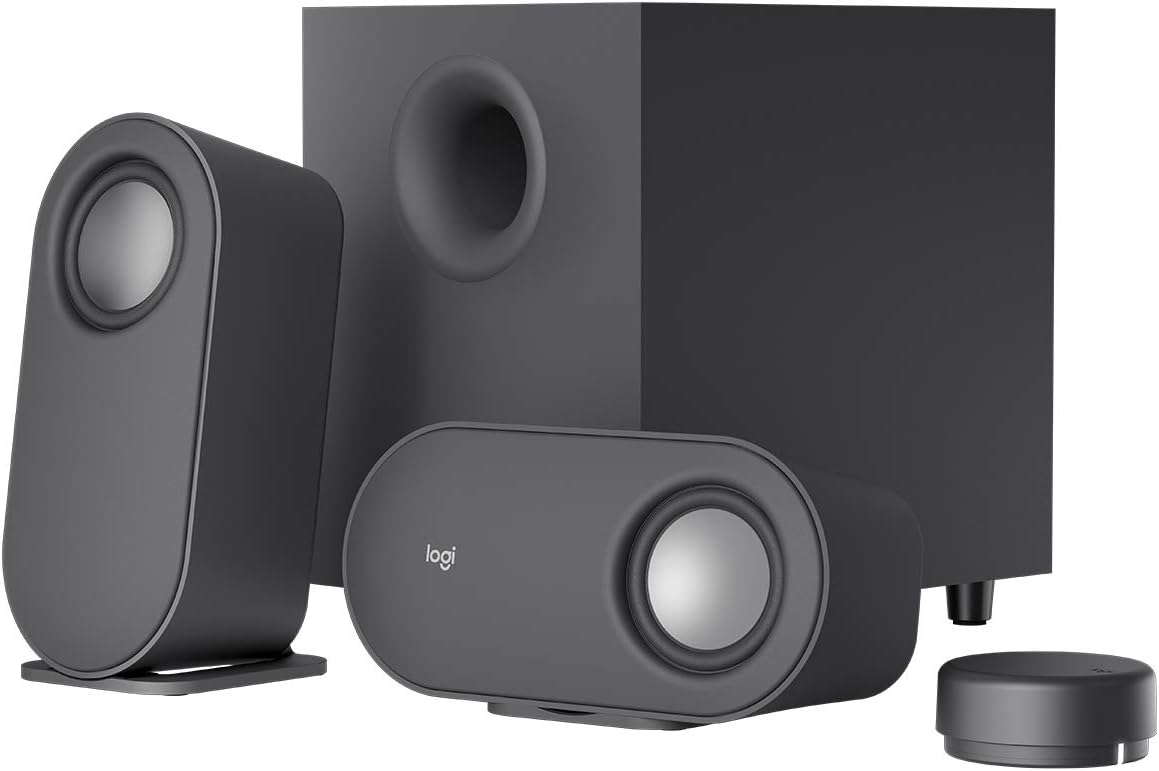
Image: The complete Logitech Z407 speaker system, showcasing the two satellite speakers, the central subwoofer, and the compact wireless control dial.
This manual provides detailed instructions for setting up, operating, maintaining, and troubleshooting your Z407 speaker system to ensure optimal performance and longevity.
పెట్టెలో ఏముంది
Before you begin, please verify that all components are present in the packaging:
- Two (2) Satellite Speakers
- One (1) Subwoofer
- One (1) Wireless BLE Control Dial (requires 2 AAA batteries, included)
- One (1) 3.5 mm Audio Cable
- వినియోగదారు డాక్యుమెంటేషన్

Image: All components included in the Logitech Z407 package, neatly arranged for inspection.
సెటప్
1. స్పీకర్ ప్లేస్మెంట్
Position the subwoofer on the floor or a sturdy surface, ensuring the down-firing port is unobstructed. Place the two satellite speakers on your desktop or desired surface. The satellite speakers can be oriented vertically or horizontally to best fit your setup and aesthetic preference.

Image: The versatile satellite speakers of the Z407 system, shown in both vertical and horizontal orientations.
2. కనెక్ట్ భాగాలు
- Connect the satellite speakers to the corresponding left (L) and right (R) audio output ports on the back of the subwoofer.
- సబ్ వూఫర్ పవర్ కేబుల్ను వాల్ అవుట్లెట్లోకి ప్లగ్ చేయండి.
- Insert the included AAA batteries into the wireless control dial.

Image: The rear panel of the Z407 subwoofer, highlighting the various input and output ports for connectivity.
3. Connecting to Audio Sources
The Z407 offers multiple connectivity options:
- బ్లూటూత్:
- Press and hold the Bluetooth button on the wireless control dial until the LED indicator blinks rapidly.
- On your device (computer, smartphone, tablet), go to Bluetooth settings and select "Logitech Z407" from the list of available devices.
- Once connected, the LED on the dial will turn solid blue.
- USB-A: Connect a USB-A cable (not included) from your computer's USB port to the USB input on the back of the subwoofer.
- 3.5 mm Audio Jack (AUX): Use the included 3.5 mm audio cable to connect your device's headphone jack to the AUX input on the back of the subwoofer.
You can connect up to three devices simultaneously and switch between them using the input selection buttons on the wireless control dial.
ఆపరేటింగ్ సూచనలు
Wireless Control Dial Functions
The wireless control dial provides convenient control over your audio from up to 20 meters line of sight. Ensure the dial is within range and has fresh batteries.

Image: The sleek, compact wireless control dial, designed for intuitive audio management.
- పవర్ ఆన్/ఆఫ్: Press and hold the main button on the dial for 3 seconds.
- వాల్యూమ్ నియంత్రణ: Rotate the outer ring of the dial clockwise to increase volume, counter-clockwise to decrease.
- ప్లే/పాజ్: Press the main button once to play or pause audio.
- ట్రాక్ దాటవేయి: Double-press the main button to skip to the next track.
- మునుపటి ట్రాక్: Triple-press the main button to go to the previous track.
- బాస్ సర్దుబాటు: Press the bass button (located on the side of the dial) once. The LED will change color. Rotate the dial to adjust bass level. Press the bass button again to return to volume control.
- ఇన్పుట్ ఎంపిక: Press the input button (located on the side of the dial) to cycle through Bluetooth, USB, and 3.5mm inputs. The LED indicator will change color to reflect the active input.
నిర్వహణ
Proper care will help extend the life and performance of your Logitech Z407 speakers:
- శుభ్రపరచడం: Use a soft, dry cloth to wipe down the speakers, subwoofer, and control dial. Avoid using abrasive cleaners, solvents, or aerosol sprays, as these can damage the surfaces.
- ప్లేస్మెంట్: Keep the speakers and subwoofer away from direct sunlight, heat sources, and excessive moisture. Ensure adequate ventilation around the subwoofer.
- Wireless Control Dial Batteries: Replace the AAA batteries in the wireless control dial when the indicator light starts to dim or the dial becomes unresponsive.
- కేబుల్ నిర్వహణ: Ensure cables are not kinked or pinched, which can lead to damage over time.
ట్రబుల్షూటింగ్
| సమస్య | సాధ్యమైన పరిష్కారం |
|---|---|
| స్పీకర్ల నుండి శబ్దం లేదు. |
|
| బ్లూటూత్ కనెక్షన్ సమస్యలు. |
|
| Wireless control dial unresponsive. |
|
| వక్రీకరించబడిన లేదా పేలవమైన ధ్వని నాణ్యత. |
|
స్పెసిఫికేషన్లు
| ఫీచర్ | వివరాలు |
|---|---|
| మోడల్ పేరు | Z407 |
| అంశం మోడల్ సంఖ్య | 980-001347 |
| స్పీకర్ రకం | Subwoofer, Satellite (2.1 System) |
| కనెక్టివిటీ టెక్నాలజీ | బ్లూటూత్, USB, 3.5mm AUX |
| వైర్లెస్ కమ్యూనికేషన్ టెక్నాలజీ | బ్లూటూత్ |
| బ్లూటూత్ రేంజ్ | Up to 65 Feet (20 meters line of sight) |
| స్పీకర్ గరిష్ట అవుట్పుట్ పవర్ | 80 వాట్స్ పీక్ / 40 వాట్స్ ఆర్ఎంఎస్ |
| ఫ్రీక్వెన్సీ రెస్పాన్స్ | 40 Hz (కనీసం) |
| సబ్ వూఫర్ కనెక్టివిటీ | Wired (to satellites), Wireless (control dial) |
| నియంత్రణ పద్ధతి | Wireless Control Dial (Button, Touch) |
| ఉత్పత్తి కొలతలు (సబ్ వూఫర్) | 12.4"డి x 9.6"వా x 7.3"హ |
| వస్తువు బరువు | 1.83 Ounces (likely for a component, not entire system) |
| బ్యాటరీలు అవసరం | 2 AAA batteries (included for control dial) |
| రంగు | నలుపు |
వారంటీ మరియు మద్దతు
వారంటీ సమాచారం
The Logitech Z407 Bluetooth Computer Speakers come with a Limited Warranty. For specific terms and conditions, please refer to the warranty documentation included with your product or visit the official Logitech support webసైట్.
తదుపరి సహాయం
For additional support, frequently asked questions, or to download the official User Manual in PDF format, please visit the Logitech support page or the product's Amazon page.
- అధికారిక వినియోగదారు మాన్యువల్ (PDF): PDFని డౌన్లోడ్ చేయండి
- Visit the Logitech Store: లాజిటెక్ అమెజాన్ స్టోర్


