1. పరిచయం
This manual provides detailed instructions for the setup, operation, and maintenance of your Pyle PMX466 Professional 6-Channel Bluetooth DJ Audio Mixer. Please read this manual thoroughly before using the device to ensure proper functionality and to prevent damage.
2 కీ ఫీచర్లు
- Rugged metal chassis and exquisite panel design.
- Preset 16 digital effects for enhanced audio.
- Built-in SUB output and EQ control for MP3 player.
- Selectable sound effects: Normal, Rock, POP, Classical, Jazz, Country.
- Flexible connectivity for various external devices.
- అధిక హెడ్రూమ్తో అల్ట్రా-తక్కువ శబ్దం డిజైన్.
- Integrated sound card for computer recording support.
- USB interface for Mac/PC connection.
- Smooth rotary-style faders for Mic/USB/Line/Master controls.
- Extremely musical 2-band EQ & Pan on each channel.
- Combo microphone jack connector (XLR and 6.35 Jack).
- 4 XLR + 6.35 JACK (L/R) stereo input and output connectors.
- Voice echo effect/delay features.
- Audio signal CLIP LED indicator lights.
- Input selection/control buttons.
- Independent channel + MASTER volume controls.
- Independent channel balance/high + low-frequency adjustment.
- Universal digital audio file అనుకూలత.

మూర్తి 1: ముందు view of the Pyle PMX466 Mixer, showcasing దాని కాంపాక్ట్ డిజైన్ మరియు నియంత్రణ లేఅవుట్.
3. పెట్టెలో ఏముంది
- Mixer Interface (Pyle PMX466)
- USB కేబుల్
- Wall Adapter (DC 5V/1A)

Figure 2: The Pyle PMX466 Mixer, USB cable, and wall adapter included in the package.
4. సెటప్
4.1 పవర్ కనెక్షన్
- Connect the provided USB cable to the 'POWER' port on the mixer.
- Connect the other end of the USB cable to the wall adapter.
- Plug the wall adapter into a standard power outlet. The mixer can also be powered via a USB port on a computer or a power bank.

Figure 3: Diagram illustrating diversified power supply modes via USB, including power bank, USB port, and power socket.
4.2 ఆడియో పరికరాలను కనెక్ట్ చేస్తోంది
- మైక్రోఫోన్లు/లైన్ ఇన్పుట్లు: Use XLR or 6.35mm (1/4 inch) jack cables to connect microphones or line-level instruments to channels 1-4.
- స్టీరియో లైన్ ఇన్పుట్లు: Use 6.35mm (1/4 inch) jack cables for stereo line inputs on channels 5/6.
- AUX ఇన్పుట్: Connect external audio sources (e.g., smartphone, tablet) via the 3.5mm AUX IN jack.
- ప్రధాన అవుట్పుట్: మీ ప్రధాన స్పీకర్లను కనెక్ట్ చేయండి లేదా amplifier to the MAIN OUT (XLR or 6.35mm jack) ports.
- హెడ్ఫోన్లు: Plug your headphones into the PHONES 6.35mm jack for monitoring.
5. ఆపరేటింగ్ సూచనలు
5.1 నియంత్రణలు ఓవర్view
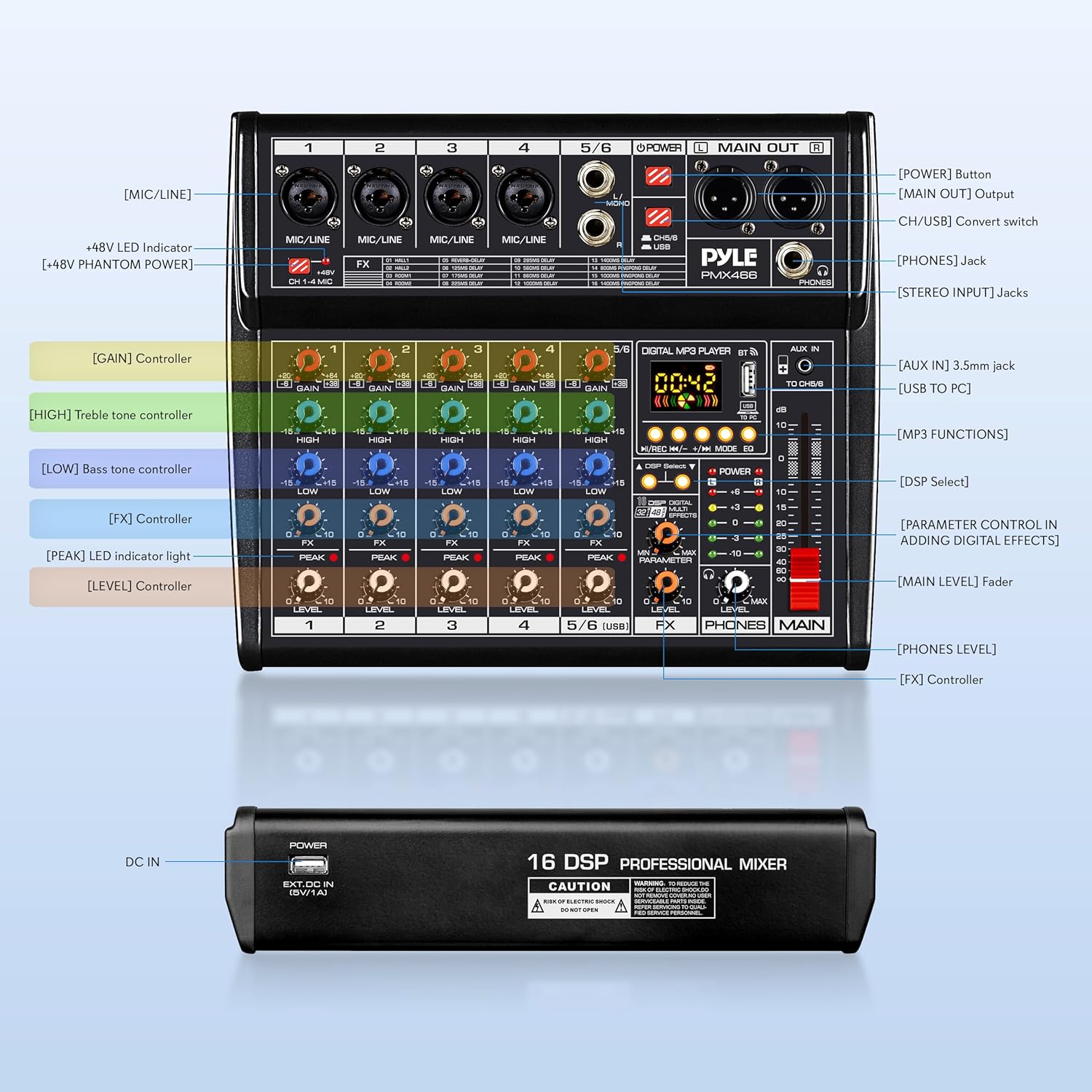
Figure 4: Detailed diagram of the Pyle PMX466 mixer's controls and input/output sections.
- [GAIN] కంట్రోలర్: Adjusts the input sensitivity for each channel.
- [HIGH] Treble Tone Controller: Adjusts the high-frequency range.
- [LOW] Bass Tone Controller: Adjusts the low-frequency range.
- [FX] కంట్రోలర్: Controls the amount of effect applied to the channel.
- [శిఖరం] LED సూచిక కాంతి: ఇన్పుట్ సిగ్నల్ చాలా ఎక్కువగా ఉన్నప్పుడు ప్రకాశిస్తుంది, ఇది సంభావ్య క్లిప్పింగ్ను సూచిస్తుంది.
- [LEVEL] కంట్రోలర్: Adjusts the output level of each channel.
- [ప్రధాన స్థాయి] ఫేడర్: మిక్సర్ యొక్క మొత్తం అవుట్పుట్ వాల్యూమ్ను నియంత్రిస్తుంది.
- [PHONES LEVEL]: హెడ్ఫోన్ అవుట్పుట్ కోసం వాల్యూమ్ను సర్దుబాటు చేస్తుంది.
- [DSP ఎంచుకోండి]: Button to cycle through the 16 digital effects.
- [డిజిటల్ ఎఫెక్ట్లను జోడించడంలో పారామీటర్ నియంత్రణ]: Adjusts specific parameters of the selected effect.
5.2 Digital MP3 Player & Bluetooth
The mixer features a built-in digital MP3 player with Bluetooth connectivity and a USB interface.
- USB ప్లేబ్యాక్: MP3తో USB డ్రైవ్ను చొప్పించండి files into the USB port. Use the control buttons (Play/Pause, Next/Previous, Mode) to navigate and play tracks.
- బ్లూటూత్ కనెక్టివిటీ: Activate Bluetooth on your external device and search for 'Pyle PMX466'. Pair the devices to stream audio wirelessly.
- సౌండ్ ఎఫెక్ట్స్: The digital MP3 player offers 6 sound effects (Normal, Rock, POP, Classical, Jazz, Country) selectable via the EQ button.
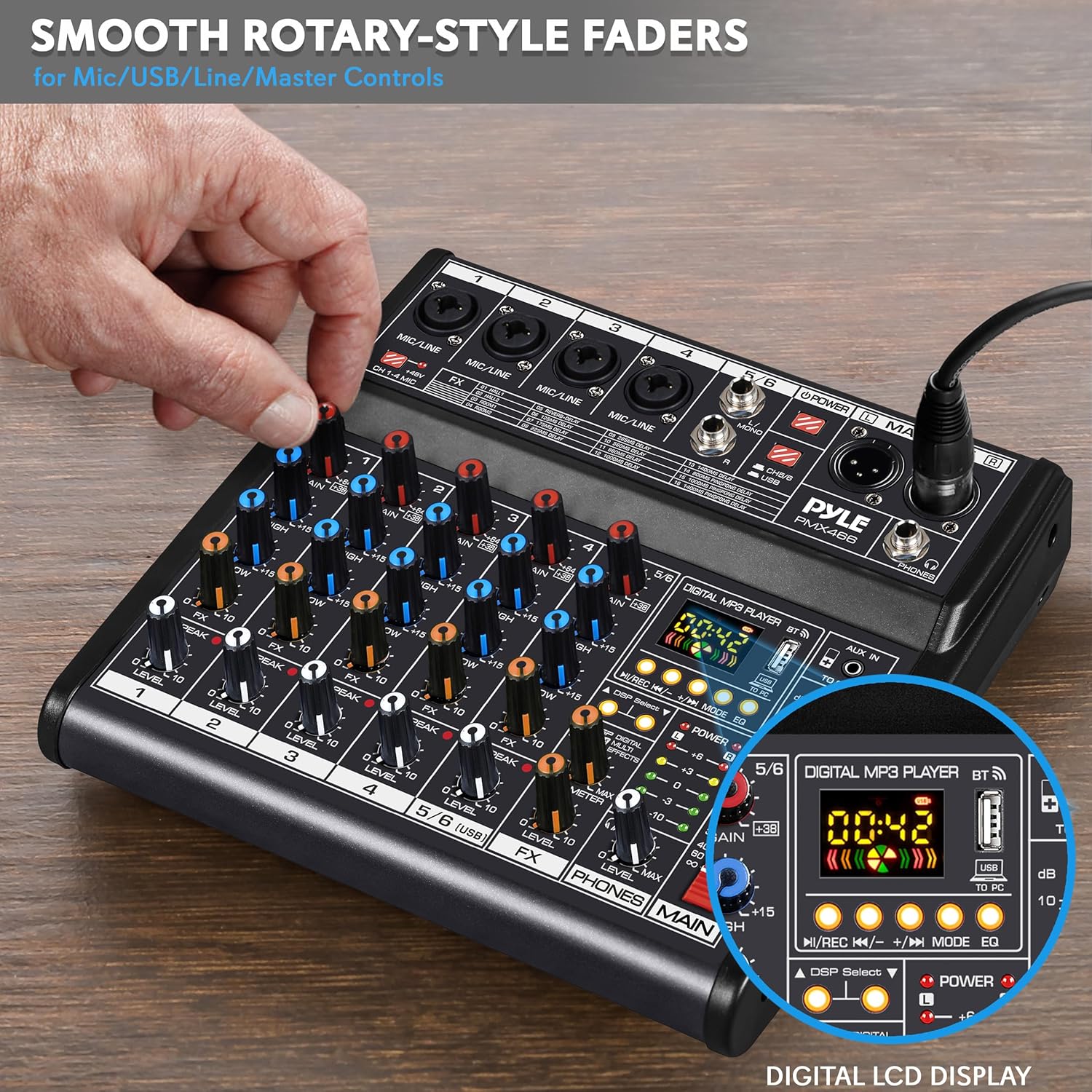
Figure 5: Smooth rotary-style faders for precise control over various inputs and the digital LCD display for MP3 player functions.
5.3 DSP Digital Effects
The mixer includes 16 preset digital effects to enhance your audio.
- ఉపయోగించండి DSP ఎంపిక button to cycle through the available effects (e.g., Reverb, Delay, Flanger).
- సర్దుబాటు చేయండి పరామితి knob to fine-tune the selected effect.
- ఉపయోగించండి FX స్థాయి knob to control the overall wet/dry mix of the effects.
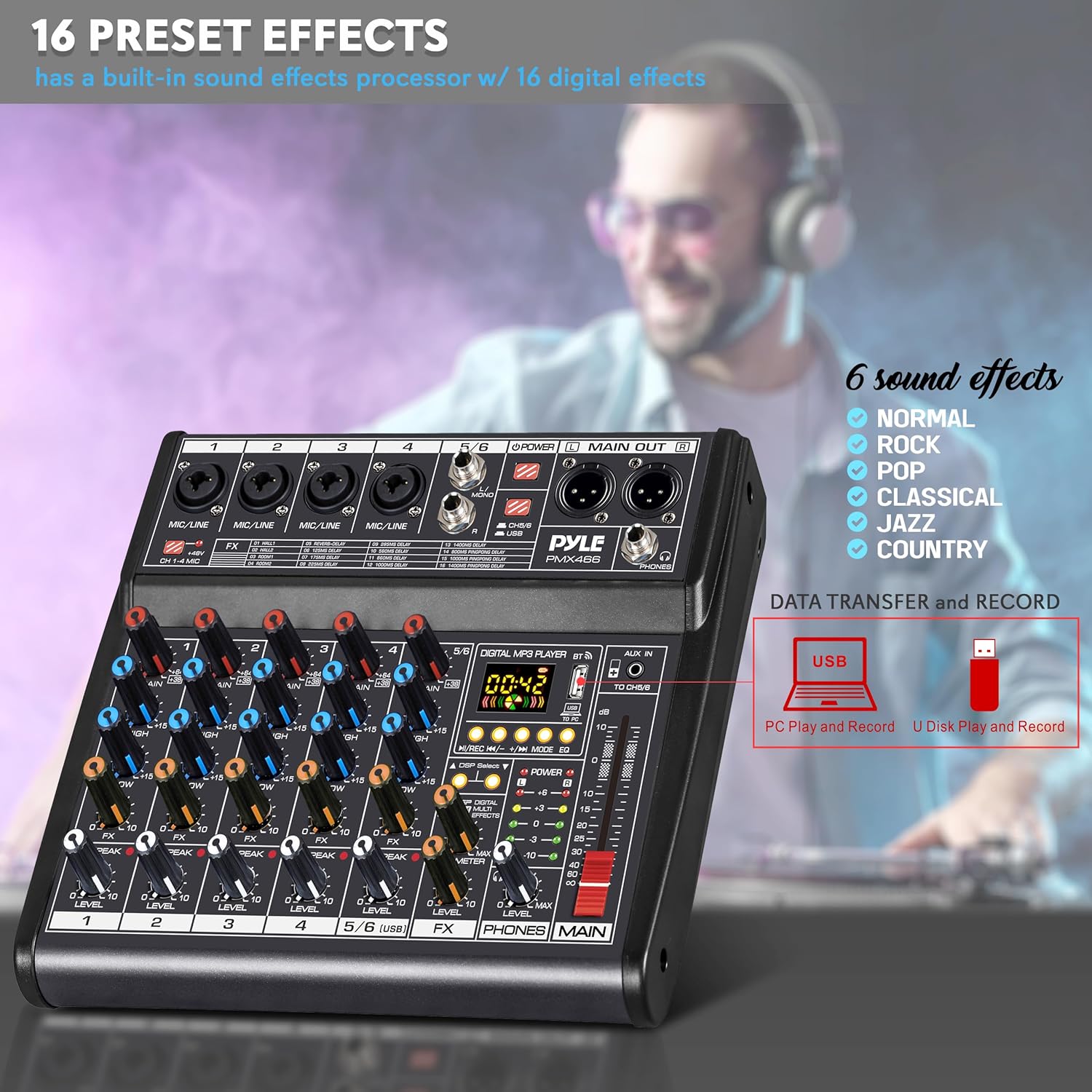
Figure 6: The 16 preset digital effects and 6 sound effects available on the Pyle PMX466 mixer.
5.4 Computer Recording
The integrated sound card allows for direct recording to a computer.
- Connect the mixer to your computer using the USB cable.
- The mixer will be recognized as an audio input/output device.
- Use your preferred digital audio workstation (DAW) or recording software to capture audio from the mixer.

Figure 7: The Pyle PMX466 mixer connected to a laptop, demonstrating its integrated sound card for computer recording.
5.5 అధికారిక ఉత్పత్తి వీడియో
వీడియో 1: అధికారిక ఉత్పత్తి వీడియో ప్రదర్శనasing the Pyle PMX466 Professional DJ Audio Mixer Controller and its features.
6. నిర్వహణ
- శుభ్రపరచడం: Use a soft, dry cloth to clean the mixer's surface. Avoid abrasive cleaners or solvents.
- నిల్వ: మిక్సర్ను ప్రత్యక్ష సూర్యకాంతి మరియు తీవ్రమైన ఉష్ణోగ్రతలకు దూరంగా చల్లని, పొడి ప్రదేశంలో నిల్వ చేయండి.
- నిర్వహణ: Handle the mixer with care to prevent physical damage to knobs, faders, and ports.
7. ట్రబుల్షూటింగ్
| సమస్య | సాధ్యమైన పరిష్కారం |
|---|---|
| శక్తి లేదు | Ensure the USB cable and wall adapter are securely connected and plugged into a working power outlet. Check if the power button on the mixer is pressed. |
| సౌండ్ అవుట్పుట్ లేదు | Verify all volume levels (channel, master, headphone) are turned up. Check cable connections to speakers/headphones. Ensure correct input selection. |
| వక్రీకృత ఆడియో | Reduce input GAIN levels to prevent clipping (check PEAK LEDs). Lower channel and master volume. Check for faulty cables. |
| బ్లూటూత్ కనెక్ట్ కావడం లేదు | Ensure Bluetooth is enabled on both the mixer and your device. Make sure the mixer is in Bluetooth mode. Try unpairing and re-pairing the devices. |
| USB రికార్డింగ్ సమస్యలు | Ensure the mixer is correctly recognized by your computer's operating system and recording software. Check USB cable connection. Verify recording settings in your software. |
8. స్పెసిఫికేషన్లు
| స్పెసిఫికేషన్ | విలువ |
|---|---|
| విద్యుత్ సరఫరా | DC 5V/1A |
| ఫాంటమ్ పవర్ | +48V |
| THD | =0.5%@+4dBµ |
| USB ఇంటర్ఫేస్ | SB 2.0, Windows 98SE+, macOS |
| కొలతలు (L x W x H) | 11.22'' x 9.06'' x 2.17'' అంగుళాలు |
| వస్తువు బరువు | 3.87 పౌండ్లు |
| ఛానెల్ల సంఖ్య | 6 |
| కనెక్టివిటీ టెక్నాలజీ | USB |
9. వారంటీ మరియు మద్దతు
Pyle products typically come with a manufacturer's warranty. Please refer to the warranty card included in your product packaging or visit the official Pyle website for detailed warranty information and support options. For technical assistance or service inquiries, contact Pyle customer support.


