Airpulse A80 Powered Bookshelf Speakers User Manual
మోడల్: A80 | బ్రాండ్: Airpulse
1. పరిచయం
ధన్యవాదాలు, ధన్యవాదాలు.asing the Airpulse A80 Powered Bookshelf Speakers. This manual provides essential information for the safe and efficient use of your new audio system. Please read it thoroughly before operation and retain it for future reference.
ప్యాకేజీ విషయాలు
- Airpulse A80 Active Speaker (Right)
- Airpulse A80 Passive Speaker (Left)
- రిమోట్ కంట్రోల్
- పవర్ కేబుల్
- Left/Right Speaker Connection Cable
- USB కేబుల్
- ఆప్టికల్ కేబుల్
- RCA కేబుల్
- Urethane Angle Bases (for speaker tilt)

మూర్తి 1: ముందు view of the Airpulse A80 powered bookshelf speakers.
2. భద్రతా సూచనలు
సురక్షితమైన ఆపరేషన్ను నిర్ధారించడానికి మరియు నష్టాన్ని నివారించడానికి, దయచేసి ఈ క్రింది భద్రతా మార్గదర్శకాలను గమనించండి:
- శక్తి మూలం: Connect the speakers only to a power outlet with the correct voltage as indicated on the product.
- వెంటిలేషన్: స్పీకర్ల చుట్టూ తగినంత వెంటిలేషన్ ఉండేలా చూసుకోండి. వెంటిలేషన్ ఓపెనింగ్లను బ్లాక్ చేయవద్దు.
- నీరు మరియు తేమ: Do not expose the speakers to water, rain, or excessive moisture.
- ఉష్ణ మూలాలు: Keep speakers away from heat sources such as radiators, heat registers, stoves, or other heat-producing apparatus.
- శుభ్రపరచడం: Unplug the speakers before cleaning. Use a dry cloth only.
- సర్వీసింగ్: Do not attempt to service the speakers yourself. Refer all servicing to qualified service personnel.
3. సెటప్
3.1 స్పీకర్ ప్లేస్మెంట్
Place the speakers on a stable, level surface. For optimal stereo imaging, position the speakers equidistant from your listening position, forming an equilateral triangle. The included urethane angle bases can be used to slightly tilt the speakers upwards for better sound dispersion if placed on a lower surface.
3.2 స్పీకర్లను కనెక్ట్ చేస్తోంది
The right speaker is the active unit containing the amplifier and controls. The left speaker is passive. Connect the left speaker to the "L SPEAKER OUT" port on the rear of the right speaker using the provided speaker connection cable.
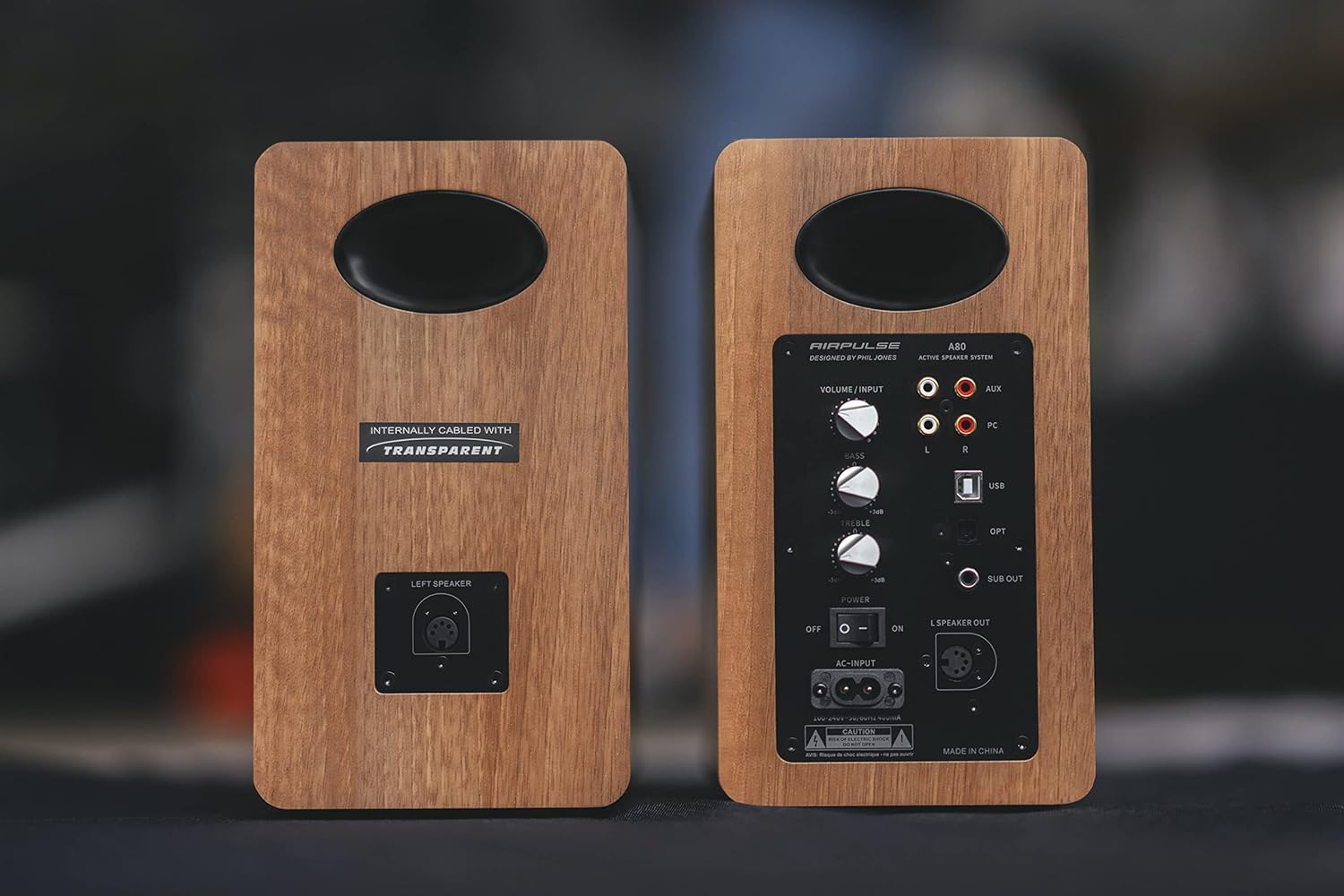
Figure 2: Rear panel of the Airpulse A80 speakers, illustrating the connection points.
3.3 పవర్ కనెక్షన్
Connect the power cable to the "AC-INPUT" port on the rear of the active (right) speaker, then plug it into a wall outlet. Ensure the power switch is in the "OFF" position before connecting to power.
3.4 ఆడియో సోర్స్ కనెక్షన్లు
The Airpulse A80 offers multiple input options:
- USB ఇన్పుట్: Connect your computer to the "USB" port using the provided USB cable for high-quality digital audio playback.
- ఆప్టికల్ ఇన్పుట్: Connect devices like TVs or game consoles to the "OPT" port using an optical cable.
- RCA (AUX) ఇన్పుట్: Use the RCA cable to connect analog audio sources to the "AUX" ports (L/R).
- PC ఇన్పుట్: Use the RCA cable to connect your PC's analog audio output to the "PC" ports (L/R).
- బ్లూటూత్: For wireless audio streaming from Bluetooth-enabled devices. (See Section 4.2 for pairing instructions)

మూర్తి 3: వివరంగా view of the active speaker's rear panel, showing input options and controls.
3.5 సబ్ వూఫర్ అవుట్పుట్
The "SUB OUT" port allows you to connect an external active subwoofer for enhanced bass response. Connect a subwoofer cable from this port to the input of your active subwoofer.
4. ఆపరేటింగ్ సూచనలు
4.1 పవర్ చేయడం ఆన్/ఆఫ్
Flip the "POWER" switch on the rear panel of the active speaker to "ON" to power on the system. Flip it to "OFF" to power off.
4.2 ఇన్పుట్ ఎంపిక
You can select the input source using the "VOLUME / INPUT" knob on the rear panel or the input selection buttons on the remote control. Rotate the knob or press the buttons to cycle through USB, Optical, Bluetooth, AUX, and PC inputs.
4.3 బ్లూటూత్ జత చేయడం
- Select the Bluetooth input on the speakers. The indicator light will flash.
- On your Bluetooth-enabled device (e.g., smartphone, tablet), search for "Airpulse A80" in the Bluetooth settings.
- Select "Airpulse A80" to pair. Once connected, the indicator light on the speaker will glow steadily.
- To disconnect or pair with another device, press and hold the Bluetooth button on the remote control or the "VOLUME / INPUT" knob for a few seconds until the indicator light flashes again.
4.4 Volume, Bass, and Treble Controls
Adjust the overall volume using the "VOLUME / INPUT" knob on the rear panel or the volume buttons on the remote control. The "BASS" and "TREBLE" knobs on the rear panel allow you to fine-tune the low and high frequencies, respectively, from -6dB to +6dB.
4.5 రిమోట్ కంట్రోల్ విధులు
చేర్చబడిన రిమోట్ కంట్రోల్ వివిధ ఫంక్షన్లకు అనుకూలమైన యాక్సెస్ను అందిస్తుంది:
- పవర్ ఆన్/ఆఫ్
- వాల్యూమ్ అప్/డౌన్
- మ్యూట్ చేయండి
- Input Selection (USB, Optical, Bluetooth, AUX, PC)
- Bluetooth Disconnect/Pairing
- Playback Controls (Play/Pause, Next/Previous Track - for Bluetooth/USB)
5. నిర్వహణ
5.1 శుభ్రపరచడం
To clean the speakers, first unplug them from the power outlet. Use a soft, dry cloth to wipe the surfaces. Do not use liquid cleaners, aerosols, or abrasive materials, as these may damage the finish or internal components.
5.2 నిల్వ
If storing the speakers for an extended period, ensure they are powered off and unplugged. Store them in a cool, dry place, away from direct sunlight and extreme temperatures.
6. ట్రబుల్షూటింగ్
| సమస్య | సాధ్యమైన కారణం | పరిష్కారం |
|---|---|---|
| శక్తి లేదు | Power cable not connected; Power switch off; Wall outlet not active. | Ensure power cable is securely connected. Turn power switch to "ON". Check wall outlet with another device. |
| శబ్దం లేదు | Incorrect input selected; Volume too low; Mute activated; Cables loose. | Select correct input. Increase volume. Deactivate mute. Check all audio cables for secure connection. |
| బ్లూటూత్ జత చేయడం లేదు | స్పీకర్లు జత చేసే మోడ్లో లేవు; పరికరం చాలా దూరంగా ఉంది; జోక్యం. | Ensure speakers are in Bluetooth input and indicator is flashing. Move device closer. Avoid other wireless devices. |
| ధ్వని వక్రీకరణ | Volume too high; Source audio quality poor; Bass/Treble settings too extreme. | Reduce volume. Check source audio. Adjust Bass/Treble knobs to neutral or lower settings. |
| ఒక స్పీకర్ మాత్రమే ధ్వనిని కలిగి ఉంది | Left speaker cable loose or disconnected; Source audio issue. | Check the connection of the left speaker cable to the active speaker. Test with a different audio source. |
7. స్పెసిఫికేషన్లు
| ఫీచర్ | వివరాలు |
|---|---|
| మోడల్ | AP-A80 |
| స్పీకర్ రకం | Powered Bookshelf Speaker System with Subwoofer Output |
| Ampజీవిత శక్తి | Woofer: 40W x 2 | Tweeter: 10W x 2 (Total 100W RMS) |
| ఇన్పుట్లు | USB, Optical, Bluetooth 5.0, RCA (AUX), PC |
| అవుట్పుట్లు | సబ్ వూఫర్ అవుట్పుట్ |
| కనెక్టివిటీ టెక్నాలజీ | బ్లూటూత్, USB |
| వూఫర్ సైజు | 4.5 అంగుళాలు (11.5 సెం.మీ.) |
| ఉత్పత్తి కొలతలు (W x D x H) | 14 cm x 24 cm x 25.5 cm (per speaker, including protrusions) |
| ఉత్పత్తి బరువు | 4.8 కిలోలు (ఒక్కో స్పీకర్) |
| నియంత్రణ పద్ధతి | Remote Control, On-board Knobs |
| ఆడియో అవుట్పుట్ మోడ్ | స్టీరియో |
| మౌంటు రకం | టాబ్లెట్ మౌంట్ |

మూర్తి 4: పేలింది view of a speaker driver, illustrating its internal components.
8. వారంటీ మరియు మద్దతు
Airpulse products are designed and manufactured to the highest quality standards. For warranty information and technical support, please refer to the warranty card included with your product or visit the official Airpulse webవారంటీ క్లెయిమ్ల కోసం కొనుగోలు రుజువుగా మీ కొనుగోలు రసీదును ఉంచండి.
For further assistance, please contact your local dealer or Airpulse customer service.


