పరిచయం
Thank you for choosing the Caliber CAM030 Wired Rear View Camera. This manual provides essential information for the proper installation, operation, and maintenance of your new camera. Please read this manual thoroughly before using the product to ensure safe and optimal performance.
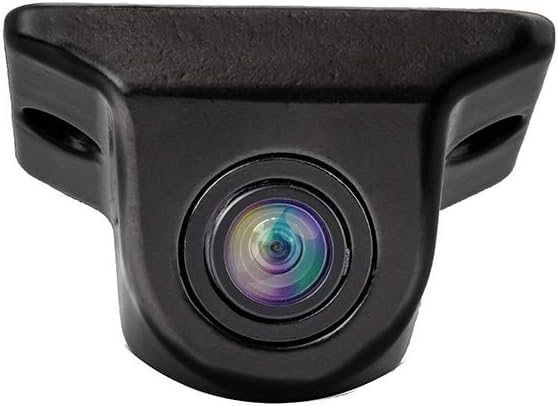
Figure 1: Caliber CAM030 Rear View కెమెరా
భద్రతా సమాచారం
పరికరానికి గాయం లేదా నష్టం జరగకుండా నిరోధించడానికి ఎల్లప్పుడూ క్రింది భద్రతా జాగ్రత్తలను గమనించండి:
- ఇన్స్టాలేషన్ ప్రారంభించే ముందు వాహనం యొక్క పవర్ ఆఫ్ చేయబడిందని నిర్ధారించుకోండి.
- మీకు ఏవైనా ఇన్స్టాలేషన్ దశల గురించి ఖచ్చితంగా తెలియకపోతే ఒక ప్రొఫెషనల్ని సంప్రదించండి.
- Do not expose the camera to extreme temperatures or direct water immersion.
- అందించిన కేబుల్స్ మరియు ఉపకరణాలను మాత్రమే ఉపయోగించండి.
- పిల్లలకు దూరంగా ఉంచండి.
ప్యాకేజీ విషయాలు
దయచేసి ప్యాకేజీలో అన్ని అంశాలు ఉన్నాయో లేదో తనిఖీ చేయండి:
- Caliber CAM030 Rear View కెమెరా
- RCA వీడియో కేబుల్
- పవర్ కేబుల్
- Mounting Hardware (screws, bracket)
- వినియోగదారు మాన్యువల్ (ఈ పత్రం)
సెటప్ మరియు ఇన్స్టాలేషన్
The Caliber CAM030 is designed for aftermarket installation and connects to a compatible monitor via an RCA connector. Follow these steps for proper installation:
- మౌంటు స్థానాన్ని ఎంచుకోండి: Select a suitable location at the rear of your vehicle, typically near the license plate or bumper, that provides a clear view. The camera is designed for a wide-angle view 170 డిగ్రీలు.
- కెమెరాను మౌంట్ చేయండి: Secure the camera using the provided mounting bracket and screws. Ensure it is firmly attached and angled correctly for optimal visibility.
- పవర్ కనెక్ట్ చేయండి: Connect the camera's power cable to the vehicle's reverse light circuit. This allows the camera to automatically power on when the vehicle is put into reverse gear. Ensure proper polarity.
- వీడియో కేబుల్ని కనెక్ట్ చేయండి: Route the RCA video cable from the camera to your in-car monitor. Connect the RCA plug from the camera to the corresponding RCA input on your monitor.
- ఇన్స్టాలేషన్ని పరీక్షించండి: Once all connections are made, turn on your vehicle and shift into reverse gear to test the camera's functionality. Adjust the camera's angle if necessary.

Figure 2: Typical mounting location near the license plate.
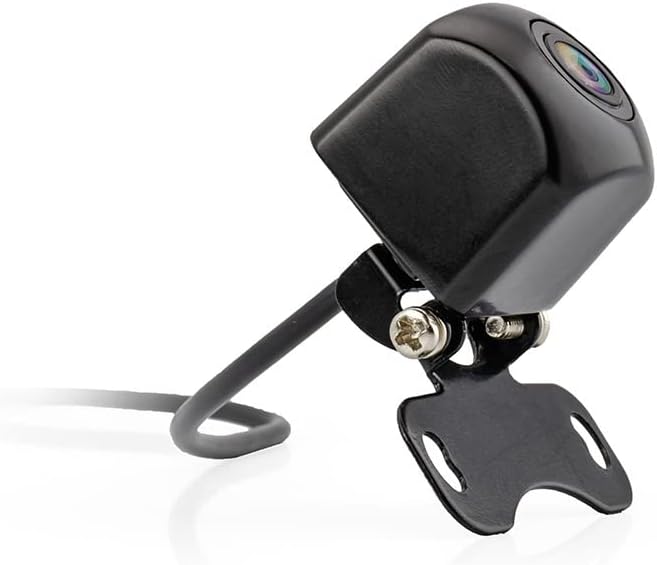
Figure 3: Camera with mounting bracket.

Figure 4: Compact size of the CAM030 camera.
ఆపరేటింగ్ సూచనలు
The Caliber CAM030 is designed for simple, automatic operation:
- ఆటోమేటిక్ యాక్టివేషన్: When properly installed and connected to the reverse light circuit, the camera will automatically activate and display the rear view on your connected monitor as soon as you shift your vehicle into reverse gear.
- వైడ్ యాంగిల్ View: The camera features a 170-degree wide-angle lens, providing a broad field of vision to assist with parking and maneuvering.
- చిత్ర నాణ్యత: The camera captures video in 1080p resolution using CMOS sensor technology for clear images.
నిర్వహణ
మీ కెమెరా యొక్క దీర్ఘాయువు మరియు సరైన పనితీరును నిర్ధారించడానికి:
- శుభ్రపరచడం: కెమెరా లెన్స్ను క్రమానుగతంగా మృదువైన, డి-ప్యాక్తో శుభ్రం చేయండి.amp అడ్డుపడే ధూళి, దుమ్ము లేదా నీటి మరకలను తొలగించడానికి వస్త్రం view. కఠినమైన రసాయనాలను ఉపయోగించవద్దు.
- కేబుల్ తనిఖీ: Regularly check the cables for any signs of wear, fraying, or damage. Ensure all connections remain secure.
- పర్యావరణ పరిరక్షణ: While the camera is designed for outdoor use, avoid exposing it to extreme pressure washing or prolonged submersion in water.
ట్రబుల్షూటింగ్
| సమస్య | సాధ్యమైన కారణం | పరిష్కారం |
|---|---|---|
| మానిటర్లో చిత్రం లేదు |
|
|
| మినుకుమినుకుమనే లేదా వక్రీకరించబడిన చిత్రం |
|
|
| చిత్రం అస్పష్టంగా లేదా అస్పష్టంగా ఉంది |
|
|
స్పెసిఫికేషన్లు
| ఫీచర్ | వివరాలు |
|---|---|
| బ్రాండ్ | క్యాలిబర్ |
| మోడల్ సంఖ్య | CAM030 |
| అనుకూల పరికరాలు | మానిటర్ |
| కనెక్టర్ రకం | RCA |
| సంస్థాపన రకం | అనంతర మార్కెట్ |
| వీడియో రికార్డింగ్ రిజల్యూషన్ | 1080p |
| ఆప్టికల్ సెన్సార్ టెక్నాలజీ | CMOS |
| లెన్స్ రకం | వైడ్ యాంగిల్ |
| యొక్క నిజమైన కోణం View | 170 డిగ్రీలు |
| ఫీల్డ్ View | 170 డిగ్రీలు |
| ఉత్పత్తి కొలతలు | 26L x 26W x 87H మిల్లీమీటర్లు |
| పునర్వినియోగపరచదగిన బ్యాటరీ | నం |
| విడిభాగాల లభ్యత | సమాచారం అందుబాటులో లేదు |
| సాఫ్ట్వేర్ నవీకరణలు వరకు హామీ ఇవ్వబడతాయి | సమాచారం అందుబాటులో లేదు |
| మొదట అందుబాటులో ఉన్న తేదీ | ఏప్రిల్ 5, 2022 |
వారంటీ మరియు మద్దతు
For warranty information and technical support, please refer to the documentation provided at the time of purchase or visit the official Caliber webసైట్. ఏవైనా వారంటీ క్లెయిమ్ల కోసం మీ కొనుగోలు రుజువును ఉంచుకోండి.
గమనిక: విడిభాగాల లభ్యత మరియు సాఫ్ట్వేర్ నవీకరణలకు సంబంధించిన సమాచారం ప్రస్తుతం అందుబాటులో లేదు.


