1. పరిచయం
The GVDA GD128 SMART Digital Multimeter is a professional testing instrument designed for accurate and reliable measurements. It is an ideal choice for professional electricians, engineers, electronics enthusiasts, and for general household use. This manual provides detailed instructions on the safe and effective operation of your GD128 multimeter.
ముఖ్య సామర్థ్యాలలో ఇవి ఉన్నాయి:
- AC మరియు DC వాల్యూమ్tagఇ కొలత
- AC మరియు DC కరెంట్ కొలత
- ప్రతిఘటన కొలత
- కెపాసిటెన్స్ కొలత
- కొనసాగింపు కొలత
- డయోడ్ కొలత
- NCV (నాన్-కాంటాక్ట్ వాల్యూమ్tage) Measurement
- True RMS for accurate readings of non-sinusoidal signals
- Large VA color HD LCD screen with 9999 counts display
- ఆటో మరియు మాన్యువల్ రేంజింగ్
- Flashlight and Input Connector LED Indication

Figure 1.1: GVDA GD128 Digital Multimeter with test probes.
2. భద్రతా సమాచారం
WARNING: To avoid electrical shock or personal injury, please read and understand all instructions and safety information before using this multimeter.
- Always ensure the multimeter is in the correct function and range before making measurements.
- ఏ పరిధికైనా గరిష్ట ఇన్పుట్ విలువలను మించకూడదు.
- వాల్యూమ్తో పని చేస్తున్నప్పుడు జాగ్రత్త వహించండిtag30V AC RMS, 42V పీక్ లేదా 60V DC కంటే ఎక్కువ. ఈ వాల్యూమ్లుtagషాక్ ప్రమాదాన్ని కలిగిస్తుంది.
- ఉపయోగించే ముందు దెబ్బతిన్న ఇన్సులేషన్ లేదా బహిర్గతమైన మెటల్ కోసం టెస్ట్ లీడ్లను తనిఖీ చేయండి. దెబ్బతిన్నట్లయితే భర్తీ చేయండి.
- Do not operate the multimeter if it appears damaged or if it is not operating properly.
- ఎల్లప్పుడూ సర్క్యూట్కు విద్యుత్తును డిస్కనెక్ట్ చేసి, అధిక-వాల్యూమ్ విద్యుత్తును విడుదల చేయండి.tagప్రతిఘటన, కొనసాగింపు, డయోడ్లు లేదా కెపాసిటెన్స్ని పరీక్షించే ముందు ఇ కెపాసిటర్లు.
- ఆపరేషన్ ముందు బ్యాటరీ కవర్ సురక్షితంగా మూసివేయబడిందని నిర్ధారించుకోండి.
- This device meets safety standards EN61010-1,-2-030, EN61010-2-033, EN61326-1 CAT III 1000V, CAT IV 600V.
3. ఉత్పత్తి ముగిసిందిview మరియు భాగాలు
Familiarize yourself with the different parts of your GVDA GD128 Digital Multimeter.

చిత్రం 3.1: ముందు మరియు వైపు view of the GD128 Multimeter with labeled components.
- NCV సెన్సార్ ప్రాంతం
- పవర్ కీ
- ఫ్లాష్లైట్ కీ
- హెచ్చరిక సూచిక
- ఫ్లాష్లైట్
- ఇన్పుట్ జాక్ సూచిక
- Jack other than current and NCV
- COM jack (Common)
- mA (<600mA) jack
- 10A జాక్
- Auto power off key
- ఫంక్షన్ కీ
- ప్రదర్శించు
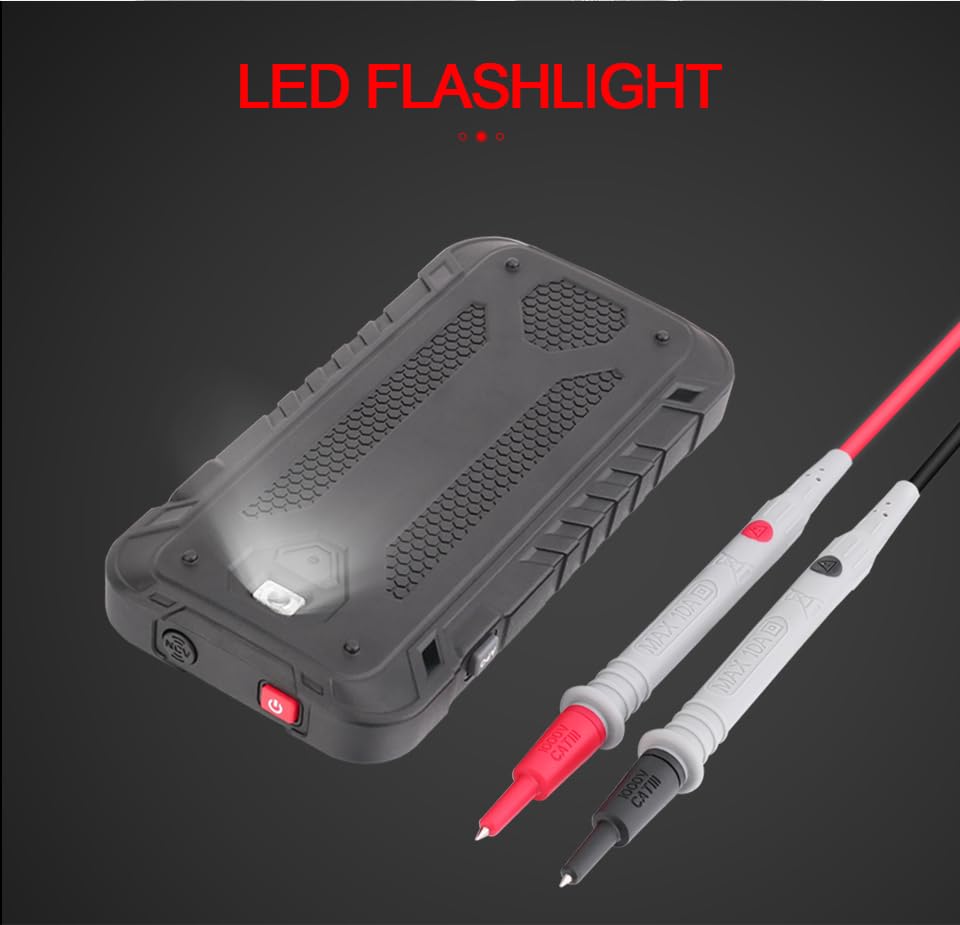
చిత్రం 3.2: వెనుక view of the GD128 Multimeter highlighting the integrated LED flashlight.
4. సెటప్
4.1 బ్యాటరీ ఇన్స్టాలేషన్
The GVDA GD128 Multimeter requires 3 x 1.5V AAA batteries (not included) for operation.
- మల్టీమీటర్ పవర్ ఆఫ్ చేయబడిందని నిర్ధారించుకోండి.
- పరికరం వెనుక బ్యాటరీ కంపార్ట్మెంట్ను గుర్తించండి.
- బ్యాటరీ కంపార్ట్మెంట్ కవర్ను తెరవడానికి స్క్రూడ్రైవర్ని ఉపయోగించండి.
- Insert 3 AAA batteries, observing the correct polarity (+ and -) as indicated inside the compartment.
- బ్యాటరీ కంపార్ట్మెంట్ కవర్ను మార్చండి మరియు దానిని స్క్రూతో భద్రపరచండి.
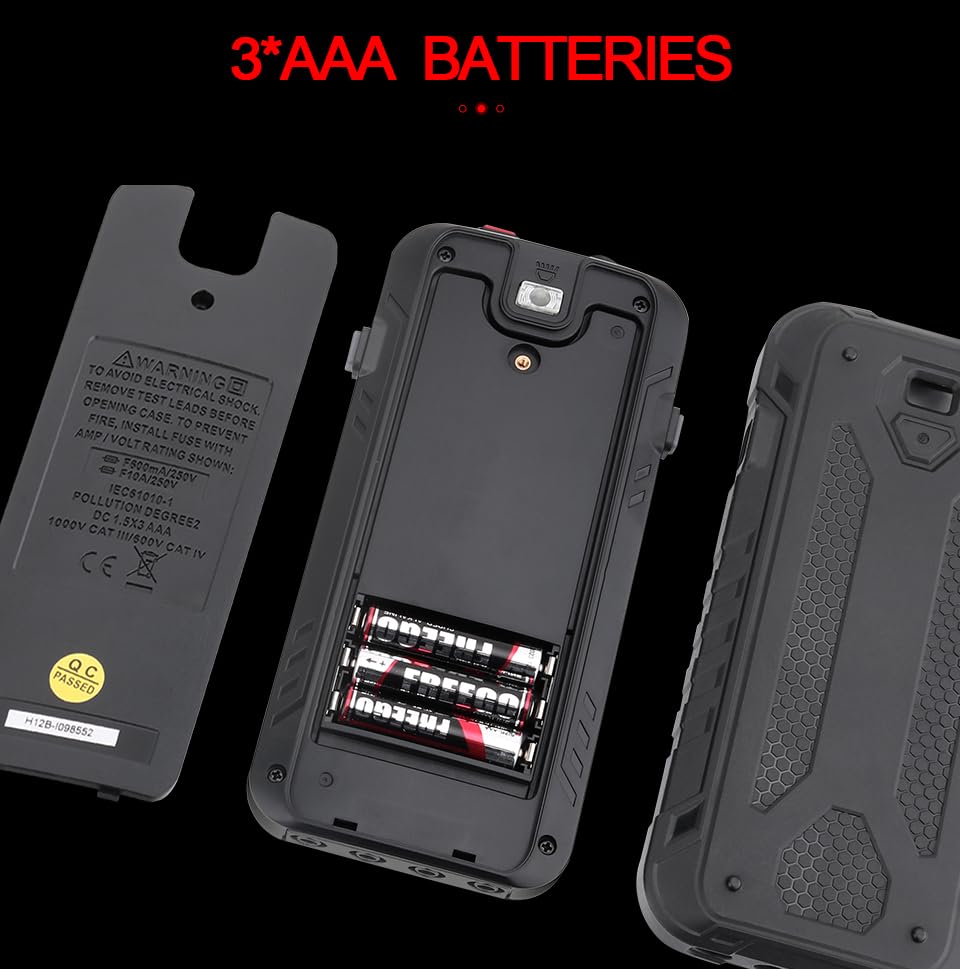
Figure 4.1: Battery compartment for 3 AAA batteries.
4.2 టెస్ట్ లీడ్లను కనెక్ట్ చేయడం
Connect the test leads to the appropriate input jacks for the desired measurement function. Always connect the black test lead to the COM (Common) jack. Connect the red test lead to the jack corresponding to the measurement type (e.g., VΩHz for voltage/resistance/frequency, mA for milliampere current, 10A for ampere current).
5. ఆపరేటింగ్ సూచనలు
The GD128 features both auto-ranging and manual-ranging capabilities. The "SMART" function automatically identifies AC/DC voltage, resistance, and continuity.
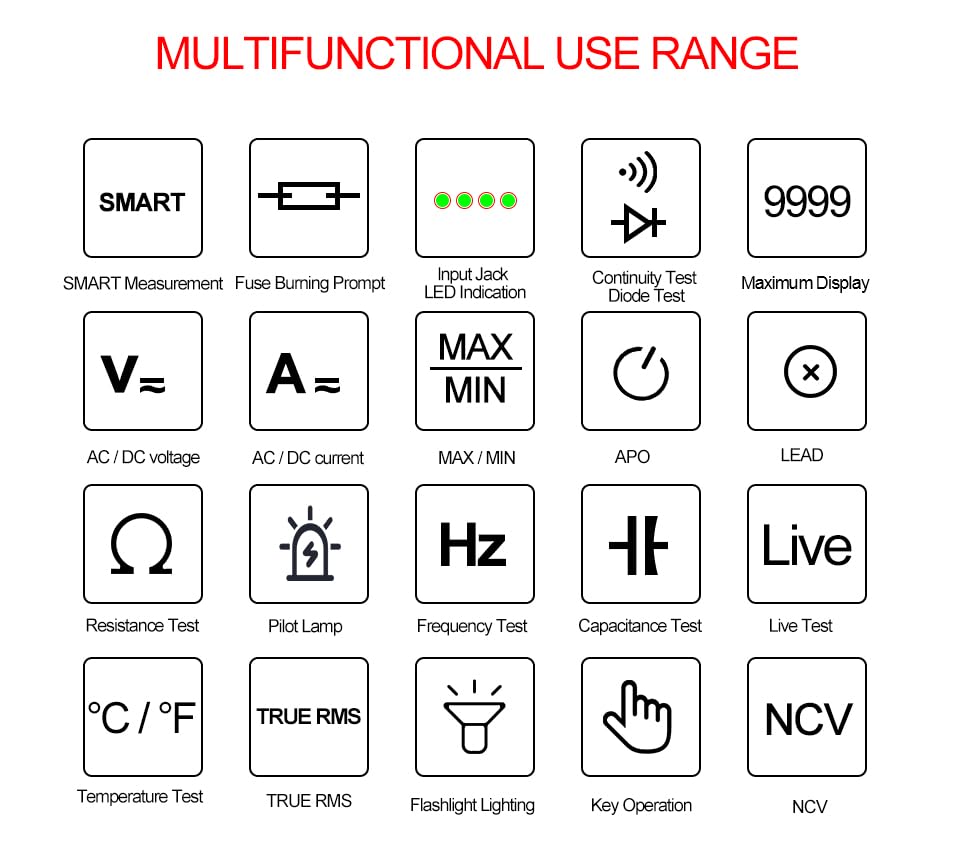
Figure 5.1: Multifunctional Use Range icons.
5.1 పవర్ ఆన్/ఆఫ్
నొక్కండి పవర్ కీ (2) to turn the multimeter on or off.
5.2 ఫంక్షన్ ఎంపిక
The multimeter typically starts in SMART mode. Press the func (Function) key (12) or SEL key to cycle through different measurement modes within a category (e.g., AC/DC voltage, resistance/continuity/diode).
5.3 Common Measurement Functions
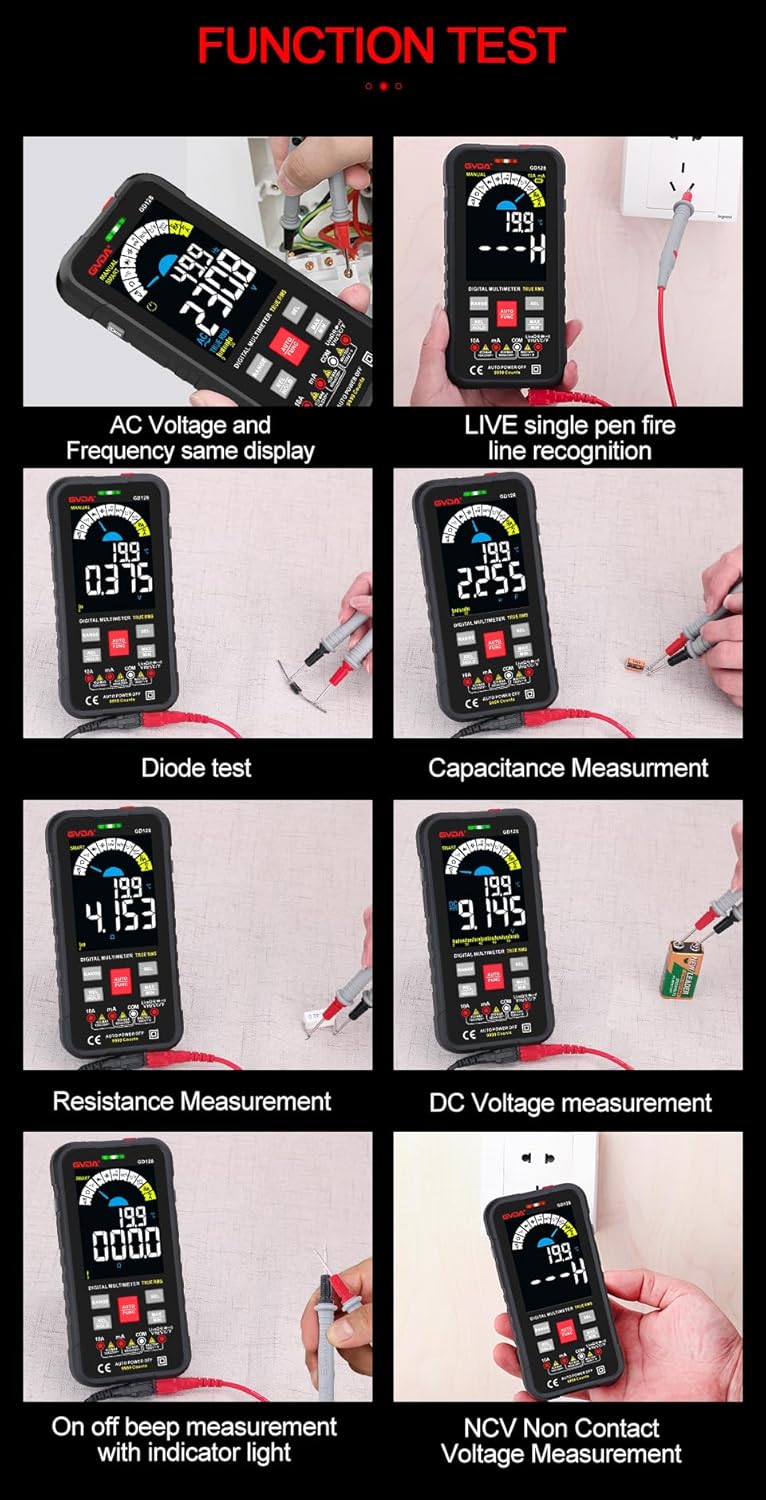
చిత్రం 5.2: ఉదాamples of various function tests.
5.3.1 సంtagఇ కొలత (AC/DC)
- బ్లాక్ టెస్ట్ లీడ్ను COM జాక్కి మరియు రెడ్ టెస్ట్ లీడ్ను VΩHz జాక్కి కనెక్ట్ చేయండి.
- Select the appropriate AC (~) or DC (---) voltagఇ మోడ్.
- కొలవవలసిన సర్క్యూట్ లేదా కాంపోనెంట్కు సమాంతరంగా పరీక్ష లీడ్లను కనెక్ట్ చేయండి.
- ప్రదర్శన వాల్యూమ్ను చూపుతుందిtagఇ పఠనం.
5.3.2 Current Measurement (AC/DC)
- బ్లాక్ టెస్ట్ లీడ్ను COM జాక్కి కనెక్ట్ చేయండి.
- For current up to 600mA, connect the red test lead to the mA jack. For current up to 10A, connect the red test lead to the 10A jack.
- Select the appropriate AC (~) or DC (---) current mode.
- Connect the multimeter in series with the circuit to be measured.
- The display will show the current reading.
5.3.3 రెసిస్టెన్స్ మెజర్మెంట్ (Ω)
- బ్లాక్ టెస్ట్ లీడ్ను COM జాక్కి మరియు రెడ్ టెస్ట్ లీడ్ను VΩHz జాక్కి కనెక్ట్ చేయండి.
- Select the Resistance (Ω) mode.
- నిరోధకతను కొలిచే ముందు సర్క్యూట్ డీ-ఎనర్జైజ్ చేయబడిందని నిర్ధారించుకోండి.
- కొలవవలసిన భాగం అంతటా పరీక్ష లీడ్లను కనెక్ట్ చేయండి.
- The display will show the resistance reading.
5.3.4 కెపాసిటెన్స్ కొలత (F)
- బ్లాక్ టెస్ట్ లీడ్ను COM జాక్కి మరియు రెడ్ టెస్ట్ లీడ్ను VΩHz జాక్కి కనెక్ట్ చేయండి.
- Select the Capacitance (F) mode.
- మల్టీమీటర్ దెబ్బతినకుండా ఉండటానికి కొలతకు ముందు కెపాసిటర్ పూర్తిగా డిశ్చార్జ్ అయ్యిందని నిర్ధారించుకోండి.
- కెపాసిటర్ టెర్మినల్స్ అంతటా టెస్ట్ లీడ్లను కనెక్ట్ చేయండి.
- The display will show the capacitance reading.
5.3.5 కంటిన్యుటీ టెస్ట్ (Ω)
- బ్లాక్ టెస్ట్ లీడ్ను COM జాక్కి మరియు రెడ్ టెస్ట్ లీడ్ను VΩHz జాక్కి కనెక్ట్ చేయండి.
- Select the Continuity mode.
- Touch the test leads to the points you want to check for continuity. A continuous beep indicates a complete circuit.
5.3.6 డయోడ్ పరీక్ష (→|)
- బ్లాక్ టెస్ట్ లీడ్ను COM జాక్కి మరియు రెడ్ టెస్ట్ లీడ్ను VΩHz జాక్కి కనెక్ట్ చేయండి.
- Select the Diode Test mode.
- Connect the red test lead to the anode and the black test lead to the cathode of the diode. The display will show the forward voltage డ్రాప్ చేయండి. లీడ్లను రివర్స్ చేయండి; ఓపెన్ సర్క్యూట్ (OL) రీడింగ్ మంచి డయోడ్ను సూచిస్తుంది.
5.3.7 NCV (నాన్-కాంటాక్ట్ వాల్యూమ్tage) Measurement
- Select the NCV mode.
- Move the NCV sensor area (1) near the conductor. The multimeter will beep and the warning indicator (4) will light up with increasing frequency as it detects AC voltage.
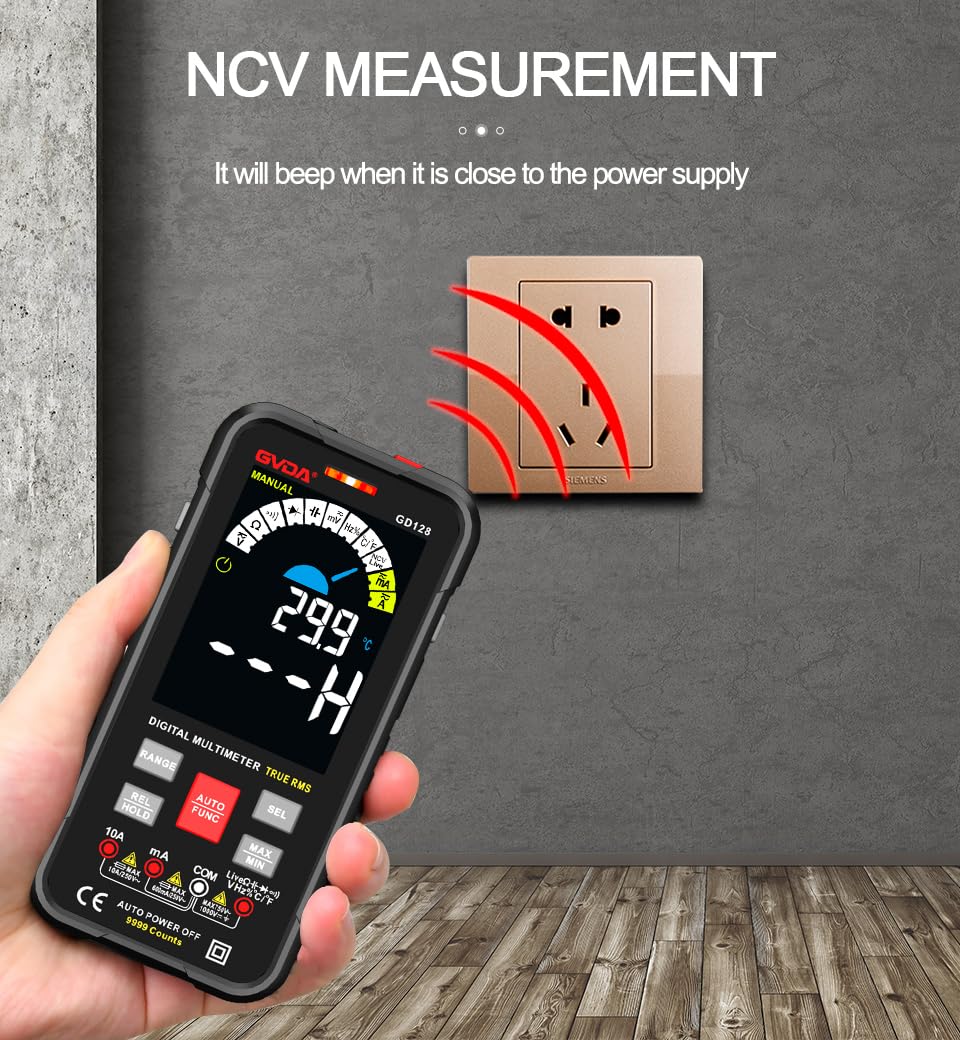
Figure 5.3: NCV (Non-Contact Voltage) measurement in progress.
5.3.8 ఇతర విధులు
- నిజమైన RMS: Provides accurate readings for both sinusoidal and non-sinusoidal AC waveforms.
- MAX/MIN/AVG: నొక్కండి గరిష్టం/నిమి key to record maximum, minimum, and average readings.
- REL (Relative Measurement): నొక్కండి REL/హోల్డ్ key briefly to set the current reading as a reference for subsequent measurements.
- డేటా హోల్డ్: నొక్కండి REL/హోల్డ్ key briefly to freeze the current reading on the display.
- ఫ్లాష్లైట్: నొక్కండి ఫ్లాష్లైట్ కీ (3) to turn the built-in flashlight on/off.
- ఆటో పవర్ ఆఫ్ (APO): The multimeter will automatically power off after a period of inactivity to save battery life.
6 అప్లికేషన్లు
The GVDA GD128 Digital Multimeter is versatile and suitable for a wide range of applications, including but not limited to:

Figure 6.1: Diverse applications of the GD128 Multimeter.
- Electronic beginners and hobbyists
- Electronic circuit installation and testing
- Electronic maintenance and repair
- Electromechanical maintenance
- Vehicle inspection and automotive electrical work
- Maintenance of household appliances
- General electrical troubleshooting
7. స్పెసిఫికేషన్లు
Detailed technical specifications for the GVDA GD128 Digital Multimeter:
| ఫీచర్ | పరిధి | ఖచ్చితత్వం |
|---|---|---|
| DC సంtage | 99.99mV/999.9mV; 9.999V/99.9V/1000V | ±(0.5%+3) |
| AC వాల్యూమ్tage | 99.9mV/999.9/mV; 9.999V/99.9V/750V | ±(0.8%+3) |
| DC కరెంట్ | 9.999mA/99.99mA/999.9mA; 9.99A | ±(0.8%+3) for mA, ±(1.2%+3) for A |
| ఎసి కరెంట్ | 9.999mA/99.99mA/999.9mA; 9.99A | ±(1.0%+3) for mA, ±(1.5%+3) for A |
| ప్రతిఘటన | 99.99/999.9 ohms/9.999k/99.99k/999.9kohm; 9.999 m/99.99 m ohms | ±(0.8%+3) for kΩ, ±(1.2%+3) for MΩ |
| కెపాసిటెన్స్ | 9.999/99.99/999.9nF/9.999/99.99/999.9uF; 9.999mF/99.99mF | ±(4.0%+3) for nF/uF, ±(5.0%+5) for mF |
| ఫ్రీక్వెన్సీ | 99.99/999.9/9.999k/99.99k/999.9kHz/9.999mHz | ±(1.0%+3) |
| డ్యూటీ సైకిల్ | 0.1%-99.99% | ±(1.0%+2) |
| ఉష్ణోగ్రత | -40~1000°C; -40-1832°F | ±2°C |
| డిస్ప్లే కౌంట్ | 9999 గణనలు | |
| ప్రదర్శన రకం | VA color screen | |
| Sampలింగ్ రేటు | సుమారు సెకనుకు 3 సార్లు | |
| ఓవర్ రేంజ్ డిస్ప్లే | "ఓఎల్" | |
| తక్కువ వాల్యూమ్tagఇ సూచన | తక్కువ బ్యాటరీ సూచన | |
| విద్యుత్ సరఫరా | 3 x 1.5V AAA బ్యాటరీలు (చేర్చబడలేదు) | |
| ఉత్పత్తి బరువు | సుమారు 230గ్రా | |
| ఉత్పత్తి పరిమాణం | 83x23x165mm | |
| భద్రతా రేటింగ్ | EN61010-1,-2-030 EN61010-2-033, EN61326-1 CAT III 1000 V CAT IV 600 V |
8. నిర్వహణ
Proper maintenance ensures the longevity and accuracy of your multimeter.
- శుభ్రపరచడం: ప్రకటనతో కేసును తుడిచివేయండిamp వస్త్రం మరియు తేలికపాటి డిటర్జెంట్. అబ్రాసివ్లు లేదా ద్రావకాలను ఉపయోగించవద్దు.
- బ్యాటరీ భర్తీ: ఖచ్చితమైన రీడింగ్లను నిర్ధారించడానికి తక్కువ బ్యాటరీ సూచిక కనిపించినప్పుడు వెంటనే బ్యాటరీలను మార్చండి.
- ఫ్యూజ్ ప్రత్యామ్నాయం: If the current measurement function fails, the fuse may be blown. Refer to the warning label inside the battery compartment for fuse specifications (e.g., F600mA/250V, F10A/250V). Ensure the multimeter is off and test leads are disconnected before replacing fuses.
- నిల్వ: If the multimeter is not used for a long period, remove the batteries to prevent leakage. Store in a cool, dry place away from direct sunlight.
9. ట్రబుల్షూటింగ్
If you encounter issues with your GVDA GD128 Multimeter, try the following:
- No Display/Power On: బ్యాటరీ ఇన్స్టాలేషన్ను తనిఖీ చేయండి మరియు బ్యాటరీలు ఖాళీ కాలేదని నిర్ధారించుకోండి. అవసరమైతే భర్తీ చేయండి.
- సరికాని రీడింగ్లు: Verify test lead connections, ensure the correct function and range are selected, and check if the circuit is de-energized for resistance/continuity/capacitance tests.
- "OL" డిస్ప్లే: Indicates an over-range condition or an open circuit (e.g., when measuring resistance on an open wire).
- నిరంతర బీప్ లేదు: Check if the circuit is truly continuous. If not, the circuit is open.
- Fuse Blown Warning: If the current measurement function is not working, the fuse might be blown. Replace the fuse as per maintenance instructions.
నిరంతర సమస్యల కోసం, కస్టమర్ మద్దతును సంప్రదించండి.
10. వారంటీ మరియు మద్దతు
Your GVDA GD128 Digital Multimeter comes with a 30-రోజుల వారంటీ for system failures or factory problems. Please retain your proof of purchase for warranty claims.
For technical support, warranty claims, or further assistance, please refer to the contact information provided with your product packaging or visit the official GVDA webసైట్.
11. ప్యాకేజీ విషయాలు
Upon opening your GVDA GD128 Digital Multimeter package, you should find the following items:

Figure 11.1: Contents included in the GD128 Multimeter package.
- 1 x GVDA GD128 Digital Multimeter
- 1 x Test Lead Set (Original pen cable)
- 1 x క్లాత్ బ్యాగ్
- 1 x Thermocouple Probe
- 1 x వినియోగదారు మాన్యువల్
- 1 x Gift Box (Packaging)


