1. పరిచయం
This user manual provides essential information for the safe and efficient operation of your Philips Audio HTL1020/94 Soundbar. Please read these instructions carefully before using the product and retain them for future reference.
The Philips HTL1020/94 is a 20W soundbar designed to enhance your audio experience with versatile connectivity options including Bluetooth 5.0, AUX, and USB. Its low-rise profile allows for flexible placement in various home entertainment setups.

చిత్రం 1.1: ముందు view of the Philips HTL1020/94 Soundbar.
2. భద్రతా సమాచారం
అగ్ని ప్రమాదం, విద్యుత్ షాక్ మరియు వ్యక్తిగత గాయాల ప్రమాదాన్ని తగ్గించడానికి ఈ ఉత్పత్తిని ఉపయోగిస్తున్నప్పుడు ఎల్లప్పుడూ ప్రాథమిక భద్రతా జాగ్రత్తలను అనుసరించండి.
- సౌండ్బార్ను వర్షం లేదా తేమకు బహిర్గతం చేయవద్దు.
- ఏ వెంటిలేషన్ ఓపెనింగ్లను నిరోధించవద్దు.
- సరైన విద్యుత్ సరఫరా వాల్యూమ్ నిర్ధారించుకోండిtage as indicated on the product.
- Keep the soundbar away from heat sources and direct sunlight.
- తయారీదారు పేర్కొన్న జోడింపులు/యాక్సెసరీలను మాత్రమే ఉపయోగించండి.
3. పెట్టెలో ఏముంది
విషయాలను జాగ్రత్తగా అన్ప్యాక్ చేసి, అన్ని అంశాలు ఉన్నాయని నిర్ధారించుకోండి:
- Philips Audio HTL1020/94 Soundbar
- పవర్ కార్డ్
- త్వరిత ప్రారంభ గైడ్
- రిమోట్ కంట్రోల్
- వినియోగదారు మాన్యువల్ (ఈ పత్రం)
- వారంటీ కార్డ్
4. ఉత్పత్తి ముగిసిందిview
4.1. నియంత్రణలు మరియు సూచికలు
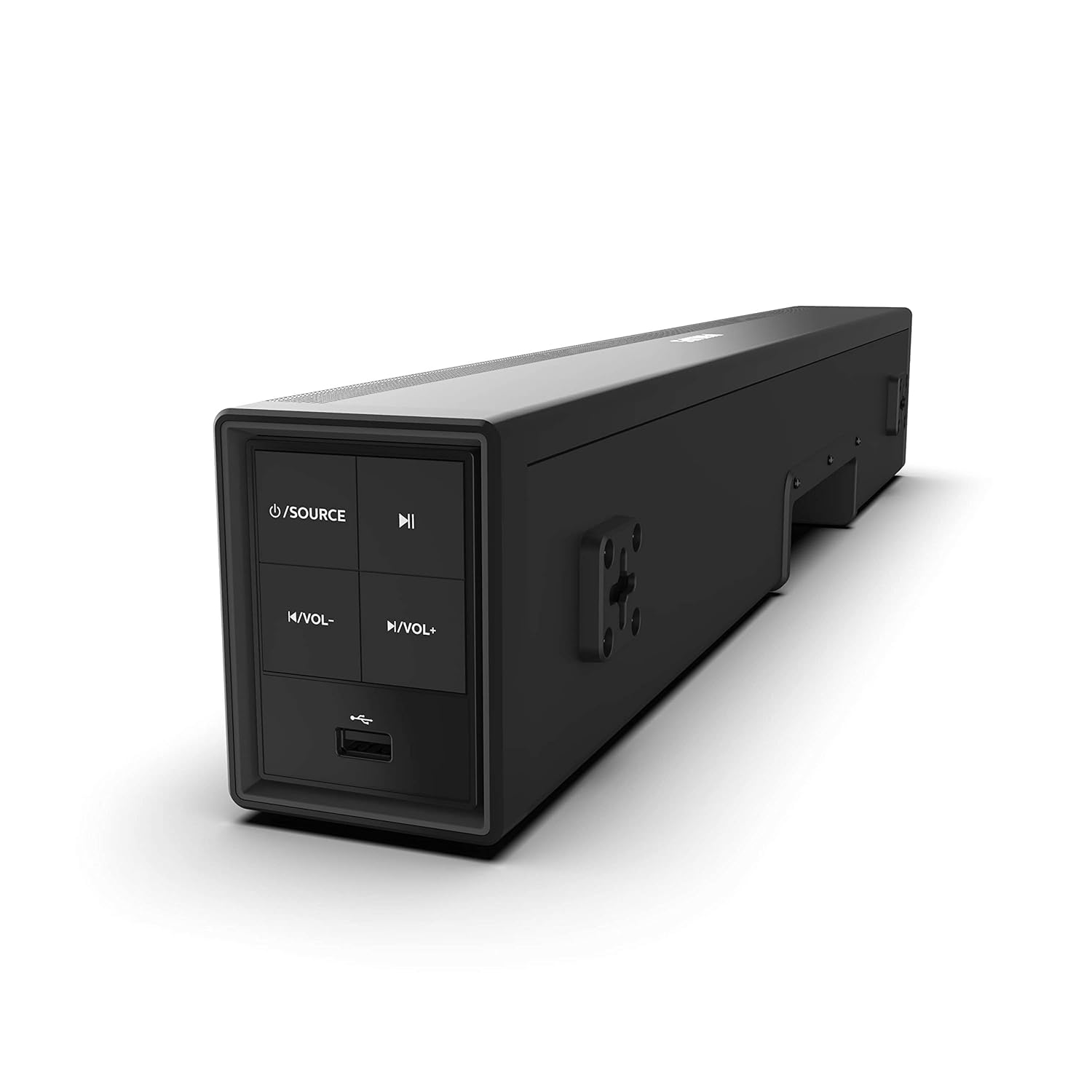
Image 4.1: Side panel controls of the Philips HTL1020/94 Soundbar.
- పవర్/సోర్స్ బటన్: Press to turn on/off or switch input sources (Bluetooth, AUX, USB).
- ప్లే/పాజ్ బటన్: Controls media playback in Bluetooth or USB mode.
- వాల్యూమ్ డౌన్ బటన్: వాల్యూమ్ స్థాయిని తగ్గిస్తుంది.
- వాల్యూమ్ అప్ బటన్: వాల్యూమ్ స్థాయిని పెంచుతుంది.
- USB పోర్ట్: For playing audio from USB storage devices.
4.2. వెనుక ప్యానెల్ కనెక్షన్లు
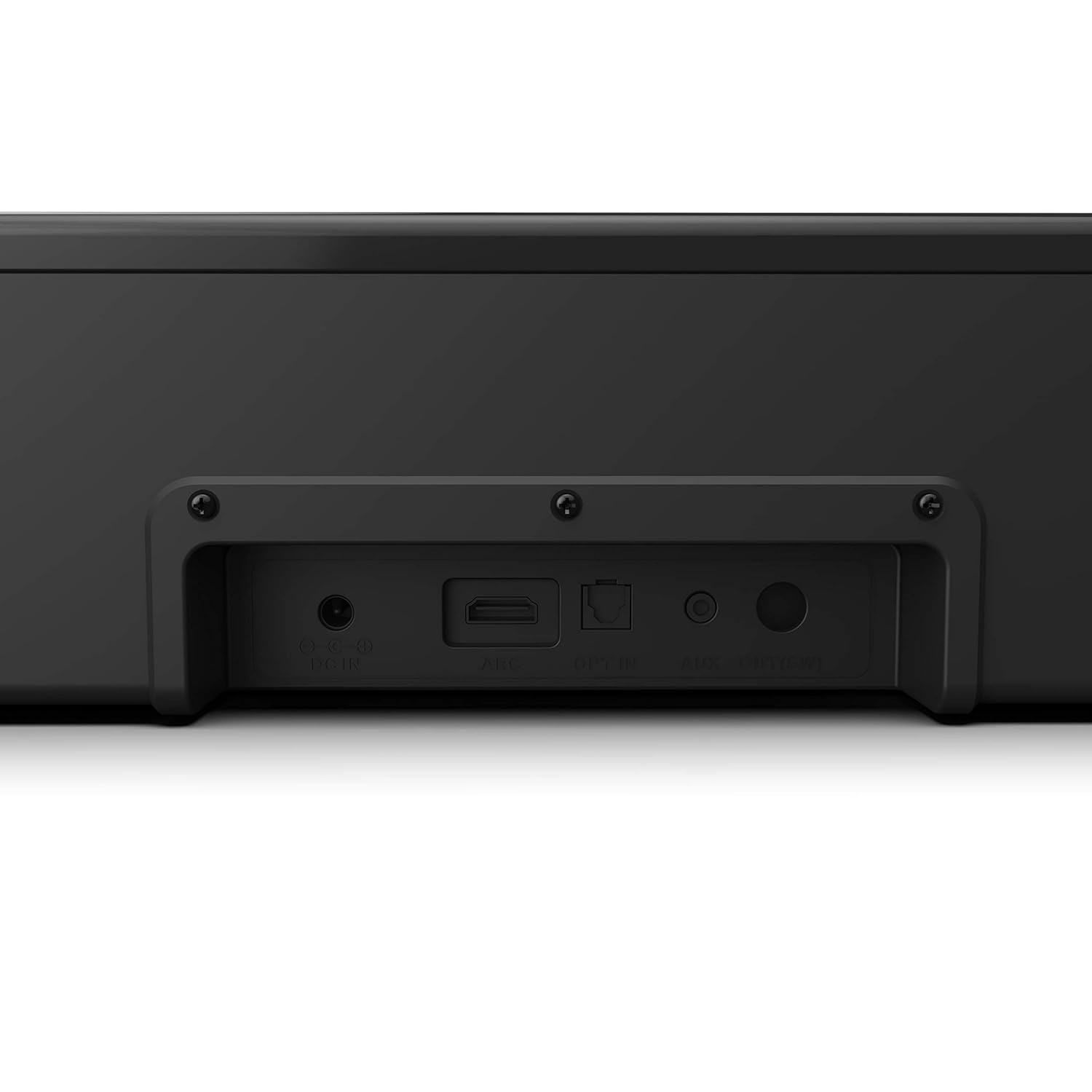
Image 4.2: Rear panel connections of the Philips HTL1020/94 Soundbar.
- DC IN: పవర్ అడాప్టర్ను ఇక్కడ కనెక్ట్ చేయండి.
- ARC (HDMI): Connect to a TV's HDMI ARC port for audio input.
- ఎంచుకోవడం: Connect to a TV or audio device's optical digital output.
- AUX IN: Connect to an audio device's analog output using a 3.5mm audio cable.
5. సెటప్ మరియు ఇన్స్టాలేషన్
5.1. ప్లేస్మెంట్
The soundbar can be placed on a tabletop or mounted on a wall. Ensure it is positioned centrally in front of your television for optimal sound distribution.
- టాబ్లెట్ ప్లేస్మెంట్: Place the soundbar on a stable, flat surface below your TV.
- వాల్ మౌంటు: Use appropriate wall mounting hardware (not included) and follow the instructions provided in the Quick Start Guide for secure installation.
5.2 పవర్కి కనెక్ట్ అవుతోంది
- పవర్ కార్డ్ను కనెక్ట్ చేయండి DC IN port on the rear of the soundbar.
- పవర్ కార్డ్ యొక్క మరొక చివరను గోడ అవుట్లెట్లోకి ప్లగ్ చేయండి.
5.3. ఆడియో మూలాలను కనెక్ట్ చేయడం
మీ ఆడియో సోర్స్ను కనెక్ట్ చేయడానికి కింది పద్ధతుల్లో ఒకదాన్ని ఎంచుకోండి:
5.3.1. బ్లూటూత్ కనెక్షన్
- నొక్కండి శక్తి వనరులు button on the soundbar or remote control to select Bluetooth mode. The indicator light will flash.
- మీ మొబైల్ పరికరంలో, బ్లూటూత్ని ప్రారంభించండి మరియు అందుబాటులో ఉన్న పరికరాల కోసం శోధించండి.
- Select "Philips HTL1020/94" from the list.
- జత చేసిన తర్వాత, ఇండికేటర్ లైట్ ఫ్లాషింగ్ ఆగిపోతుంది మరియు పటిష్టంగా ఉంటుంది.
5.3.2. AUX కనెక్షన్
- Connect a 3.5mm audio cable (not included) from your audio device's headphone jack or AUX output to the AUX IN సౌండ్బార్లోని పోర్ట్.
- నొక్కండి శక్తి వనరులు AUX మోడ్ని ఎంచుకోవడానికి బటన్.
5.3.3 USB కనెక్షన్
- Insert a USB storage device (e.g., USB flash drive) into the USB పోర్ట్ on the side panel of the soundbar.
- నొక్కండి శక్తి వనరులు button to select USB mode. The soundbar will automatically begin playing compatible audio files.
5.3.4. HDMI ARC Connection
- Connect an HDMI cable (not included) from your TV's HDMI ARC port to the ARC సౌండ్బార్లోని పోర్ట్.
- Ensure your TV's HDMI ARC function is enabled in its settings.
- నొక్కండి శక్తి వనరులు button to select ARC mode.
5.3.5. ఆప్టికల్ కనెక్షన్
- Connect an optical cable (not included) from your TV's optical digital output to the ఎంచుకోవడం సౌండ్బార్లోని పోర్ట్.
- నొక్కండి శక్తి వనరులు button to select OPTICAL mode.
6. ఆపరేషన్
6.1. పవర్ ఆన్/ఆఫ్
నొక్కండి శక్తి వనరులు యూనిట్ను ఆన్ లేదా ఆఫ్ చేయడానికి సౌండ్బార్ లేదా రిమోట్ కంట్రోల్లోని బటన్.
6.2. మూలం ఎంపిక
పదే పదే నొక్కండి శక్తి వనరులు button on the soundbar or the remote control to cycle through available input sources: Bluetooth, AUX, USB, ARC, Optical.
6.3. వాల్యూమ్ నియంత్రణ
ఉపయోగించండి వాల్యూమ్ అప్ మరియు వాల్యూమ్ డౌన్ buttons on the soundbar or the remote control to adjust the audio level.
6.4. Bluetooth Pairing (Re-pairing)
If the soundbar is not automatically connecting to a previously paired device, or if you wish to pair a new device:
- Ensure the soundbar is in Bluetooth mode (indicator light flashing).
- On your device, go to Bluetooth settings and select "Philips HTL1020/94" to connect.
7. నిర్వహణ
మీ సౌండ్బార్ యొక్క దీర్ఘాయువు మరియు సరైన పనితీరును నిర్ధారించడానికి, ఈ నిర్వహణ మార్గదర్శకాలను అనుసరించండి:
- శుభ్రపరచడం: సౌండ్బార్ ఉపరితలాన్ని శుభ్రం చేయడానికి మృదువైన, పొడి వస్త్రాన్ని ఉపయోగించండి. ద్రవ క్లీనర్లను లేదా రాపిడి పదార్థాలను ఉపయోగించవద్దు.
- వెంటిలేషన్: వేడెక్కడాన్ని నివారించడానికి వెంటిలేషన్ ఓపెనింగ్లను స్పష్టంగా ఉంచండి.
- నిల్వ: సౌండ్బార్ను ఎక్కువసేపు నిల్వ ఉంచినట్లయితే, దానిని పవర్ నుండి డిస్కనెక్ట్ చేసి, చల్లని, పొడి ప్రదేశంలో నిల్వ చేయండి.
8. ట్రబుల్షూటింగ్
మీ సౌండ్బార్తో మీకు సమస్యలు ఎదురైతే, ఈ క్రింది సాధారణ సమస్యలు మరియు పరిష్కారాలను చూడండి:
| సమస్య | సాధ్యమైన కారణం | పరిష్కారం |
|---|---|---|
| శక్తి లేదు | పవర్ కార్డ్ కనెక్ట్ కాలేదు; పవర్ అవుట్లెట్ యాక్టివ్గా లేదు | పవర్ కార్డ్ సురక్షితంగా కనెక్ట్ చేయబడిందని నిర్ధారించుకోండి; మరొక పరికరంతో అవుట్లెట్ను పరీక్షించండి. |
| శబ్దం లేదు | Incorrect source selected; Volume too low; Cables not connected | Select correct input source; Increase volume; Check all audio cables |
| బ్లూటూత్ జత చేయడం విఫలమైంది | సౌండ్బార్ జత చేసే మోడ్లో లేదు; పరికరం చాలా దూరంగా ఉంది; జోక్యం | Ensure soundbar is in Bluetooth mode; Move device closer; Restart both devices |
| USB ప్లేబ్యాక్ సమస్యలు | అననుకూలమైనది file format; USB device not recognized | ఆడియోను నిర్ధారించుకోండి files are compatible (e.g., MP3); Try a different USB device |
9. స్పెసిఫికేషన్లు
Technical specifications for the Philips Audio HTL1020/94 Soundbar:
| ఫీచర్ | స్పెసిఫికేషన్ |
|---|---|
| మోడల్ పేరు | HTL1020/94 |
| స్పీకర్ రకం | సౌండ్ బార్ |
| ఆడియో అవుట్పుట్ ఛానెల్లు | 2.0 |
| మొత్తం అవుట్పుట్ పవర్ | 20 వాట్స్ |
| కనెక్టివిటీ టెక్నాలజీ | Bluetooth 5.0, AUX, USB, HDMI ARC, Optical |
| నియంత్రణ పద్ధతి | టచ్, రిమోట్ కంట్రోల్ |
| కొలతలు (LxWxH) | 60 x 15 x 9.2 సెం.మీ |
| వస్తువు బరువు | 2 కిలోలు |
| శక్తి మూలం | కార్డెడ్ ఎలక్ట్రిక్ |
| సిగ్నల్-టు-శబ్ద నిష్పత్తి | 55 డిబి |
| చేర్చబడిన భాగాలు | Power cord, Quick Start Guide, Remote, User Manual, Warranty Card |
10. వారంటీ మరియు మద్దతు
Your Philips Audio HTL1020/94 Soundbar comes with a 1-year warranty. Please refer to the included Warranty Card for detailed terms and conditions.
For technical support or service inquiries, please contact Philips Audio customer service. Contact information can typically be found on the Philips Audio official webసైట్ లేదా మీ వారంటీ కార్డ్లో.


