1. పరిచయం
This manual provides essential information for the installation, operation, and maintenance of your ADATA XPG GAMMIX S50 Lite PCIe Gen4x4 M.2 2280 Solid State Drive. The GAMMIX S50 Lite is designed to deliver next-generation performance with PCIe Gen4x4 interface, offering sustained read/write speeds up to 3900/3200 MB per second. It is backward compatible with PCIe 3.0 and features 3D NAND Flash memory for enhanced capacity and durability, making it ideal for gamers, overclockers, and PC enthusiasts.
Please read this manual thoroughly before proceeding with installation to ensure proper setup and optimal performance of your SSD.
2. భద్రతా సమాచారం
Observe the following safety precautions to prevent damage to the product or injury to yourself:
- Always disconnect power from your computer and discharge static electricity before handling internal components.
- Handle the SSD by its edges to avoid touching the gold connectors or components on the circuit board.
- Do not attempt to disassemble or modify the SSD. This will void the warranty.
- Keep the SSD away from moisture, extreme temperatures, and direct sunlight.
- Ensure proper ventilation within your system to maintain optimal operating temperatures for all components, including the SSD.
3. ప్యాకేజీ విషయాలు
మీ ప్యాకేజీ కింది అంశాలను కలిగి ఉందని ధృవీకరించండి:
- ADATA XPG GAMMIX S50 Lite PCIe Gen4x4 M.2 2280 Solid State Drive
- (Optional: M.2 mounting screw, depending on motherboard accessories)

Figure 3.1: The ADATA XPG GAMMIX S50 Lite SSD shown in its retail box, highlighting the product's branding and key features.
4. సెటప్ మరియు ఇన్స్టాలేషన్
The XPG GAMMIX S50 Lite is an M.2 2280 form factor SSD, designed for easy installation into compatible motherboards. Ensure your motherboard supports PCIe Gen4x4 M.2 NVMe SSDs.
4.1 ప్రీ-ఇన్స్టాలేషన్ చెక్లిస్ట్
- A compatible motherboard with an available M.2 slot (Key M, 2280 size).
- ఫిలిప్స్ హెడ్ స్క్రూడ్రైవర్.
- An M.2 mounting screw and standoff (usually provided with your motherboard).
- యాంటీ-స్టాటిక్ మణికట్టు పట్టీ (సిఫార్సు చేయబడింది).
4.2. సంస్థాపనా దశలు
- పవర్ ఆఫ్: Shut down your computer completely and disconnect the power cable from the power supply unit.
- ఓపెన్ కేస్: మదర్బోర్డును యాక్సెస్ చేయడానికి మీ కంప్యూటర్ కేసును తెరవండి.
- M.2 స్లాట్ను గుర్తించండి: Identify an available M.2 slot on your motherboard. It typically looks like a small horizontal slot with a screw hole at the end.
- Install Standoff: If not already present, install the M.2 standoff into the appropriate screw hole for the 2280 size.
- SSD ని చొప్పించండి: Gently slide the XPG GAMMIX S50 Lite SSD into the M.2 slot at a 30-degree angle. The gold contacts on the SSD should align with the slot.
- సురక్షితమైన SSD: Once fully inserted, push the SSD down until it is parallel with the motherboard. Secure it with the M.2 mounting screw. Do not overtighten.
- కేస్ మూసివేసి పవర్ ఆన్ చేయండి: Close your computer case, reconnect the power cable, and power on your computer.
- Initialize & Format: After booting into your operating system, you may need to initialize and format the new SSD through Disk Management (Windows) or Disk Utility (macOS) before it can be used. Refer to your operating system's documentation for detailed steps.

Figure 4.1: An M.2 SSD being installed into a compatible slot on a motherboard, demonstrating the simple insertion and securing process.
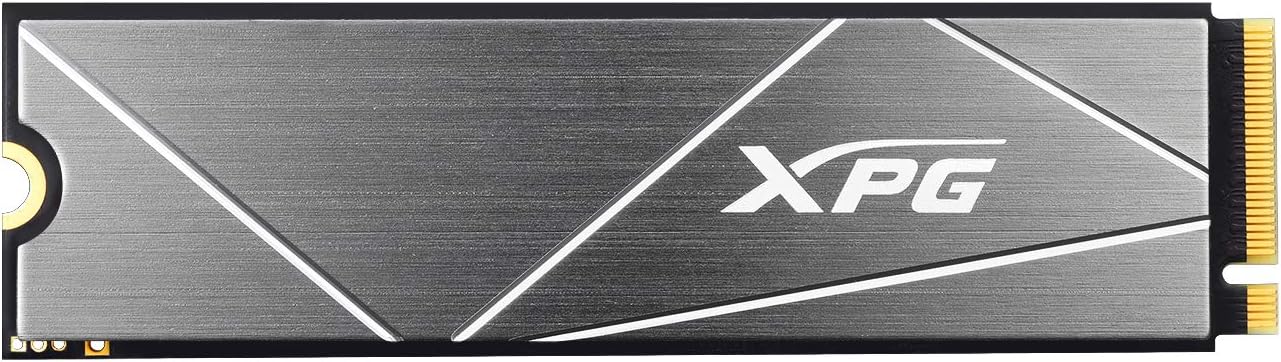
చిత్రం 4.2: ప్రత్యక్ష ఓవర్ హెడ్ view of the ADATA XPG GAMMIX S50 Lite SSD, showcasing its sleek design and XPG branding.
5. ఆపరేటింగ్ సూచనలు
Once installed and formatted, the XPG GAMMIX S50 Lite SSD operates as a high-speed storage device within your system. Its performance benefits include:
- Next-Generation Performance: Leveraging PCIe Gen4x4, the SSD provides significantly faster read/write speeds compared to SATA SSDs, enhancing system responsiveness, game loading times, and large file బదిలీలు.
- సమర్థవంతమైన శీతలీకరణ: Equipped with a robust aluminum heatsink, the GAMMIX S50 Lite effectively dissipates heat, maintaining optimal performance even under heavy loads. This can reduce temperatures by up to 20%.
- Advanced Caching: Utilizes dynamic SLC Caching and a DRAM Cache Buffer to achieve high random read/write IOPS, crucial for demanding applications like video editing, animation, and gaming.
- మెరుగైన మన్నిక: Built with 3D NAND Flash and featuring a wide range of data protection and correction technologies (like LDPC and E2E Data Protection), ensuring high Total Bytes Written (TBW) for extended product lifespan.

Figure 5.1: Visual representation of the SSD's cooling efficiency, indicating a 20% temperature reduction due to its integrated heatsink.

Figure 5.2: An abstract diagram depicting the SLC Caching and DRAM Cache Buffer technologies at work within the SSD, enhancing its performance.

Figure 5.3: A graphic illustrating the 2TB storage capacity of the SSD, surrounded by various application icons, symbolizing its suitability for diverse uses like gaming and content creation.
6. నిర్వహణ
SSDs generally require less maintenance than traditional hard drives. However, following these practices can help ensure longevity and optimal performance:
- ఫర్మ్వేర్ నవీకరణలు: అధికారిక XPG/ADATA ని కాలానుగుణంగా తనిఖీ చేయండి website for firmware updates for your S50 Lite SSD. Firmware updates can improve performance, stability, and compatibility.
- TRIM కమాండ్: Ensure that the TRIM command is enabled in your operating system. TRIM helps the SSD manage its data more efficiently, preventing performance degradation over time. Modern operating systems typically enable TRIM by default for SSDs.
- డీఫ్రాగ్మెంటేషన్ నివారించండి: Do not defragment your SSD. Defragmentation is unnecessary for SSDs and can reduce their lifespan by causing unnecessary write cycles.
- ఖాళీ స్థలాన్ని నిర్వహించండి: While not strictly necessary, maintaining some free space on your SSD (e.g., 10-15%) can help with performance and wear leveling.
- డేటా బ్యాకప్: Regularly back up important data. While SSDs are reliable, no storage device is immune to failure.
7. ట్రబుల్షూటింగ్
If you encounter issues with your XPG GAMMIX S50 Lite SSD, refer to the following common troubleshooting steps:
7.1. సిస్టమ్ ద్వారా SSD గుర్తించబడలేదు
- కనెక్షన్లను తనిఖీ చేయండి: Ensure the SSD is fully seated in the M.2 slot and the mounting screw is secure.
- BIOS/UEFI సెట్టింగ్లు: Enter your system's BIOS/UEFI settings. Verify that the M.2 slot is enabled and configured correctly (e.g., NVMe mode). Some motherboards may disable certain SATA ports when an M.2 SSD is installed.
- డ్రైవర్ ఇన్స్టాలేషన్: Ensure your operating system has the necessary NVMe drivers. Windows 10/11 typically includes native NVMe support. For older OS versions, you might need to install specific drivers.
- డిస్క్ను ప్రారంభించండి: If detected in BIOS but not in OS, check Disk Management (Windows) or Disk Utility (macOS) to see if the drive needs to be initialized and formatted.
- మదర్బోర్డు అనుకూలత: Confirm your motherboard's M.2 slot supports PCIe Gen4x4 NVMe SSDs.
7.2. నెమ్మది పనితీరు
- PCIe స్లాట్: Ensure the SSD is installed in a PCIe Gen4x4 compatible M.2 slot. Using a Gen3 slot will limit performance.
- TRIM ప్రారంభించబడింది: మీ ఆపరేటింగ్ సిస్టమ్లో TRIM కమాండ్ ప్రారంభించబడిందని ధృవీకరించండి.
- ఫర్మ్వేర్: Check for and install the latest firmware updates from the XPG/ADATA webసైట్.
- ఉష్ణోగ్రత: High temperatures can cause thermal throttling. Ensure adequate airflow in your PC case. The integrated heatsink helps, but overall system cooling is important.
- నేపథ్య ప్రక్రియలు: Close unnecessary background applications that might be consuming disk I/O.
If problems persist, contact XPG/ADATA customer support for further assistance.
8. స్పెసిఫికేషన్లు
| ఫీచర్ | స్పెసిఫికేషన్ |
|---|---|
| బ్రాండ్ | XPG |
| మోడల్ సంఖ్య | S50 Lite (AGAMMIXS50L-2T-C for 2TB) |
| ఫారమ్ ఫ్యాక్టర్ | M.2 2280 |
| ఇంటర్ఫేస్ | PCIe Gen4x4 |
| NAND ఫ్లాష్ | 3D NAND (TLC) |
| కెపాసిటీ | 2TB (2000GB) |
| సీక్వెన్షియల్ రీడ్ (గరిష్టంగా) | 3900 MB/s వరకు |
| సీక్వెన్షియల్ రైట్ (గరిష్టంగా) | 3200 MB/s వరకు |
| Random Read IOPS (Max) | IGN ల వరకు |
| Random Write IOPS (Max) | IGN ల వరకు |
| ఆపరేటింగ్ ఉష్ణోగ్రత | 0°C నుండి 70°C |
| నిల్వ ఉష్ణోగ్రత | -40°C నుండి 85°C |
| షాక్ రెసిస్టెన్స్ | 1500G/0.5ms |
| MTBF (వైఫల్యాల మధ్య సగటు సమయం) | 2,000,000 గంటలు |
| కొలతలు (L x W x H) | 80 x 22 x 4.3 మిమీ |
| బరువు | 10గ్రా |
| అనుకూలత | PC, Laptop, Gaming Console (with M.2 2280 PCIe Gen4x4 NVMe slot) |
Note: Performance figures may vary based on SSD capacity, host hardware, software, and system usage.
9. వారంటీ మరియు మద్దతు
XPG products are manufactured to the highest standards and undergo rigorous testing. This product is covered by a limited warranty from the date of purchase. The specific warranty period and terms may vary by region and product type. Please refer to the official XPG/ADATA webఅత్యంత తాజా మరియు వివరణాత్మక వారంటీ సమాచారం కోసం సైట్.
For technical support, driver downloads, firmware updates, or warranty claims, please visit the official XPG support webసైట్:
When contacting support, please have your product model number (S50 Lite) and serial number ready.


