1. పరిచయం
The PeakTech P 8005 is a high-precision Class 2 sound level meter designed for accurate noise measurement and data logging. It is suitable for a wide range of applications including noise projects, quality control, disease prevention, and environmental sound measurements in factories, schools, offices, traffic, and households. This device features a 4-digit 20mm LCD multi-function display with a bargraph and backlight, a USB interface for continuous measurements, and AC/DC outputs for connection to frequency analyzers or X-Y wave recorders. This manual provides detailed instructions for the proper use, maintenance, and troubleshooting of your PeakTech P 8005.
2. భద్రతా సమాచారం
Please read all safety instructions carefully before operating the device. Failure to follow these instructions may result in damage to the device or personal injury.
- పరికరాన్ని తీవ్రమైన ఉష్ణోగ్రతలు, తేమ లేదా ప్రత్యక్ష సూర్యకాంతికి బహిర్గతం చేయవద్దు.
- బలమైన కంపనాలు లేదా ప్రభావాలను నివారించండి.
- పరికరాన్ని తెరవడానికి లేదా సవరించడానికి ప్రయత్నించవద్దు. మరమ్మతులు అర్హత కలిగిన సిబ్బంది మాత్రమే చేయాలి.
- పరికరాన్ని బలమైన విద్యుదయస్కాంత క్షేత్రాల నుండి దూరంగా ఉంచండి.
- Ensure proper ventilation when using the AC adapter for extended periods.
- స్థానిక నిబంధనల ప్రకారం బ్యాటరీలను పారవేయండి.
3. ప్యాకేజీ విషయాలు
క్రింద జాబితా చేయబడిన అన్ని వస్తువులు మీ ప్యాకేజీలో చేర్చబడ్డాయని ధృవీకరించండి:
- PeakTech P 8005 Sound Level Meter
- క్యారీయింగ్ కేసు
- 3m Additional Microphone Cable
- USB ఇంటర్ఫేస్ కేబుల్
- Software for Windows (on CD-ROM)
- మినీ ట్రైపాడ్
- 9V AC పవర్ అడాప్టర్
- 9V బ్యాటరీ
- వినియోగదారు మాన్యువల్

4. ఉత్పత్తి ముగిసిందిview
The PeakTech P 8005 is designed for user-friendly operation while providing professional-grade accuracy. Familiarize yourself with the main components and controls.
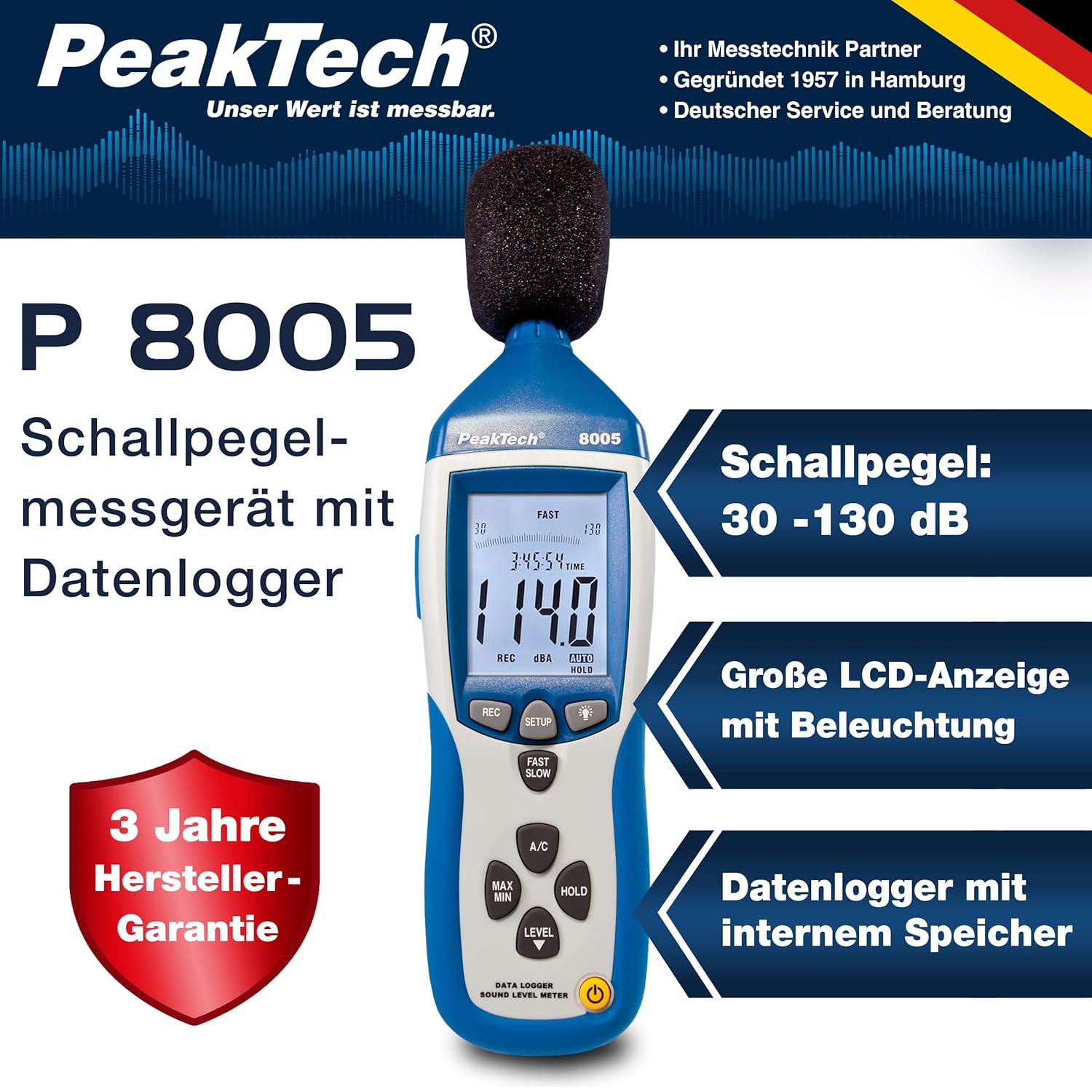
4.1 ప్రధాన లక్షణాలు
- ఖచ్చితత్వ కొలత: Class 2 sound level meter (IEC-61672-1 compliant) for accurate readings even in noisy environments.
- విస్తృత కొలత పరిధి: 30 to 130 dB across 4 ranges with 0.1 dB resolution.
- డేటా లాగింగ్: Internal memory for up to 32,000 readings (1x/sec to 1x/min).
- కనెక్టివిటీ: USB 2.0 interface for PC connection and data transfer.
- అనలాగ్ అవుట్పుట్లు: AC/DC outputs for connecting to frequency analyzers or X-Y wave recorders.
- ప్రదర్శన: 4-digit 20mm LCD with bargraph and backlight.
- కొలత మోడ్లు: Fast (125 ms) and Slow (1 s) response times, A and C weighting.
- అదనపు విధులు: MIN/MAX measurements, over-range/under-range indication.

5. సెటప్
5.1. బ్యాటరీ ఇన్స్టాలేషన్
The PeakTech P 8005 operates on a 9V battery or via the included 9V AC power adapter.
- పరికరం వెనుక బ్యాటరీ కంపార్ట్మెంట్ను గుర్తించండి.
- బ్యాటరీ కవర్ తెరవండి.
- సరైన ధ్రువణతను నిర్ధారించుకుంటూ 9V బ్యాటరీని చొప్పించండి.
- బ్యాటరీ కవర్ను సురక్షితంగా మూసివేయండి.
5.2. పరికరాన్ని శక్తివంతం చేయడం
- పవర్ ఆన్ చేయడానికి, నొక్కండి శక్తి బటన్.
- శక్తిని ఆపివేయడానికి, నొక్కండి మరియు పట్టుకోండి శక్తి డిస్ప్లే ఆఫ్ అయ్యే వరకు బటన్.
- For continuous operation, connect the 9V AC power adapter to the DC 9V input port on the side of the device.
5.3. మైక్రోఫోన్ కనెక్షన్
The device comes with a built-in microphone. For remote measurements or specific setups, you can use the included 3m additional microphone cable.
- Unscrew the microphone cap from the top of the device.
- Connect the 3m microphone cable to the microphone input.
- Attach the external microphone to the other end of the cable.
- For stable measurements, attach the device to the mini tripod using the threaded mount at the bottom.

వీడియో 5.1: ఒక ఓవర్view of the PeakTech 8005 Sound Level Meter, demonstrating its features and setup, including the use of the external microphone and power adapter.
6. ఆపరేటింగ్ సూచనలు
6.1. ప్రాథమిక కొలతలు
After powering on, the device will immediately begin measuring sound levels.
- The current sound level in dB is displayed on the LCD.
- ఉపయోగించండి స్థాయి button to cycle through the four measurement ranges (30-80 dB, 50-100 dB, 80-130 dB, Auto 30-130 dB).
- నొక్కండి వేగంగా/నెమ్మదిగా to switch between fast (125 ms) and slow (1 s) response times. Fast is suitable for sudden noise changes, while slow is for average noise levels.
- నొక్కండి A/C to select A-weighting (dBA) or C-weighting (dBC). A-weighting mimics human ear response, C-weighting is for mechanical noise.

6.2. Data Logging and PC Connection
The P 8005 can record up to 32,000 measurement values internally. To access and analyze this data, use the included Windows software.
- Install the software from the provided CD-ROM onto a Windows PC (Windows 95/98/NT/2000/XP/VISTA/7/8/10 supported).
- Connect the sound level meter to your PC using the USB interface cable.
- Open the software. The software allows for real-time data display, data import from the device's internal memory, and export to formats like Excel for further analysis.
- Refer to the software's help documentation for detailed instructions on data logging setup and analysis.

7. నిర్వహణ
7.1. శుభ్రపరచడం
సరైన పనితీరును నిర్ధారించడానికి పరికరాన్ని క్రమం తప్పకుండా శుభ్రం చేయండి.
- మృదువైన, పొడి వస్త్రంతో బాహ్య భాగాన్ని తుడవండి.
- రాపిడి క్లీనర్లు లేదా ద్రావకాలు ఉపయోగించవద్దు.
- Keep the microphone free from dust and debris.
7.2. నిల్వ
When not in use, store the device in its carrying case in a cool, dry place, away from direct sunlight and extreme temperatures.
7.3. క్రమాంకనం
The PeakTech P 8005 is a precision instrument. Regular calibration is recommended to maintain accuracy, especially for professional applications. Refer to the included test report for the last calibration date. Contact PeakTech support for calibration services.
8. ట్రబుల్షూటింగ్
| సమస్య | సాధ్యమైన కారణం | పరిష్కారం |
|---|---|---|
| పరికరం పవర్ ఆన్ చేయదు. | Low or dead battery; AC adapter not connected or faulty. | Replace the 9V battery or connect the AC adapter. Ensure the adapter is working. |
| సరికాని రీడింగ్లు. | Incorrect measurement range; microphone obstructed; device needs calibration. | Adjust the measurement range using the స్థాయి button. Clear any obstructions from the microphone. Consider professional calibration. |
| సాఫ్ట్వేర్ పరికరాన్ని గుర్తించదు. | USB cable faulty; driver issue; software compatibility. | Try a different USB port or cable. Reinstall the software and drivers. Check software compatibility settings (e.g., Windows 98 compatibility mode for older systems). |
| Data logging issues. | Memory full; incorrect logging settings. | Download and clear data from the device. Review data logging settings in the software. |
9. స్పెసిఫికేషన్లు
| పరామితి | విలువ |
|---|---|
| అప్లైడ్ స్టాండర్డ్ | IEC-61672-1 Type 2, ANSI S1.4 Type 2 |
| Accuracy (1 kHz Sine; A, C) | ± 1.4 డిబి |
| ఖచ్చితత్వం (ఫ్రీక్వెన్సీ రేంజ్) | According to EN-61672-1 Class 2, max. ± 5.6 dB |
| ఫ్రీక్వెన్సీ రేంజ్ | 31.5 హెర్ట్జ్ - 8 కిలోహెర్ట్జ్ |
| డైనమిక్ రేంజ్ | 50 డిబి |
| స్థాయి పరిధులు | Low: 30 dB ~ 80 dB, Med: 50 dB ~ 100 dB, High: 80 dB ~ 130 dB, Auto: 30 dB ~ 130 dB |
| ప్రతిస్పందన సమయం | Fast: 125 ms / Slow: 1 s |
| మైక్రోఫోన్ | ½-inch Electret Condenser Microphone |
| రిజల్యూషన్ | 0.1 డిబి |
| ప్రదర్శన నవీకరణ | 2 సార్లు / సెకను. |
| అనలాగ్ అవుట్పుట్ | AC/DC Outputs, AC: 1 Veff = 10 mV/dB |
| ఆపరేటింగ్ వాల్యూమ్tage | 9V Battery or 9V AC Power Adapter |
| కొలతలు (WxHxD) | 80 x 280 x 50 మిమీ |
| బరువు | 350 గ్రా |
| Data Logger Memory | 32,000 రీడింగ్ల వరకు |
10. వారంటీ మరియు మద్దతు
PeakTech products are designed for reliability and performance. For warranty information and technical support, please refer to the documentation included with your product or visit the official PeakTech webవారంటీ క్లెయిమ్ల కోసం కొనుగోలు రుజువుగా మీ కొనుగోలు రసీదును ఉంచండి.
తయారీదారు: పీక్టెక్
Webసైట్: PeakTech Official Store


