1. పరిచయం
Thank you for choosing the Venom PS5 DualSense Controller Twin Docking Station. This manual provides essential information for the proper setup, operation, and maintenance of your charging station. Please read these instructions carefully before use.
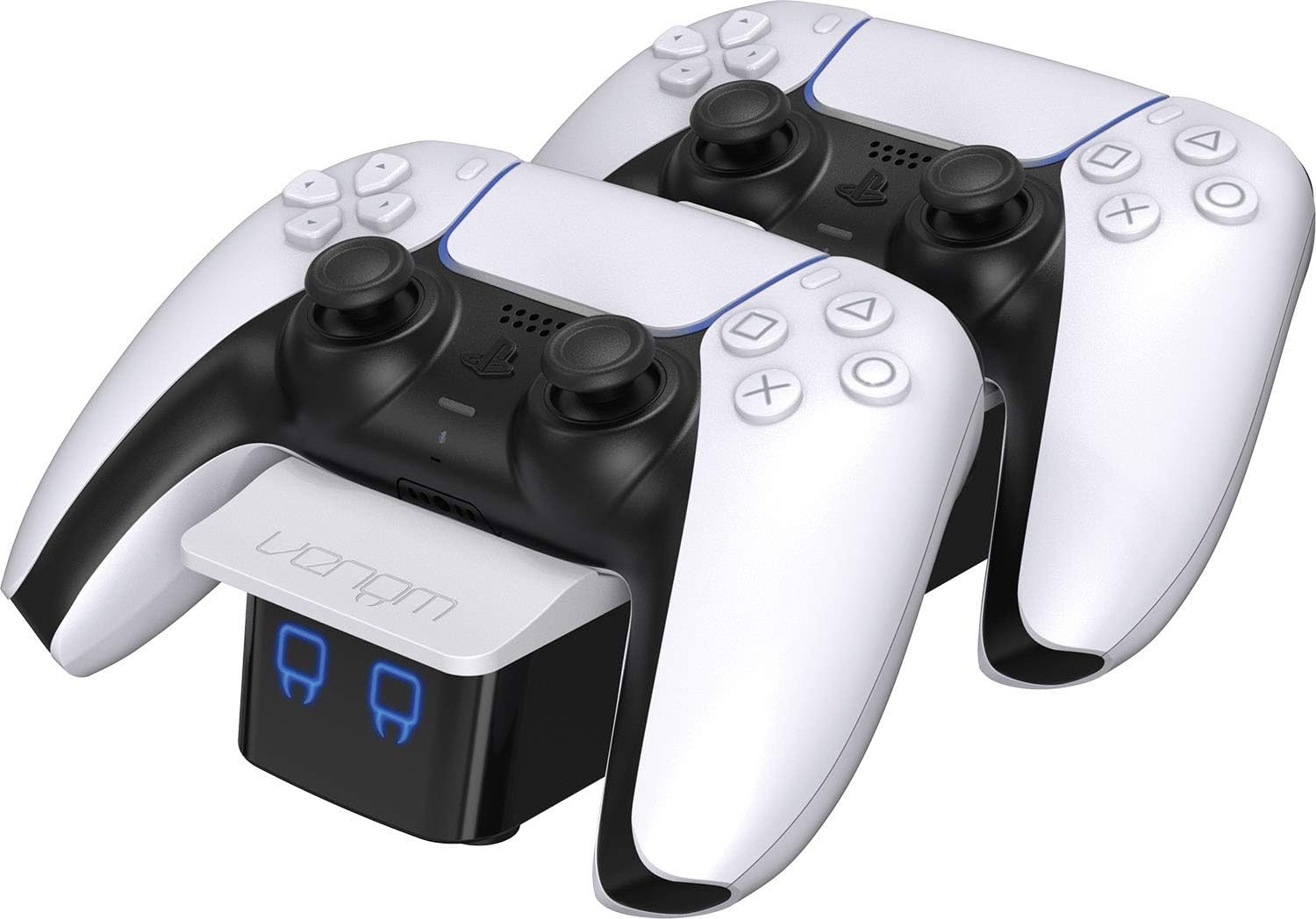
Image 1.1: The Venom PS5 DualSense Controller Twin Docking Station with two controllers.
2. ప్యాకేజీ విషయాలు
మీ ప్యాకేజీలో ఈ క్రింది అన్ని అంశాలు ఉన్నాయని నిర్ధారించుకోండి:
- Venom PS5 DualSense Controller Twin Docking Station
- USB-A to USB-C Charging Cable (1 meter)
- 2 x USB-C Charging Dongles

Image 2.1: The two included USB-C charging dongles.

Image 2.2: The USB-A to USB-C charging cable.
3. సెటప్ సూచనలు
- Attach Charging Dongles: Carefully insert one USB-C charging dongle into the USB-C port on each of your PS5 DualSense controllers. These dongles are designed to remain in the controller for convenient drop-and-charge functionality.
- పవర్ కనెక్ట్ చేయండి: Connect the supplied USB-A to USB-C charging cable to the USB-C input port on the rear of the docking station. Plug the USB-A end into a compatible USB power source (e.g., a PS5 console USB port, a USB wall adapter, or a PC USB port). Ensure the power source provides sufficient output (minimum 5V/1.8A recommended for optimal charging of two controllers).
- స్థాన నియంత్రికలు: Gently place your PS5 DualSense controllers onto the docking station, aligning the dongles with the charging contacts. The controllers should sit securely in the cradles.

Image 3.1: USB-C dongle correctly inserted into a PS5 DualSense controller.

Image 3.2: Rear ports of the docking station, including the USB-C power input.

Image 3.3: A PS5 controller correctly placed on the docking station.
4. ఆపరేటింగ్ సూచనలు
4.1 Charging Controllers
Once controllers are correctly placed on the docking station and power is connected, charging will begin automatically. The front LED indicators provide charging status:
- ఎరుపు LED: Indicates the controller is currently charging.
- నీలం LED: Indicates the controller is fully charged.
4.2 Rear USB Output
The docking station features a rear USB-A output port. This port can be used to charge other USB-powered devices, such as wireless headsets or mobile phones, while the docking station is powered.
5. నిర్వహణ
- శుభ్రపరచడం: Disconnect the docking station from power before cleaning. Use a soft, dry cloth to wipe the surface. Do not use abrasive cleaners or solvents.
- నిల్వ: ఎక్కువసేపు ఉపయోగంలో లేనప్పుడు, డాకింగ్ స్టేషన్ను ప్రత్యక్ష సూర్యకాంతి మరియు తీవ్రమైన ఉష్ణోగ్రతలకు దూరంగా చల్లని, పొడి ప్రదేశంలో నిల్వ చేయండి.
- నిర్వహణ: Avoid dropping or subjecting the docking station to strong impacts, as this may damage internal components.
6. ట్రబుల్షూటింగ్
- కంట్రోలర్ ఛార్జింగ్ లేదు:
- Ensure the USB-C dongle is fully inserted into the controller.
- Verify the controller is correctly seated on the docking station, making proper contact with the charging pins.
- Check that the power cable is securely connected to both the docking station and the power source.
- Try a different USB power source or USB-A to USB-C cable to rule out a faulty component.
- Only One Controller Charges at a Time:
- Ensure your power source provides adequate current (at least 1.8 Amps). Lower current power sources may prioritize charging one controller over two.
- Verify both controllers have their USB-C dongles correctly inserted and are properly seated on the dock.
- LED సూచికలు పనిచేయవు:
- Confirm the docking station is receiving power.
- If the station is powered but LEDs are off, ensure a controller is placed on the dock and requires charging.
- Concerns about Controller Battery Life:
- The docking station is designed to provide optimal charging. To prolong battery life, avoid leaving controllers on the charger indefinitely after they reach full charge. While modern batteries have overcharge protection, prolonged trickle charging can still contribute to long-term degradation.
- Ensure you are using a reliable power source that meets the recommended specifications.
- Missing USB-C Charging Dongles:
- The package should contain two dongles. If any are missing, please contact Venom customer support.
7. స్పెసిఫికేషన్లు
| ఫీచర్ | స్పెసిఫికేషన్ |
|---|---|
| మోడల్ సంఖ్య | VS5001 |
| ఉత్పత్తి కొలతలు | 9.45 x 3.94 x 2.13 అంగుళాలు |
| వస్తువు బరువు | 8.5 ఔన్సులు |
| ఇన్పుట్ కనెక్టర్ రకం | USB-C |
| అవుట్పుట్ కనెక్టర్ రకం | USB-A (for auxiliary charging) |
| Ampఎరేజ్ | 1.8 Amps (Input) |
| వాట్tage | 18 watts (Input) |
| ప్రత్యేక ఫీచర్ | Wireless Charging (via dongle), LED Indicators |
| అనుకూల పరికరాలు | PS5 DualSense Controllers, Cellular Phones (via rear USB) |
8. వారంటీ మరియు మద్దతు
For warranty information, technical support, or to report missing components, please visit the official Venom webసైట్ లేదా వారి కస్టమర్ సర్వీస్ను నేరుగా సంప్రదించండి. వారంటీ క్లెయిమ్ల కోసం మీ కొనుగోలు రుజువును ఉంచండి.
Venom Official Webసైట్: www.venomuk.com


