పరిచయం
The Amazon Echo Show 5 (2nd Gen, 2021 release) is a smart display designed to simplify your daily routines and enhance your connected home experience. This certified refurbished device has been tested and certified to function like new, offering all the features of a new unit.
With Alexa built-in, you can manage your day, stay entertained, and connect with others using just your voice. The compact 5.5-inch screen provides visual feedback for alarms, timers, news, video calls, and more.

Image: The Echo Show 5 on a nightstand, illustrating its use as a smart display for time and daily information.
సెటప్
Setting up your Echo Show 5 is a straightforward process. The device is designed for simple setup, allowing you to connect to your Wi-Fi network with ease.
పెట్టెలో ఏముంది:
- Echo Show 5 device
- Glacier White power adapter (15W) with cable (4.9 ft.)
- త్వరిత ప్రారంభ గైడ్
ప్రారంభ సెటప్ దశలు:
- ప్లగ్ ఇన్: Connect the power adapter to your Echo Show 5 and plug it into a wall outlet.
- ఆన్-స్క్రీన్ సూచనలను అనుసరించండి: The device will power on and guide you through the initial setup process on its touch screen.
- Wi-Fiకి కనెక్ట్ చేయండి: Select your Wi-Fi network from the list and enter the password. The Echo Show 5 supports dual-band 802.11a/b/g/n/ac Wi-Fi networks.
- Sign In to Amazon Account: Log in with your Amazon account credentials.
- సెట్టింగ్లను వ్యక్తిగతీకరించండి: Customize settings such as time zone, device name, and privacy preferences.
- అలెక్సా యాప్ను డౌన్లోడ్ చేసుకోండి: For full functionality and advanced controls, download the Alexa app on your Fire OS, Android, or iOS device. The app is also accessible via a web బ్రౌజర్.
Amazon's Wi-Fi simple setup technology helps streamline the connection process, making it easier to get your device up and running quickly.
Operating Your Echo Show 5
The Echo Show 5 offers a wide range of functionalities, primarily controlled by voice commands to Alexa and through its interactive touch screen.
Daily Assistance:
- అలారాలు & టైమర్లు: Set alarms and timers with voice commands.
- Calendar & News: Check your calendar, get news updates, and view వాతావరణ సూచనలు.
- నిత్యకృత్యాలు: Create routines to automate actions, such as gradually turning on compatible lights in the morning.
స్మార్ట్ హోమ్ కంట్రోల్:
Manage compatible smart home devices using the interactive display, your voice, or motion detection.
- అంతర్నిర్మిత కెమెరా: Use the 2 MP camera to look in on your home when you're away.
- పరికర నియంత్రణ: Control lights, cameras, and other smart devices.

Image: A man carrying a laundry basket, with an Echo Show 5 in the foreground, demonstrating how the device can be used to control smart home devices, possibly through motion detection.
కమ్యూనికేషన్:
- వీడియో కాలింగ్: Make video calls to friends and family who have the Alexa app or an Echo device with a screen using the 2 MP camera.
- ప్రకటనలు: Send announcements to other compatible devices in your home.

Image: The Echo Show 5 displaying an active video call, highlighting its communication capabilities.
వినోదం:
- స్ట్రీమింగ్: Play TV shows and movies from services like Prime Video and Netflix on the 5.5-inch screen.
- సంగీతం & ఆడియో: Stream music from Amazon Music, Apple Music, Spotify, and others.
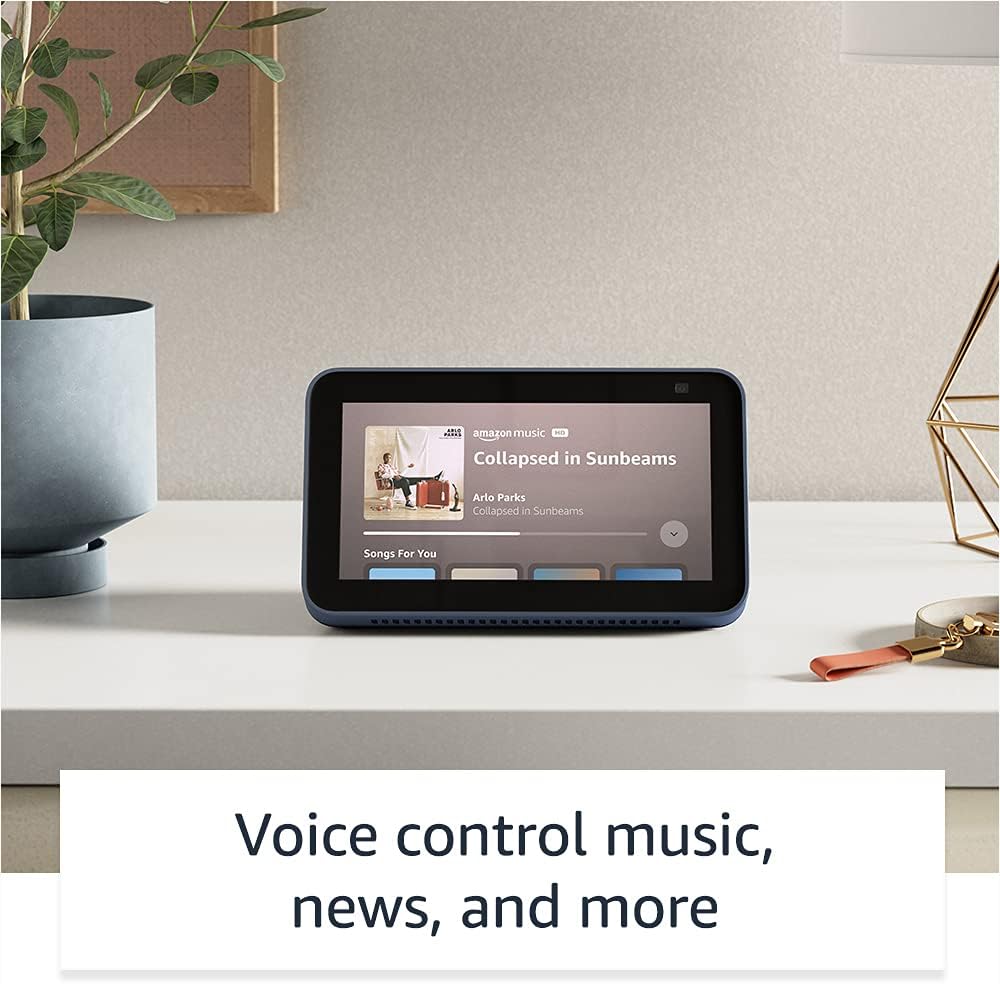
Image: The Echo Show 5 displaying a music playback screen, demonstrating its entertainment features.
వ్యక్తిగతీకరణ:
- Digital Photo Frame: Use Amazon Photos to turn your home screen into a digital photo frame.

Image: The Echo Show 5 displaying a personal photo, illustrating its use as a digital photo frame.
గోప్యతా లక్షణాలు:
The Echo Show 5 is designed with multiple layers of privacy controls:
- Mic/Camera Off Button: A physical button to electronically disconnect the microphones and camera.
- Built-in Camera Shutter: A physical shutter to cover the camera lens.
- Voice Recording Controls: సామర్థ్యం view మరియు మీ వాయిస్ రికార్డింగ్లను తొలగించండి.
- వేక్ వర్డ్ టెక్నాలజీ: The device only begins listening after detecting your chosen wake word.
- స్ట్రీమింగ్ సూచికలు: Visual indicators show when audio or video is being streamed to the cloud.

చిత్రం: క్లోజప్ view of the Echo Show 5's top, highlighting the physical camera shutter button for privacy control.
యాక్సెసిబిలిటీ ఫీచర్లు:
The Echo Show 5 includes various accessibility features to personalize Alexa to your abilities. These can be accessed via సెట్టింగ్లు → యాక్సెసిబిలిటీ మీ పరికరంలో.
- అలెక్సాకు నొక్కండి: Interact with Alexa via touch through on-screen tiles or a keyboard.
- అనుకూల శ్రవణం: అలెక్సా స్పందించే ముందు మాట్లాడటం ముగించడానికి ఎక్కువ సమయాన్ని అందిస్తుంది.
- ఇష్టపడే మాట్లాడే రేటు: అలెక్సా ఎంత వేగంగా లేదా నెమ్మదిగా మాట్లాడుతుందో నియంత్రించండి.
- Captioning: Alexa Captioning, Call Captioning, and Closed Captioning provide text for supported content.
- Show and Tell: Helps identify products for users who are blind or visually impaired.
- వాయిస్View స్క్రీన్ రీడర్: అంధులు లేదా దృష్టి లోపం ఉన్న వినియోగదారులకు ప్రాప్యతను అనుమతిస్తుంది.
- స్క్రీన్ మాగ్నిఫైయర్: జూమ్ ఇన్/అవుట్ చేసి స్క్రీన్ చుట్టూ ప్యాన్ చేయండి.
- సమీపంలో ఉన్నప్పుడు తెలియజేయండి: పరికరం దగ్గర గుర్తించినప్పుడు నోటిఫికేషన్ శబ్దాలను ప్లే చేస్తుంది.
- కిండిల్ బిగ్గరగా చదవండి: అలెక్సా మీ కిండిల్ పుస్తకాలను బిగ్గరగా చదవగలదు.
- రియల్ టైమ్ టెక్స్ట్: Type live text during a video call.
- Additional settings for Color Inversion, Color Correction, Request Sound, and more.
నిర్వహణ
The Certified Refurbished Echo Show 5 has undergone rigorous testing and certification to ensure it looks and works like new. Regular maintenance is minimal.
- శుభ్రపరచడం: స్క్రీన్ మరియు పరికరం వెలుపలి భాగాన్ని మృదువైన, మెత్తటి బట్టతో సున్నితంగా తుడవండి. రాపిడి క్లీనర్లు లేదా స్ప్రేలను నివారించండి.
- సాఫ్ట్వేర్ అప్డేట్లు: Ensure your device is connected to Wi-Fi to receive automatic software security updates, which are guaranteed for at least four years after the device is last available for purchase as a new unit.
ట్రబుల్షూటింగ్
If you encounter issues with your Echo Show 5, consider the following general troubleshooting steps:
- పవర్ సైకిల్: Unplug the device from the power outlet, wait for 30 seconds, and then plug it back in.
- Wi-Fi కనెక్షన్ని తనిఖీ చేయండి: Ensure your Wi-Fi network is active and the device is connected. You can check network status in the device settings.
- Verify Internet Connectivity: Confirm your internet service is working by testing other devices on the same network.
- Check Microphone/Camera: Ensure the mic/camera off button is not activated and the camera shutter is open if you are trying to use these features.
- అలెక్సా యాప్: Use the Alexa app on your smartphone or tablet to manage device settings, check for updates, and access further support resources.
- వాయిస్ ఆదేశాలు: Speak clearly and ensure you are within range of the device's microphones.
For more detailed troubleshooting or specific issues, refer to the help section within the Alexa app or visit the official Amazon support webసైట్.
స్పెసిఫికేషన్లు
| ఫీచర్ | వివరాలు |
|---|---|
| పరిమాణం | 5.8” x 3.4” x 2.9” (148 మిమీ x 86 మిమీ x 73 మిమీ) |
| బరువు | 14.5 oz (410 గ్రాములు) |
| ప్రదర్శించు | 5.5 ”టచ్ స్క్రీన్ |
| కెమెరా | 2 MP camera with built-in shutter |
| వైఫై కనెక్టివిటీ | Dual-band wifi (802.11a/b/g/n/ac). Does not support ad-hoc networks. |
| బ్లూటూత్ కనెక్టివిటీ | A2DP support for audio streaming; AVRCP for voice control of connected mobile devices. PIN-code speakers not supported. |
| ఆడియో | Full range 1.65” built-in speaker |
| ప్రాసెసర్ | MediaTek MT 8163 |
| తరం | Echo Show 5 (2nd Gen) - 2021 release |
| భాష | అలెక్సా ఇంగ్లీష్ మరియు స్పానిష్ మాట్లాడుతుంది |
వారంటీ మరియు మద్దతు
Your Certified Refurbished Echo Show 5 comes with the same limited warranty as a new device. For specific details regarding your warranty, please refer to the documentation included with your device or visit the official Amazon website for Certified Refurbished Amazon devices.
For customer support, troubleshooting, and to manage your device settings, utilize the Alexa app on your compatible smartphone or tablet. You can also find extensive support resources and FAQs on the Amazon support webసైట్.
సాఫ్ట్వేర్ భద్రతా నవీకరణలు: This device receives guaranteed software security updates until at least four years after the device is last available for purchase as a new unit on Amazon's webసైట్లు.
సంబంధిత పత్రాలు - ఎకో షో 5 (2వ తరం, 2021 విడుదల)
 |
అమెజాన్ ఎకో షో 8 (2వ తరం) క్విక్ స్టార్ట్ గైడ్ మీ అమెజాన్ ఎకో షో 8 (2వ తరం) తో ప్రారంభించడానికి ఒక గైడ్, సెటప్, ఫీచర్లు మరియు గోప్యతను కవర్ చేస్తుంది. |
 |
అమెజాన్ ఎకో షో 8 (2వ తరం) యూజర్ గైడ్ అమెజాన్ ఎకో షో 8 (2వ తరం) కోసం సమగ్ర యూజర్ గైడ్, సెటప్, గోప్యతా ఫీచర్లు, వాయిస్ కమాండ్లు మరియు అలెక్సాను ఉపయోగించడం కోసం చిట్కాలను వివరిస్తుంది. |
 |
బాహ్య భాగస్వాముల కోసం అమెజాన్ ఎకో & అలెక్సా బ్రాండ్ వినియోగ మార్గదర్శకాలు లోగోలు, టైపోగ్రఫీ, రంగులు మరియు మార్కెటింగ్ సామగ్రిలో ప్రాతినిధ్యంతో సహా అమెజాన్ ఎకో మరియు అలెక్సా బ్రాండ్ ఆస్తుల సరైన వినియోగంపై బాహ్య భాగస్వాములకు అధికారిక మార్గదర్శకాలు. బ్రాండ్ స్థిరత్వం మరియు సమగ్రతను నిర్ధారించండి. |
 |
అమెజాన్ ఎకో షో 8 (2వ తరం) క్విక్ స్టార్ట్ గైడ్: సెటప్ మరియు ఫీచర్లు మీ Amazon Echo Show 8 (2వ తరం) ను ఎలా సెటప్ చేయాలో మరియు ఉపయోగించాలో తెలుసుకోండి. ఈ గైడ్ రోజువారీ పనుల కోసం పరికర లక్షణాలు, గోప్యతా నియంత్రణలు మరియు అవసరమైన Alexa ఆదేశాలను కవర్ చేస్తుంది. |
 |
అమెజాన్ ఎకో షో 5 (2వ తరం) క్విక్ స్టార్ట్ గైడ్ A quick start guide for the Amazon Echo Show 5 (2nd Generation), covering setup, privacy features, and basic usage with Alexa. |
 |
అమెజాన్ ఎకో షో 5 (2వ తరం) క్విక్ స్టార్ట్ గైడ్ మీ Amazon Echo Show 5 (2వ తరం) తో ప్రారంభించండి. ఈ గైడ్ సెటప్, పరికర లక్షణాలు, గోప్యతా నియంత్రణలు మరియు వినోదం, స్మార్ట్ హోమ్ మరియు కమ్యూనికేషన్ కోసం Alexa ను ఎలా ఉపయోగించాలో వివరిస్తుంది. |