పరిచయం
This manual provides detailed instructions for the installation, operation, and maintenance of your Fractal Design Pop XL Silent computer case. Please read this manual thoroughly before beginning any installation or operation to ensure proper usage and to prevent damage to the product or other components.

The Fractal Design Pop XL Silent case, designed for quiet operation and spacious component accommodation.
భద్రతా సమాచారం
- Always disconnect power from all components before installing or removing any parts.
- ఎలక్ట్రోస్టాటిక్ డిశ్చార్జ్ (ESD) నివారించడానికి భాగాలను జాగ్రత్తగా నిర్వహించండి. యాంటీ-స్టాటిక్ రిస్ట్ స్ట్రాప్ని ఉపయోగించడాన్ని పరిగణించండి.
- చిన్న భాగాలు మరియు ప్యాకేజింగ్ సామగ్రిని పిల్లలకు దూరంగా ఉంచండి.
- వేడెక్కకుండా ఉండటానికి కేసు చుట్టూ సరైన వెంటిలేషన్ ఉండేలా చూసుకోండి.
- Do not attempt to modify the case or its components, as this may void your warranty and pose a safety risk.
ప్యాకేజీ విషయాలు
క్రింద జాబితా చేయబడిన అన్ని అంశాలు మీ ప్యాకేజీలో ఉన్నాయని నిర్ధారించుకోండి:
- Fractal Design Pop XL Silent Case
- యాక్సెసరీ బాక్స్ (స్క్రూలు, జిప్ టైలు, స్టాండ్ఆఫ్లు మొదలైనవి)
- వినియోగదారు మాన్యువల్ (ఈ పత్రం)
- Four pre-installed 120 mm Aspect fans

ఒక పేలింది view showing the various components of the Pop XL Silent case, including panels, fans, and drive trays.
ఫీచర్లు ముగిశాయిview
The Fractal Design Pop XL Silent case offers a range of features designed for optimal performance and user convenience:
- మదర్బోర్డు అనుకూలత: Accommodates E-ATX (up to 280 mm), ATX, mATX, and Mini ITX motherboards.
- శబ్దం తగ్గింపు: Features a closed front, closed top, bitumen side panels, and sound-damping foam for excellent noise reduction.
- టెంపర్డ్ గ్లాస్ సైడ్ ప్యానెల్: An easily mounted tempered glass side panel allows for showcasing అంతర్గత భాగాలు.
- నిల్వ ఎంపికలు: Supports up to four 3.5" HDDs and six 2.5" SSDs (or three 3.5" HDDs and five 2.5" SSDs with one optical bay in use).
- ముందే ఇన్స్టాల్ చేసిన అభిమానులు: Comes with four 120 mm Aspect fans for efficient cooling.
- 5.25" Bays: Two neatly concealed 5.25" bays with a storage drawer and magnetic cover.

The Fractal Design Pop XL Silent case, showcasing its tempered glass side panel.
సెటప్
1. కేసును సిద్ధం చేయడం
Before installing components, remove the side panels. The tempered glass side panel can be easily unlatched and removed. The solid side panel is secured with thumbscrews at the rear.

ఇంటీరియర్ view of the case, showing the spacious layout for component installation.
2. మదర్బోర్డు సంస్థాపన
Install the necessary motherboard standoffs into the motherboard tray. Align your motherboard with the standoffs and the I/O shield opening at the rear of the case. Secure the motherboard with screws provided in the accessory box.
3. స్టోరేజ్ డ్రైవ్ ఇన్స్టాలేషన్
The case supports both 3.5" HDDs and 2.5" SSDs. Utilize the dedicated drive trays and mounting points behind the motherboard tray and in the PSU shroud area.
- 2.5" SSDలు: Mount SSDs directly onto the dedicated 2.5" drive brackets located behind the motherboard tray.
- 3.5" HDDలు: Install HDDs into the removable drive cages located beneath the PSU shroud.

వెనుక లోపలి భాగం view highlighting the 2.5" SSD and 3.5" HDD mounting locations.
4. పవర్ సప్లై ఇన్స్టాలేషన్
Install your ATX power supply into the dedicated compartment at the bottom rear of the case. Secure it with screws from the rear of the case.
5. కేబుల్ నిర్వహణ
Utilize the cable routing channels and Velcro straps behind the motherboard tray to manage cables neatly. This improves airflow and aesthetics.
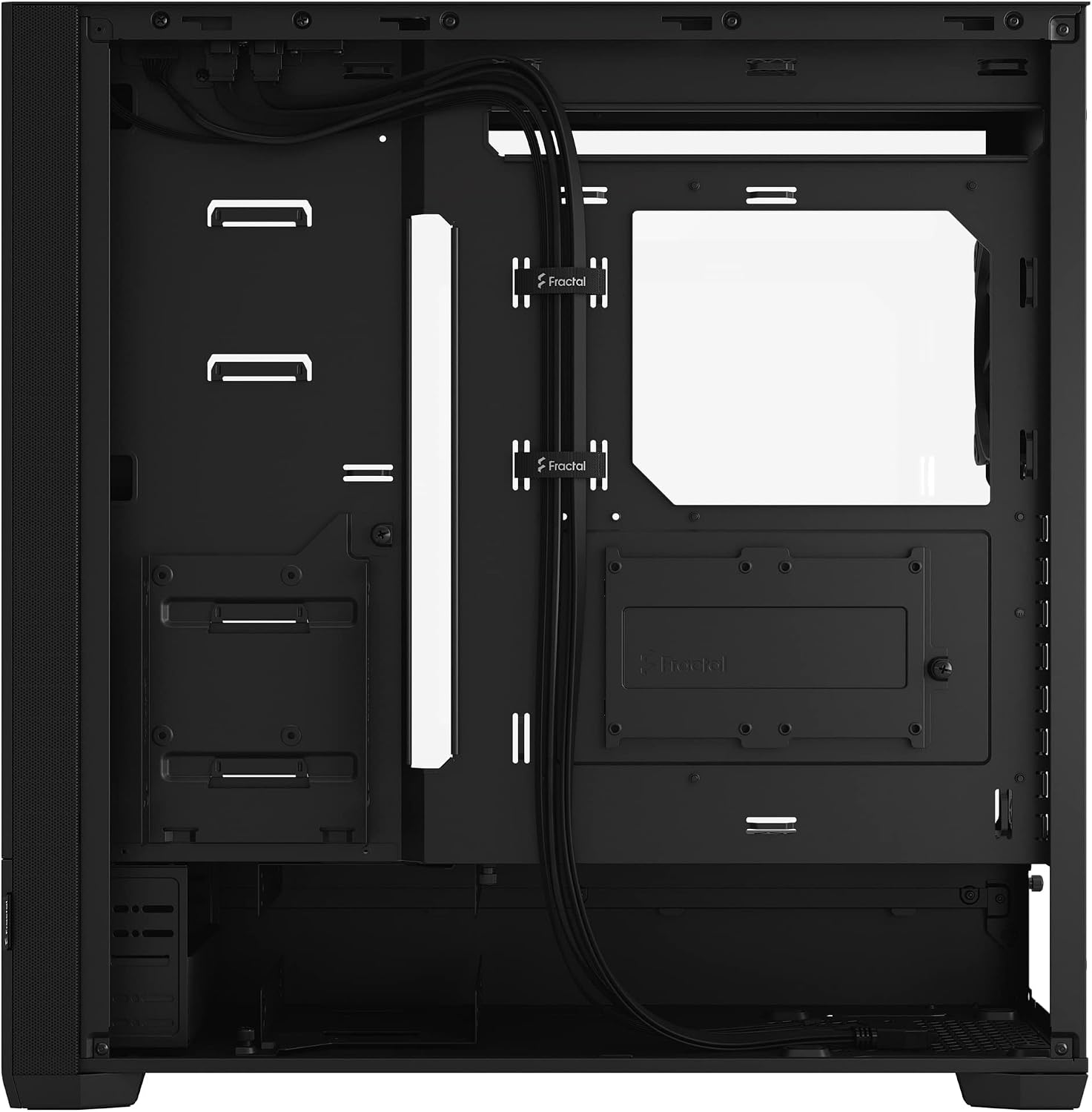
Cable routing channels and Velcro straps for organized cable management.
6. ఫ్రంట్ I/O కనెక్షన్లు
Connect the front panel cables (USB 3.0, audio, power, reset, LED) to the corresponding headers on your motherboard. The Pop XL Silent features two USB 3.0 ports on the top panel.

ఎగువ ప్యానెల్ view displaying the front I/O ports, including USB 3.0.
ఆపరేటింగ్
Once all components are installed and connected, replace the side panels. Connect your monitor, keyboard, mouse, and power cable to the system. Press the power button on the top panel to start your computer.

The Pop XL Silent case integrated into a desktop setup.
నిర్వహణ
డస్ట్ ఫిల్టర్ క్లీనింగ్
The Pop XL Silent case is equipped with easily removable dust filters to prevent dust buildup inside your system. Regularly clean these filters to maintain optimal airflow and cooling performance.
- ఫ్రంట్ ఫిల్టర్: The front panel can be removed to access the front dust filter.
- టాప్ ఫిల్టర్: The top panel features a magnetic dust filter that can be easily lifted off for cleaning.
- దిగువ ఫిల్టర్: A slide-out filter is located at the bottom, covering the PSU intake.

The magnetic top dust filter being removed for cleaning.
సాధారణ సంరక్షణ
కేస్ బాహ్య భాగాన్ని మృదువైన, d వస్త్రంతో తుడవండి.amp వస్త్రం. ముగింపు లేదా టెంపర్డ్ గ్లాస్ను దెబ్బతీసే కఠినమైన రసాయనాలు లేదా రాపిడి పదార్థాలను ఉపయోగించకుండా ఉండండి.
ట్రబుల్షూటింగ్
- శక్తి లేదు: Ensure all power cables (PSU to wall, PSU to motherboard, CPU, GPU) are securely connected. Check the power button connection to the motherboard.
- తిరుగుతున్న ఫ్యాన్లు: Verify fan cables are correctly connected to motherboard headers or fan controller. Check BIOS settings for fan control.
- అధిక శబ్దం: Check for loose cables or components. Ensure fans are clean and free of obstructions. Verify all screws are tightened.
- వేడెక్కడం: Clean dust filters. Ensure proper fan orientation for airflow. Verify CPU cooler and GPU cooler are properly seated.
స్పెసిఫికేషన్లు
| ఫీచర్ | స్పెసిఫికేషన్ |
|---|---|
| మోడల్ పేరు | Pop XL Silent Black - Tempered Glass Clear Tint |
| మోడల్ సంఖ్య | FD-C-POS1X-02 |
| కేసు రకం | పూర్తి టవర్ |
| మదర్బోర్డు అనుకూలత | E-ATX (up to 280 mm), ATX, mATX, Mini ITX |
| కొలతలు (LxWxH) | 23.62 x 24.02 x 12.6 అంగుళాలు |
| వస్తువు బరువు | 26.6 పౌండ్లు |
| మెటీరియల్ | స్టీల్, టెంపర్డ్ గ్లాస్ |
| రంగు | నలుపు TG క్లియర్ టింట్ |
| USB 3.0 పోర్ట్లు | 2 |
| ముందే ఇన్స్టాల్ చేసిన అభిమానులు | 4 x 120 mm Aspect fans |
| డ్రైవ్ బేస్ | Up to 4 x 3.5" HDD, 6 x 2.5" SSD (or 3 x 3.5" HDD, 5 x 2.5" SSD with 1 optical bay in use) |
| Optical Drive Bays | 2 x 5.25" |
| శీతలీకరణ పద్ధతి | గాలి |
| విద్యుత్ సరఫరా మౌంటు | దిగువ మౌంట్ |
వారంటీ సమాచారం
For detailed warranty information regarding your Fractal Design Pop XL Silent case, please refer to the official Fractal Design webసైట్ లేదా వారి కస్టమర్ సపోర్ట్ను సంప్రదించండి. వారంటీ నిబంధనలు మరియు షరతులు ప్రాంతం మరియు కొనుగోలు తేదీని బట్టి మారవచ్చు.
మద్దతు
If you encounter any issues or have questions not covered in this manual, please visit the official Fractal Design support page for FAQs, troubleshooting guides, and contact options:
Fractal Design Support Webసైట్
You may also find helpful resources and community support on the Fractal Design Store on Amazon.


