పరిచయం
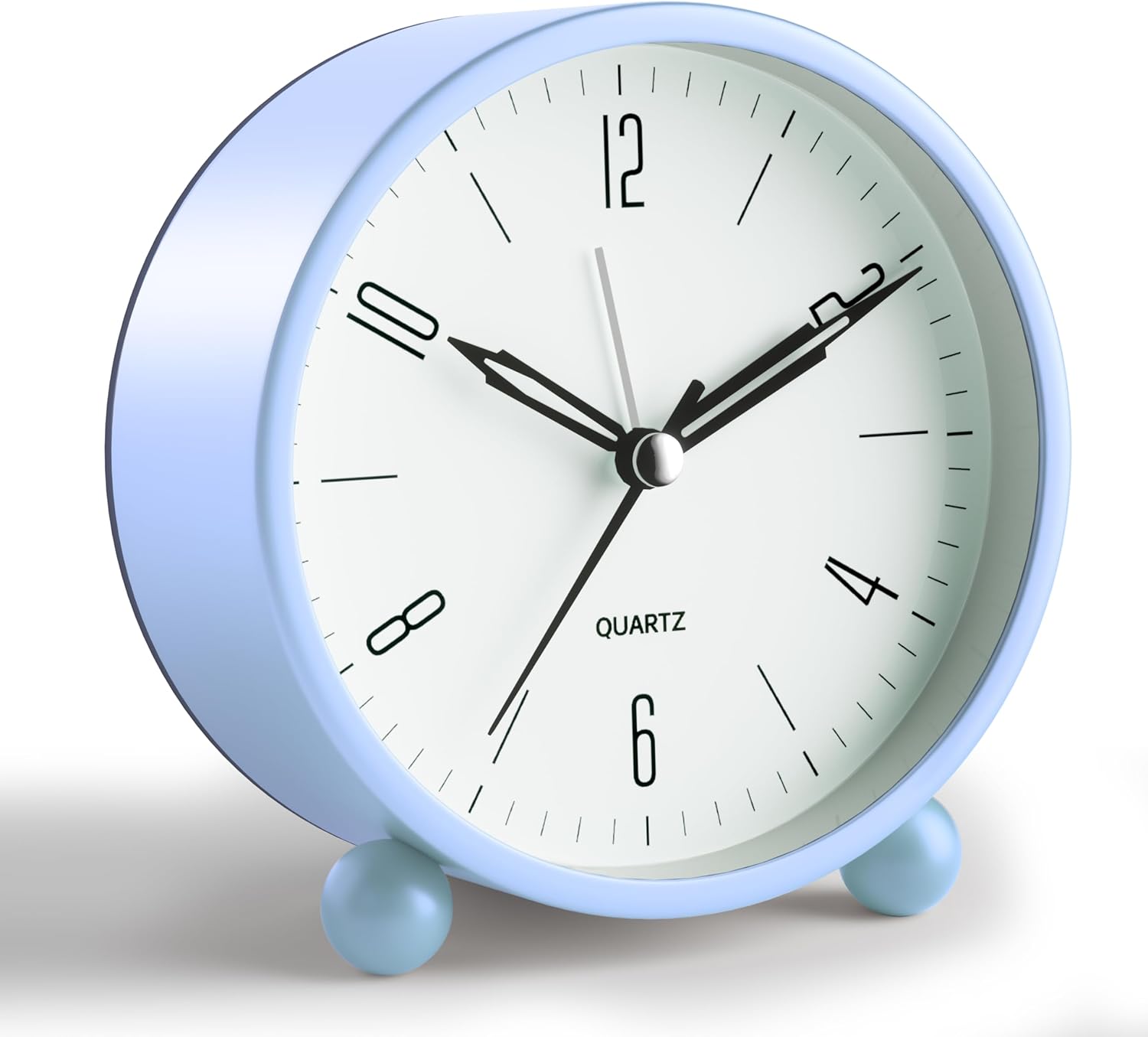
చిత్రం: The JALL Analog Alarm Clock in Skyblue, presented from a slight angle.
Thank you for choosing the JALL Analog Alarm Clock. This manual provides detailed instructions for setting up, operating, and maintaining your new alarm clock. Please read this manual thoroughly before use to ensure proper function and longevity of the product.
ఉత్పత్తి ముగిసిందిview
The JALL Analog Alarm Clock is designed for simplicity and reliability. Key features include a silent, non-ticking sweep second hand, a loud alarm, and a soft night light function. Its compact size makes it suitable for various settings.
ముఖ్య లక్షణాలు:
- నిశ్శబ్ద ఆపరేషన్: The sweep second hand moves continuously without producing any ticking noise, ensuring a quiet environment.
- లౌడ్ అలారం: An effective alarm designed to wake users, capable of sounding for up to 30 minutes.
- రాత్రి కాంతి: A soft, yellow light illuminates the clock dial when activated, providing visibility in the dark while being gentle on the eyes.
- బ్యాటరీ ఆపరేటింగ్: Requires one AA battery for all functions.
- మన్నికైన డిజైన్: Constructed from high-quality materials for reliable performance.

చిత్రం: The JALL Analog Alarm Clock positioned near a sleeping baby, visually representing its silent, non-ticking operation.
భాగాలు:
Refer to the image below for an illustration of the clock's components and controls located on the back panel.
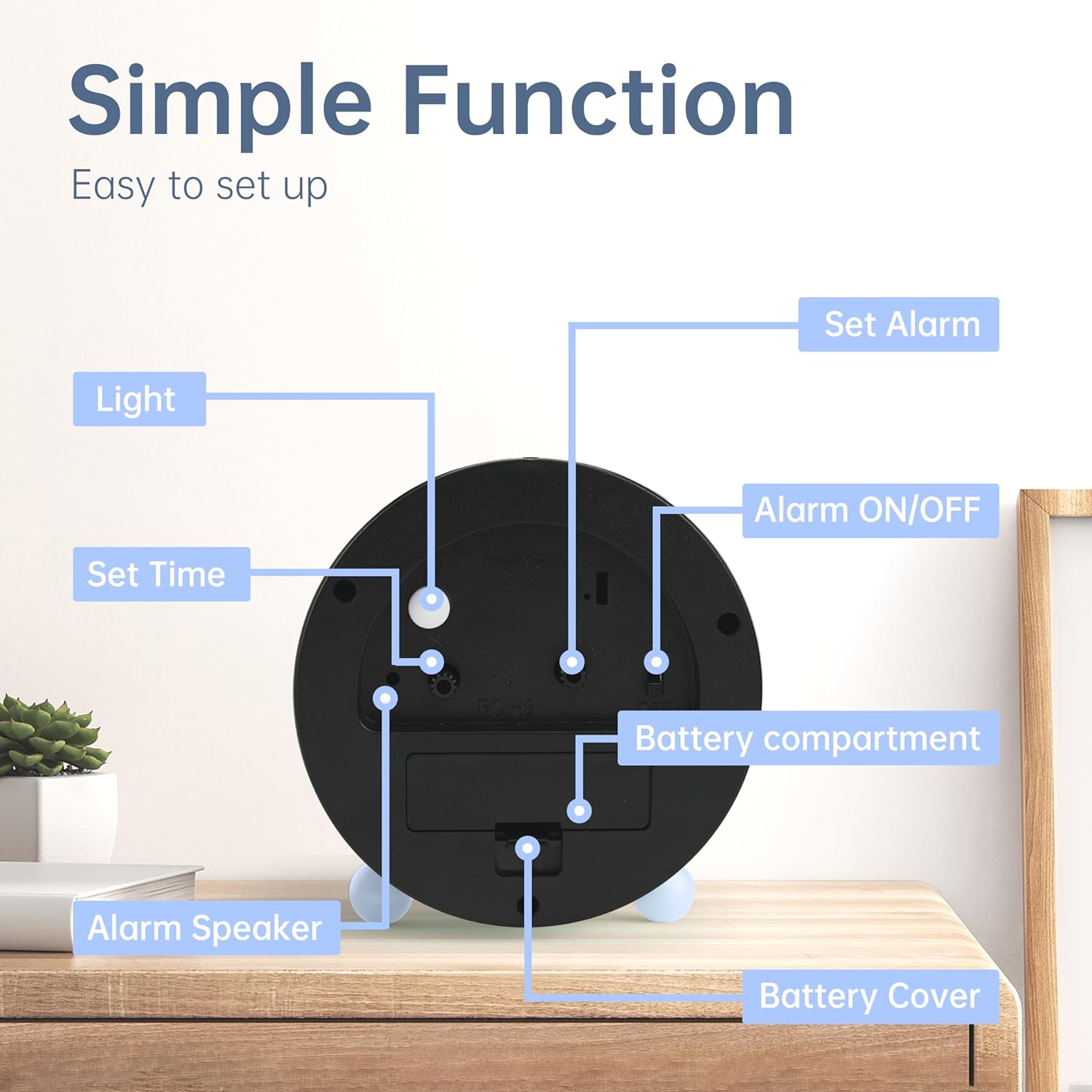
చిత్రం: వెనుక view of the JALL Analog Alarm Clock, highlighting and labeling its various controls and features, including the Light button, Set Time knob, Alarm Speaker, Battery Compartment, Battery Cover, Alarm ON/OFF switch, and Set Alarm knob.
- లైట్ బటన్: Press to activate the night light.
- Set Time Knob: Rotate to adjust the current time displayed by the hour and minute hands.
- Alarm Speaker: The component from which the alarm sound is emitted.
- బ్యాటరీ కంపార్ట్మెంట్: The housing for the AA battery.
- బ్యాటరీ కవర్: A removable cover that secures the battery within its compartment.
- అలారం ఆన్/ఆఫ్ స్విచ్: A toggle switch to enable or disable the alarm function.
- Set Alarm Knob: Rotate to adjust the position of the alarm hand to the desired alarm time.
సెటప్
1. బ్యాటరీ ఇన్స్టాలేషన్
- గడియారం వెనుక బ్యాటరీ కంపార్ట్మెంట్ను గుర్తించండి.
- Remove the battery cover by sliding or lifting it off.
- Insert one AA battery (not included), ensuring the correct polarity (+ and -) as indicated inside the compartment.
- బ్యాటరీ కవర్ను సురక్షితంగా మార్చండి.

చిత్రం: The JALL Analog Alarm Clock on a surface, with an overlay indicating the battery compartment and the requirement for a single AA battery.
2. ప్రస్తుత సమయాన్ని సెట్ చేయడం
- గుర్తించండి Set Time Knob on the back of the clock.
- Rotate this knob clockwise or counter-clockwise until the hour and minute hands display the correct current time.
ఆపరేటింగ్ సూచనలు
అలారం సెట్ చేస్తోంది
- గుర్తించండి Set Alarm Knob on the back of the clock.
- Rotate this knob to move the alarm hand to your desired alarm time.
- అలారంను యాక్టివేట్ చేయడానికి, అలారం ఆన్ / ఆఫ్ స్విచ్ to the "ON" position.
- అలారంను నిష్క్రియం చేయడానికి, అలారం ఆన్ / ఆఫ్ స్విచ్ to the "OFF" position.
నైట్ లైట్ ఉపయోగించి
- In low-light conditions, press and hold the లైట్ బటన్ on the back of the clock.
- The clock face will illuminate with a soft, yellow light.
- లైట్ ఆఫ్ చేయడానికి బటన్ను విడుదల చేయండి.

చిత్రం: The JALL Analog Alarm Clock in a dimly lit setting, showcasing its warm night light illuminating the clock face. An inset highlights the night light button on the clock's rear.
నిర్వహణ
క్లీనింగ్
- మృదువైన, పొడి వస్త్రంతో గడియారాన్ని తుడవండి.
- Do not use abrasive cleaners, chemical sprays, or solvents, as these may damage the clock's finish or internal components.
బ్యాటరీ భర్తీ
- When the clock hands begin to move slowly, or the alarm sound weakens, it indicates that the battery needs replacement.
- "సెటప్" విభాగంలో వివరించిన బ్యాటరీ ఇన్స్టాలేషన్ దశలను అనుసరించండి.
- Dispose of used batteries responsibly according to local environmental regulations.
ట్రబుల్షూటింగ్
| సమస్య | సాధ్యమైన కారణం | పరిష్కారం |
|---|---|---|
| Clock is not running or running slowly. | The AA battery is depleted or incorrectly installed. | Replace the AA battery, ensuring correct polarity (+ and -) alignment. |
| అలారం మోగడం లేదు. | The alarm function is not activated, the alarm time is incorrectly set, or the battery is low. | నిర్ధారించండి అలారం ఆన్ / ఆఫ్ స్విచ్ is in the "ON" position. Verify the alarm hand is accurately set to the desired wake-up time. Check and replace the battery if necessary. |
| రాత్రి దీపం పనిచేయడం లేదు. | బ్యాటరీ తక్కువగా ఉంది లేదా క్షీణించింది. | AA బ్యాటరీని భర్తీ చేయండి. |
| Clock makes a ticking noise. | This model is designed with a silent, non-ticking sweep second hand. A ticking noise indicates a potential malfunction. | Contact JALL customer support for further assistance. |
స్పెసిఫికేషన్లు
| ఫీచర్ | వివరాలు |
|---|---|
| బ్రాండ్ | జాల్ |
| మోడల్ | B08L4VPXGT |
| ప్రదర్శన రకం | అనలాగ్ |
| ప్రత్యేక లక్షణాలు | Alarm, Loud Alarm, Silent Clock, Night Light |
| శక్తి మూలం | బ్యాటరీ పవర్డ్ (1 x AA బ్యాటరీ, చేర్చబడలేదు) |
| ఉత్పత్తి కొలతలు | 4.25"W x 4.5"H (approximately 10.8 cm W x 11.4 cm H) |
| వస్తువు బరువు | 8.6 ఔన్సులు (సుమారు 244 గ్రాములు) |
| ఫ్రేమ్ మెటీరియల్ | యాక్రిలోనిట్రైల్ బుటాడిన్ స్టైరిన్ |
| రంగు | స్కైబ్లూ |
| ఇండోర్/అవుట్డోర్ వినియోగం | ఇండోర్ |

చిత్రం: The JALL Analog Alarm Clock displayed with its approximate width (4.25 inches) and height (4.5 inches) dimensions.
వారంటీ మరియు మద్దతు
JALL offers a 365-రోజుల వారంటీ on products sold on Amazon. This warranty covers manufacturing defects and ensures product reliability. For any questions, concerns, or support needs regarding your JALL Analog Alarm Clock, please contact JALL customer service through the Amazon platform or visit the official JALL store page for more information.
JALL Store: Visit the JALL Store on Amazon


