1. భద్రతా సమాచారం
Please read and understand all safety information and operating instructions before using this multimeter. Failure to follow these instructions may result in electric shock, fire, or damage to the meter.
- Always ensure the test leads are properly connected and the function switch is set to the correct range before making any measurements.
- వాల్యూమ్ను కొలవడానికి ప్రయత్నించవద్దుtages or currents exceeding the maximum rated values for this meter.
- లైవ్ సర్క్యూట్లతో పనిచేసేటప్పుడు చాలా జాగ్రత్తగా ఉండండి. అధిక వాల్యూమ్tagఇవి ప్రమాదకరం కావచ్చు.
- Never open the meter casing unless specifically instructed for battery or fuse replacement. Ensure test leads are disconnected before opening.
- Replace the battery when the low battery indicator appears to ensure accurate readings.
- మీటర్ దెబ్బతిన్నట్లు కనిపిస్తే లేదా టెస్ట్ లీడ్స్పై ఇన్సులేషన్ దెబ్బతిన్నట్లయితే దాన్ని ఉపయోగించవద్దు.
మూర్తి 1: వెనుక view of the Rebel MIE-RB-830 Multimeter, showing the battery compartment cover and a warning label. The label advises removing test leads before opening the case to avoid electrical shock and to install fuses with correct amp/volt ratings. It also indicates the power supply is a 9V battery, type NEDA 1604 9V 6F22.
2. ఉత్పత్తి ముగిసిందిview
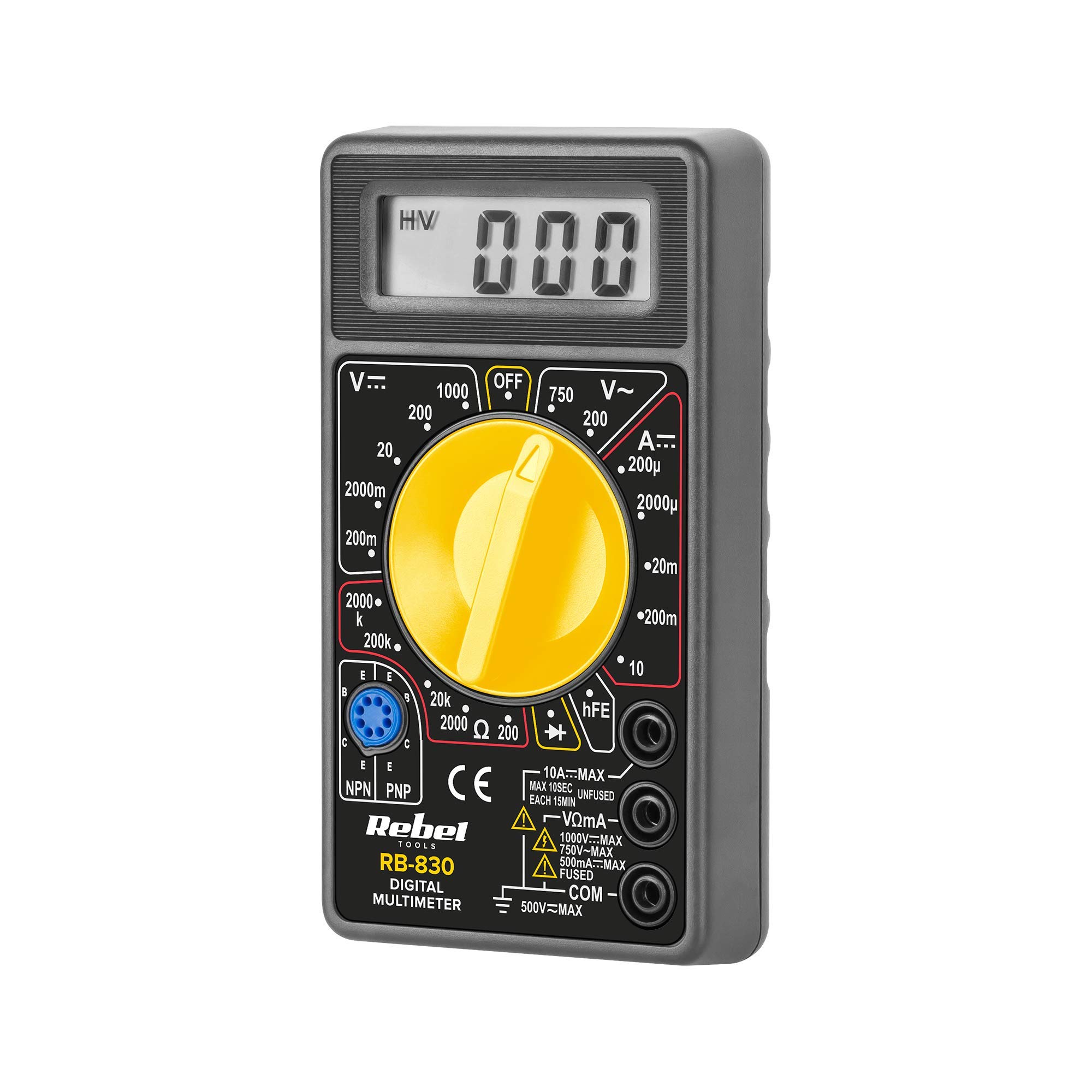
The Rebel MIE-RB-830 is a compact, battery-operated digital multimeter designed for measuring DC/AC voltage, DC current, resistance, diode, and transistor (hFE) values. It is suitable for general electrical testing and troubleshooting.
2.1. భాగాలు
- Digital Multimeter Unit
- పరీక్ష లీడ్లు (ఎరుపు మరియు నలుపు)
- 9V Battery (may be included or sold separately)
- వినియోగదారు మాన్యువల్ (ఈ పత్రం)

మూర్తి 2: The Rebel MIE-RB-830 Digital Multimeter shown with its accompanying red and black test leads. The multimeter features a large LCD display and a rotary function switch.

మూర్తి 3: క్లోజ్-అప్ view of the red and black test leads. These leads are essential for connecting the multimeter to the circuit under test.
3. సెటప్
3.1. బ్యాటరీ ఇన్స్టాలేషన్
- మల్టీమీటర్ ఆఫ్ చేయబడిందని మరియు అన్ని పరీక్ష లీడ్లు డిస్కనెక్ట్ చేయబడిందని నిర్ధారించుకోండి.
- మీటర్ వెనుక భాగంలో బ్యాటరీ కంపార్ట్మెంట్ కవర్ను గుర్తించండి (చిత్రం 1 చూడండి).
- Unscrew the retaining screw(s) and carefully remove the cover.
- Insert a new 9V battery (NEDA 1604 or 6F22 type), observing the correct polarity (+ and -).
- బ్యాటరీ కంపార్ట్మెంట్ కవర్ను మార్చి, దానిని స్క్రూ(లు)తో భద్రపరచండి.
3.2. టెస్ట్ లీడ్లను కనెక్ట్ చేయడం
- కనెక్ట్ చేయండి ఎరుపు test lead to the "VΩmA" input jack.
- కనెక్ట్ చేయండి నలుపు test lead to the "COM" (common) input jack.
- For current measurements exceeding 200mA (up to 10A), connect the red test lead to the "10A" input jack.
4. ఆపరేటింగ్ సూచనలు
4.1. ఫంక్షన్ ఎంపిక
Turn the rotary switch to the desired measurement function and range. Always start with a higher range if the approximate value is unknown to prevent overloading the meter.
4.2. DC వాల్యూమ్ను కొలవడంtagఇ (వి–)
- రోటరీ స్విచ్ను కావలసిన DC వాల్యూమ్కు సెట్ చేయండిtage (V–) range (e.g., 20V, 200V).
- ఎరుపు పరీక్ష తాడును సర్క్యూట్ యొక్క సానుకూల (+) వైపుకు మరియు నలుపు పరీక్ష తాడును ప్రతికూల (-) వైపుకు కనెక్ట్ చేయండి.
- సంపుటాన్ని చదవండిtagఎల్సిడి డిస్ప్లేపై ఇ విలువ.
4.3. AC వాల్యూమ్ను కొలవడంtagఇ (వి ∼)
- రోటరీ స్విచ్ను కావలసిన AC వాల్యూమ్కు సెట్ చేయండిtage (V∼) పరిధి (ఉదా., 200V, 750V).
- AC వాల్యూమ్ అంతటా టెస్ట్ లీడ్లను కనెక్ట్ చేయండి.tagఇ మూలం.
- సంపుటాన్ని చదవండిtagఎల్సిడి డిస్ప్లేపై ఇ విలువ.
4.4. DC కరెంట్ను కొలవడం (A–)
జాగ్రత్త: To measure current, the meter must be connected in series with the circuit. Never connect the meter in parallel with a voltage source when in current mode, as this can damage the meter and the circuit.
- Set the rotary switch to the desired DC Current (A–) range (e.g., 20mA, 200mA, 10A).
- For currents up to 200mA, ensure the red lead is in the "VΩmA" jack. For currents up to 10A, move the red lead to the "10A" jack.
- కరెంట్ కొలవవలసిన సర్క్యూట్ను తెరిచి, మీటర్ను సిరీస్లో కనెక్ట్ చేయండి.
- LCD డిస్ప్లేలో ప్రస్తుత విలువను చదవండి.
4.5. Measuring Resistance (Ω)
జాగ్రత్త: Ensure the circuit or component under test is de-energized before measuring resistance.
- Set the rotary switch to the desired Resistance (Ω) range (e.g., 200Ω, 2kΩ, 200kΩ).
- కొలవవలసిన భాగం లేదా సర్క్యూట్ అంతటా పరీక్ష లీడ్లను కనెక్ట్ చేయండి.
- LCD డిస్ప్లేలో నిరోధక విలువను చదవండి.
4.6. Diode Test (→|–)
- Set the rotary switch to the Diode Test (→|–) position.
- ఎరుపు పరీక్ష లీడ్ను డయోడ్ యొక్క ఆనోడ్కు మరియు నలుపు పరీక్ష లీడ్ను కాథోడ్కు అనుసంధానించండి.
- డిస్ప్లే ఫార్వర్డ్ వాల్యూమ్ను చూపుతుందిtage డ్రాప్ (సాధారణంగా సిలికాన్ డయోడ్లకు 0.5V నుండి 0.8V వరకు).
- లీడ్లను రివర్స్ చేయండి. మంచి డయోడ్ కోసం డిస్ప్లే "OL" (ఓపెన్ లూప్) చూపించాలి.
4.7. Transistor (hFE) Test
- రోటరీ స్విచ్ను hFE స్థానానికి సెట్ చేయండి.
- ట్రాన్సిస్టర్ NPN లేదా PNP అని గుర్తించండి.
- Insert the transistor's emitter, base, and collector leads into the corresponding sockets on the hFE test socket.
- డిస్ప్లేపై hFE (DC కరెంట్ గెయిన్) విలువను చదవండి.
5. నిర్వహణ
5.1. బ్యాటరీ భర్తీ
When the low battery indicator appears on the display, replace the 9V battery as described in Section 3.1. Using a low battery can lead to inaccurate readings.
5.2. ఫ్యూజ్ ప్రత్యామ్నాయం
If the current measurement function stops working, the fuse may need replacement. This operation should only be performed by qualified personnel.
- మల్టీమీటర్ ఆఫ్ చేయబడిందని మరియు అన్ని పరీక్ష లీడ్లు డిస్కనెక్ట్ చేయబడిందని నిర్ధారించుకోండి.
- Open the back casing of the meter (this may involve more screws than just the battery compartment).
- Locate the blown fuse and replace it with a fuse of the exact same type and rating (e.g., F200mA/250V for mA range, F10A/250V for 10A range). Refer to the internal markings or specifications for precise fuse ratings.
- Carefully reassemble the meter, ensuring all screws are tightened.
5.3. శుభ్రపరచడం
Wipe the meter with a damp cloth and mild detergent. Do not use abrasives or solvents. Keep the meter dry.
6. ట్రబుల్షూటింగ్
| సమస్య | సాధ్యమైన కారణం | పరిష్కారం |
|---|---|---|
| డిస్ప్లే లేదు లేదా మసక డిస్ప్లే | తక్కువ లేదా చనిపోయిన బ్యాటరీ | 9 వి బ్యాటరీని మార్చండి. |
| సరికాని రీడింగ్లు | Low battery; Incorrect range selection; Poor test lead connection | Replace battery; Select appropriate range; Ensure leads are firmly connected. |
| కరెంట్ కొలత పనిచేయడం లేదు | Blown fuse; Incorrect lead connection for current | Replace fuse (see Section 5.2); Ensure red lead is in "VΩmA" or "10A" jack as appropriate. |
| "OL" (ఓవర్లోడ్) ప్రదర్శించబడింది | Measured value exceeds selected range; Open circuit (for resistance/continuity) | అధిక పరిధిని ఎంచుకోండి; బ్రేక్ల కోసం సర్క్యూట్ను తనిఖీ చేయండి. |
7. స్పెసిఫికేషన్లు
| కొలత ఫంక్షన్ | పరిధి | ఖచ్చితత్వం |
|---|---|---|
| DC సంtagఇ (వి–) | 200mV, 2V, 20V, 200V, 1000V | ±(0.5% + 2 అంకెలు) |
| AC వాల్యూమ్tagఇ (వి ∼) | 200V, 750V | ±(1.2% + 10 అంకెలు) |
| DC Current (A–) | 200μA, 2mA, 20mA, 200mA, 10A | ±(1.0% + 2 అంకెలు) |
| ప్రతిఘటన (Ω) | 200Ω, 2kΩ, 20kΩ, 200kΩ, 2MΩ | ±(0.8% + 2 అంకెలు) |
| డయోడ్ టెస్ట్ | అవును | ఫార్వార్డ్ వాల్యూమ్tagఇ డ్రాప్ |
| ట్రాన్సిస్టర్ (hFE) పరీక్ష | అవును | hFE value |
| విద్యుత్ సరఫరా | 9V Battery (NEDA 1604 or 6F22) | |
| ప్రదర్శించు | 3½ Digit LCD, Max. 1999 | |
| కొలతలు | సుమారు. 13.5 x 10 x 4 సెం.మీ. | |
| బరువు | సుమారు 107 గ్రాములు (బ్యాటరీ లేకుండా) | |
| ఆపరేటింగ్ ఉష్ణోగ్రత | 0°C నుండి 40°C (32°F నుండి 104°F) | |
| నిల్వ ఉష్ణోగ్రత | -10°C నుండి 50°C (14°F నుండి 122°F) | |
| భద్రతా ప్రమాణాలు | CE, RoHS |
8. వారంటీ మరియు మద్దతు
This Rebel MIE-RB-830 Digital Multimeter is covered by a standard manufacturer's warranty against defects in materials and workmanship. Please refer to the warranty card included with your purchase or contact your retailer for specific warranty terms and conditions.
For technical support or service inquiries, please contact the point of purchase or visit the official Rebel webసంప్రదింపు సమాచారం కోసం సైట్.


