పరిచయం
This manual provides detailed instructions for the setup, operation, and maintenance of your Roborock S6 MaxV Robot Vacuum Cleaner. Please read this manual thoroughly before using the product to ensure optimal performance and safety.

The Roborock S6 MaxV is a sophisticated robotic vacuum cleaner designed for automated floor cleaning, featuring advanced navigation and mopping capabilities.
కీ ఫీచర్లు
ReactiveAI అడ్డంకి గుర్తింపు
The S6 MaxV utilizes twin cameras and proprietary ReactiveAI technology to recognize and avoid common household obstacles, including pet waste, shoes, and power cords. This intelligent system ensures a worry-free cleaning experience by preventing collisions and getting stuck.

Equipped with twin cameras, the Roborock S6 MaxV uses ReactiveAI to identify and navigate around various objects on the floor, such as power strips and footwear, ensuring uninterrupted cleaning.

The ReactiveAI system is designed to detect and avoid unexpected obstacles, such as pet accidents or spilled items, preventing messes and ensuring a smooth cleaning process.
ప్రెసిషన్ LiDAR నావిగేషన్
Equipped with Precision LiDAR navigation, the S6 MaxV accurately maps your home, allowing for efficient and systematic cleaning paths. This technology enables the creation of detailed floor plans for customized cleaning options, day or night.
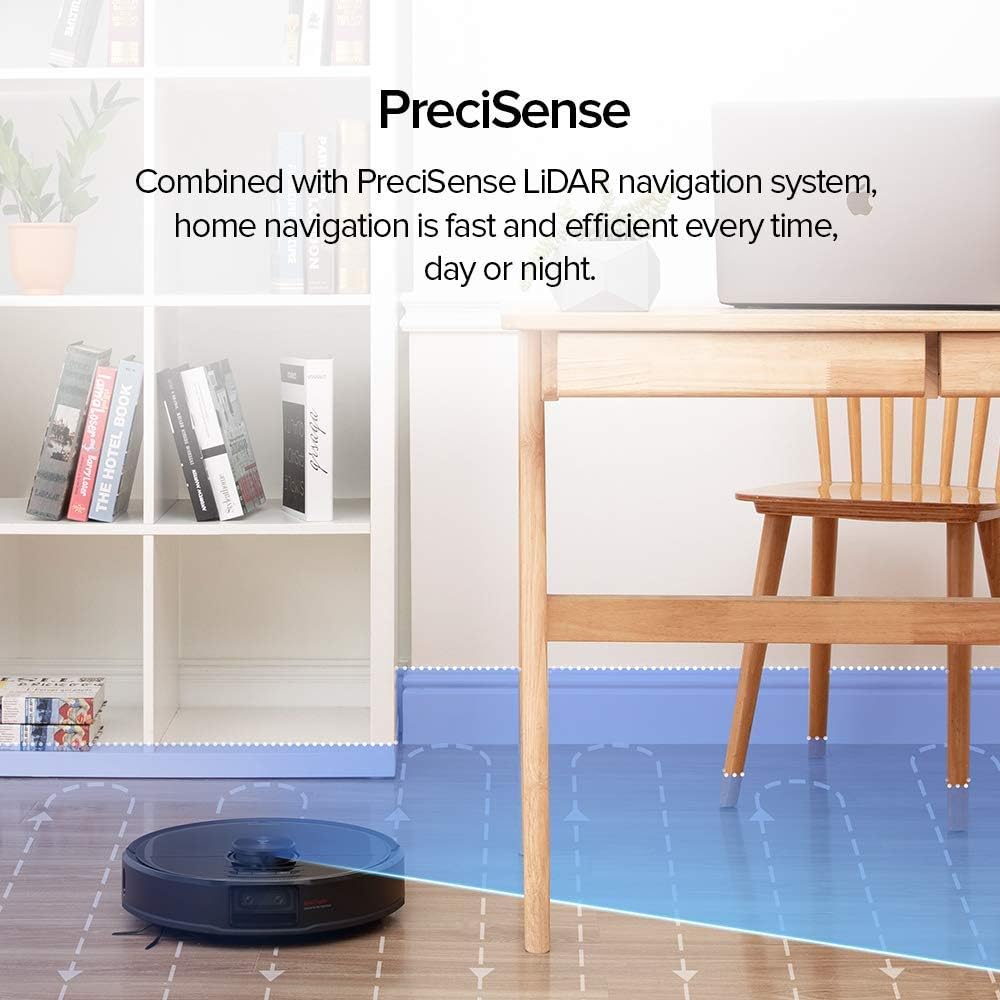
The robot vacuum employs PreciSense LiDAR navigation to create precise maps of your home, facilitating efficient and thorough cleaning by understanding its environment.

The Roborock S6 MaxV supports multi-floor mapping, allowing users to define independent No-go Zones, Invisible Walls, and No-mop Zones for each level of their home.
Intelligent Mopping System
The S6 MaxV features an intelligent mopping system with app-controlled customization. You can schedule mopping, define room-specific mopping areas, adjust water flow, and set No-Mop Zones to protect carpets and rugs.

The Roborock S6 MaxV's 297ml SnapMop system offers advanced mopping features, controllable via the app to adjust water levels and define mopping areas.
శక్తివంతమైన చూషణ
With a maximum suction power of 2500Pa, the S6 MaxV delivers deep cleaning performance, effectively removing dust, dirt, and debris from various floor types.

ఒక అంతర్గత view of the Roborock S6 MaxV highlights its powerful 2500Pa suction, capable of picking up diverse particles like oats, pet hair, dirt, and small candies.
సెటప్
అన్ప్యాకింగ్ మరియు ప్లేస్మెంట్
Carefully remove all packaging materials. Place the charging dock against a wall on a hard, level surface, ensuring there is adequate clear space around it (at least 0.5m on both sides and 1.5m in front). Connect the power cable to the charging dock.
రోబోట్ను ఛార్జ్ చేస్తోంది
Place the Roborock S6 MaxV onto the charging dock. The indicator light will pulse, indicating it is charging. For first-time use, fully charge the robot before operation.
యాప్కి కనెక్ట్ చేస్తోంది
Download the Roborock app from your mobile device's app store. Follow the in-app instructions to connect your robot vacuum to your Wi-Fi network and complete the initial setup. This will enable advanced features like mapping, scheduling, and zone cleaning.
ఆపరేటింగ్ సూచనలు
శుభ్రపరచడం ప్రారంభించడం
Press the power button on the robot or use the Roborock app to start a cleaning cycle. The robot will automatically map its environment and begin cleaning.
పాజ్ చేయడం మరియు పునఃప్రారంభించడం
Press any button on the robot or use the app to pause a cleaning cycle. Press the power button again or use the app to resume cleaning.
డాక్కు తిరిగి వస్తోంది
రోబోట్ను దాని ఛార్జింగ్ డాక్కు తిరిగి పంపడానికి రోబోట్లోని హోమ్ బటన్ను నొక్కండి లేదా యాప్ని ఉపయోగించండి.
Customizing Cleaning
Use the Roborock app to set up No-go Zones, Invisible Walls, and No-mop Zones. You can also schedule cleaning times, select specific rooms for cleaning, and adjust suction power and water flow levels.
నిర్వహణ
Regular maintenance ensures the longevity and optimal performance of your Roborock S6 MaxV.
డస్ట్బిన్ను ఖాళీ చేయడం
Open the top cover of the robot and remove the dustbin. Open the dustbin cover and empty its contents. It is recommended to empty the dustbin after each cleaning cycle.
ఫిల్టర్ శుభ్రపరచడం
Remove the filter from the dustbin. Tap the filter against a trash can to remove loose dirt. The filter can be rinsed with water; ensure it is completely dry before reinserting.
ప్రధాన బ్రష్ శుభ్రపరచడం
Flip the robot over and remove the main brush cover. Take out the main brush and use the cleaning tool to remove tangled hair and debris. Reinstall the brush and cover.
సైడ్ బ్రష్ క్లీనింగ్
Inspect the side brush for tangled hair or debris. If necessary, remove the screw holding the side brush, clean it, and reattach.
శుభ్రపరిచే సెన్సార్లు
Wipe all sensors (cliff sensors, wall sensor, charging contacts) with a soft, dry cloth to ensure proper functionality.
మాప్ క్లాత్ క్లీనింగ్
Remove the mop cloth from the water tank. Rinse the mop cloth thoroughly with water and allow it to air dry completely before reattaching.
ట్రబుల్షూటింగ్
If you encounter issues with your Roborock S6 MaxV, refer to the following common problems and solutions:
- రోబోట్ ఛార్జింగ్ లేదు: Ensure the charging dock is powered on and the robot is properly aligned with the charging contacts. Clean the charging contacts on both the robot and the dock.
- రోబో తరచుగా ఇరుక్కుపోతోంది: Clear obstacles from the cleaning path. Ensure the ReactiveAI cameras are clean. Check for tangled wires or small objects.
- పేలవమైన శుభ్రపరిచే పనితీరు: Empty the dustbin and clean the filter. Clean the main brush and side brush. Adjust suction power settings in the app.
- తుడవడం ప్రభావవంతంగా లేదు: Ensure the water tank is filled and the mop cloth is clean and properly attached. Check water flow settings in the app.
- యాప్ కనెక్టివిటీ సమస్యలు: మీ Wi-Fi నెట్వర్క్ స్థిరంగా ఉందని మరియు రోబోట్ పరిధిలో ఉందని నిర్ధారించుకోండి. రోబోట్ మరియు మీ రౌటర్ను పునఃప్రారంభించండి. అవసరమైతే యాప్తో రోబోట్ను తిరిగి జత చేయండి.
For persistent issues, consult the Roborock app for further diagnostics or contact customer support.
స్పెసిఫికేషన్లు
| ఫీచర్ | వివరాలు |
|---|---|
| బ్రాండ్ | రోబోరాక్ |
| మోడల్ పేరు | MaxV |
| ప్రత్యేక ఫీచర్ | జలనిరోధిత |
| రంగు | S6max V |
| ఫిల్టర్ రకం | వస్త్రం, గుళిక |
| శక్తి మూలం | బ్యాటరీ ఆధారితమైనది |
| బ్యాటరీలు ఉన్నాయి | Yes (1 Lithium Metal) |
| నియంత్రణ పద్ధతి | యాప్ |
| అనుకూల పరికరాలు | అమెజాన్ ఎకో |
| ఫారమ్ ఫ్యాక్టర్ | రోబోటిక్ |
| UPC | 649661438137 |
| ప్యాకేజీ కొలతలు | 19.4 x 16 x 6 అంగుళాలు |
| వస్తువు బరువు | 12.1 పౌండ్లు |
| తయారీదారు | రోబోరాక్ |
| చూషణ శక్తి | 2500పా |
వారంటీ మరియు మద్దతు
Your Roborock S6 MaxV Robot Vacuum Cleaner comes with a 90-day limited warranty. For warranty claims, technical support, or further assistance, please refer to the contact information provided in the Roborock app or on the official Roborock webసైట్.


