పరిచయం
Welcome to the user manual for your EVERCROSS Hoverboard with Seat Attachment. This self-balancing scooter is designed for both adults and kids, offering an exciting and stable riding experience. It features a built-in Bluetooth speaker for music playback and vibrant LED lights for enhanced visibility and style. This manual provides essential information on setup, operation, maintenance, and safety to ensure you get the most out of your product.
భద్రతా సమాచారం
Your safety is paramount. Please read and understand all safety warnings and instructions before operating the hoverboard.
- హెల్మెట్, మోకాలి ప్యాడ్లు మరియు ఎల్బో ప్యాడ్లతో సహా ఎల్లప్పుడూ తగిన భద్రతా గేర్ను ధరించండి.
- Ensure the hoverboard is fully charged before each use.
- గరిష్ట లోడ్ సామర్థ్యం 220 పౌండ్లు (100 కిలోలు) మించకూడదు.
- Operate the hoverboard on flat, dry surfaces. Avoid wet, slippery, or uneven terrain.
- Children should only operate the hoverboard under adult supervision.
- Avoid sudden turns or rapid acceleration/deceleration, especially at high speeds.
- Be aware of your surroundings and other people or obstacles.
- Do not operate the hoverboard if it is damaged or malfunctioning.
ప్యాకేజీ విషయాలు
అన్ని అంశాలు ఉన్నాయని నిర్ధారించుకోవడానికి దయచేసి పెట్టెను ఎంచుకోండి:
- EVERCROSS Self-Balancing Hoverboard
- హోవర్బోర్డ్ సీట్ అటాచ్మెంట్
- పవర్ ఛార్జర్
- వినియోగదారు మాన్యువల్
సెటప్
ప్రారంభ ఛార్జింగ్
Before first use, fully charge your hoverboard. Connect the charger to the charging port on the hoverboard and then to a power outlet. The indicator light on the charger will change (e.g., from red to green) when charging is complete. Do not overcharge.
Assembling the Seat Attachment
The seat attachment transforms your hoverboard into a go-kart style ride. Follow these steps for assembly:
- Unpack all components of the seat attachment.
- Attach the main frame to the hoverboard using the sturdy straps provided. Ensure the straps are securely fastened around the hoverboard's footpads.
- Connect the handles and adjust the length of the frame to suit the rider's height for comfortable operation. The design allows for convenient adjustment.
- Ensure all connections are tight and secure before riding.

Image: The EVERCROSS Hoverboard in Rose Red, shown with its vibrant LED wheels, alongside the pink seat attachment. This image illustrates the complete product package.
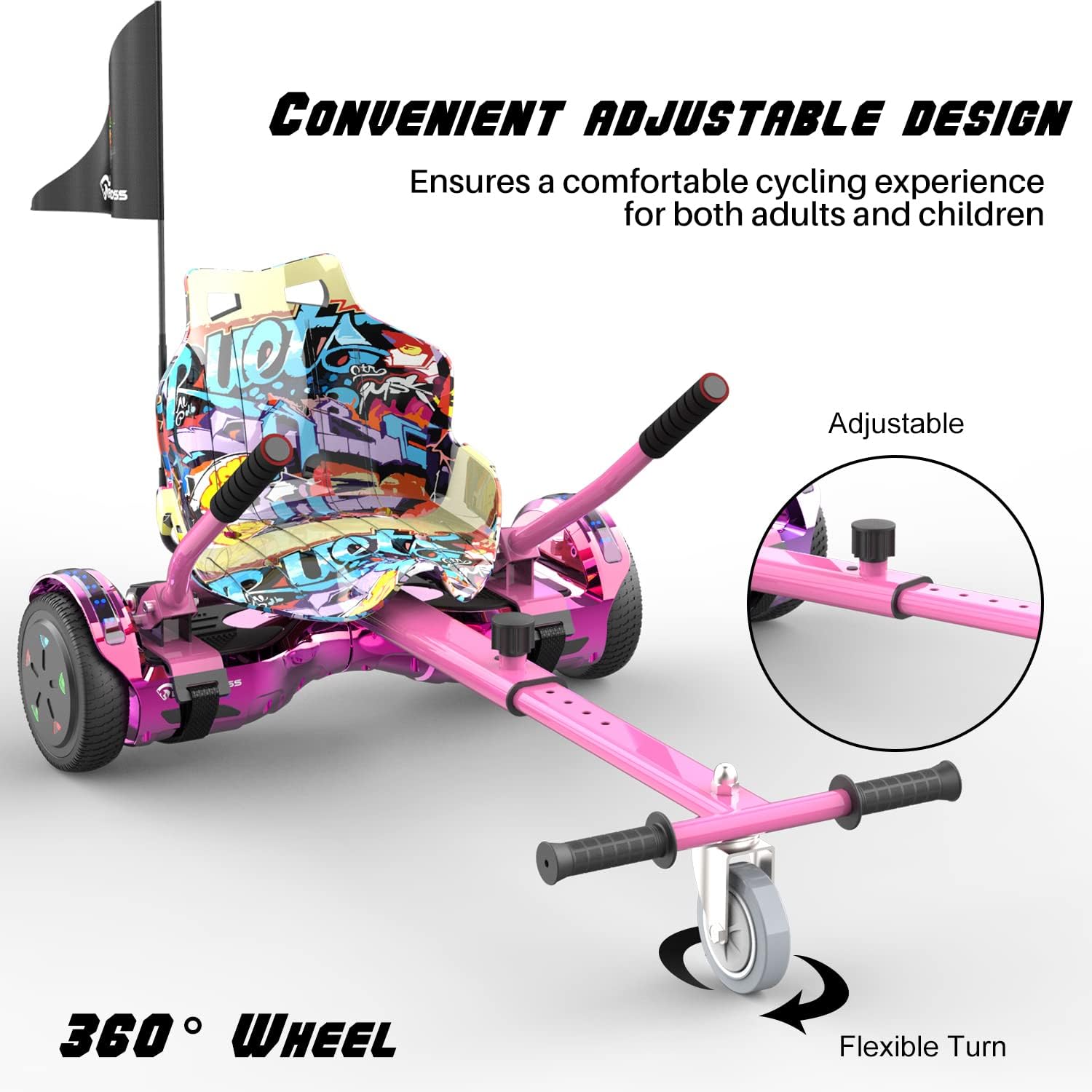
Image: A close-up of the hoverboard seat attachment, highlighting its adjustable frame and 360-degree swivel front wheel for flexible turning. This design ensures a comfortable experience for various rider heights.

చిత్రం: వివరణాత్మకం view of the seat attachment's components, including the sturdy strap for secure attachment to the hoverboard, soft sponge grips on the handles for comfort, and sweatproof material for durability during use.
ఆపరేటింగ్ సూచనలు
పవర్ ఆన్/ఆఫ్
Press the power button to turn the hoverboard on. The indicator lights will illuminate. To turn off, press and hold the power button until the lights extinguish.
Riding the Hoverboard (Standing Mode)
The EVERCROSS hoverboard features an advanced self-balancing system. To ride:
- Place one foot firmly on a footpad.
- Quickly place your second foot on the other footpad. The hoverboard will self-balance.
- Lean slightly forward to move forward, and lean backward to slow down or reverse.
- To turn, apply more pressure with the foot on the side opposite to the desired turn (e.g., press left footpad to turn right).
- To dismount, step off one foot at a time, preferably backward.
Using the Seat Attachment (Riding Mode)
Once the seat attachment is securely installed:
- Sit comfortably on the seat.
- Use the hand levers to control movement. Pushing both levers forward moves the hoverboard forward. Pulling both levers back moves it backward.
- To turn, push one lever forward while pulling the other back (e.g., push left lever forward and pull right lever back to turn right).
- The 360-degree wheel on the seat attachment allows for flexible and agile turns.
బ్లూటూత్ స్పీకర్ ఆపరేషన్
Your hoverboard is equipped with a high-quality Bluetooth speaker:
- Ensure the hoverboard is powered on.
- మీ మొబైల్ పరికరంలో బ్లూటూత్ని ప్రారంభించండి.
- కోసం వెతకండి available Bluetooth devices and select "EVERCROSS" or a similar name.
- Once connected, you can play music through the hoverboard's speaker while riding.

Image: The EVERCROSS Hoverboard with a graphic indicating its Bluetooth connectivity and surround sound system. This highlights the ability to play music directly from the hoverboard.
నిర్వహణ
Proper maintenance will extend the life of your EVERCROSS Hoverboard:
- శుభ్రపరచడం: ఒక మృదువైన ఉపయోగించండి, డిamp cloth to wipe down the hoverboard. Do not use harsh chemicals or abrasive cleaners. Avoid getting water into electronic components.
- నిల్వ: Store the hoverboard in a cool, dry place away from direct sunlight and extreme temperatures. If storing for an extended period, ensure the battery is charged to about 50% to prevent deep discharge.
- బ్యాటరీ సంరక్షణ: Charge the battery regularly, even if not in use, to maintain its health. Avoid completely draining the battery.
- టైర్ తనిఖీ: Periodically check the 6.5-inch solid tires for wear and tear.
- సాధారణ తనిఖీ: Before each ride, inspect the hoverboard and seat attachment for any loose parts, damage, or unusual noises.
ట్రబుల్షూటింగ్
ఇక్కడ కొన్ని సాధారణ సమస్యలు మరియు వాటి పరిష్కారాలు ఉన్నాయి:
| సమస్య | సాధ్యమైన కారణం | పరిష్కారం |
|---|---|---|
| Hoverboard not turning on | బ్యాటరీ తక్కువగా ఉంది; పవర్ బటన్ సరిగ్గా నొక్కబడలేదు. | Charge the hoverboard; Press and hold the power button firmly |
| Hoverboard not balancing | Rider not centered; Calibration needed | Ensure feet are centered on footpads; Refer to calibration instructions in full manual (if applicable) |
| బ్లూటూత్ కనెక్ట్ కావడం లేదు | Hoverboard not in pairing mode; Device Bluetooth off | Ensure hoverboard is on; Turn on Bluetooth on your device and search for "EVERCROSS" |
| తగ్గిన పరిధి లేదా వేగం | Low battery; Overload; Road conditions | Fully charge battery; Ensure rider weight is within limits; Ride on smooth, flat surfaces |
స్పెసిఫికేషన్లు
Key technical specifications for the EVERCROSS Hoverboard:
| ఫీచర్ | వివరాలు |
|---|---|
| మోడల్ పేరు | EVERCROSS Hoverboard (HY-A21) |
| మోటార్ పవర్ | 2 x 350W Dual Engines |
| గరిష్ట వేగం | 10 MPH (15 KM/H) వరకు |
| క్రూజింగ్ రేంజ్ | Up to 10 miles (dependent on load, road conditions, battery level) |
| గరిష్ట లోడ్ కెపాసిటీ | 220 పౌండ్లు (100 కిలోలు) |
| టైర్ పరిమాణం | 6.5 inch Solid Tires |
| మెటీరియల్ | High Quality ABS Polymer, Rubber |
| గ్రేడబిలిటీ | <15° |
| ఫీచర్లు | Bluetooth Speaker, LED Lights, Self-Balancing System |

Image: A graphic illustrating the core features of the EVERCROSS Hoverboard, including its powerful dual motors, thick wide tires, shock absorption, intelligent self-balancing technology, dazzling color lamps, weightless power-off protection, upgraded motherboard, and long-lasting battery life.

చిత్రం: ఒక అంతర్గత view graphic of the hoverboard's 'Super Power Engine', detailing its capabilities such as a maximum speed of 15 KM/H, gradeability of less than 15 degrees, 360-degree rotating ability, and low operational noise.
వారంటీ మరియు మద్దతు
EVERCROSS products are manufactured with high-quality materials and undergo strict quality control. For warranty information, product support, or to report any issues, please refer to the contact details provided in your product packaging or visit the official EVERCROSS website. Please have your model number (HY-A21) and purchase information ready when contacting support.


