1. పరిచయం
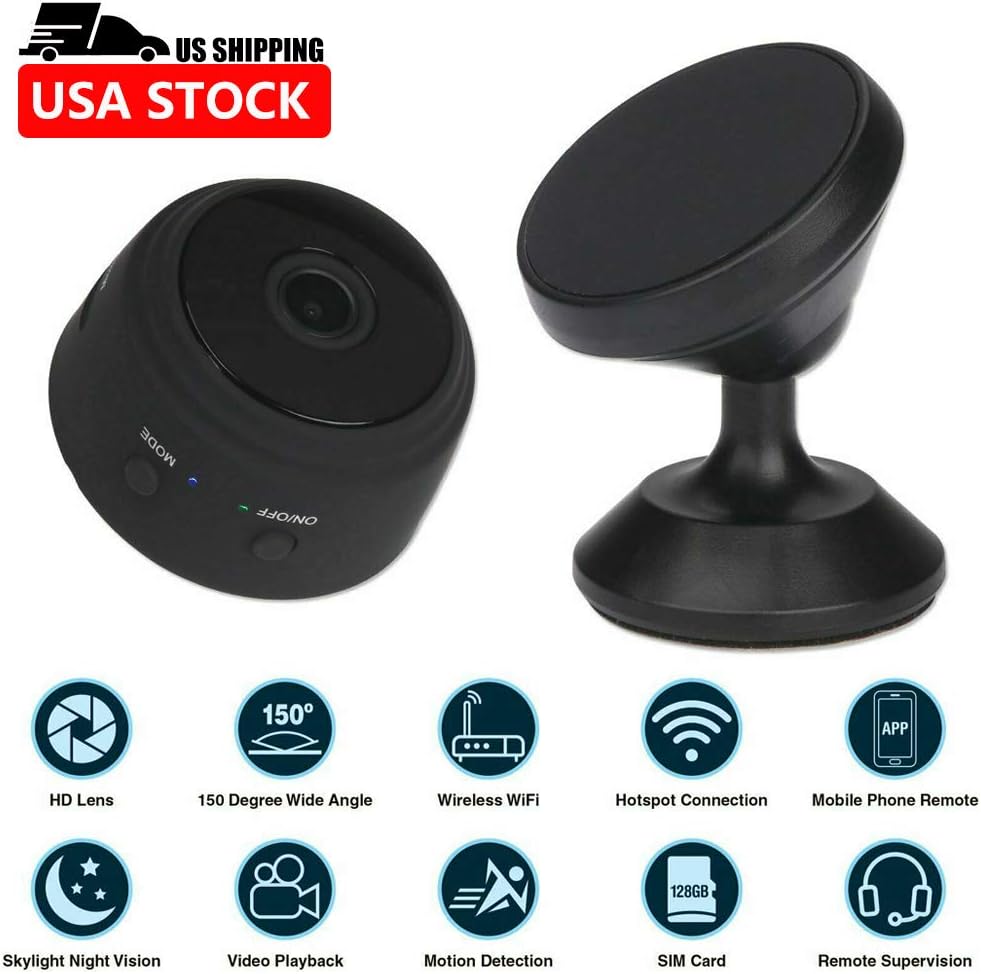
The A9 Mini Camera is a compact and versatile wireless IP camera designed for home and office security, surveillance, and general monitoring. Featuring 1080P HD video recording, 150-degree wide-angle viewing, night vision capabilities, and smart motion detection, this camera offers comprehensive monitoring solutions. Its ultra-miniature design and multiple installation options make it suitable for various indoor and outdoor applications. This manual provides detailed instructions for setup, operation, maintenance, and troubleshooting to ensure optimal performance of your device.
2. ప్యాకేజీ విషయాలు
క్రింద జాబితా చేయబడిన అన్ని వస్తువులు మీ ప్యాకేజీలో చేర్చబడ్డాయని దయచేసి ధృవీకరించండి:
- 1 x A9 Mini Camera
- 1 x Camera Holder
- 1 x Standard USB Cable
- 1 x Flexible Gooseneck USB Cable
- 1 x వినియోగదారు మాన్యువల్

3. ఉత్పత్తి ముగిసిందిview
Familiarize yourself with the components of your A9 Mini Camera:

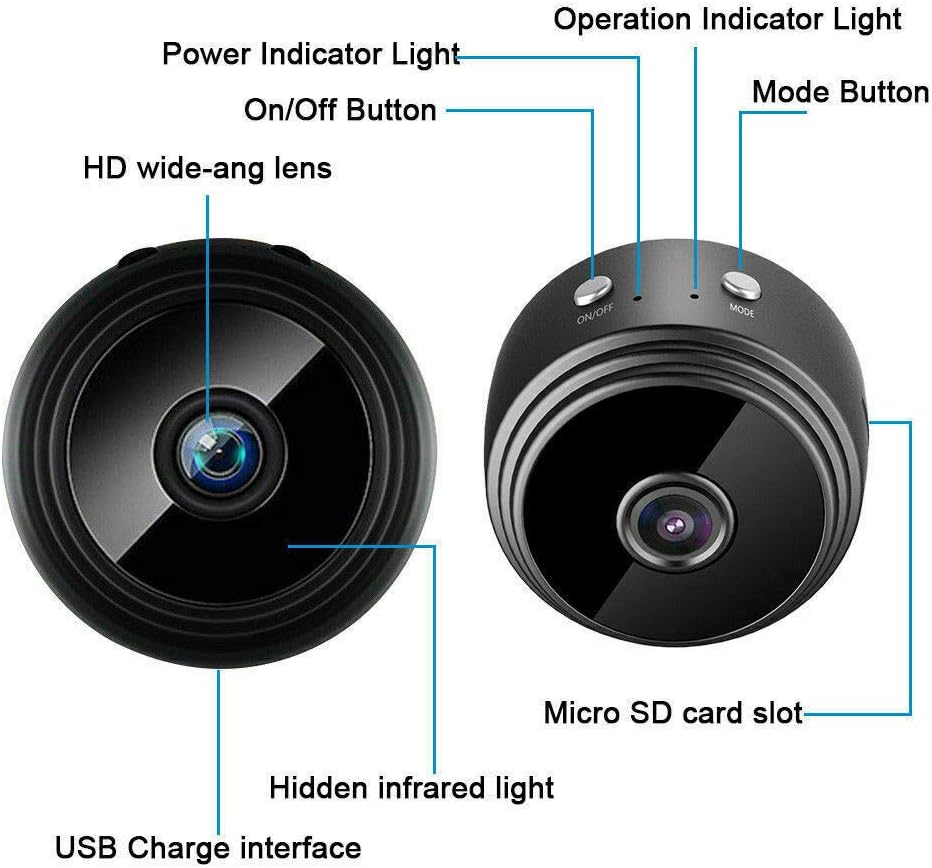
- HD wide-angle lens: Captures 1080P video with a 150-degree viewing కోణం.
- ఆన్/ఆఫ్ బటన్: పరికరాన్ని ఆన్ లేదా ఆఫ్ చేస్తుంది.
- శక్తి సూచిక కాంతి: శక్తి స్థితిని సూచిస్తుంది.
- ఆపరేషన్ ఇండికేటర్ లైట్: Shows current operating mode (e.g., recording, standby).
- మోడ్ బటన్: వివిధ ఆపరేటింగ్ మోడ్ల మధ్య మారుతుంది.
- మైక్రో SD కార్డ్ స్లాట్: For inserting a TF card (not included) for local storage.
- Hidden infrared light: Enables night vision capabilities.
- USB Charge interface: For charging the camera and connecting to power.
4. సెటప్
4.1 ఇన్స్టాలేషన్ పద్ధతులు
The A9 Mini Camera offers flexible installation options:
- With Holder: Place the camera on the included holder for stable placement on countertops, desks, or flat surfaces.
- అంతర్నిర్మిత మాగ్నెట్: The camera features a powerful built-in magnet, allowing it to be easily attached to metal surfaces such as table legs, refrigerators, or metal shelves.
- Flexible Gooseneck USB Cable: Use the flexible gooseneck USB cable to power the camera and adjust its angle. This can be inserted directly into a PC USB port or a USB power adapter.

4.2 Initial Setup (App & Power)
- అనువర్తనాన్ని డౌన్లోడ్ చేయండి: Download the compatible application to your smartphone or tablet. The camera supports Android and iOS mobile operating systems.
- పవర్ ఆన్: Connect the camera to a power source using the provided USB cable. The camera will power on automatically or can be turned on using the On/Off button.
- Wi-Fi కనెక్షన్: Proceed to connect the camera to your Wi-Fi network as described in the next section.
4.3 Wi-Fi Connection Methods
There are two primary methods for connecting your camera to Wi-Fi:
- Wireless Wi-Fi Connection (via Router): Connect the camera to your home or office Wi-Fi router. This allows for remote control and viewing from anywhere with an internet connection.
- Camera's Built-in Wi-Fi Hotspot: The camera has a built-in Wi-Fi hotspot. You can directly connect your phone to this hotspot. This method allows for remote control within approximately 10 meters, even if your phone does not have an internet connection.
5. ఆపరేటింగ్ సూచనలు
5.1 రికార్డింగ్ మోడ్లు
The A9 Mini Camera supports three recording modes:
- 24H Recording: The camera records continuously throughout the day (default mode).
- చలన గుర్తింపు: Recording starts automatically when motion is detected within the camera's field of view.
- టైమర్: Set a specific schedule for the camera to record, allowing for customized recording periods.
౪.౧.౧౦ నైట్ విజన్
The camera is equipped with hidden infrared lights, enabling clear video recording in low-light conditions or complete darkness. Night vision activates automatically when ambient light levels are insufficient.
5.3 మోషన్ డిటెక్షన్
When motion detection is enabled, the camera will begin recording when it senses movement. This feature helps conserve storage space and battery life by only recording when an event occurs. Alerts can be configured through the mobile application.
5.4 Multi-Platform and Multi-User Support
The A9 Mini Camera supports viewing and control from multiple platforms, including Android, iOS, Windows, and Mac OS. Multiple users can also access the camera feed simultaneously from different devices (phone and computer).
5.5 Recording Without Wi-Fi
The camera can record video even without a Wi-Fi connection. Simply insert a Micro SD card (TF card, not included) into the camera's slot. The camera will automatically record HD video to the Micro SD card. This is useful for situations where Wi-Fi is unavailable or unreliable.
6. నిర్వహణ
- శుభ్రపరచడం: కెమెరా లెన్స్ మరియు బాడీని శుభ్రం చేయడానికి మృదువైన, పొడి వస్త్రాన్ని ఉపయోగించండి. ద్రవ క్లీనర్లు లేదా రాపిడి పదార్థాలను ఉపయోగించడం మానుకోండి.
- ఉష్ణోగ్రత మరియు తేమ: Store and operate the camera within the specified temperature and humidity ranges to prevent damage. Avoid extreme heat, cold, or high humidity.
- నిల్వ: When not in use for extended periods, ensure the camera is fully charged and stored in a cool, dry place.
- ఫర్మ్వేర్ నవీకరణలు: తయారీదారుని తనిఖీ చేయండి website or the mobile application periodically for any available firmware updates to ensure optimal performance and security.
7. ట్రబుల్షూటింగ్
- కెమెరా ఆన్ చేయడం లేదు: Ensure the camera is properly connected to a power source or that its internal battery is charged.
- Wi-Fiకి కనెక్ట్ చేయడం సాధ్యపడదు: Verify that your Wi-Fi network is active and within range. Ensure you have entered the correct Wi-Fi password. If using the camera's hotspot, ensure your phone is connected directly to it.
- తక్కువ బ్యాటరీ జీవితం: The camera's continuous recording time is approximately 1 hour. For extended use, keep the camera connected to a power source.
- వీడియో నాణ్యత బాగాలేదు: Check if the lens is clean and free from obstructions. Ensure adequate lighting for optimal video clarity, especially if night vision is not active. Verify the resolution settings in the app.
- మైక్రో SD కార్డ్ గుర్తించబడలేదు: Ensure the TF card is inserted correctly and is not damaged. Format the card if necessary (this will erase all data).
8. స్పెసిఫికేషన్లు
| ఫీచర్ | స్పెసిఫికేషన్ |
|---|---|
| రిజల్యూషన్ | 1080P HD |
| వీడియో ఫార్మాట్ | AVI, MP4 |
| ఫ్రేమ్ రేట్ | 25 FPS |
| Viewing యాంగిల్ | 150 డిగ్రీలు |
| మోషన్ డిటెక్షన్ దూరం | 6 మీటర్లు (నేరుగా) |
| కనిష్ట ప్రకాశం | 1 లక్స్ |
| నిరంతర రికార్డింగ్ సమయం | సుమారు 1 గంట |
| కంప్రెస్డ్ ఫార్మాట్ | H.264 |
| రికార్డింగ్ పరిధి | 5మీ² |
| విద్యుత్ వినియోగం | 240MA/3.7V |
| నిల్వ ఉష్ణోగ్రత | -20 నుండి 80 డిగ్రీల సెల్సియస్ |
| ఆపరేటింగ్ ఉష్ణోగ్రత | -10 నుండి 60 డిగ్రీల సెల్సియస్ |
| ఆపరేటింగ్ తేమ | 15% నుండి 85% RH |
| మెమరీ కార్డ్ రకం | TF card (Micro SD, not included) |
| Compatible Playback Software | VLCPlayer / SMPlayer |
| కంప్యూటర్ OS అనుకూలత | Windows / Mac OS X |
| మొబైల్ OS అనుకూలత | Android/iOS |
| Web బ్రౌజర్ అనుకూలత | IE7+, Chrome, Firefox, Safari, etc. |
| అంశం పరిమాణం | 4.4cm x 2.3cm |
| వస్తువు బరువు | 0.15 కిలోగ్రాములు (5.3 ఔన్సులు) |
| మెటీరియల్ | మెటల్ |
| కనెక్టివిటీ టెక్నాలజీ | వైర్డు, వైర్లెస్ (వై-ఫై) |
| శక్తి మూలం | బ్యాటరీ ఆధారితమైనది |
| మౌంటు రకం | Wall Mount, Stand, Magnetic |
| ప్రత్యేక లక్షణాలు | మోషన్ సెన్సార్, నైట్ విజన్ |
| ఇండోర్/అవుట్డోర్ వినియోగం | ఇండోర్, అవుట్డోర్ |
| అంతర్జాతీయ రక్షణ రేటింగ్ | IP67 |
| UPC | 772728676361 |
9. వారంటీ మరియు మద్దతు
For information regarding the product warranty, please refer to the documentation provided at the time of purchase or visit the official website of the retailer or manufacturer. If you encounter any issues not covered in this manual or require further assistance, please contact the customer support channels provided by your point of purchase or the manufacturer's official support page.