1. పరిచయం
This manual provides essential information for the safe and effective operation, setup, maintenance, and troubleshooting of your Crown CT33100 Digital Inverter Welding Machine. Please read this manual thoroughly before using the machine to ensure proper handling and to prevent injury or damage.
ముఖ్యమైన భద్రతా సమాచారం
అగ్ని ప్రమాదం, విద్యుత్ షాక్ మరియు వ్యక్తిగత గాయాల ప్రమాదాన్ని తగ్గించడానికి ఎల్లప్పుడూ ప్రాథమిక భద్రతా జాగ్రత్తలను పాటించండి. భవిష్యత్తు సూచన కోసం ఈ మాన్యువల్ను ఉంచండి.
- పని ప్రదేశం బాగా వెంటిలేషన్ చేయబడిందని మరియు మండే పదార్థాలు లేకుండా ఉండేలా చూసుకోండి.
- వెల్డింగ్ హెల్మెట్, చేతి తొడుగులు మరియు రక్షణ దుస్తులతో సహా తగిన వ్యక్తిగత రక్షణ పరికరాలు (PPE) ధరించండి.
- d లో యంత్రాన్ని ఆపరేట్ చేయవద్దుamp లేదా తడి పరిస్థితులు.
- ఏదైనా నిర్వహణ లేదా సర్దుబాట్లు చేసే ముందు విద్యుత్తును డిస్కనెక్ట్ చేయండి.
2. భాగాలు ఓవర్view
Familiarize yourself with the main parts of your Crown CT33100 welding machine.

మూర్తి 2.1: మొత్తం view of the Crown CT33100 Digital Inverter Welding Machine, showing its compact design and integrated handle.

Figure 2.2: Front panel of the welding machine, featuring the current adjustment knob (30-250A scale, actual range 30-200A) and the positive (+) and negative (-) output terminals for connecting welding cables.

Figure 2.3: Rear panel of the welding machine, showing the main power switch (ON/OFF), AC 220V power input, and the cooling fan for heat dissipation.
ముఖ్య భాగాలు:
- ప్రస్తుత సర్దుబాటు నాబ్: Used to set the welding current (Ampకోపం).
- అవుట్పుట్ టెర్మినల్స్: ఎలక్ట్రోడ్ హోల్డర్ మరియు గ్రౌండ్ cl ని కనెక్ట్ చేయండి.amp తంతులు.
- పవర్ స్విచ్: Turns the machine ON or OFF.
- కూలింగ్ ఫ్యాన్: సరైన వెంటిలేషన్ను నిర్ధారిస్తుంది మరియు వేడెక్కడాన్ని నివారిస్తుంది.
- క్యారీ హ్యాండిల్: పోర్టబిలిటీ కోసం.
3. సెటప్ సూచనలు
Follow these steps to prepare your welding machine for operation.
- అన్ప్యాకింగ్: Carefully remove the welding machine and all accessories from its packaging. Inspect for any shipping damage.
- ప్లేస్మెంట్: Place the machine on a stable, level surface, ensuring adequate clearance around the cooling fan and vents for proper airflow.
- పవర్ కనెక్షన్: Connect the power cord to a suitable electrical outlet. The machine operates on a rated input voltage of 160-265 Volt. Ensure your power supply matches this requirement.
- Connect Welding Cables:
- Connect the electrode holder cable to the positive (+) output terminal.
- గ్రౌండ్ clని కనెక్ట్ చేయండిamp cable to the negative (-) output terminal.
- అన్ని కనెక్షన్లు గట్టిగా మరియు సురక్షితంగా ఉన్నాయని నిర్ధారించుకోండి.
- గ్రౌండ్ Cl ని అటాచ్ చేయండిamp: గ్రౌండ్ cl ని సురక్షితంగా అటాచ్ చేయండిamp to the workpiece or a metal workbench that is in direct contact with the workpiece. A good ground connection is crucial for stable arc and safe operation.
- Insert Electrode: Insert the appropriate welding electrode into the electrode holder. The machine supports electrode diameters from 2.4 mm to 4 mm.
4. ఆపరేటింగ్ సూచనలు
This section outlines the basic steps for operating your welding machine.
- పవర్ ఆన్: Turn the main power switch on the rear panel to the 'ON' position. The machine's indicator light should illuminate.
- వెల్డింగ్ కరెంట్ సెట్ చేయండి: Adjust the current adjustment knob on the front panel to the desired amperage. The current adjustment range is 30-200 A. The optimal setting depends on the electrode type, diameter, and material thickness. Refer to electrode manufacturer guidelines for recommended settings.
- వెల్డింగ్ ప్రారంభించండి:
- Put on all necessary PPE, including your welding helmet.
- వర్క్పీస్కు వ్యతిరేకంగా ఎలక్ట్రోడ్ను తేలికగా గీసుకోవడం ద్వారా ఒక ఆర్క్ను కొట్టండి.
- Once the arc is established, maintain a consistent arc length and travel speed to create a uniform weld bead.
- మానిటర్ పనితీరు: Pay attention to the sound of the arc and the appearance of the weld puddle. Adjust current as needed for optimal results.
- పవర్ ఆఫ్: After completing your welding task, turn the main power switch to the 'OFF' position. Allow the machine to cool down before storing.
Operational Safety Precautions:
- Never touch live electrical parts or electrodes with bare hands or wet gloves.
- Avoid looking at the welding arc without proper eye protection.
- Ensure proper ventilation to disperse welding fumes.
5. నిర్వహణ
క్రమం తప్పకుండా నిర్వహణ మీ వెల్డింగ్ యంత్రం యొక్క దీర్ఘాయువు మరియు సురక్షితమైన ఆపరేషన్ను నిర్ధారిస్తుంది.
- శుభ్రపరచడం: Periodically clean the machine's exterior, especially the cooling vents, to prevent dust and debris buildup. Use compressed air to gently clear internal components if necessary, ensuring the machine is unplugged.
- కేబుల్ తనిఖీ: Regularly inspect welding cables, electrode holder, and ground clamp for damage, frayed wires, or loose connections. Replace damaged components immediately.
- నిల్వ: Store the welding machine in a clean, dry environment, away from moisture and extreme temperatures.
- వృత్తిపరమైన సేవ: For internal repairs or complex issues, contact qualified service personnel. Do not attempt to open the machine casinమీరు శిక్షణ పొందిన ప్రొఫెషనల్ అయితే తప్ప.
6. ట్రబుల్షూటింగ్
ఈ విభాగం మీరు ఎదుర్కొనే సాధారణ సమస్యలను మరియు వాటి సంభావ్య పరిష్కారాలను చర్చిస్తుంది.
| సమస్య | సాధ్యమైన కారణం | పరిష్కారం |
|---|---|---|
| యంత్రం పవర్ ఆన్ చేయదు | No power supply; Power switch off; Faulty power cord | Check power outlet and circuit breaker; Ensure power switch is ON; Inspect power cord for damage. |
| వెల్డింగ్ ఆర్క్ లేదు | Poor ground connection; Incorrect current setting; Wet electrode; Faulty cables | గ్రౌండ్ క్లియరెన్స్ను నిర్ధారించుకోండిamp is securely attached to clean metal; Adjust current; Use dry electrodes; Check cables for damage. |
| Weak or unstable arc | Low current setting; Poor ground; Incorrect electrode size | Increase current; Improve ground connection; Use appropriate electrode for material thickness. |
| Machine overheats (thermal protection activates) | Blocked cooling vents; Excessive duty cycle; High ambient temperature | Clean vents; Allow machine to cool down; Operate within recommended duty cycle. |
7. స్పెసిఫికేషన్లు
Technical specifications for the Crown CT33100 Digital Inverter Welding Machine.
| ఫీచర్ | స్పెసిఫికేషన్ |
|---|---|
| మోడల్ | CT33100 |
| రేట్ చేయబడిన ఇన్పుట్ వాల్యూమ్tage | 160-265 వోల్ట్ |
| ప్రస్తుత సర్దుబాటు పరిధి | 30-200 ఎ |
| Welding Electrode Diameter | 2.4-4 మి.మీ |
| పవర్ సోర్స్ రకం | కార్డెడ్ ఎలక్ట్రిక్ |
| వస్తువు బరువు | 209 గ్రా |
| ఉత్పత్తి కొలతలు (L x W x H) | 37 x 20 x 10 సెం.మీ |
| తయారీదారు | ఈజిప్ట్ |
| మొదటి తేదీ అందుబాటులో ఉంది | 14 ఫిబ్రవరి 2021 |
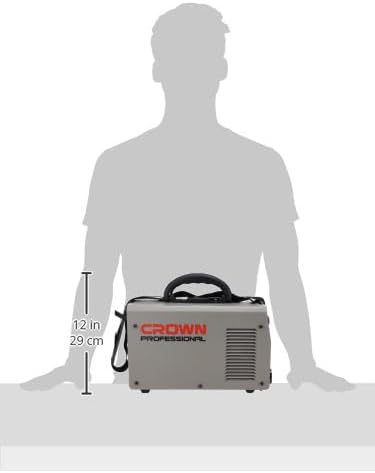
Figure 7.1: Size comparison of the Crown CT33100 welding machine, illustrating its compact form factor relative to a person.
8. వారంటీ మరియు మద్దతు
For warranty information, technical support, or service inquiries regarding your Crown CT33100 Digital Inverter Welding Machine, please contact the retailer or the manufacturer directly. Keep your purchase receipt as proof of purchase.
You can visit the official Crown store for more information: Crown Official Store