1. పరిచయం
Thank you for choosing the Amcrest USB C Power Bank 26800mAh. This portable charger is designed to provide reliable and fast power to your electronic devices on the go. Please read this manual carefully to ensure proper use and to maximize the lifespan of your power bank.

Image: The Amcrest USB C Power Bank, a sleek black device with a textured surface and an LED digital display.
2. ప్యాకేజీ విషయాలు
మీ ప్యాకేజీలో అన్ని వస్తువులు ఉన్నాయని నిర్ధారించుకోండి:
- 1 x Amcrest USB C Power Bank (Model: APB-USB26-BLACK)
- 1 x USB ఛార్జింగ్ కేబుల్
- 1 x యూజర్ మాన్యువల్ (ఈ పత్రం)
3. ఉత్పత్తి ముగిసిందిview
Familiarize yourself with the ports and features of your Amcrest Power Bank:

Image: A detailed diagram highlighting the various ports and buttons on the Amcrest Power Bank, including USB Output, USB-C In/Out, Micro USB Input, Lightning Input, and Power Button.
- USB-C (Input/Output): 18W PD 3.0 port for fast charging the power bank or compatible devices.
- USB-A (అవుట్పుట్): Two 18W USB-A ports for charging various devices.
- MicroUSB (Input): Dedicated port for charging the power bank using a MicroUSB cable.
- Lightning (Input): Dedicated port for charging the power bank using a Lightning cable.
- పవర్ బటన్: Activates the LED display and initiates charging.
- LED డిజిటల్ డిస్ప్లే: బ్యాటరీ శాతాన్ని చూపుతుందిtagఇ, ప్రస్తుత వాల్యూమ్tage, and PD fast charge status.

చిత్రం: ఒక ఇన్ఫోగ్రాఫిక్ షోక్asing key features of the Amcrest Power Bank, including Type-C port, Dual USB ports, Overheat Protection, LED Digital Display, and Long Lasting Battery.
Video: An official Amcrest video demonstrating the various features and ports of the power bank.
4. పవర్ బ్యాంక్ను ఛార్జ్ చేయడం
To ensure optimal performance, fully charge your power bank before first use.
- Connect the provided USB charging cable (or your own USB-C, MicroUSB, or Lightning cable) to the corresponding input port on the power bank.
- కేబుల్ యొక్క మరొక చివరను అనుకూలమైన USB వాల్ ఛార్జర్కి కనెక్ట్ చేయండి (చేర్చబడలేదు).
- The LED digital display will show the charging progress. The fastest way to charge the device is via the USB-C input, which can take up to 6 hours for a full charge.
- The display will show 100% when fully charged.
5. బాహ్య పరికరాలను ఛార్జ్ చేయడం
The Amcrest Power Bank can charge up to three devices simultaneously.
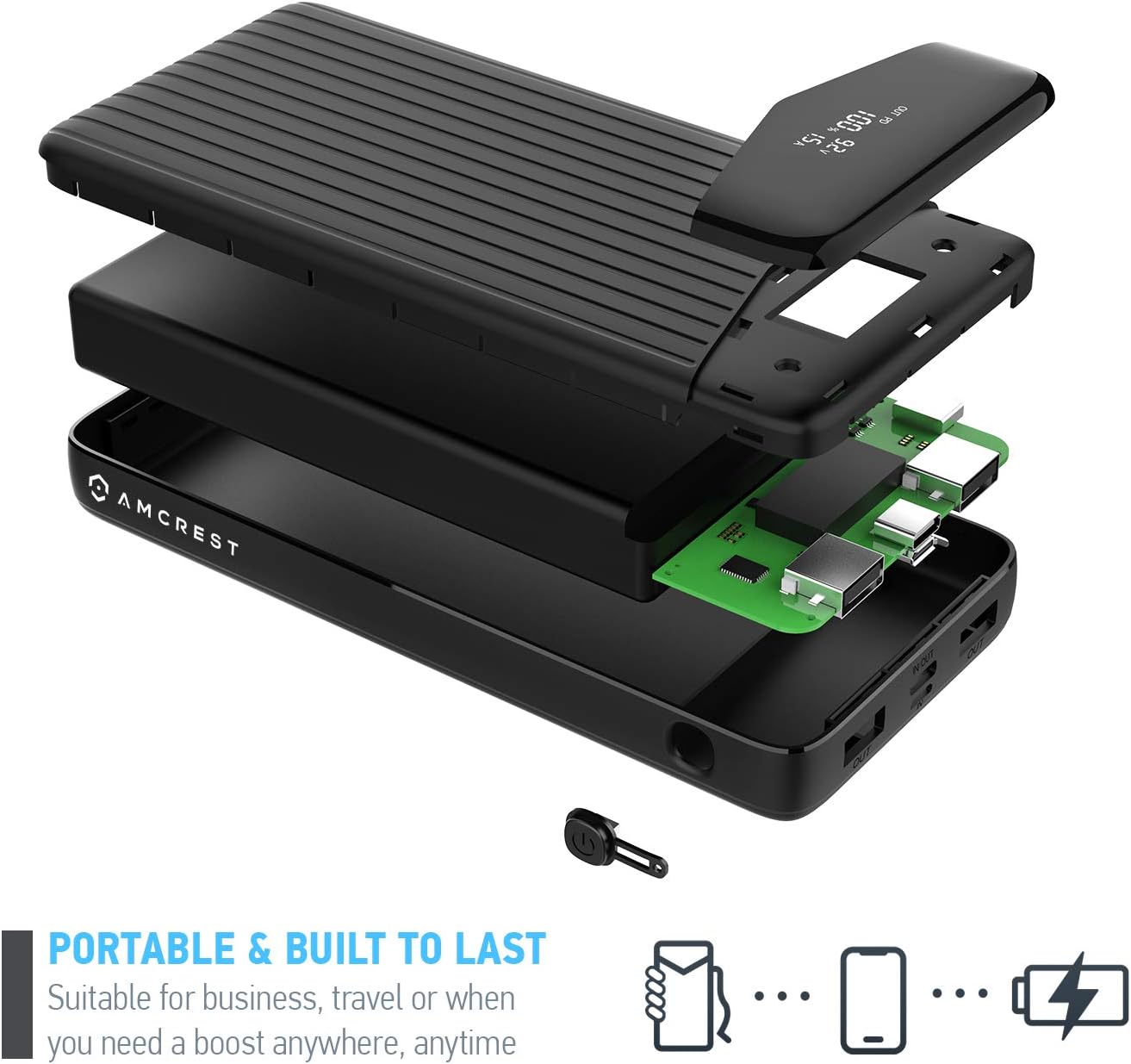
Image: A visual representation of the power bank's charging capabilities, showing approximate charges for various smartphone models.
- Connect your device's charging cable to one of the output ports on the power bank (USB-C, USB-A).
- The power bank will automatically begin charging your device. The LED display will show the remaining battery level and charging status.
- For devices supporting Power Delivery (PD 3.0), use the USB-C port for the fastest charging speeds (up to 18W).
- The power bank provides a combined output of 22W across all three output ports.
6. LED డిజిటల్ డిస్ప్లే
The unique LED display provides real-time information:
- బ్యాటరీ శాతంtage: Shows the exact remaining power level of the power bank.
- ప్రస్తుత సంtage: ప్రస్తుత వాల్యూమ్ను ప్రదర్శిస్తుందిtage during charging or discharging.
- PD Fast Charge Mode: The "PD" light font will appear on the display when the power bank is in PD fast charge mode via the USB-C port.
7. భద్రతా సమాచారం
To prevent damage to the device or injury, please observe the following safety guidelines:
- Do not expose the power bank to extreme temperatures (above 140°F / 60°C) or direct sunlight.
- Do not disassemble, crush, or puncture the device.
- నీరు, తేమ మరియు మండే పదార్థాలకు దూరంగా ఉంచండి.
- పవర్ బ్యాంక్ దెబ్బతిన్నా, ఉబ్బినా, లేదా లీక్ అయినా ఉపయోగించవద్దు.
- అనుకూల ఛార్జింగ్ కేబుల్లు మరియు అడాప్టర్లను మాత్రమే ఉపయోగించండి.
- పిల్లలకు దూరంగా ఉంచండి.
- The power bank includes UL-certified lithium-ion batteries and overheat protection to prevent over-charging or short-circuiting.

చిత్రం: పేలినది view of the power bank showing its internal components, emphasizing its robust construction and built-in safety features.
8. స్పెసిఫికేషన్లు
| ఫీచర్ | వివరాలు |
|---|---|
| మోడల్ | APB-USB26-బ్లాక్ |
| బ్యాటరీ రకం | లి-అయాన్ |
| బ్యాటరీ కెపాసిటీ | 26800mAh |
| USB-C ఇన్పుట్/అవుట్పుట్ | 18W PD 3.0 |
| USB-A అవుట్పుట్ | 2 x 18W |
| మైక్రో USB ఇన్పుట్ | అవును |
| మెరుపు ఇన్పుట్ | అవును |
| మొత్తం అవుట్పుట్ | 22W (కలిపి) |
| కొలతలు | 6.69 x 3.14 x 0.85 అంగుళాలు |
| బరువు | 1.01 పౌండ్లు (460 గ్రా) |
| నిల్వ ఉష్ణోగ్రత | 23°F ~ 95°F (1 నెల కంటే తక్కువ) / 23°F ~ 86°F (6 నెలల కంటే తక్కువ) |
| Working Temperature (Charging) | 32 ° F ~ 113 ° F. |
| Working Temperature (Not Charging) | -4 ° F ~ 140 ° F. |

Image: The Amcrest Power Bank with its dimensions (length, width, thickness) clearly labeled.
9. నిర్వహణ మరియు నిల్వ
- మెత్తటి, పొడి గుడ్డతో పవర్ బ్యాంక్ శుభ్రం చేయండి. కఠినమైన రసాయనాలు లేదా రాపిడి పదార్థాలను ఉపయోగించవద్దు.
- పవర్ బ్యాంక్ను ప్రత్యక్ష సూర్యకాంతి మరియు తీవ్రమైన ఉష్ణోగ్రతలు లేకుండా చల్లని, పొడి ప్రదేశంలో నిల్వ చేయండి.
- If storing for extended periods, charge the power bank to approximately 50-75% every 3-6 months to maintain battery health.
10. ట్రబుల్షూటింగ్
- పవర్ బ్యాంక్ ఛార్జింగ్ లేదు: Ensure the charging cable and wall adapter are functioning correctly and properly connected to the correct input port.
- పరికరం ఛార్జ్ చేయడం లేదు: Ensure the power bank has sufficient charge. Check the charging cable for damage and ensure it's securely connected to both the power bank's output port and your device.
- నెమ్మదిగా ఛార్జింగ్: Verify that your device and cable support fast charging protocols (e.g., PD 3.0) and that you are using the appropriate port (USB-C for PD).
- LED డిస్ప్లే పనిచేయడం లేదు: Press the power button to activate the display. If it remains off, the battery may be completely depleted or the unit may require service.
11. వారంటీ మరియు మద్దతు
Amcrest provides a full 1-year US warranty and lifetime technical support for this product. Additionally, a 30-day money-back guarantee is included with your purchase.
For technical assistance or warranty claims, please contact Amcrest Direct customer support. Refer to the official Amcrest webసంప్రదింపు సమాచారం కోసం సైట్.
Video: An official Amcrest video highlighting the brand's commitment to simplicity, reliability, and security, and mentioning support and warranty.


