1. పరిచయం
This manual provides essential information for the installation, operation, and maintenance of your PowerColor Fighter AMD Radeon RX 6700 XT Gaming Graphics Card. Please read these instructions carefully before proceeding with installation to ensure proper functionality and to prevent damage to your system components.

Image 1.1: PowerColor Fighter AMD Radeon RX 6700 XT Graphics Card and its retail packaging.
2. ఉత్పత్తి లక్షణాలు
- వీడియో మెమరీ: 12GB GDDR6
- స్ట్రీమ్ ప్రాసెసర్లు: 2560
- ఆట గడియారం: 2424MHz
- బూస్ట్ క్లాక్: 2581MHz
- మెమరీ గడియారం: 16 Gbps
- మెమరీ ఇంటర్ఫేస్: 192-బిట్
- డిజిటల్ గరిష్ట రిజల్యూషన్: 7680x4320
- Powered by AMD RDNA 2 Architecture
- Supports Raytracing technology
- PCI ఎక్స్ప్రెస్ 4.0 ఇంటర్ఫేస్
- HDMI 2.1 Connectivity
- Features AMD Infinity Cache
3. ప్యాకేజీ విషయాలు
ప్యాకేజీలో అన్ని అంశాలు ఉన్నాయని నిర్ధారించుకోండి:
- PowerColor Fighter AMD Radeon RX 6700 XT Graphics Card
- Quick Installation Guide (this document)
Note: Additional accessories such as driver CDs or power cables may vary by region or retailer. Drivers are typically downloaded from the official AMD webసైట్.
4. స్పెసిఫికేషన్లు
| ఫీచర్ | స్పెసిఫికేషన్ |
|---|---|
| గ్రాఫిక్స్ ప్రాసెసర్ | AMD రేడియన్ RX 6700 XT |
| వీడియో మెమరీ | 12 GB GDDR6 |
| మెమరీ వేగం | 16 Gbps |
| గరిష్ట స్క్రీన్ రిజల్యూషన్ | 7680x4320 |
| ఇంటర్ఫేస్ | PCI ఎక్స్ప్రెస్ 4.0 |
| వీడియో అవుట్పుట్ ఇంటర్ఫేస్ | డిస్ప్లేపోర్ట్, HDMI |
| అంశం మోడల్ సంఖ్య | AXRX 6700XT 12GBD6-3DH |
| వస్తువు బరువు | 1.44 పౌండ్లు |
| ఉత్పత్తి కొలతలు (LxWxH) | 9.49 x 5.08 x 1.54 అంగుళాలు |
5. సెటప్ మరియు ఇన్స్టాలేషన్
5.1 ప్రీ-ఇన్స్టాలేషన్ చెక్లిస్ట్
- విద్యుత్ సరఫరా యూనిట్ (PSU): Ensure your PSU has sufficient wattage (minimum 650W recommended) and the necessary 8-pin and 6-pin PCIe power connectors.
- మదర్బోర్డ్: Verify your motherboard has an available PCI Express x16 slot (preferably PCIe 4.0 for optimal performance).
- కేసు క్లియరెన్స్: Check your PC case for adequate space to accommodate the card's dimensions (9.49 x 5.08 x 1.54 inches).
- డ్రైవర్లు: Download the latest AMD Radeon drivers from the official AMD webసంస్థాపనకు ముందు సైట్.
5.2 భౌతిక సంస్థాపన
- పవర్ ఆఫ్: Shut down your computer completely and unplug the power cord from the wall outlet.
- ఓపెన్ కేస్: మీ కంప్యూటర్ కేసు యొక్క సైడ్ ప్యానెల్ను తీసివేయండి.
- PCIe స్లాట్ను గుర్తించండి: మీ మదర్బోర్డులో అందుబాటులో ఉన్న PCI ఎక్స్ప్రెస్ x16 స్లాట్ను గుర్తించండి.
- స్లాట్ కవర్లను తీసివేయండి: Remove the necessary expansion slot covers from the back of your PC case.
- గ్రాఫిక్స్ కార్డ్ చొప్పించు: Carefully align the graphics card with the PCIe slot and press down firmly until it is securely seated. You should hear a click from the slot's retention clip.
- సెక్యూర్ కార్డ్: Fasten the graphics card to the case with screws or the case's locking mechanism.
- పవర్ కనెక్ట్ చేయండి: Connect the 8-pin and 6-pin PCIe power connectors from your PSU to the corresponding ports on the graphics card. Ensure a snug fit.
- కేసును మూసివేయి: మీ కంప్యూటర్ కేసు యొక్క సైడ్ ప్యానెల్ను భర్తీ చేయండి.

చిత్రం 5.1: ముందు view of the PowerColor Fighter RX 6700 XT, showing the dual fan design.
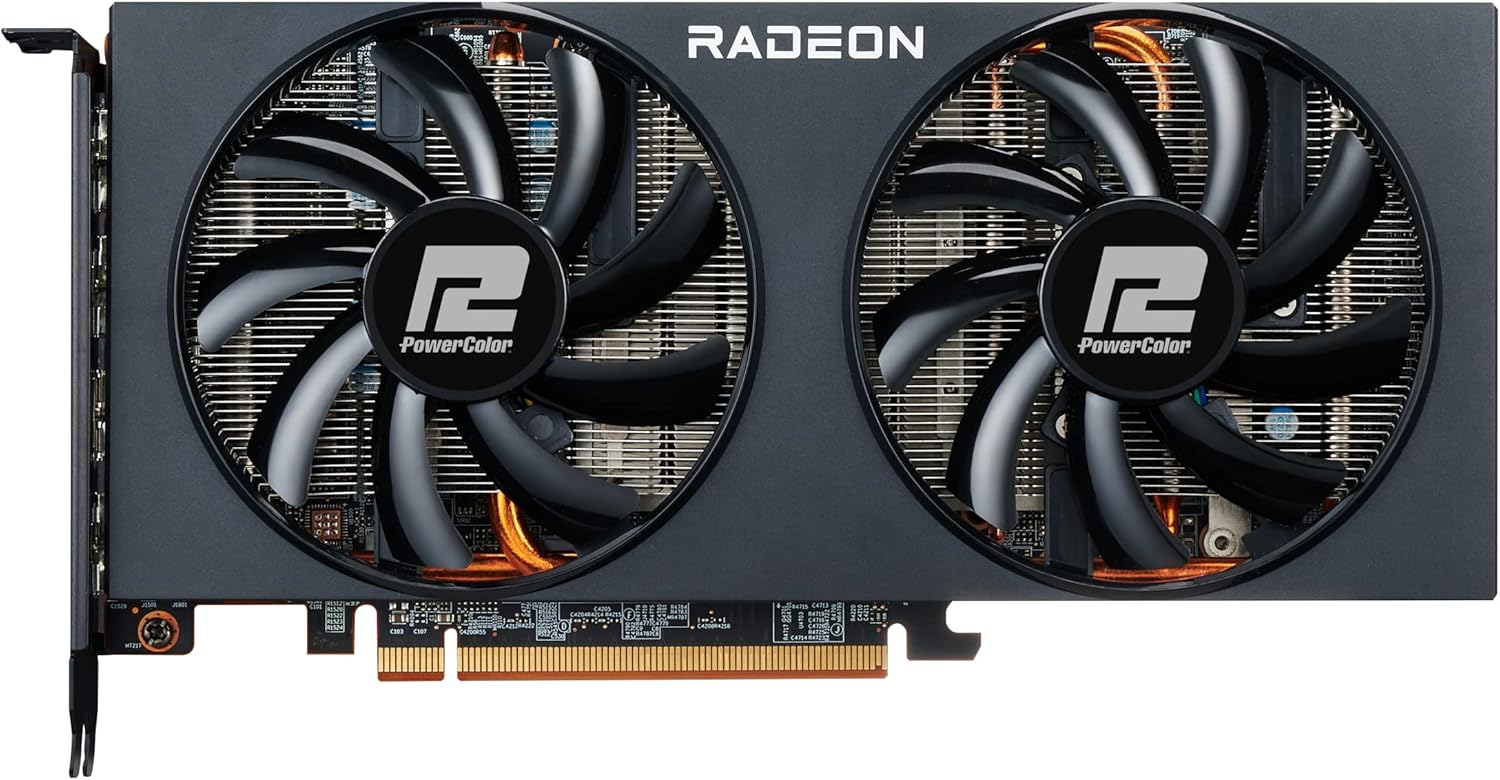
చిత్రం 5.2: పైభాగం view of the graphics card, highlighting the PCIe power connectors.
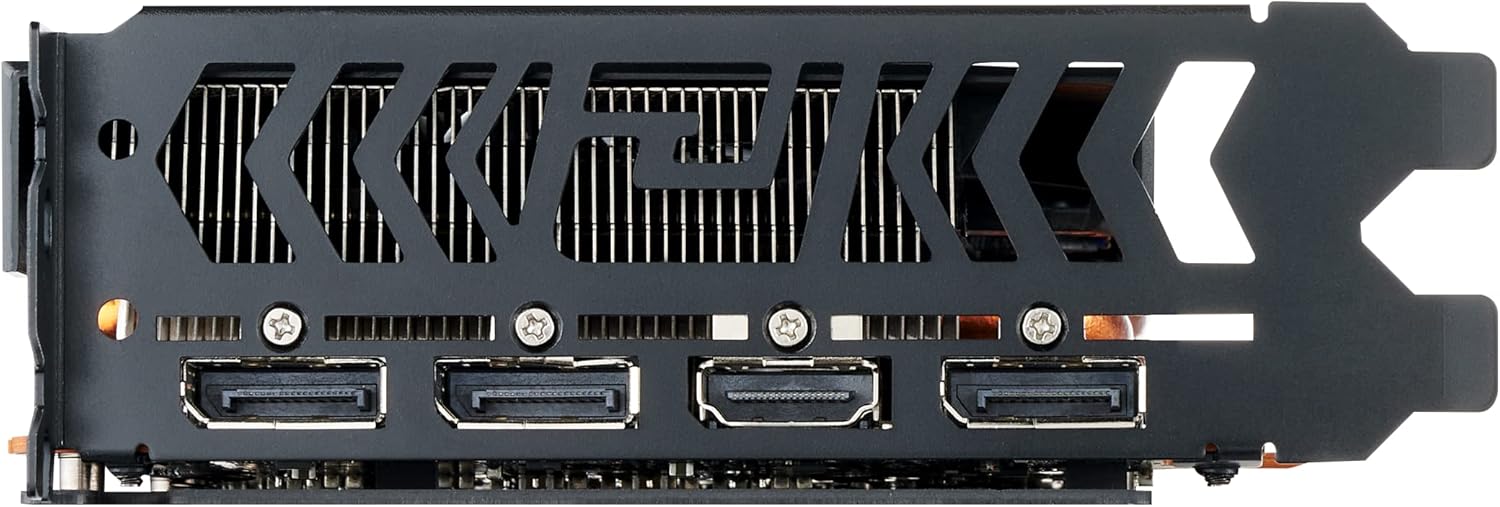
చిత్రం 5.3: వెనుక view of the graphics card, showing the DisplayPort and HDMI output interfaces.
5.3 Connecting to Display
Connect your monitor(s) to the graphics card using DisplayPort or HDMI cables. The card supports multiple displays.
6. ఆపరేటింగ్ సూచనలు
6.1 డ్రైవర్ ఇన్స్టాలేషన్
- పవర్ ఆన్: పవర్ కార్డ్ని మళ్లీ కనెక్ట్ చేసి, మీ కంప్యూటర్ను ఆన్ చేయండి.
- ప్రారంభ బూట్: Your system may boot into a low-resolution display. This is normal before drivers are installed.
- డ్రైవర్లను ఇన్స్టాల్ చేయండి: Run the AMD Radeon Software installer you downloaded earlier. Follow the on-screen prompts to complete the installation.
- పునఃప్రారంభించు: డ్రైవర్ ఇన్స్టాలేషన్ పూర్తయిన తర్వాత మీ కంప్యూటర్ను పునఃప్రారంభించండి.
6.2 AMD Radeon Software
The AMD Radeon Software provides a comprehensive interface for managing your graphics card settings. Here you can:
- Adjust display resolution and refresh rates.
- Configure game-specific graphics settings.
- Monitor GPU performance and temperatures.
- డ్రైవర్లను నవీకరించండి.
- Access features like Radeon Anti-Lag, Radeon Boost, and FidelityFX Super Resolution (FSR).
7. నిర్వహణ
7.1 శుభ్రపరచడం
క్రమం తప్పకుండా శుభ్రపరచడం వల్ల మీ గ్రాఫిక్స్ కార్డ్ యొక్క సరైన పనితీరు మరియు దీర్ఘాయువును నిర్వహించడానికి సహాయపడుతుంది.
- పవర్ ఆఫ్: Always power off your computer and unplug it before cleaning.
- దుమ్ము తొలగింపు: Use compressed air to gently blow dust from the heatsink fins and fan blades. Hold the fans in place to prevent over-spinning.
- బాహ్య: Wipe the exterior of the card with a soft, dry, anti-static cloth.
7.2 సాఫ్ట్వేర్ నవీకరణలు
Keep your graphics drivers updated to ensure compatibility with new games and applications, and to benefit from performance improvements and bug fixes. Check the AMD website regularly for the latest driver releases.
8. ట్రబుల్షూటింగ్
8.1 డిస్ప్లే అవుట్పుట్ లేదు
- మానిటర్ కేబుల్ గ్రాఫిక్స్ కార్డ్ మరియు మానిటర్ రెండింటికీ సురక్షితంగా కనెక్ట్ చేయబడిందని నిర్ధారించుకోండి.
- PCIe స్లాట్లో గ్రాఫిక్స్ కార్డ్ పూర్తిగా అమర్చబడిందో లేదో ధృవీకరించండి.
- Check that all PCIe power connectors are properly attached to the graphics card.
- మీ మానిటర్ సరైన ఇన్పుట్ సోర్స్కు సెట్ చేయబడిందని నిర్ధారించండి.
- If using an integrated GPU, ensure your BIOS is configured to use the dedicated graphics card.
8.2 Performance Issues / Low FPS
- తాజా గ్రాఫిక్స్ డ్రైవర్లు ఇన్స్టాల్ చేయబడ్డాయని నిర్ధారించుకోండి.
- Check GPU temperatures using monitoring software (e.g., AMD Radeon Software). High temperatures can lead to thermal throttling. Ensure adequate case airflow.
- Verify that your system meets the minimum requirements for the game or application.
- Adjust in-game graphics settings to a lower preset.
- Confirm that your power supply unit (PSU) is providing stable and sufficient power.
8.3 Excessive Fan Noise
While some fan noise is normal under heavy load, excessive or unusual noise can indicate an issue.
- డస్ట్ బిల్డప్: Clean the fans and heatsink as described in the Maintenance section.
- ఫ్యాన్ ప్రోfile: Adjust the fan curve settings in the AMD Radeon Software or a third-party utility (e.g., MSI Afterburner) to find a balance between cooling and noise.
- కేస్ ఎయిర్ ఫ్లో: Improve overall case airflow to reduce the need for aggressive fan speeds.
- శారీరక అవరోధం: ఫ్యాన్ బ్లేడ్లతో ఎటువంటి కేబుల్లు లేదా ఇతర భాగాలు జోక్యం చేసుకోకుండా చూసుకోండి.
8.4 Driver Crashes / Instability
- Perform a clean installation of the graphics drivers. Use AMD's cleanup utility to remove old drivers before installing new ones.
- మీ ఆపరేటింగ్ సిస్టమ్ పూర్తిగా నవీకరించబడిందని నిర్ధారించుకోండి.
- Check for any conflicting software or background applications.
9. వారంటీ మరియు మద్దతు
For warranty information and technical support, please refer to the official PowerColor webమీ సైట్లో లేదా మీ రిటైలర్ను సంప్రదించండి. వారంటీ క్లెయిమ్ల కోసం మీ కొనుగోలు రుజువును ఉంచండి.
For the latest drivers and additional support resources, visit the official AMD webసైట్: www.amd.com/en/support


