1. ఉత్పత్తి ముగిసిందిview
The Sonos Roam is a portable smart speaker designed for versatile listening experiences. It offers both Wi-Fi connectivity for home use and Bluetooth for on-the-go audio streaming. Its compact and durable design makes it suitable for various environments.

మూర్తి 1: ముందు view of the Sonos Roam speaker.
ముఖ్య లక్షణాలు:
- ద్వంద్వ కనెక్టివిటీ: Stream music over Wi-Fi at home or via Bluetooth on the go.
- పోర్టబిలిటీ: Lightweight and compact design for easy transport.
- మన్నిక: Waterproof (IP67 rated) and drop-resistant construction.
- సుదీర్ఘ బ్యాటరీ జీవితం: Up to 10 hours of continuous playback.
- వాయిస్ నియంత్రణ: Integrated microphone for voice assistant compatibility (e.g., Amazon Alexa, Google Assistant).
- Automatic Trueplay™: Adapts sound to the environment for optimal listening.
- బహుళ-గది ఆడియో: Seamless integration with existing Sonos systems.
- సహజమైన నియంత్రణలు: Physical buttons for playback, volume, and microphone control.

Figure 2: At a glance features of the Sonos Roam.
2. సెటప్
2.1 అన్బాక్సింగ్ మరియు ప్రారంభ ఛార్జ్
అన్బాక్సింగ్ చేసిన తర్వాత, అన్ని భాగాలు ఉన్నాయని నిర్ధారించుకోండి:
- Sonos Roam Speaker
- USB-C కేబుల్
Before first use, fully charge your Sonos Roam using the included USB-C cable and a compatible USB power adapter (not included). The speaker has a battery life of up to 10 hours on a full charge, with a charging time of approximately 10 hours for a complete recharge.

Figure 3: Sonos Roam with its USB-C charging cable.
2.2 Connecting to Wi-Fi (Sonos App)
- Download the Sonos app from your device's app store.
- Open the Sonos app and follow the on-screen instructions to set up your new Roam.
- The app will guide you through connecting the speaker to your home Wi-Fi network.
2.3 బ్లూటూత్ జత చేయడం
To use the Sonos Roam with Bluetooth:
- స్పీకర్ పవర్ ఆన్ చేయబడిందని నిర్ధారించుకోండి.
- Press and hold the power button on the back of the speaker for approximately 2 seconds until you hear a second tone, and the status light begins flashing blue. This indicates Bluetooth pairing mode.
- On your mobile device, go to Bluetooth settings and select "Sonos Roam" from the list of available devices.
- Once paired, the status light will turn solid blue.
3. Operating the Sonos Roam
3.1 నియంత్రణలు మరియు సూచికలు
The Sonos Roam features intuitive physical buttons on its top panel:
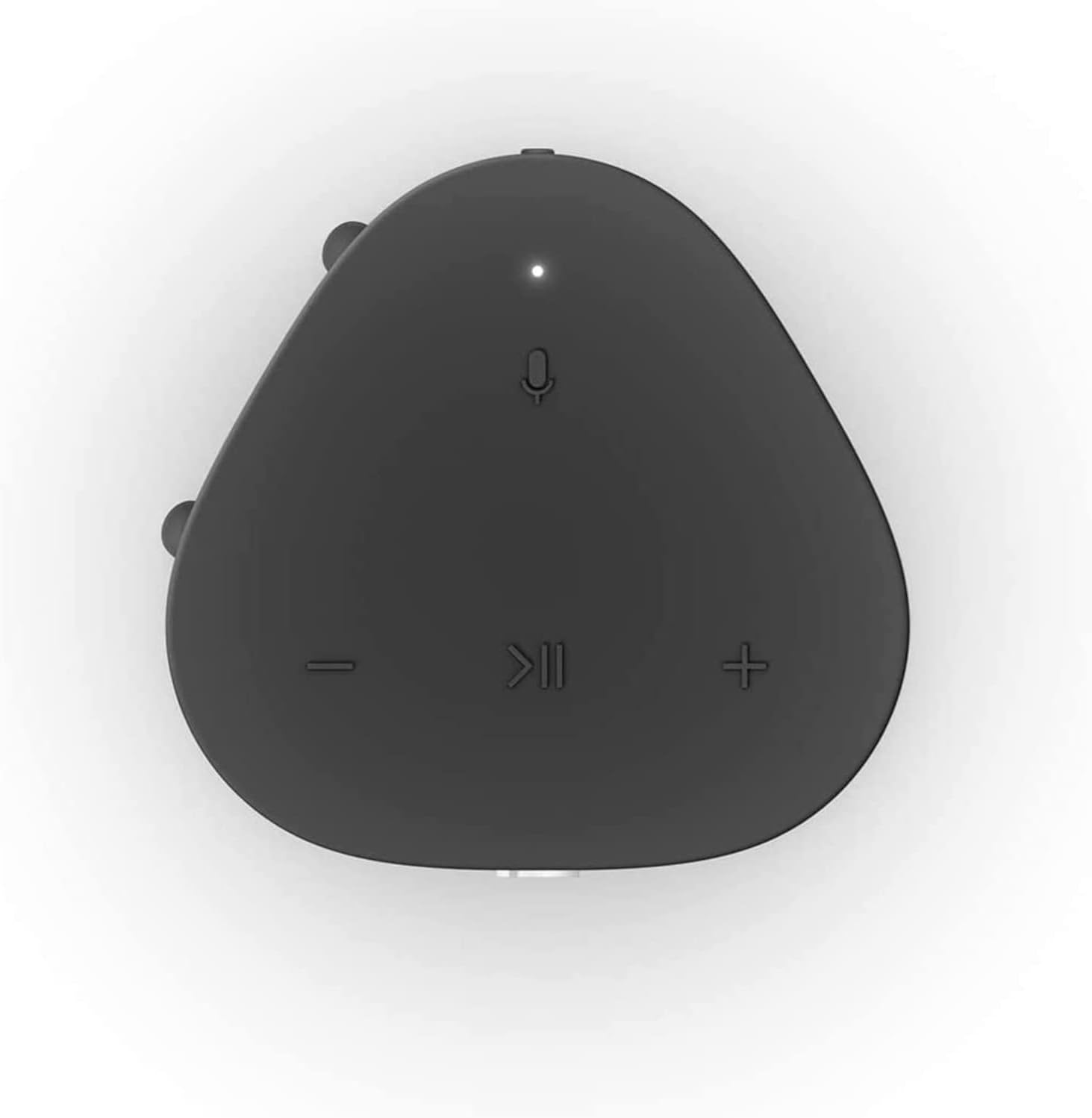
Figure 4: Top panel controls of the Sonos Roam.
- ప్లే/పాజ్: ఆడియోను ప్లే చేయడానికి లేదా పాజ్ చేయడానికి ఒకసారి నొక్కండి.
- వాల్యూమ్ అప్ (+): వాల్యూమ్ పెంచడానికి నొక్కండి.
- వాల్యూమ్ డౌన్ (-): వాల్యూమ్ తగ్గించడానికి నొక్కండి.
- మైక్రోఫోన్: Press to toggle the microphone on/off for voice control.
- Power Button (Rear): Press and hold for 5 seconds to power on/off. A short press puts it into sleep mode.
3.2 Switching Between Wi-Fi and Bluetooth
The Sonos Roam automatically connects to your Wi-Fi network when in range. To switch to Bluetooth mode, ensure the speaker is powered on and press and hold the power button until the status light flashes blue. To switch back to Wi-Fi, simply bring the speaker back into range of your configured Wi-Fi network.

Figure 5: The Sonos Roam offers seamless connectivity.
3.3 Automatic Trueplay™
The Sonos Roam features Automatic Trueplay, which uses the speaker's microphone to detect the environment and automatically adjust the sound for optimal audio performance. This feature works in both Wi-Fi and Bluetooth modes.
3.4 స్పీకర్ ప్లేస్మెంట్
The Sonos Roam can be placed either vertically or horizontally. Placing it vertically saves surface space, while laying it horizontally provides added stability. The speaker's sound adapts to its orientation for the best listening experience.
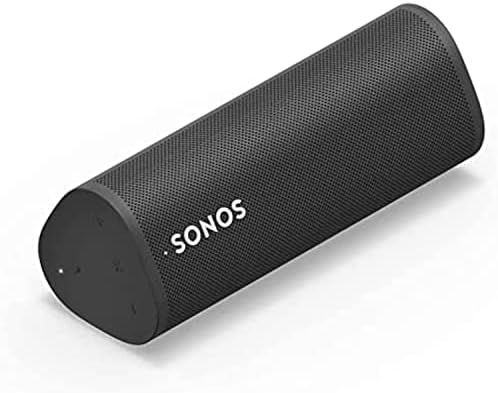
Figure 6: Sonos Roam in horizontal orientation.
4. నిర్వహణ
4.1 శుభ్రపరచడం
To clean your Sonos Roam, use a soft, dry cloth. Avoid using harsh chemicals or abrasive materials, as these may damage the speaker's finish or internal components. Ensure the charging port is free of debris.
4.2 నీరు మరియు ధూళి నిరోధకత
The Sonos Roam is rated IP67, meaning it is dustproof and can withstand immersion in up to one meter of water for up to 30 minutes. While designed for rugged use, it is recommended to dry the speaker thoroughly after exposure to water to prevent long-term damage to the charging port or internal electronics.

Figure 7: The Sonos Roam is built for rugged durability.
4.3 బ్యాటరీ సంరక్షణ
To maximize battery lifespan, avoid fully discharging the speaker frequently. For long-term storage, charge the battery to about 50% before storing it in a cool, dry place.
5. ట్రబుల్షూటింగ్
5.1 సాధారణ సమస్యలు మరియు పరిష్కారాలు
- శక్తి లేదు: స్పీకర్ ఛార్జ్ అయ్యిందని నిర్ధారించుకోండి. USB-C కేబుల్ ఉపయోగించి దాన్ని పవర్ సోర్స్కి కనెక్ట్ చేయండి.
- Wi-Fiకి కనెక్ట్ చేయడం సాధ్యపడదు:
- Verify your Wi-Fi network is active and the password is correct.
- Restart your router and the Sonos Roam.
- స్పీకర్ మీ Wi-Fi రూటర్ పరిధిలో ఉందని నిర్ధారించుకోండి.
- Check the Sonos app for network diagnostics.
- బ్లూటూత్ జత చేయడం సమస్యలు:
- Ensure the Sonos Roam is in Bluetooth pairing mode (flashing blue light).
- Forget "Sonos Roam" from your device's Bluetooth settings and try pairing again.
- Move closer to the speaker and ensure no other devices are interfering.
- ధ్వని లేదు లేదా తక్కువ వాల్యూమ్:
- స్పీకర్ మరియు మీ కనెక్ట్ చేయబడిన పరికరం రెండింటిలోనూ వాల్యూమ్ స్థాయిలను తనిఖీ చేయండి.
- Ensure the correct input source is selected in the Sonos app.
- If using Wi-Fi, check the Sonos app for any playback errors.
5.2 ఫ్యాక్టరీ రీసెట్
మీరు నిరంతర సమస్యలను ఎదుర్కొంటుంటే, ఫ్యాక్టరీ రీసెట్ వాటిని పరిష్కరించవచ్చు. హెచ్చరిక: A factory reset will erase all settings and data from your speaker. You will need to set it up again as a new device.
- Unplug the Sonos Roam from its power source.
- Press and hold the Play/Pause button while simultaneously plugging the power cable back in.
- Continue holding the Play/Pause button until the status light flashes orange and white.
- Release the button. The light will flash green when the reset is complete and the speaker is ready for setup.
6. స్పెసిఫికేషన్లు

Figure 8: Sonos Roam dimensions.
| ఫీచర్ | వివరాలు |
|---|---|
| బ్రాండ్ | సోనోస్ |
| మోడల్ పేరు | Sonos Roam - Black (ROAM1US1BLK) |
| రంగు | నలుపు |
| ఉత్పత్తి కొలతలు | 2.44"డి x 2.32"వా x 6.61"హ |
| వస్తువు బరువు | 7.1 ఔన్సులు (200 గ్రాములు) |
| మెటీరియల్ | పాలికార్బోనేట్ (PC) |
| కనెక్టివిటీ టెక్నాలజీ | Bluetooth, USB, Wi-Fi, Airplay, NFC |
| బ్యాటరీ లైఫ్ | 10 గంటల వరకు |
| ఛార్జింగ్ సమయం | సుమారు 10 గంటలు |
| జలనిరోధిత రేటింగ్ | IP67 |
| నియంత్రణ పద్ధతి | App, Voice, Buttons |
| చేర్చబడిన భాగాలు | Sonos Roam - Black, USB C Cable |
| UPC | 840136801467 |
7. వారంటీ మరియు మద్దతు
7.1 పరిమిత వారంటీ
The Sonos Roam comes with a Limited Warranty. For specific terms and conditions, please refer to the warranty information provided in the product packaging or visit the official Sonos webసైట్.
7.2 కస్టమర్ మద్దతు
For further assistance, technical support, or to register your product, please visit the Sonos support website or contact their customer service. Keep your purchase receipt and product serial number handy for any warranty claims.
Official Sonos Webసైట్: www.sonos.com


