1. పరిచయం
This manual provides essential information for the proper setup, operation, and maintenance of your Roland FP-30X 88-Key Digital Piano. Please read it thoroughly to ensure optimal performance and longevity of your instrument.

Figure 1: Roland FP-30X Digital Piano with included accessories.
2. పెట్టెలో ఏముంది
Your Roland FP-30X package includes the following components:
- Roland FP-30X 88-Key Digital Piano
- KSC-70 Custom Stand
- KPD-70 Three Pedal Unit
- బెంచ్
- AC అడాప్టర్
- పవర్ కార్డ్
- మ్యూజిక్ రెస్ట్
- యజమాని మాన్యువల్
- "యూనిట్ను సురక్షితంగా ఉపయోగించడం" అనే కరపత్రం
- Online Lessons Access Card
- బోధనా DVD
- ఆస్టిన్ బజార్ పాలిషింగ్ క్లాత్
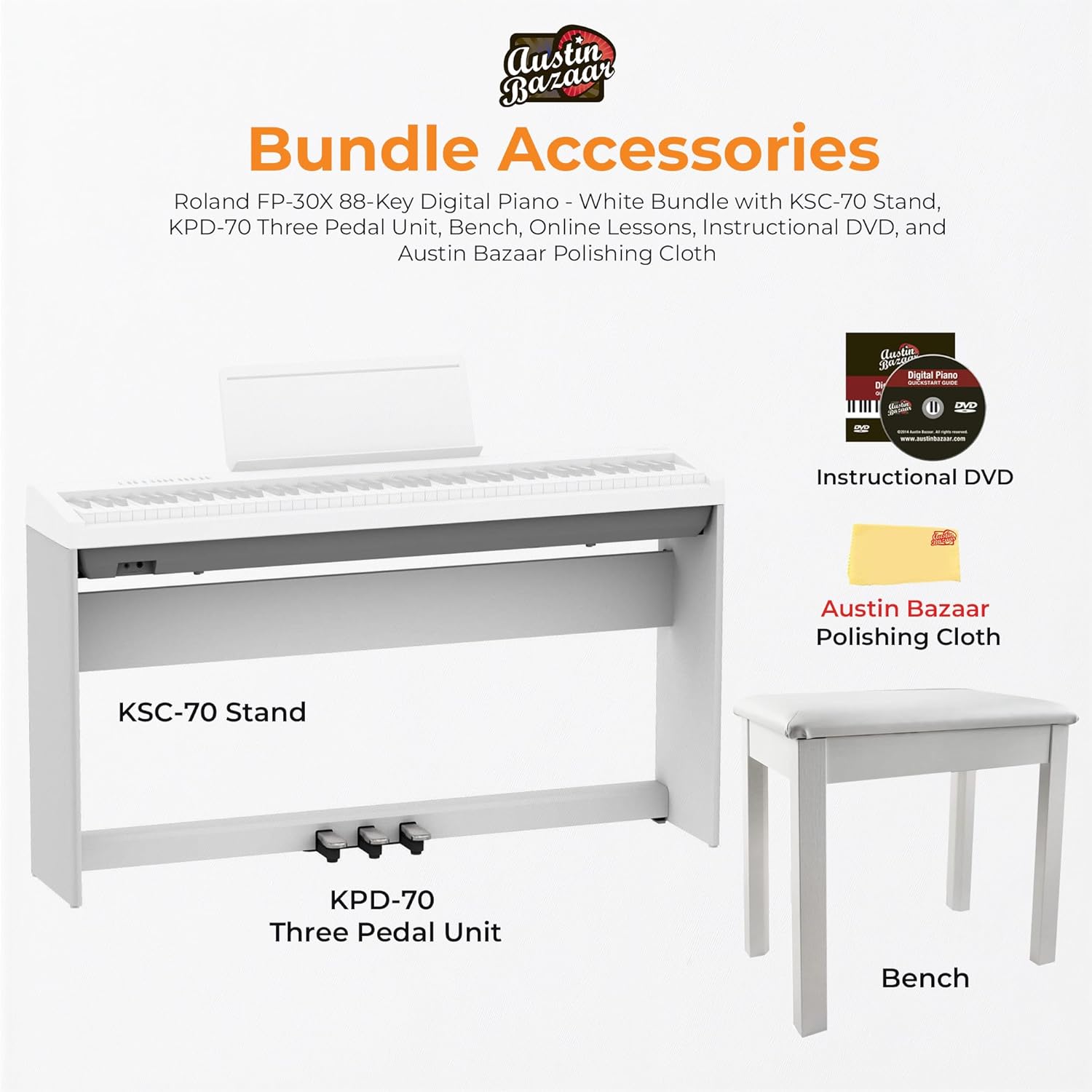
Figure 2: Included bundle accessories.
3. సెటప్
3.1 అసెంబ్లీ
Follow the instructions provided in the separate assembly guide for the KSC-70 Custom Stand and KPD-70 Three Pedal Unit. Ensure all screws are tightened securely for stability.
3.2 కనెక్ట్ పవర్
- Connect the AC adaptor to the DC IN jack on the rear panel of the piano.
- పవర్ కార్డ్ను ప్రామాణిక AC అవుట్లెట్లోకి ప్లగ్ చేయండి.
- నొక్కండి శక్తి button located on the left side of the piano to turn it on.
3.3 కనెక్టింగ్ యాక్సెసరీలు
The FP-30X offers various connectivity options:
- హెడ్ఫోన్లు: హెడ్ఫోన్లను దీనికి కనెక్ట్ చేయండి ఫోన్లు jacks (1/4-inch or 1/8-inch stereo phone type) on the rear panel for private practice.
- External Speakers/Ampజీవితకాలం: ఉపయోగించండి అవుట్పుట్ (L/MONO, R) jacks to connect to an external sound system for ampలిఫైడ్ ధ్వని.
- USB Computer: Connect to a computer via the USB కంప్యూటర్ port (USB Type B) for MIDI communication.
- USB మెమరీ: Connect a USB flash drive to the USB మెమరీ port (USB Type A) for recording and playback of audio/MIDI data.
- పెడల్స్: Connect the KPD-70 Three Pedal Unit to the పెడల్ కనెక్టర్.

Figure 3: Rear panel connectors.
4. ఆపరేటింగ్ సూచనలు
4.1 ప్రాథమిక నియంత్రణలు
The FP-30X features intuitive controls for easy operation:
- పవర్ బటన్: Located on the far left of the control panel.
- వాల్యూమ్ స్లైడర్: మొత్తం అవుట్పుట్ వాల్యూమ్ను సర్దుబాటు చేయండి.
- Tone Buttons: Select between Piano, E. Piano, and Other tones.
- ఫంక్షన్ బటన్: Access advanced settings and features.
- Split/Dual: Enable keyboard split or dual-tone modes.
- మెట్రోనొమ్: Activate the built-in metronome for practice.
- Song Select: Choose from internal songs for playback or practice.

Figure 4: Control panel and key functions.
4.2 ధ్వని ఎంపిక మరియు పనితీరు
The FP-30X utilizes Roland's SuperNATURAL Piano sound engine, offering a wide range of expressive tones. The PHA-4 Standard keyboard provides an authentic acoustic-style piano feel with responsive touch sensitivity.
- Piano Tones: నొక్కండి పియానో button to select various acoustic piano sounds.
- E. Piano Tones: నొక్కండి E. PIANO button for electric piano sounds.
- Other Tones: ది OTHER button provides access to additional instrument sounds like strings, organs, and pads.
- బ్లూటూత్ కనెక్టివిటీ: The FP-30X supports Bluetooth Ver 4.0, allowing wireless connection to mobile devices for app integration (e.g., Roland Piano Designer) and audio streaming.
4.3 రికార్డింగ్ లక్షణాలు
The FP-30X includes built-in recording capabilities:
- అంతర్గత రికార్డింగ్: Record your performances directly to the piano's internal memory (up to 70,000 notes).
- USB Memory Recording: Save your recorded performances to a USB flash drive connected to the USB మెమరీ port for easy transfer and sharing.
4.4 Official Product Video: The Piano Essentials
Video Description: This video provides a comprehensive overview of the Roland FP-30X, demonstrating its key features, sound capabilities, and various functions for both beginners and experienced players. It covers aspects like sound engine, keyboard action, connectivity, and performance options.
5. నిర్వహణ
To keep your Roland FP-30X in excellent condition:
- శుభ్రపరచడం: పియానో ఉపరితలాన్ని తుడవడానికి మృదువైన, పొడి వస్త్రాన్ని ఉపయోగించండి. మొండి ధూళి కోసం, కొద్దిగా dampen the cloth with water and a mild, non-abrasive cleaner, then wipe dry immediately. Avoid harsh chemicals.
- కీ క్లీనింగ్: Gently wipe the keys with a soft cloth. For white keys, a slightly damp వస్త్రం ఉపయోగించవచ్చు.
- నిల్వ: When not in use, cover the piano with a dust cover to protect it from dust and debris. Avoid placing the piano in direct sunlight or near heat sources.
- పాలిషింగ్: Use the provided Austin Bazaar polishing cloth for gentle cleaning and to maintain the finish.
6. ట్రబుల్షూటింగ్
If you encounter issues with your FP-30X, refer to the following common problems and solutions:
| సమస్య | సాధ్యమైన కారణం | పరిష్కారం |
|---|---|---|
| శబ్దం లేదు | Volume too low; headphones connected; external speakers off/unplugged. | Increase volume; disconnect headphones; check external speaker power/connections. |
| కీలు స్పందించడం లేదని భావిస్తున్నాయి | Touch sensitivity setting too low. | Adjust touch sensitivity in the Function menu. |
| బ్లూటూత్ కనెక్షన్ విఫలమైంది | Bluetooth not enabled on piano/device; device too far. | Ensure Bluetooth is on for both; move device closer; try re-pairing. |
| Recorded audio is distorted | Input volume too high; microphone issues. | Adjust input volume; check microphone connection/settings. |
For further assistance, please consult the full Owner's Manual or contact Roland customer support.
7. స్పెసిఫికేషన్లు
- మోడల్: FP-30X
- కీబోర్డ్: 88 కీలు (ఎస్కేప్మెంట్ మరియు ఐవరీ ఫీల్తో PHA-4 స్టాండర్డ్ కీబోర్డ్)
- సౌండ్ ఇంజిన్: సూపర్ నేచురల్ పియానో
- బహుధ్వని: 256 స్వరాలు
- టోన్లు: 56 Piano Tones, 321 E. Piano Tones, various Other Tones
- స్పీకర్లు: 12 cm (4-3/4 inches) x 2, 11 W x 2
- కనెక్టివిటీ: Bluetooth Ver 4.0, USB Computer (Type B), USB Memory (Type A), Phones jacks (1/4-inch, 1/8-inch), Output jacks (L/MONO, R), Pedal connector
- కొలతలు (W x D x H): 1300 mm x 284 mm x 151 mm (51-3/16 inches x 11-3/16 inches x 5-9/16 inches)
- బరువు: 14.8 కిలోలు (32 పౌండ్లు 10 oz)

చిత్రం 5: ఉత్పత్తి కొలతలు.
8. వారంటీ మరియు మద్దతు
Your Roland FP-30X Digital Piano comes with a manufacturer's warranty. Please refer to the warranty card included in your package for detailed terms and conditions.
For product support, technical assistance, or service inquiries, please visit the official Roland website or contact their customer service department. Online resources, FAQs, and driver downloads are also available on the Roland support page.
You can register your piano on the Roland website to unlock access to valuable online piano lessons in collaboration with Pianote.


