1. పరిచయం మరియు ఓవర్view
The EASTRON SDM630MCT-Modbus Power Consumption Monitor is a robust device designed for precise monitoring and management of single and three-phase electrical usage. It features an easy-to-read digital backlit LCD display, ensuring clear data visibility in various lighting conditions. This meter facilitates seamless integration with other systems via its Modbus RS485 communication function.
The SDM630MCT-Modbus accurately measures a comprehensive range of electrical parameters, including voltage, frequency (Hz), current (A), power (KW/kVA/kVAr), and both import, export, and total energy (kWH/kVArh). This detailed measurement capability assists users in identifying areas for energy consumption reduction, leading to potential energy and cost savings.
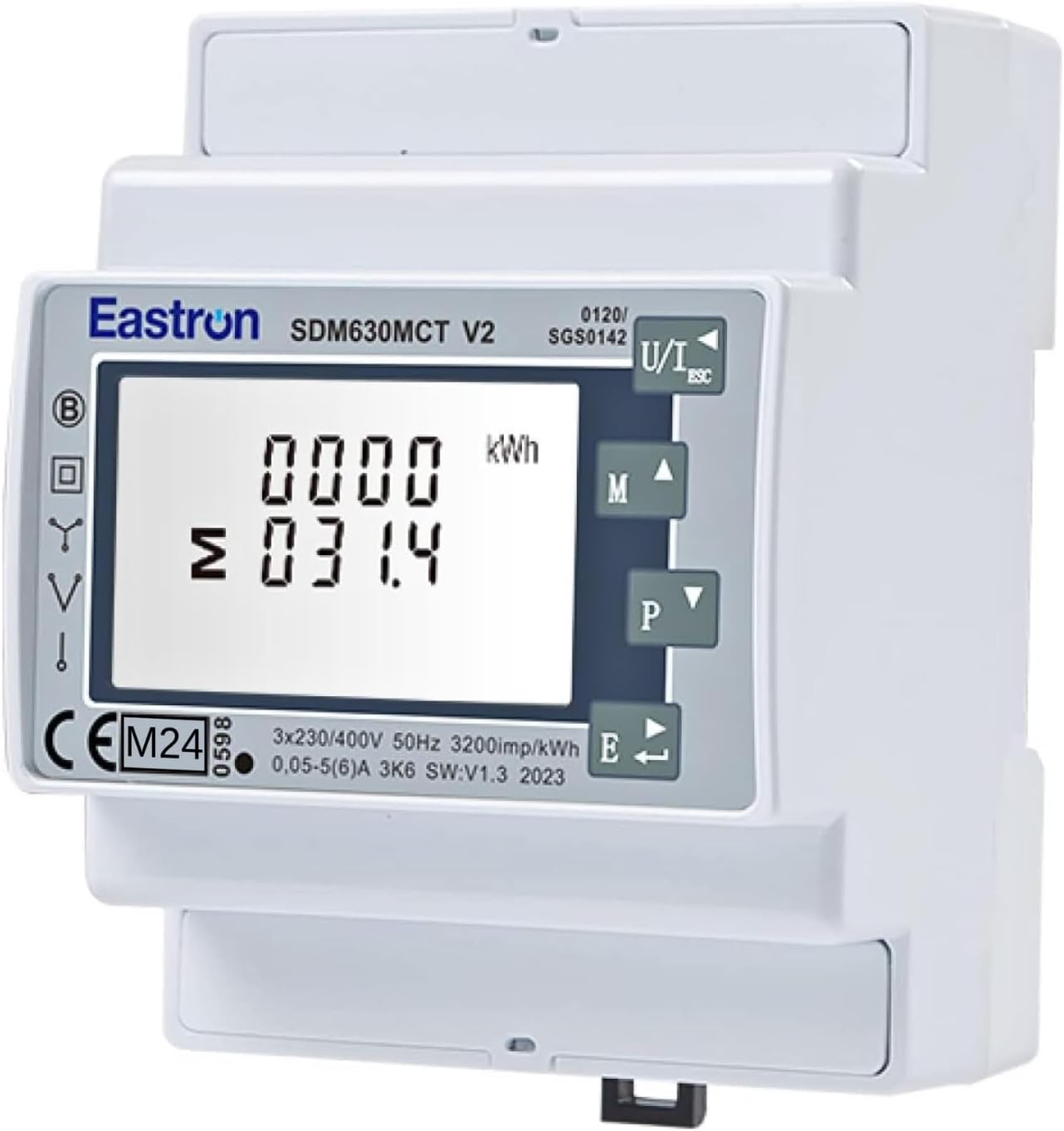
మూర్తి 1: ముందు view of the EASTRON SDM630MCT V2 Electricity Meter, showing the LCD display and control buttons.
2 కీ ఫీచర్లు
- Versatile Network Compatibility: Supports single-phase or three-phase networks (3P4W, 3P3W, 1P2W).
- Current Transformer (CT) Input: Compatible with 1A or 5A current transformers.
- Comprehensive Measurement: Measures kWh, kVArh, W, Var, VA, V, A, PF (Power Factor), THD (Total Harmonic Distortion), Hz, Max.DMD (Maximum Demand), Imp_kWh (Import kWh), Exp_kWh (Export kWh), and more.
- ద్వి దిశాత్మక కొలత: Capable of measuring both import and export for kW and kWh.
- Modbus RS485 Communication: Built-in Modbus RS485 RTU for integration with building management systems or data loggers.
- Pulsed Outputs: Includes 2 configurable pulsed outputs for energy indication (e.g., import/export/net kWh).
- DIN రైలు మౌంటు: Designed for easy installation on a standard 35mm DIN rail.
- కాంపాక్ట్ డిజైన్: Four-module wide housing, optimizing space in electrical panels.
- బ్యాక్లిట్ LCD డిస్ప్లే: Digital display with backlight for clear readability day and night.
- User-Friendly Navigation: Easy menu navigation via intuitive buttons.
- MID Certified: Suitable for billing purposes (MID calibrated).
- Sealing Hole: Provides a safety seal option after installation to prevent tampఈరింగ్.
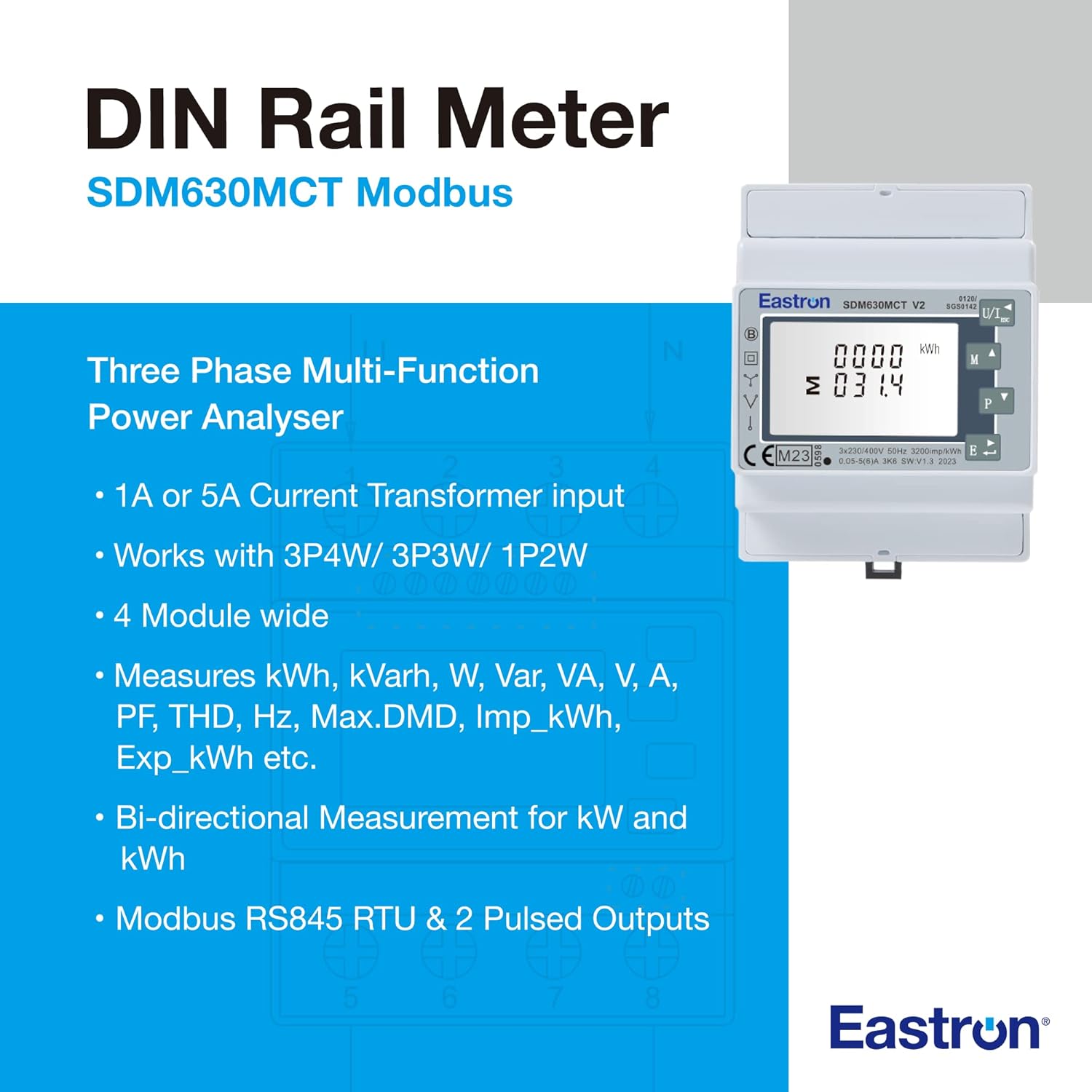
Figure 2: Key features and capabilities of the SDM630MCT Modbus meter, highlighting its multi-function power analysis.
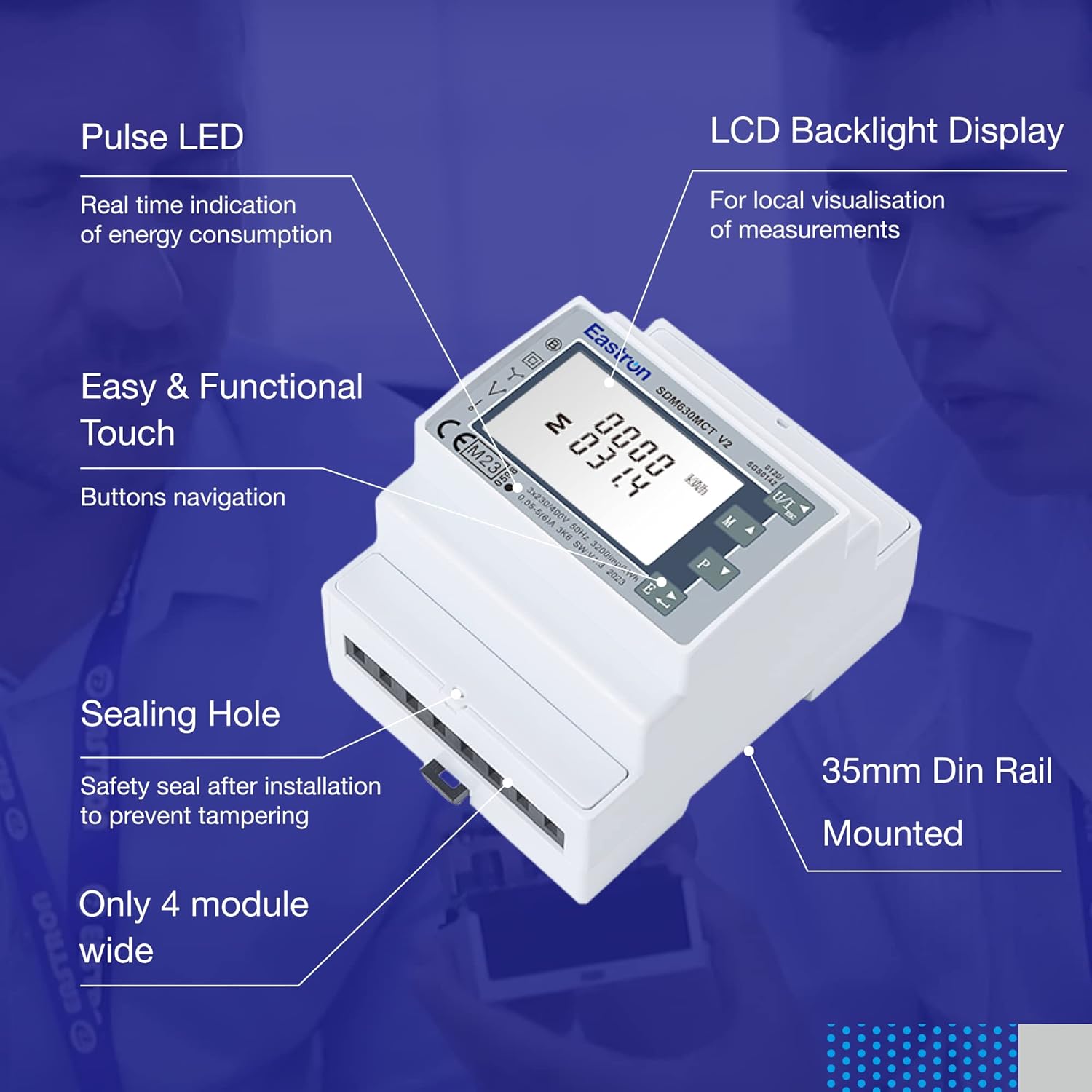
మూర్తి 3: క్లోజ్-అప్ view illustrating the Pulse LED, LCD Backlight Display, functional touch buttons, sealing hole, and 35mm DIN rail mounting.
3. సెటప్ మరియు ఇన్స్టాలేషన్
The EASTRON SDM630MCT V2 is designed for DIN rail mounting within an electrical enclosure. Proper installation requires knowledge of electrical systems and adherence to local electrical codes. It is strongly recommended that installation be performed by a qualified electrician.
3.1 Current Transformer (CT) Connection
This meter requires external Current Transformers (CTs) for operation. CTs are essential for measuring current in high-amperage circuits and provide isolation between the measurement device and the main power lines. The meter supports 1A or 5A CT inputs. Ensure the CTs are correctly sized for your application and connected according to the wiring diagram provided in the full product manual.
CT-powered meters are widely used to monitor power grid operation. Multiple CTs may be installed for different applications, such as protective devices and revenue measurement, to ensure proper isolation and allow for CTs with varying characteristics (accuracy, overload capacity).
3.2 Modbus RS485 Connection
The Modbus RS485 interface allows the meter to communicate with other devices, such as data loggers, PLCs, or building management systems. Connect the RS485 A and B terminals to your Modbus network. Ensure proper polarity and termination resistors are used as per Modbus standards. The meter's Modbus address can typically be configured via the device's menu.
3.3 భౌతిక సంస్థాపన
- Mount the meter securely on a standard 35mm DIN rail within an appropriate electrical enclosure.
- వాల్యూమ్ని కనెక్ట్ చేయండిtage inputs (L1, L2, L3, N) as per your single or three-phase system configuration.
- Connect the secondary windings of the Current Transformers to the meter's CT input terminals. Ensure correct phase and direction.
- Connect the Modbus RS485 communication lines (A and B) and any pulsed output lines if required.
- After installation, the sealing hole can be used to apply a safety seal, preventing unauthorized tampఈరింగ్.
గమనిక: ఈ మాన్యువల్ సాధారణ ఓవర్ను అందిస్తుందిview. For detailed wiring diagrams, safety precautions, and specific installation steps, please refer to the complete installation guide provided with your product or consult a qualified electrician.
4. ఆపరేటింగ్ సూచనలు
The EASTRON SDM630MCT V2 features an intuitive interface for easy operation and data retrieval.
4.1 LCD డిస్ప్లే మరియు నావిగేషన్
The backlit LCD display provides real-time readings of various electrical parameters. Navigation through the display screens and configuration menus is done using the front panel buttons (typically 'M' for Menu/Mode, 'Up' and 'Down' arrows for navigation, and 'Enter' for selection).
4.2 Viewing Measurements
Upon power-up, the meter typically displays the total energy (kWh). Use the navigation buttons to cycle through different measurement screens, which may include:
- వాల్యూమ్tage (V) per phase and line-to-line
- Current (A) per phase
- Active Power (kW) per phase and total
- Reactive Power (kVAr) per phase and total
- Apparent Power (kVA) per phase and total
- పవర్ ఫాక్టర్ (పిఎఫ్)
- ఫ్రీక్వెన్సీ (Hz)
- Import/Export kWh and kVArh
- Maximum Demand (Max.DMD)
4.3 Configuration (Advanced Users)
The meter allows configuration of various settings, such as the CT ratio, Modbus address, baud rate, and pulse output parameters. Accessing and modifying these settings typically involves entering a password-protected menu. Refer to the detailed product manual for specific instructions on menu navigation and parameter configuration.
ఉదాహరణకుample, some users have reported that when connecting to specific inverters (e.g., Growatt), the Modbus address may need to be set to '2' for proper communication.
గమనిక: Incorrect configuration can lead to inaccurate readings or communication issues. Only modify settings if you are familiar with the required parameters.
5. నిర్వహణ
The EASTRON SDM630MCT V2 is designed for long-term, reliable operation with minimal maintenance. However, periodic checks can help ensure optimal performance:
- శుభ్రపరచడం: Keep the meter's display and casing clean using a soft, dry cloth. Avoid abrasive cleaners or solvents.
- కనెక్షన్లు: Periodically inspect all wiring connections (voltage, CT, Modbus, pulse outputs) to ensure they are secure and free from corrosion. Loose connections can lead to inaccurate readings or intermittent operation.
- పర్యావరణం: Ensure the meter is operating within its specified environmental conditions (temperature, humidity) to prevent damage and ensure accuracy.
- ఫర్మ్వేర్ నవీకరణలు: While not typically user-serviceable, check with EASTRON support for any available firmware updates that might improve performance or address known issues.
హెచ్చరిక: Always disconnect power to the meter and associated circuits before performing any inspection or maintenance to prevent electric shock.
6. ట్రబుల్షూటింగ్
This section provides solutions to common issues you might encounter with your EASTRON SDM630MCT V2 meter. If the problem persists, contact technical support.
| సమస్య | సాధ్యమైన కారణం | పరిష్కారం |
|---|---|---|
| Meter display is blank or not powering on. | No power supply to the meter; incorrect wiring; internal fault. |
|
| Readings are inaccurate or zero. | Incorrect CT wiring (polarity, ratio); incorrect meter configuration; faulty CT. |
|
| Modbus communication failure. | Incorrect Modbus address; incorrect baud rate; wiring issues (A/B swapped, no termination); incompatible inverter/device. |
|
| Meter not responding to button presses. | Temporary software glitch; physical button damage. |
|
నిరాకరణ: This troubleshooting guide covers common issues. For complex problems or if you are unsure, always consult a qualified professional or EASTRON technical support.
7. స్పెసిఫికేషన్లు
Below are the technical specifications for the EASTRON SDM630MCT V2 Electricity Meter.

Figure 4: Comprehensive technical specification table for the SDM630MCT V2 meter.
| వర్గం | పరామితి | విలువ |
|---|---|---|
| స్పెసిఫికేషన్ | నామమాత్రపు వాల్యూమ్tagEu n) | 3x230/400V AC |
| ఆపరేషనల్ వాల్యూమ్tage | 80% - 120% of Un | |
| Insulation capabilities - AC voltagఇ తట్టుకోగలవు | 4 నిమిషానికి 1KV | |
| Insulation capabilities - Impulse voltagఇ తట్టుకోగలవు | 6KV - 1.2µS | |
| Rated current (Ib) | 5A CT or 333mV CT input | |
| కార్యాచరణ ప్రస్తుత పరిధి | 0.4% Ib - Imax | |
| ఓవర్ కరెంట్ తట్టుకుంటుంది | 20సెకు 0.01 ఐమాక్స్ | |
| కార్యాచరణ ఫ్రీక్వెన్సీ పరిధి | 50 లేదా 60Hz | |
| Power consumption per phase | ≤ 2W/10VA | |
| పల్స్ అవుట్పుట్ 1 | కాన్ఫిగర్ చేయదగినది | |
| పల్స్ అవుట్పుట్ 2 | 3200 Imp/kWh | |
| ప్రదర్శించు | LCD | |
| Max reading | 999999.9 kWh/kVArh | |
| పనితీరు ప్రమాణాలు | ఆపరేటింగ్ తేమ | ≤ 90% |
| నిల్వ తేమ | ≤ 95% | |
| ఆపరేటింగ్ ఉష్ణోగ్రత | -25°C - +55°C | |
| నిల్వ ఉష్ణోగ్రత | -40°C - +70°C | |
| సూచన ఉష్ణోగ్రత | 23°C ± 2°C | |
| అంతర్జాతీయ ప్రమాణం | IEC 62053-21 / EN50470-1/3 | |
| ఖచ్చితత్వం తరగతి | Class 1 / Class B | |
| పర్యావరణ సంబంధమైనది | ఇన్స్టాలేషన్ వర్గం | క్యాట్ III |
| యాంత్రిక వాతావరణం | M1 | |
| విద్యుదయస్కాంత వాతావరణం | E2 | |
| కాలుష్యం యొక్క డిగ్రీ | 2 | |
| దుమ్ము మరియు నీరు ప్రవేశించకుండా రక్షణ | IP51 (ఇండోర్) | |
| రక్షిత తరగతి యొక్క ఇన్సులేటింగ్ ఎన్కేస్డ్ మీటర్ | II | |
| EMC | ఎలెక్ట్రోస్టాటిక్ డిశ్చార్జెస్ | 8KV contact / 15KV air gap |
| Radiated & conducted emissions | EN 55022 | |
| ఖచ్చితత్వం | వాల్యూమ్tagఇ, కరెంట్ | 1.0 % or 0.5% option available |
| ఫ్రీక్వెన్సీ | మిడ్-ఫ్రీక్వెన్సీలో 0.2% | |
| శక్తి కారకం | 1% of Unity (0.01) | |
| Active power / Apparent power | గరిష్ట పరిధి ±1% | |
| రియాక్టివ్ పవర్ | గరిష్ట పరిధి ±1% | |
| రియాక్టివ్ ఎనర్జీ (kVArh) | తరగతి 2 | |
| క్రియాశీల శక్తి (kWh) | తరగతి 1 | |
| ఉత్పత్తి కొలతలు | 10.3 x 11 x 8 సెం.మీ; 290 గ్రాములు | |
| మోడ్బస్ | బస్సు రకం | RS485 (semi-duplex) |
| ప్రోటోకాల్ | మోడ్బస్ RTU | |
| బాడ్ రేటు | 2400/4800/9600/19200/38400bps | |
| చిరునామా పరిధి | 1-247 | |
| Max. Bus loading | 64pcs | |
| కమ్యూనికేషన్ దూరం | 1000మీ | |
| సమానత్వం | సరి/బేసి/కాదు | |
| డేటా బిట్ | 8 | |
| బిట్ ఆపు | 1 |

Figure 5: Dimensional drawing of the EASTRON SDM630MCT V2, showing height, width, and depth.
- ఉత్పత్తి కొలతలు: 10.3 x 11 x 8 సెం.మీ; 290 గ్రాములు
- అంశం మోడల్ సంఖ్య: SDM630MCT-MODBUS-MID
- తయారీదారు: ఈస్ట్రాన్
8. వారంటీ మరియు మద్దతు
EASTRON is committed to providing high-quality electrical measurement instruments. While specific warranty details are not provided in this document, standard manufacturer warranties typically cover defects in materials and workmanship for a defined period from the date of purchase.
For warranty claims, technical assistance, or to obtain the full product documentation (including detailed wiring diagrams and advanced configuration guides), please contact EASTRON customer support or your authorized reseller. Many users have reported positive experiences with EASTRON's responsiveness in providing necessary documentation and support.
You can typically find contact information on the official EASTRON webసైట్ లేదా మీ కొనుగోలు డాక్యుమెంటేషన్ ద్వారా.

Figure 6: EASTRON's commitment to quality and reliability, as evidenced by certifications like the SGS EU Type Examination Certificate.

Figure 7: EASTRON's dedication to innovation and quality in the development of intelligent meters.


