పరిచయం
This instruction manual provides comprehensive guidance for the SOAR NFL True Wireless Earbuds V.4. These earbuds feature Bluetooth 5.0 technology, a built-in microphone, and touch controls, offering 3-4 hours of playtime per charge. The included charging case ensures portability and extended use. Please read this manual thoroughly before using your earbuds to ensure proper operation and longevity.
పెట్టెలో ఏముంది
Upon opening your SOAR NFL True Wireless Earbuds V.4 package, you should find the following items:
- One (1) Pair of True Wireless Earbuds
- ఒకటి (1) ఛార్జింగ్ కేసు
- One (1) Micro-USB Charging Cable

The image above displays the SOAR NFL True Wireless Earbuds V.4 in their retail packaging. The package includes the earbuds, the charging case, and a micro-USB charging cable.
ఉత్పత్తి ముగిసిందిview
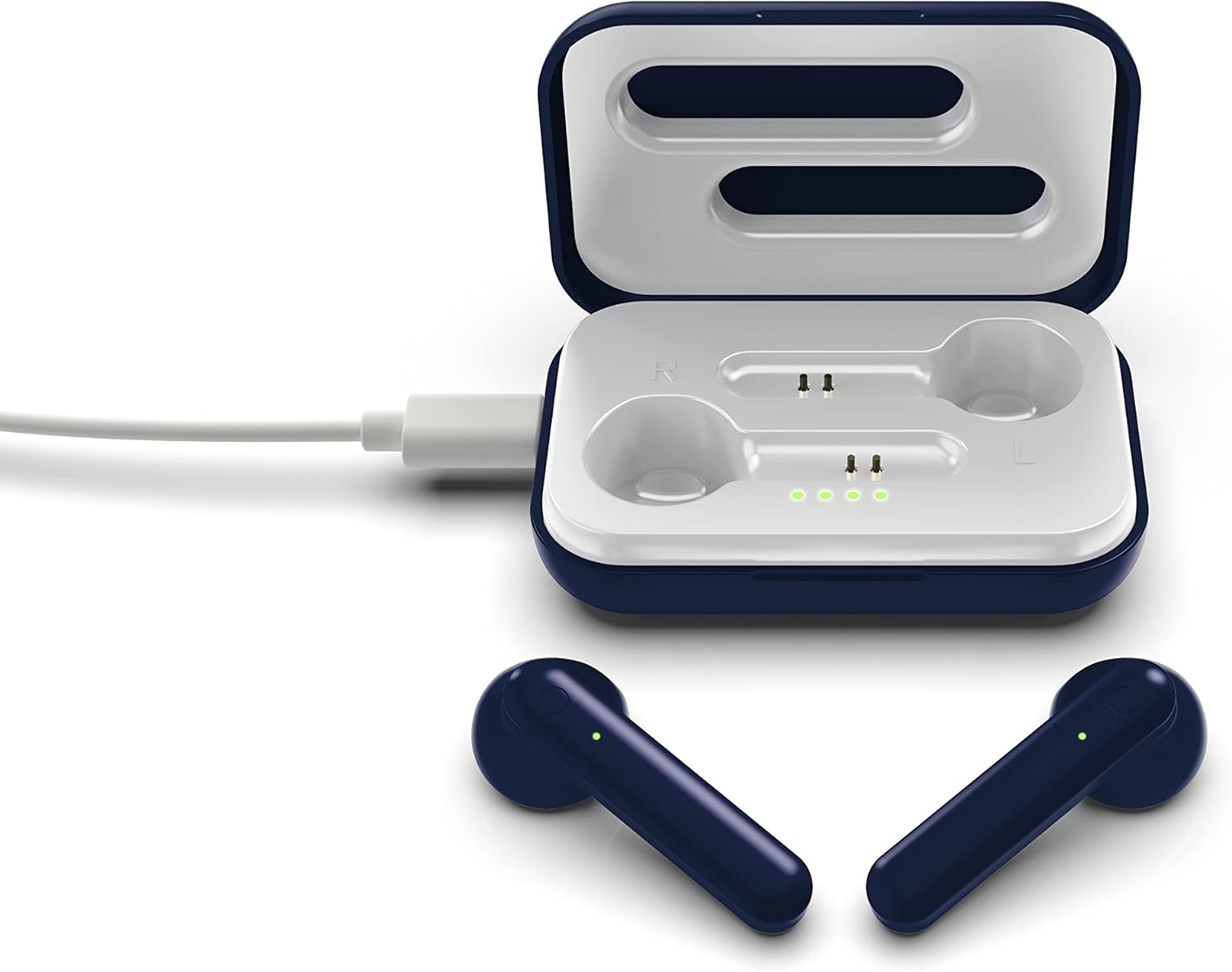
The SOAR NFL True Wireless Earbuds V.4 consist of two individual earbuds and a portable charging case. Each earbud features a touch-sensitive area for controls and an LED indicator. The charging case has a lid, charging ports for the earbuds, and LED indicators to show its battery status.

This image shows the earbuds outside their charging case, which is open and connected to a charging cable. The charging case has designated slots for each earbud (Left and Right) and LED indicators for charging status.
The image above illustrates the earbuds securely placed within their charging case. The illuminated LED lights on the case indicate the charging status of both the case and the earbuds.
సెటప్
1. ఇయర్బడ్లు మరియు కేస్ను ఛార్జ్ చేయడం
మొదటిసారి ఉపయోగించే ముందు, ఇయర్బడ్లు మరియు ఛార్జింగ్ కేసు రెండింటినీ పూర్తిగా ఛార్జ్ చేయండి.
- కేసు వసూలు చేయడం: Connect the provided Micro-USB cable to the charging port on the case and the other end to a USB power source (e.g., computer, wall adapter). The LED indicators on the case will illuminate to show charging progress.
- ఇయర్బడ్లను ఛార్జ్ చేస్తోంది: Place the earbuds into their respective slots in the charging case. Ensure they are correctly seated. The earbuds will begin charging automatically from the case's internal battery. The LED indicators on the earbuds will show their charging status.
- A full charge provides approximately 3-4 hours of playtime.
2. బ్లూటూత్ పెయిరింగ్
మీ ఇయర్బడ్లను పరికరానికి కనెక్ట్ చేయడానికి:
- ఇయర్బడ్లు ఛార్జ్ అయ్యాయని నిర్ధారించుకోండి.
- Open the charging case. The earbuds will automatically power on and enter pairing mode. The LED indicator on one earbud will flash, indicating it is ready to pair.
- మీ పరికరంలో (స్మార్ట్ఫోన్, టాబ్లెట్, మొదలైనవి), బ్లూటూత్ను ప్రారంభించండి.
- కోసం వెతకండి available Bluetooth devices and select "SOAR TWS4" from the list.
- కనెక్ట్ చేసిన తర్వాత, ఇయర్బడ్ LED సూచిక ఫ్లాషింగ్ ఆగిపోతుంది. మీరు వినగల నిర్ధారణను వింటారు.
- పరికరంలో బ్లూటూత్ ప్రారంభించబడితే, ఇయర్బడ్లను కేస్ నుండి తీసివేసినప్పుడు అవి చివరిగా జత చేసిన పరికరానికి స్వయంచాలకంగా తిరిగి కనెక్ట్ అవుతాయి.
ఆపరేటింగ్ సూచనలు
The SOAR NFL True Wireless Earbuds V.4 feature touch controls for easy management of audio and calls.
పవర్ ఆన్/ఆఫ్
- పవర్ ఆన్: ఛార్జింగ్ కేసును తెరవండి లేదా రెండు ఇయర్బడ్లలోని టచ్ ప్రాంతాన్ని 3 సెకన్ల పాటు ఎక్కువసేపు నొక్కండి.
- పవర్ ఆఫ్: ఇయర్బడ్లను తిరిగి ఛార్జింగ్ కేసులో ఉంచి మూత మూసివేయండి లేదా రెండు ఇయర్బడ్లపై టచ్ ఏరియాను 5 సెకన్ల పాటు ఎక్కువసేపు నొక్కండి.
మ్యూజిక్ ప్లేబ్యాక్
- ప్లే/పాజ్: ఇయర్బడ్పై ఒక్కసారి నొక్కండి.
- తదుపరి ట్రాక్: కుడి ఇయర్బడ్ని రెండుసార్లు నొక్కండి.
- మునుపటి ట్రాక్: ఎడమ ఇయర్బడ్ని రెండుసార్లు నొక్కండి.
కాల్ నిర్వహణ
- సమాధానం/ముగింపు కాల్: ఇన్కమింగ్ కాల్ లేదా యాక్టివ్ కాల్ సమయంలో ఇయర్బడ్పై ఒకేసారి నొక్కండి.
- కాల్ని తిరస్కరించండి: Long-press on either earbud for 2 seconds during an incoming call.
వాయిస్ అసిస్టెంట్
- వాయిస్ అసిస్టెంట్ను సక్రియం చేయండి: ఏ ఇయర్బడ్పైనా మూడుసార్లు నొక్కండి.
నిర్వహణ
సరైన జాగ్రత్త మీ ఇయర్బడ్ల జీవితకాలాన్ని పొడిగిస్తుంది.
- శుభ్రపరచడం: ఇయర్బడ్లు మరియు ఛార్జింగ్ కేసును శుభ్రం చేయడానికి మృదువైన, పొడి వస్త్రాన్ని ఉపయోగించండి. కఠినమైన రసాయనాలు లేదా రాపిడి పదార్థాలను ఉపయోగించవద్దు.
- నిల్వ: ఉపయోగంలో లేనప్పుడు, ఇయర్బడ్లను రక్షించడానికి మరియు వాటిని ఛార్జ్లో ఉంచడానికి వాటి ఛార్జింగ్ కేసులో నిల్వ చేయండి.
- నీటి నిరోధకత: ఈ ఇయర్బడ్లు నీటి నిరోధకత కాదు. Avoid exposure to liquids, moisture, and extreme temperatures.
- ఛార్జింగ్: Use only the provided Micro-USB cable or a certified equivalent for charging.
ట్రబుల్షూటింగ్
మీ ఇయర్బడ్లతో సమస్యలు ఎదురైతే, ఈ క్రింది సాధారణ పరిష్కారాలను చూడండి:
| సమస్య | పరిష్కారం |
|---|---|
| One earbud is not connecting or producing sound. |
|
| Earbuds are not pairing with my device. |
|
| ఇయర్బడ్లు ఛార్జ్ చేయడం లేదు. |
|
స్పెసిఫికేషన్లు
| ఫీచర్ | వివరాలు |
|---|---|
| మోడల్ పేరు | నిజమైన వైర్లెస్ ఇయర్బడ్స్ V.4 |
| అంశం మోడల్ సంఖ్య | NFL-TWS4-SHKS |
| కనెక్టివిటీ టెక్నాలజీ | బ్లూటూత్, వైర్లెస్ |
| వైర్లెస్ కమ్యూనికేషన్ టెక్నాలజీ | బ్లూటూత్ 5.0 |
| బ్లూటూత్ రేంజ్ | 30 అడుగుల (9.14 మీటర్లు) వరకు |
| బ్యాటరీ లైఫ్ (ప్లేటైమ్) | ఛార్జీకి 3-4 గంటలు |
| నియంత్రణ రకం | టచ్, మీడియా కంట్రోల్ |
| ప్రత్యేక ఫీచర్ | మైక్రోఫోన్ చేర్చబడింది |
| చెవి ప్లేస్మెంట్ | చెవిలో |
| నీటి నిరోధక స్థాయి | వాటర్ రెసిస్టెంట్ కాదు |
| మెటీరియల్ | ప్లాస్టిక్ |
| ఉత్పత్తి కొలతలు | 1.25 x 4.5 x 6.5 అంగుళాలు |
| వస్తువు బరువు | 3.52 ఔన్సులు |
| తయారీదారు | Prime Brands Group, Inc. |
| UPC | 192129070757 |
అధికారిక ఉత్పత్తి వీడియో
ఈ వీడియో దృశ్యమానతను అందిస్తుందిview of the SOAR TWS4 True Wireless Earbuds V.4, highlighting key features such as the wireless charging case, touch controls, and Bluetooth 5.0 technology. It demonstrates the product's design and functionality.
వారంటీ మరియు మద్దతు
Your SOAR NFL True Wireless Earbuds V.4 are covered by a 1-సంవత్సరం పరిమిత వారంటీ. This warranty covers manufacturing defects and issues arising from normal use. It does not cover damage caused by misuse, accidents, unauthorized modifications, or exposure to liquids.
For warranty claims, technical support, or further assistance, please contact the manufacturer, Prime Brands Group, Inc., or visit their official webసైట్. వారంటీ ధ్రువీకరణ కోసం మీ కొనుగోలు రుజువును ఉంచండి.


