పరిచయం
Thank you for choosing the Spigen S610W Gimbal Wireless Selfie Stick. This device combines the functionality of a selfie stick, a tripod, and a single-axis gimbal stabilizer, offering enhanced stability and versatility for capturing photos and videos with your smartphone. Its durable design and ease of use make it an ideal companion for modern smartphone photography.
ప్యాకేజీ విషయాలు
- Spigen S610W Gimbal Wireless Selfie Stick
- వినియోగదారు మాన్యువల్ (ఈ పత్రం)
- ఛార్జింగ్ కేబుల్
సెటప్
1. పరికరాన్ని విప్పడం
Gently unfold the Spigen S610W from its compact state. The device is designed to be portable and easily deployable.
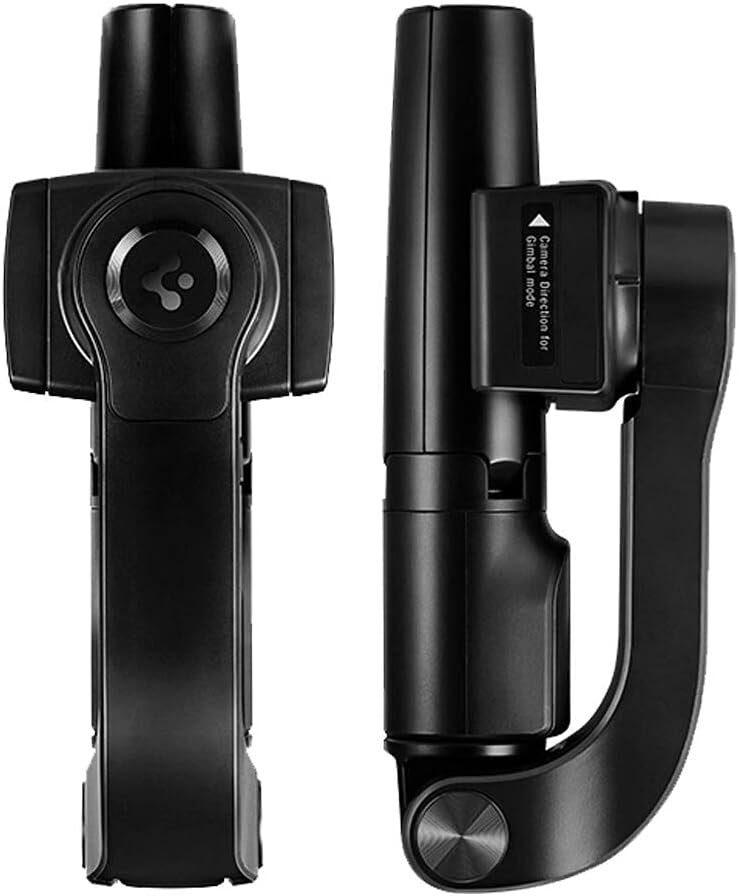
Image: The Spigen S610W Gimbal Wireless Selfie Stick shown in its compact, folded state, ready for storage or transport. The left view shows the top with the control button, and the right view shows the side with the gimbal mechanism.
2. పరికరాన్ని ఛార్జ్ చేస్తోంది
Before first use, ensure the device is fully charged. Connect the charging cable to the charging port on the device and a suitable USB power source. The charging indicator light will show the charging status.
3. మీ స్మార్ట్ఫోన్ను మౌంట్ చేయడం
ఫోన్ cl ని పొడిగించండిamp and securely place your smartphone into the holder. Ensure the phone is balanced in the clamp for optimal gimbal performance. The device is compatible with most cellphones.

Image: The Spigen S610W Gimbal Wireless Selfie Stick fully extended, with a smartphone securely mounted in the clamp. The tripod legs are deployed, indicating its use as a stable stand for photography or video recording.
4. బ్లూటూత్ పెయిరింగ్
- Power on the Spigen S610W by pressing and holding the power button.
- మీ స్మార్ట్ఫోన్లో, బ్లూటూత్ సెట్టింగ్లకు నావిగేట్ చేసి, బ్లూటూత్ను ప్రారంభించండి.
- కోసం వెతకండి available devices and select "Spigen S610W" (or similar name) from the list.
- Once paired, the indicator light on the device will confirm the connection.
ఆపరేటింగ్ సూచనలు
1. Selfie Stick Function
Extend the telescopic rod to your desired length. Use the wireless remote (integrated or detachable) to trigger your smartphone's camera shutter.
2. Tripod Function
Unfold the tripod legs located at the base of the stick. Place the device on a flat, stable surface. This is ideal for group photos, time-lapses, or stable video recording.
3. Gimbal Stabilization
Activate the gimbal mode by pressing the dedicated gimbal button (if available) or by ensuring the device is powered on and the phone is balanced. The single-axis gimbal will automatically stabilize your phone, reducing shakes and jitters for smoother video footage, ముఖ్యంగా కదిలేటప్పుడు.

Image: A composite image showing the Spigen S610W in two configurations: on the left, the device is folded, highlighting its compact form and the gimbal mechanism; on the right, it is fully extended with a smartphone mounted and tripod legs deployed, demonstrating its versatility as both a selfie stick and a stable tripod with gimbal capabilities.
The gimbal feature allows for both vertical and horizontal phone positioning, adapting to your shooting needs.
4. రిమోట్ కంట్రోల్ వినియోగం
The integrated wireless remote allows you to control your phone's camera from a distance. Typically, a single press triggers the shutter for photos, and a long press may initiate video recording (functionality may vary by phone and app).
నిర్వహణ
- శుభ్రపరచడం: పరికరాన్ని మృదువైన, పొడి వస్త్రంతో తుడవండి. కఠినమైన రసాయనాలు లేదా రాపిడి క్లీనర్లను ఉపయోగించవద్దు.
- నిల్వ: పరికరాన్ని ప్రత్యక్ష సూర్యకాంతి మరియు తీవ్రమైన ఉష్ణోగ్రతలు లేకుండా చల్లని, పొడి ప్రదేశంలో నిల్వ చేయండి.
- బ్యాటరీ సంరక్షణ: బ్యాటరీ జీవితకాలాన్ని పొడిగించడానికి, బ్యాటరీని తరచుగా పూర్తిగా డిశ్చార్జ్ చేయకుండా ఉండండి. ఎక్కువసేపు ఉపయోగంలో లేనప్పటికీ, పరికరాన్ని క్రమం తప్పకుండా ఛార్జ్ చేయండి.
ట్రబుల్షూటింగ్
- పరికరం ఆన్ చేయడం లేదు:
- పరికరం పూర్తిగా ఛార్జ్ అయ్యిందని నిర్ధారించుకోండి. పవర్ బటన్ను కొన్ని సెకన్ల పాటు నొక్కి ఉంచండి.
- బ్లూటూత్ కనెక్ట్ కావడం లేదు:
- Make sure Bluetooth is enabled on your phone and the device is in pairing mode. Try forgetting the device on your phone and re-pairing. Ensure the device is charged.
- Gimbal not stabilizing:
- Ensure your phone is securely and balanced in the clamp. Check if the gimbal mode is activated. Recharge the device if the battery is low.
- రిమోట్ కంట్రోల్ పనిచేయదు:
- Verify Bluetooth connection. Check if the remote's battery (if separate) needs replacement or charging.
స్పెసిఫికేషన్లు
| బ్రాండ్ | స్పిజెన్ |
| మోడల్ సంఖ్య | 8809710757653 (S610W) |
| అనుకూల పరికరాలు | సెల్ఫోన్ |
| రంగు | నలుపు |
| వస్తువు బరువు | 0.1 కిలోగ్రాములు (100 గ్రా) |
| ప్యాకేజీ కొలతలు | 20.7 x 9.7 x 7.9 సెం.మీ |
| బ్యాటరీలు | 1 లిథియం అయాన్ బ్యాటరీ అవసరం |
| తయారీదారు | స్పిజెన్ |
వారంటీ మరియు మద్దతు
For warranty information and customer support, please refer to the official Spigen website or contact your point of purchase. Specific warranty terms may vary by region.


