1. పరిచయం
Welcome to your JBL J777 Wireless In-Ear Headphones. This manual provides detailed instructions to help you get the most out of your device, ensuring proper setup, operation, and maintenance. Please read this manual thoroughly before using your headphones.
2. ఉత్పత్తి ముగిసిందిview
The JBL J777 headphones are designed for wireless audio playback and hands-free calling, offering convenience and quality sound.
2.1 భాగాలు
- In-ear earbuds with silicone tips
- Flexible neckband cable
- Inline remote control with integrated microphone
- USB charging port (typically located on the remote)
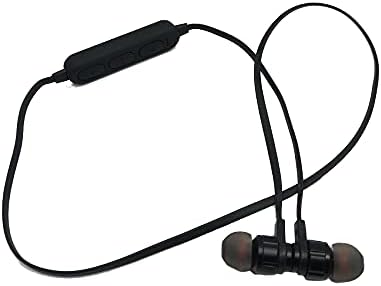
This image displays the complete JBL J777 wireless in-ear headphones. It features two black earbuds connected by a flexible cable, with an inline remote control positioned on the cable. The design is intended for comfortable wear around the neck.
2.2 నియంత్రణలు
The inline remote control provides easy access to various functions:
- పవర్/మల్టీ-ఫంక్షన్ బటన్: Used for powering on/off, play/pause music, and answering/ending calls.
- వాల్యూమ్ అప్ బటన్: Increases volume, also used for skipping to the next track.
- వాల్యూమ్ డౌన్ బటన్: Decreases volume, also used for skipping to the previous track.

ఒక వివరణాత్మక view of the inline remote control for the JBL J777 headphones. It shows three distinct buttons for power/multi-function, volume up, and volume down, along with a small microphone opening for hands-free calls.
3. సెటప్
3.1 హెడ్ఫోన్లను ఛార్జ్ చేయడం
- Connect the micro-USB charging cable to the charging port on the inline remote control.
- కేబుల్ యొక్క మరొక చివరను USB పవర్ సోర్స్కి కనెక్ట్ చేయండి (ఉదా. కంప్యూటర్ USB పోర్ట్, USB వాల్ అడాప్టర్).
- The LED indicator will typically show red during charging and turn off or blue when fully charged.
- The integrated 90mAh lithium battery provides wireless operation.
3.2 బ్లూటూత్ జత చేయడం
To connect your JBL J777 headphones to a Bluetooth-enabled device:
- హెడ్ఫోన్లు ఆఫ్ చేయబడి ఉన్నాయని నిర్ధారించుకోండి.
- నొక్కండి మరియు పట్టుకోండి Power/Multi-function button for approximately 5-7 seconds until the LED indicator flashes red and blue alternately. This indicates the headphones are in pairing mode.
- On your mobile phone or Bluetooth-enabled device, go to the Bluetooth settings and enable Bluetooth.
- కోసం వెతకండి available devices and select "JBL J777" from the list.
- Once paired, the LED indicator will typically flash blue slowly or remain solid blue.
- The headphones have an operation distance of up to 10 meters (33 feet) in an open environment.
4. ఆపరేటింగ్ సూచనలు
4.1 పవర్ ఆన్/ఆఫ్
- పవర్ ఆన్ చేయడానికి: నొక్కండి మరియు పట్టుకోండి Power/Multi-function button for 3 seconds. The LED will flash blue.
- పవర్ ఆఫ్ చేయడానికి: నొక్కండి మరియు పట్టుకోండి Power/Multi-function button for 3 seconds. The LED will flash red and then turn off.
4.2 మ్యూజిక్ ప్లేబ్యాక్
- ప్లే/పాజ్: నొక్కండి Power/Multi-function ఒకసారి బటన్.
- తదుపరి ట్రాక్: నొక్కండి మరియు పట్టుకోండి వాల్యూమ్ అప్ బటన్.
- మునుపటి ట్రాక్: నొక్కండి మరియు పట్టుకోండి వాల్యూమ్ డౌన్ బటన్.
- ధ్వని పెంచు: నొక్కండి వాల్యూమ్ అప్ బటన్ క్లుప్తంగా.
- వాల్యూమ్ డౌన్: నొక్కండి వాల్యూమ్ డౌన్ బటన్ క్లుప్తంగా.
4.3 కాల్ నిర్వహణ
- సమాధానం/ముగింపు కాల్: నొక్కండి Power/Multi-function ఒకసారి బటన్.
- కాల్ని తిరస్కరించండి: నొక్కండి మరియు పట్టుకోండి Power/Multi-function 2 సెకన్ల పాటు బటన్.
- చివరి నంబర్ని మళ్లీ డయల్ చేయండి: రెండుసార్లు నొక్కండి Power/Multi-function బటన్.
4.4 యాక్టివ్ నాయిస్ రద్దు
The JBL J777 headphones feature active noise cancellation to reduce ambient noise for a more immersive listening experience. This feature operates automatically or is controlled via the multi-function button, depending on the specific model variant.
5. నిర్వహణ
సరైన జాగ్రత్త మీ హెడ్ఫోన్ల దీర్ఘాయువు మరియు సరైన పనితీరును నిర్ధారిస్తుంది.
- శుభ్రపరచడం: ఇయర్బడ్లు మరియు కేబుల్ను మృదువైన, పొడి గుడ్డతో సున్నితంగా తుడవండి. కఠినమైన రసాయనాలు లేదా రాపిడి పదార్థాలను ఉపయోగించవద్దు.
- నిల్వ: Store the headphones in a cool, dry place away from direct sunlight and extreme temperatures. Avoid tangling the cable.
- బ్యాటరీ సంరక్షణ: బ్యాటరీ జీవితకాలాన్ని పొడిగించడానికి, బ్యాటరీని తరచుగా పూర్తిగా డిశ్చార్జ్ చేయకుండా ఉండండి. ఎక్కువసేపు ఉపయోగంలో లేనప్పటికీ, హెడ్ఫోన్లను క్రమం తప్పకుండా ఛార్జ్ చేయండి.
6. ట్రబుల్షూటింగ్
If you encounter any issues with your JBL J777 headphones, refer to the following common problems and solutions:
- హెడ్ఫోన్లు ఆన్ కావడం లేదు: బ్యాటరీ ఛార్జ్ అయ్యిందని నిర్ధారించుకోండి. పవర్ సోర్స్కి కనెక్ట్ చేసి, మళ్లీ ప్రయత్నించండి.
- పరికరంతో జత చేయడం సాధ్యం కాదు:
- Ensure the headphones are in pairing mode (flashing red and blue).
- మీ పరికరంలో బ్లూటూత్ ప్రారంభించబడిందని నిర్ధారించుకోండి.
- హెడ్ఫోన్లను మీ పరికరానికి దగ్గరగా తరలించండి.
- హెడ్ఫోన్లు మరియు మీ పరికరం రెండింటినీ ఆఫ్ చేసి ఆన్ చేసి, ఆపై మళ్లీ జత చేయడానికి ప్రయత్నించండి.
- శబ్దం లేదు:
- హెడ్ఫోన్లు మరియు మీ కనెక్ట్ చేయబడిన పరికరం రెండింటిలోనూ వాల్యూమ్ స్థాయిని తనిఖీ చేయండి.
- హెడ్ఫోన్లు సరిగ్గా జత చేయబడి కనెక్ట్ అయ్యాయని నిర్ధారించుకోండి.
- వేరే అప్లికేషన్ లేదా మూలం నుండి ఆడియోను ప్లే చేయడానికి ప్రయత్నించండి.
- పేలవమైన ధ్వని నాణ్యత లేదా అడపాదడపా కనెక్షన్:
- హెడ్ఫోన్లు మరియు మీ పరికరం మధ్య ఎటువంటి అడ్డంకులు లేవని నిర్ధారించుకోండి.
- అంతరాయానికి కారణమయ్యే ఇతర వైర్లెస్ పరికరాల నుండి దూరంగా వెళ్లండి.
- మీ పరికరంతో హెడ్ఫోన్లను తిరిగి జత చేయండి.
7. స్పెసిఫికేషన్లు
Detailed technical specifications for the JBL J777 Wireless In-Ear Headphones:
| బ్రాండ్ | JBL |
| మోడల్ సంఖ్య | J777 |
| టైప్ చేయండి | ఇన్-ఇయర్ వైర్లెస్ హెడ్ఫోన్లు |
| కనెక్టివిటీ | వైర్లెస్ (బ్లూటూత్ 4.2) |
| బ్లూటూత్ ప్రోfiles | HFP, A2DP, AVCTP, AVDTP, AVRCP |
| ఆపరేషన్ దూరం | 10 మీటర్లు (33 అడుగులు) వరకు |
| శక్తిని ప్రసారం చేయడం | తరగతి 2 |
| ఫ్రీక్వెన్సీ రేంజ్ | 2.402 - 2.480 గిగాహెర్ట్జ్ |
| స్పీకర్ వ్యాసం | Ø15మి.మీ |
| ఇంపెడెన్స్ | 32Ω |
| మైక్రోఫోన్ | ఇంటిగ్రేటెడ్ |
| నాయిస్ కంట్రోల్ | యాక్టివ్ నాయిస్ రద్దు |
| బ్యాటరీ | Rechargeable Lithium, 90mAh |
| తో అనుకూలమైనది | మొబైల్ ఫోన్లు |
| TF కార్డ్ మద్దతు | 128MB - 32GB |
| చేర్చబడిన భాగాలు | చెవి కుషన్లు |

This image shows the rear side of the JBL J777 product packaging. It clearly lists technical specifications such as Bluetooth version, supported profiles, operation distance, transmitting power, frequency range, speaker size, impedance, and battery capacity. It also indicates TF card support.
8. వారంటీ మరియు మద్దతు
For warranty information regarding your JBL J777 Wireless In-Ear Headphones, please refer to the documentation provided at the time of purchase. This information is typically included in the product packaging or available on the official JBL webసైట్.
For further assistance, technical support, or to inquire about service, please visit the official JBL support page or contact their customer service department directly. Keep your proof of purchase handy for any warranty claims.


