1. పరిచయం మరియు ఓవర్view
The Thinkcar THINKOBD 500 is a professional-grade OBD2 scanner designed to diagnose vehicle issues, read and clear diagnostic trouble codes (DTCs), and perform various emission-related tests. This tool provides essential information for maintaining vehicle health and ensuring compliance with emission standards. It is compatible with most US-based vehicles manufactured in 1996 or later, EU-based vehicles from 2000 or later, and Asia-based vehicles from 2008 or later.

చిత్రం: The Thinkcar THINKOBD 500 is compatible with a wide range of vehicles, including US-based cars from 1996 and newer, EU-based cars from 2000 and newer, and Asia-based cars from 2008 and newer. Note that it is not compatible with JODB compliant Japanese cars.
2. Product Features and Functions
The THINKOBD 500 offers a comprehensive suite of OBDII diagnostic functions to help users identify and resolve vehicle problems efficiently:
- కోడ్లను చదవండి: Retrieves generic (P0, P2, P3, and U0) and manufacturer specific (P1, P3, and U1) codes.
- కోడ్లను క్లియర్ చేయండి: Erases Diagnostic Trouble Codes (DTCs) and turns off the Check Engine Light (MIL).
- I/M సంసిద్ధత: ఉద్గార పర్యవేక్షణ వ్యవస్థల సంసిద్ధతను తనిఖీ చేస్తుంది.
- ప్రత్యక్ష డేటా: వాహనం యొక్క సెన్సార్ల నుండి నిజ-సమయ డేటా స్ట్రీమ్ను ప్రదర్శిస్తుంది.
- ఫ్రీజ్ ఫ్రేమ్: Records a snapshot of the vehicle's operating conditions at the time an emission-related fault occurs.
- O2 సెన్సార్ టెస్ట్: Retrieves O2 sensor monitor test results for the most recently completed tests from the vehicle’s on-board computer.
- ఆన్-బోర్డ్ మానిటర్ టెస్ట్: Retrieves results for emission-related powertrain components and systems that are not continuously monitored.
- EVAP సిస్టమ్ పరీక్ష: Initiates a leak test for the vehicle's Evaporative Emission System.
- Vehicle Information (VIN): Displays the Vehicle Identification Number, Calibration ID, and Calibration Verification Number.
- DTC శోధన: Provides detailed descriptions of Diagnostic Trouble Codes.
- Smog Check: Assists in preparing the vehicle for emission testing.
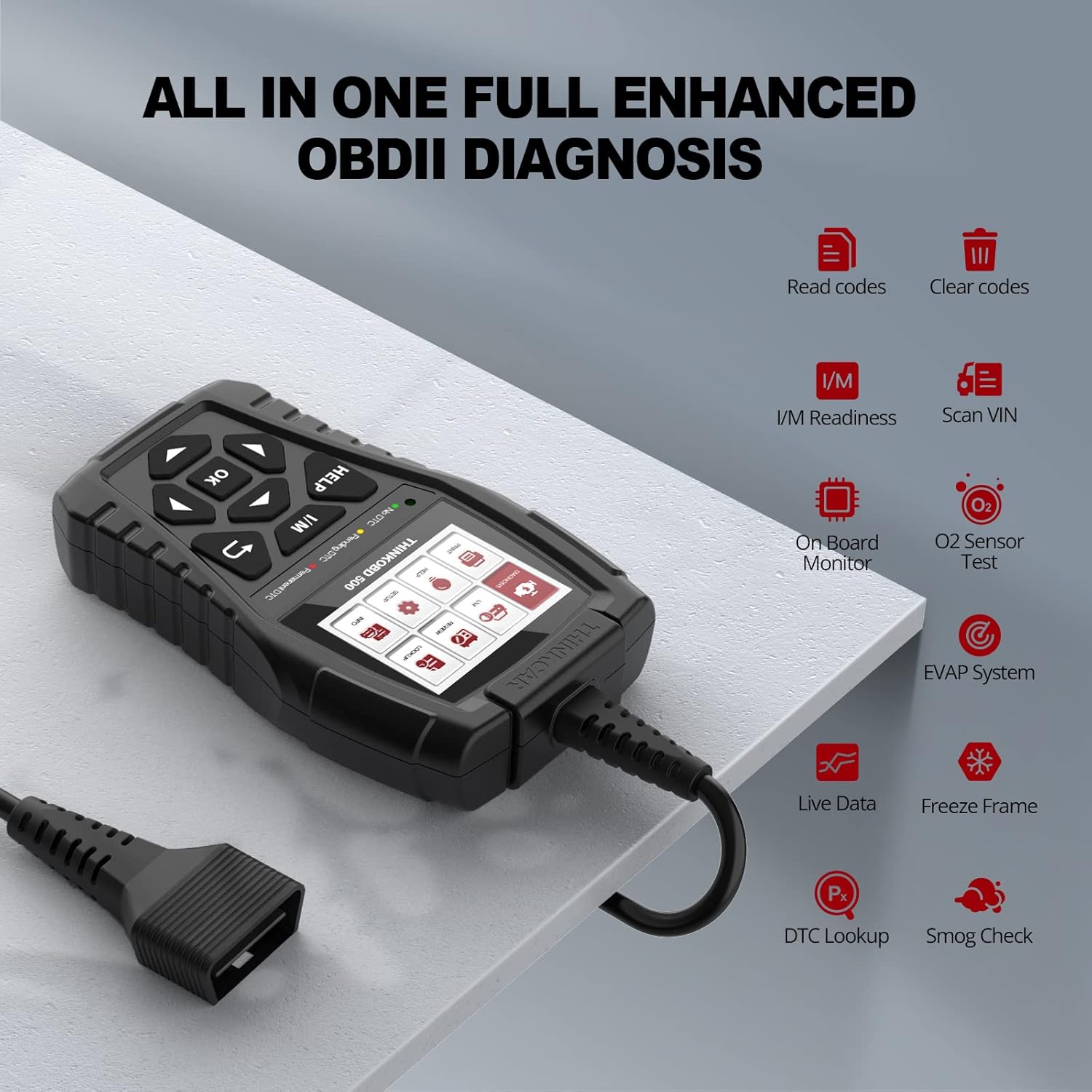
చిత్రం: The THINKOBD 500 offers a comprehensive set of OBDII diagnostic functions, including reading and clearing codes, I/M readiness, live data, O2 sensor tests, and more.

చిత్రం: This scanner helps save time and money by allowing users to easily scan DTCs, identify parts for replacement, and erase codes to turn off the Malfunction Indicator Lamp (MIL).
వీడియో: This video provides a customer's experience review of the Thinkcar OBD2 Scanner, demonstrating its practical use in diagnosing and resolving a check engine light issue related to an evaporative emission system. It highlights the ease of use and the value of having such a tool for preliminary diagnostics.
3. సెటప్
Follow these steps to set up and begin using your Thinkcar THINKOBD 500 scanner:
- OBDII పోర్ట్ను గుర్తించండి: The OBDII port is typically located under the dashboard on the driver's side of the vehicle. Refer to your vehicle's manual or search online for its exact location (often positions A to E as shown in diagrams).
- ప్లగ్ ఇన్: Connect the OBDII connector from the scanner into your vehicle's OBDII port.
- Turn On Vehicle: Start your vehicle's engine. The scanner will power on automatically.
- Scanner Display System: The scanner's display system should activate within approximately 5 seconds, ready for operation.

చిత్రం: Visual guide for the easy setup of the THINKOBD 500 scanner, showing how to locate the OBDII port, turn on the vehicle, and wait for the scanner to display its system.
సాఫ్ట్వేర్ నవీకరణ ప్రక్రియ
To ensure your THINKOBD 500 has the latest vehicle coverage and features, it is recommended to update its software. The product offers lifetime free updates. The device is compatible with Windows XP, 7, 8, and 10.
- కంప్యూటర్కు కనెక్ట్ చేయండి: Connect one end of the included USB cable to the scanner and the other end to a USB port on your computer.
- సాఫ్ట్వేర్ డౌన్లోడ్: Visit the official Thinkcar technical support website to download the update software.
- సాఫ్ట్వేర్ను ఇన్స్టాల్ చేయండి: డౌన్లోడ్ చేసిన దాన్ని విడదీయండి file and install the software on your computer.
- పరికరాన్ని నవీకరించండి: Launch the software and follow the on-screen prompts to choose either 'Print' or 'Update' function. The device should update automatically if a newer version is available. Note: The OBD 500 may already be installed with the latest version upon receipt, so an update might not be immediately necessary.
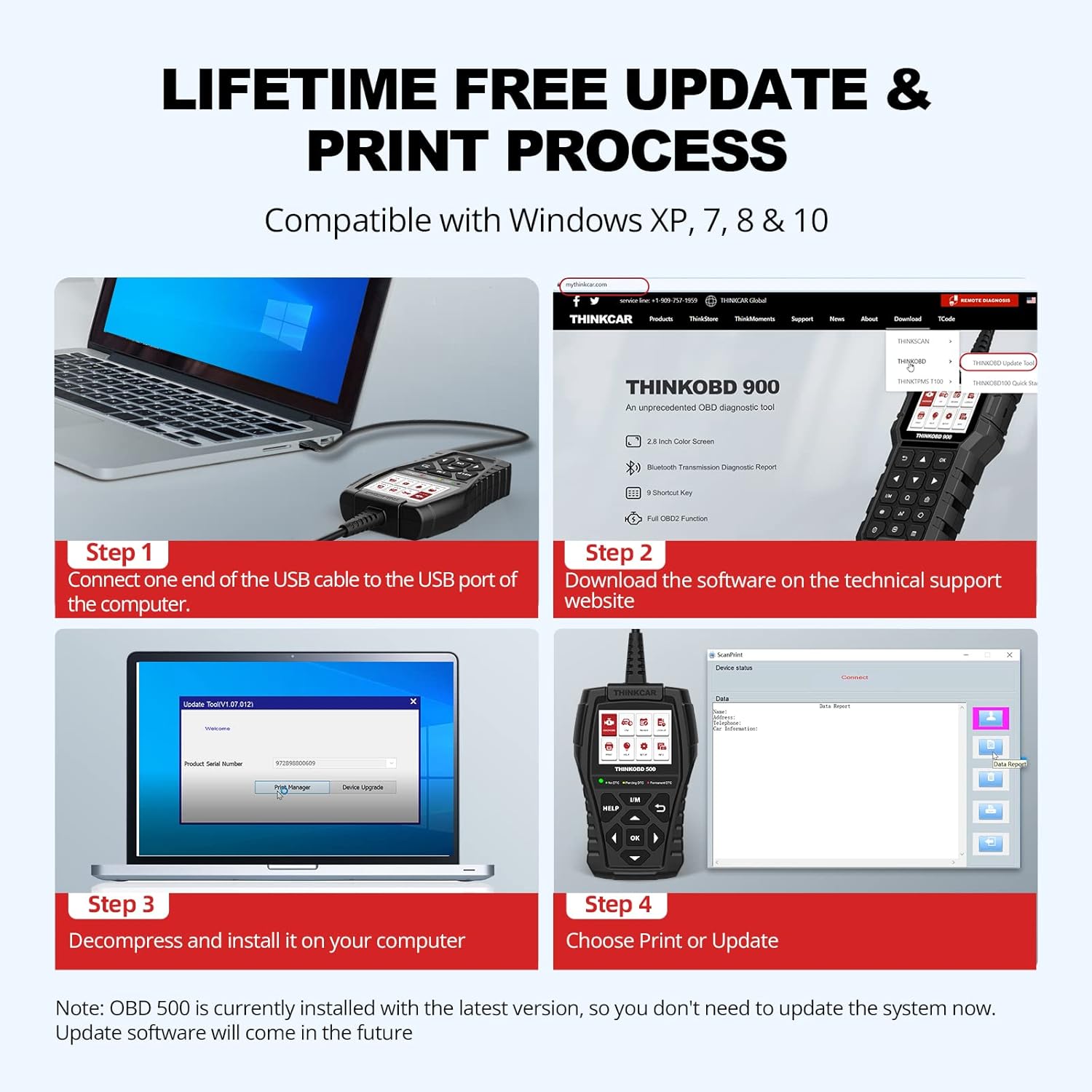
చిత్రం: This image illustrates the four-step process for updating the THINKOBD 500's software and printing data, involving connecting the device to a computer, downloading software, installing it, and then performing the update or print function.
4. ఆపరేటింగ్ సూచనలు
The THINKOBD 500 features a user-friendly interface with a larger screen and intuitive button layout for easy navigation. The main menu provides access to various diagnostic functions:

చిత్రం: The main screen of the Thinkcar THINKOBD 500, showing the menu icons for Diagnosis, I/M, Review, Lookup, Print, Help, Setup, and Info. It also displays the 3-color LED indicators for DTC status.
నావిగేషన్ మరియు ఎంపిక
- ఉపయోగించండి Up, క్రిందికి, ఎడమ, మరియు కుడి arrow buttons to navigate through menu options and data.
- నొక్కండి OK ఎంపికను నిర్ధారించడానికి లేదా ఉపమెనును నమోదు చేయడానికి బటన్ను క్లిక్ చేయండి.
- ది I/M బటన్ I/M సంసిద్ధత స్థితికి త్వరిత ప్రాప్యతను అందిస్తుంది.
- ది సహాయం button offers on-screen assistance and definitions.
- ది తిరిగి button navigates back to the previous screen.
Performing a Diagnostic Scan
- ప్రధాన మెను నుండి, ఎంచుకోండి వ్యాధి నిర్ధారణ మరియు నొక్కండి OK.
- The scanner will automatically link to the vehicle's ECU and begin scanning for codes.
- Once the scan is complete, you can select options like కోడ్లను చదవండి కు view detected DTCs or I/M సంసిద్ధత to check emission system status.
- To clear codes, navigate to the కోడ్లను క్లియర్ చేయండి option and confirm. This will turn off the Check Engine Light.
5. నిర్వహణ
To ensure the longevity and optimal performance of your Thinkcar THINKOBD 500 scanner, follow these maintenance guidelines:
- శుభ్రముగా ఉంచు: పరికరాన్ని మృదువైన, పొడి గుడ్డతో తుడవండి. రాపిడి క్లీనర్లు లేదా ద్రావకాలను ఉపయోగించవద్దు.
- సరైన నిల్వ: Store the scanner in a dry, cool environment away from direct sunlight and extreme temperatures.
- కేబుల్ కేర్: Handle the OBDII cable carefully. Avoid bending or twisting it excessively, which can damage internal wires.
- సాఫ్ట్వేర్ అప్డేట్లు: Regularly check for and install software updates from the official Thinkcar website to ensure compatibility with new vehicle models and access to the latest diagnostic features. The product offers lifetime free updates.
6. ట్రబుల్షూటింగ్
If you encounter issues while using your THINKOBD 500, consider the following common troubleshooting tips:
- స్కానర్ ఆన్ చేయడం లేదు: Ensure the OBDII connector is securely plugged into the vehicle's port and the vehicle's ignition is on (or engine running). Check the vehicle's fuse for the OBDII port if the issue persists.
- "Failed to Update" Message: If the software update process repeatedly fails, the device may already have the latest available software version installed. Verify the current software version on your device against the latest version listed on the Thinkcar support webసైట్.
- Check Engine Light Remains On After Clearing Codes: This may indicate an underlying issue that needs to be addressed. Sometimes, a loose or faulty gas cap can trigger an evaporative emission system code (e.g., P0450). Ensure the gas cap is securely tightened. If the light persists, further diagnosis by a qualified mechanic may be required.
- వాహనంతో కమ్యూనికేషన్ లేదు: Verify that the vehicle supports the OBDII protocol (most vehicles from 1996 onwards do). Check the connection of the OBDII cable. Ensure the vehicle's battery has sufficient charge.
7. స్పెసిఫికేషన్లు
| స్పెసిఫికేషన్ | విలువ |
|---|---|
| బ్రాండ్ | థింక్కార్ |
| మోడల్ సంఖ్య | థింకోబ్డ్ 500 |
| వస్తువు బరువు | 1.06 పౌండ్లు |
| ఉత్పత్తి కొలతలు | 6.5 x 3.74 x 1.38 అంగుళాలు |
| తయారీదారు | ఆలోచనాపరుడు |
| UPC | 768297142451 |
8. వారంటీ మరియు మద్దతు
For detailed warranty information and technical support, please refer to the documentation included with your Thinkcar THINKOBD 500 device or visit the official Thinkcar webసైట్. మీరు అదనపు వనరులను మరియు సంప్రదింపు సమాచారాన్ని కూడా కనుగొనవచ్చు ద్వారా Thinkcar Store on Amazon.


