1. పరిచయం
Thank you for choosing the hohem iSteady X2 3-Axis Gimbal Stabilizer. This manual provides essential information for the safe and effective operation of your device. Please read it thoroughly before use and retain it for future reference.
ప్యాకేజీ విషయాలు
- hohem iSteady X2 Gimbal Stabilizer
- వైర్లెస్ రిమోట్ కంట్రోల్
- మినీ ట్రైపాడ్
- USB-C ఛార్జింగ్ కేబుల్
- నిల్వ పర్సు
- వినియోగదారు మాన్యువల్ (ఈ పత్రం)
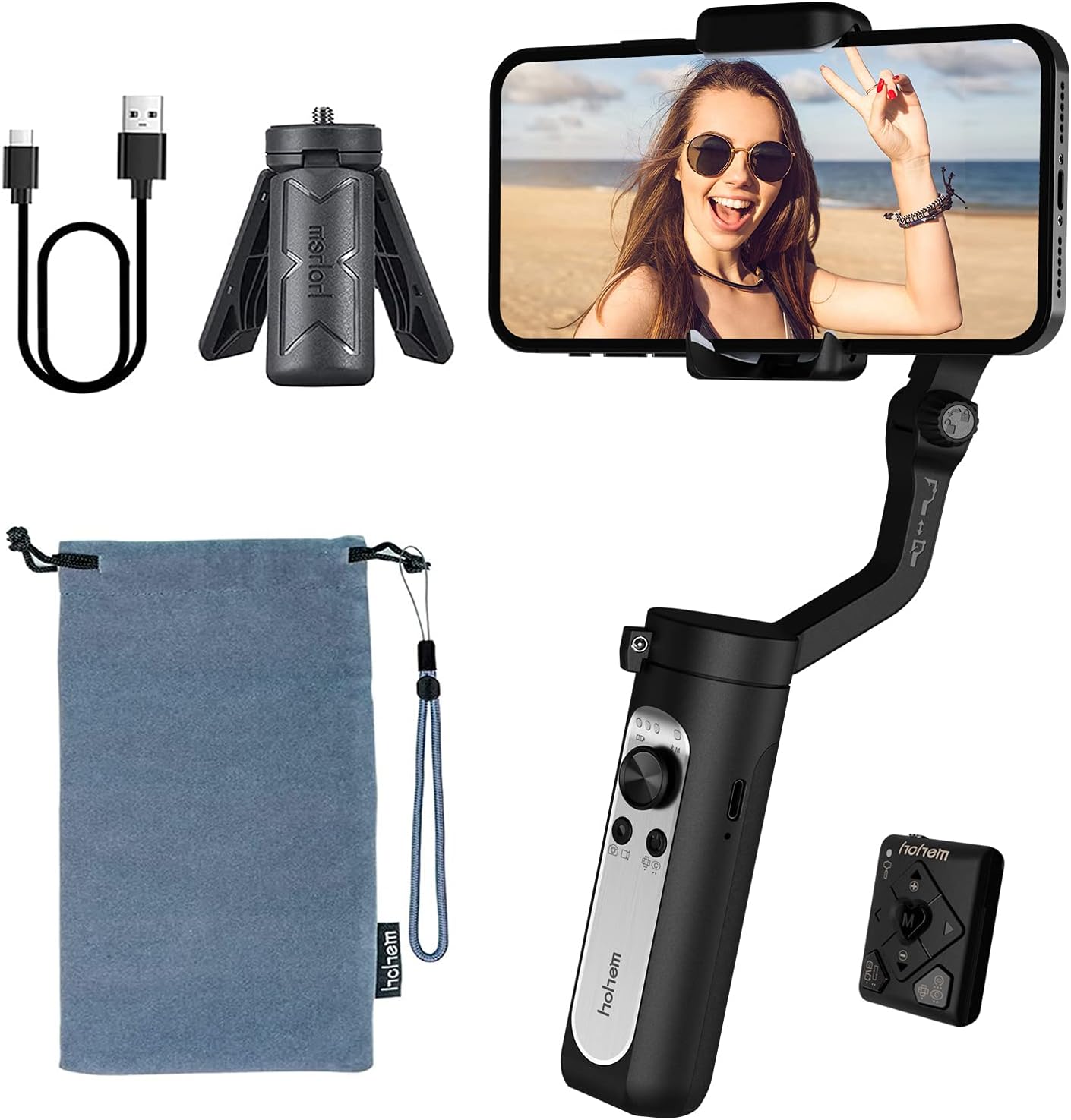
The image above displays the hohem iSteady X2 gimbal stabilizer along with its standard accessories. These include the main gimbal unit, a compact wireless remote control, a mini tripod for stable placement, a USB-C cable for charging, and a soft storage pouch for portability.
2. భద్రతా సమాచారం
To ensure safe operation and prevent damage to the device or injury to yourself or others, please observe the following safety precautions:
- Do not disassemble, repair, or modify the gimbal.
- Keep the gimbal away from water and other liquids.
- గింబాల్ను పడవేయడం లేదా బలమైన ప్రభావాలకు గురిచేయడం మానుకోండి.
- Do not expose the gimbal to extreme temperatures or direct sunlight for prolonged periods.
- Ensure your smartphone is securely mounted before powering on the gimbal.
- Keep fingers clear of moving parts during operation.
- అందించిన ఛార్జింగ్ కేబుల్ మరియు అనుకూలమైన పవర్ అడాప్టర్ను మాత్రమే ఉపయోగించండి.
3. ఉత్పత్తి ముగిసిందిview
The hohem iSteady X2 is a compact and lightweight 3-axis gimbal stabilizer designed for smartphones, offering enhanced stability and creative shooting modes. It features a foldable design for easy portability and comes with a wireless remote control.

This image illustrates the primary features of the hohem iSteady X2, including its ultralight design (259g), 3-axis stabilization for smooth footage, wireless remote control capability, advanced face tracking, various Moment Modes for creative shots, emergency power bank function for charging your phone, and a quick roll switch for easy orientation changes.
భాగాలు మరియు నియంత్రణలు
- ఫోన్ Clamp: Securely holds your smartphone.
- Roll Axis Motor: Controls the roll movement for horizontal stability.
- Pan Axis Motor: Controls the pan movement for horizontal rotation.
- Tilt Axis Motor: Controls the tilt movement for vertical stability.
- జాయ్ స్టిక్: Controls pan and tilt movements manually.
- మోడ్ బటన్ (M): Switches between different working modes.
- పవర్ బటన్: Powers the gimbal on/off.
- షట్టర్ బటన్: Triggers photo/video recording via Bluetooth.
- జూమ్ స్లయిడర్: Controls digital zoom in the Hohem Pro app.
- USB-C పోర్ట్: For charging the gimbal and emergency phone charging.
- 1/4-inch Screw Hole: For mounting the tripod or other accessories.

This image highlights some of the creative shooting modes accessible through the Hohem Pro app, including Inception Mode for rotating shots, Dolly Zoom for dramatic effects, Timelapse for accelerated video, and Panoramic for wide-angle captures. These modes enhance the versatility of the gimbal for various content creation needs.
4. సెటప్
4.1 గింబాల్ను విప్పడం
- Gently unfold the gimbal arm until it locks into place.
- ఫోన్ cl ని పొడిగించండిamp.

The image above demonstrates the compact, folded state of the hohem iSteady X2, showing how easily it fits into a pocket. This highlights its lightweight design, weighing only 0.57 lbs, making it highly portable for on-the-go use.
4.2 Mounting and Balancing Your Smartphone
సరైన పనితీరు మరియు బ్యాటరీ జీవితకాలం కోసం సరైన బ్యాలెన్సింగ్ చాలా ముఖ్యమైనది.
- Place your smartphone firmly into the phone clamp. Ensure the phone is centered and snug.
- cl లోపల ఫోన్ స్థానాన్ని సర్దుబాటు చేయండిamp until it remains level when the gimbal is powered off. If the phone tilts to one side, adjust its position slightly until it stays horizontal.

This image visually represents the 3-axis stabilization capability of the hohem iSteady X2. It shows a smartphone mounted on the gimbal, with arrows indicating the three axes of movement (pan, tilt, and roll) that work together using the 4.0 anti-shake algorithm system to ensure smooth and stable video footage, even during dynamic movements.
4.3 App Installation (Hohem Pro)
For full functionality and advanced features, download the "Hohem Pro" app from your smartphone's app store (iOS App Store or Google Play Store).
- కోసం వెతకండి "Hohem Pro".
- యాప్ను ఇన్స్టాల్ చేసి, అవసరమైన అనుమతులను మంజూరు చేయండి.
5. ఆపరేటింగ్ సూచనలు
5.1 పవర్ చేయడం ఆన్/ఆఫ్
- పవర్ ఆన్: పవర్ బటన్ను 3 సెకన్ల పాటు నొక్కి పట్టుకోండి.
- పవర్ ఆఫ్: పవర్ బటన్ను 3 సెకన్ల పాటు నొక్కి పట్టుకోండి.
5.2 బ్లూటూత్ కనెక్షన్
- Ensure the gimbal is powered on.
- మీ స్మార్ట్ఫోన్లో బ్లూటూత్ని ప్రారంభించండి.
- Open the Hohem Pro app. The app will automatically search for and connect to the gimbal.
- ప్రాంప్ట్ చేయబడితే, జత చేయడాన్ని నిర్ధారించండి.
5.3 గింబాల్ మోడ్లు
Press the Mode Button (M) to cycle through the following modes:
- Pan & Tilt Follow (PF): The pan and tilt axes follow your movements, while the roll axis remains locked.
- పాన్ ఫాలో (PF): Only the pan axis follows your movements.
- ఆల్ లాక్ (AL): మూడు అక్షాలు లాక్ చేయబడ్డాయి, కెమెరా స్థిరమైన దిశలో చూపబడుతుంది.
- POV (పాయింట్ ఆఫ్ View): All three axes follow your movements, providing a first-person perspective.
- ప్రారంభ మోడ్: Rotates the phone 360 degrees along the roll axis.
5.4 వైర్లెస్ రిమోట్ కంట్రోల్
The iSteady X2 comes with a dedicated wireless remote control for convenient operation.

This image highlights the convenience of the wireless remote control. It shows the gimbal set up with a smartphone, and a hand holding the remote, enabling users to capture photos or videos from a distance, perfect for group shots or when you need to be in the frame yourself.
- పవర్ బటన్: Power on/off the remote.
- షట్టర్ బటన్: Take photos or start/stop video recording.
- జాయ్ స్టిక్: Control gimbal movement (pan/tilt).
- మోడ్ బటన్: Switch gimbal modes.
- జూమ్ ఇన్/అవుట్: Control digital zoom.
5.5 Emergency Power Bank Function
The iSteady X2 features a built-in 2800mAh battery that can also serve as an emergency power bank for your smartphone via the USB-C port.

This image demonstrates the hohem iSteady X2's capability to act as an emergency power bank. It shows a smartphone connected to the gimbal via a USB-C cable, indicating that the gimbal's internal 2800mAh battery can provide power to charge your phone when needed, extending your shooting time.
5.6 అధికారిక ఉత్పత్తి వీడియో
The embedded video showcases the hohem iSteady X2, emphasizing its lightweight design and various functionalities. It demonstrates the gimbal's ease of use, portability, and some of its advanced features in action, providing a visual guide to its capabilities.
6. నిర్వహణ
- శుభ్రపరచడం: గింబాల్ను శుభ్రం చేయడానికి మృదువైన, పొడి వస్త్రాన్ని ఉపయోగించండి. ద్రవ క్లీనర్లను లేదా ద్రావకాలను ఉపయోగించవద్దు.
- నిల్వ: Store the gimbal in its provided storage pouch in a cool, dry place away from direct sunlight.
- బ్యాటరీ సంరక్షణ: For long-term storage, charge the battery to approximately 50-60% every three months to prevent over-discharge.
7. ట్రబుల్షూటింగ్
| సమస్య | సాధ్యమైన కారణం | పరిష్కారం |
|---|---|---|
| గింబాల్ ఆన్ చేయడం లేదు. | తక్కువ బ్యాటరీ. | గింబాల్ను పూర్తిగా ఛార్జ్ చేయండి. |
| Gimbal unstable or vibrating. | Smartphone not balanced correctly. | Re-balance the smartphone in the clamp. |
| బ్లూటూత్ కనెక్షన్ సమస్యలు. | Bluetooth off on phone, app not open, interference. | Ensure Bluetooth is on, open Hohem Pro app, restart gimbal and phone. |
| రిమోట్ కంట్రోల్ పనిచేయడం లేదు. | Remote battery low, not paired. | Ensure remote is charged/has fresh batteries, re-pair with gimbal. |
8. స్పెసిఫికేషన్లు
| ఫీచర్ | వివరాలు |
|---|---|
| మోడల్ | X2 |
| ఉత్పత్తి కొలతలు | 7.05 x 3.11 x 1.54 అంగుళాలు (మడతపెట్టబడింది) |
| వస్తువు బరువు | 9.1 ఔన్సులు (సుమారు 259గ్రా) |
| గరిష్ట బరువు సిఫార్సు | 280 గ్రాములు (0.62 పౌండ్లు) |
| బ్యాటరీ రకం | లిథియం అయాన్ |
| బ్యాటరీ కెపాసిటీ | 2800mAh (approx. 10 hours battery life) |
| ఛార్జింగ్ పోర్ట్ | USB-C (supports two-way charging) |
| స్థిరీకరణ | 3-Axis (Pan, Tilt, Roll) with 4.0 anti-shake algorithm |
| అనుకూల పరికరాలు | iPhone 12/12mini/12pro/12pro max/11/11 pro max/Xs max/xs/x, Samsung Galaxy s10e/s10 plus/Note10, Huawei P40/P40+/P30/mate 30, Google Pixel 4/4XL |
| UPC | 673400922373 |
9. వారంటీ మరియు మద్దతు
hohem products are designed and manufactured to the highest quality standards. For warranty information and technical support, please refer to the official hohem webసైట్ లేదా వారి కస్టమర్ సేవను నేరుగా సంప్రదించండి.
- అధికారిక Webసైట్: www.hohem.com
- కస్టమర్ సేవ: Refer to the contact information provided on the product packaging or official webసైట్.
- యూజర్ మాన్యువల్ (PDF): యూజర్ మాన్యువల్ యొక్క డౌన్లోడ్ చేసుకోదగిన PDF వెర్షన్ ఇక్కడ అందుబాటులో ఉండవచ్చు ఈ లింక్.
వారంటీ క్లెయిమ్ల కోసం దయచేసి మీ కొనుగోలు రుజువును ఉంచుకోండి.


