పరిచయం
This manual provides comprehensive instructions for the setup, operation, and maintenance of your MOFII Sweet 2.4G Wireless Keyboard and Mouse Set. Please read this manual thoroughly before using the product to ensure proper functionality and longevity.
ప్యాకేజీ విషయాలు
- MOFII Sweet Wireless Keyboard
- MOFII Sweet Wireless Mouse
- USB 2.4G రిసీవర్
- 2 x AA బ్యాటరీలు (ముందే ఇన్స్టాల్ చేయబడ్డాయి లేదా విడిగా చేర్చబడ్డాయి)
- వినియోగదారు మాన్యువల్ (ఈ పత్రం)
సెటప్
1. బ్యాటరీ ఇన్స్టాలేషన్
The MOFII Sweet set requires AA batteries for both the keyboard and the mouse. Ensure correct polarity when inserting batteries.
- కీబోర్డ్ కోసం: Locate the battery compartment on the underside of the keyboard. Open the cover, insert the AA batteries according to the polarity markings, and close the cover.
- మౌస్ కోసం: Locate the battery compartment on the underside of the mouse. Open the cover, insert the AA battery according to the polarity markings, and close the cover.

Image: The MOFII Sweet wireless keyboard and mouse, showcasing their design and color. This image represents the complete set.
2. USB రిసీవర్ కనెక్షన్
- Locate the USB 2.4G receiver, typically stored in the mouse's battery compartment or included separately.
- మీ కంప్యూటర్, ల్యాప్టాప్ లేదా టాబ్లెట్లో అందుబాటులో ఉన్న USB పోర్ట్లోకి USB రిసీవర్ను ప్లగ్ చేయండి.
- మీ ఆపరేటింగ్ సిస్టమ్ అవసరమైన డ్రైవర్లను స్వయంచాలకంగా గుర్తించి ఇన్స్టాల్ చేయాలి. ఈ ప్రక్రియకు కొన్ని క్షణాలు పట్టవచ్చు.
3. పవర్ చేయడం
Ensure the power switch on both the keyboard and mouse is in the "ON" position. The power switch for the mouse is usually on its underside. The keyboard may not have a dedicated power switch and will activate upon key press after battery installation.
ఆపరేటింగ్ సూచనలు
కీబోర్డ్ వినియోగం
The MOFII Sweet keyboard features a standard QWERTY layout with additional function keys. It is designed for comfortable typing.
- ప్రామాణిక కీలు: All alphanumeric and symbol keys function as expected.
- ఫంక్షన్ కీలు (F1-F12): These keys may have secondary functions (e.g., media control, volume adjustment) when pressed in combination with the Fn key. Refer to the keycap legends for specific functions.
- సంఖ్యా కీప్యాడ్: The dedicated numeric keypad on the right provides efficient data entry. Ensure నమ్ లాక్ is active if numbers are not registering.
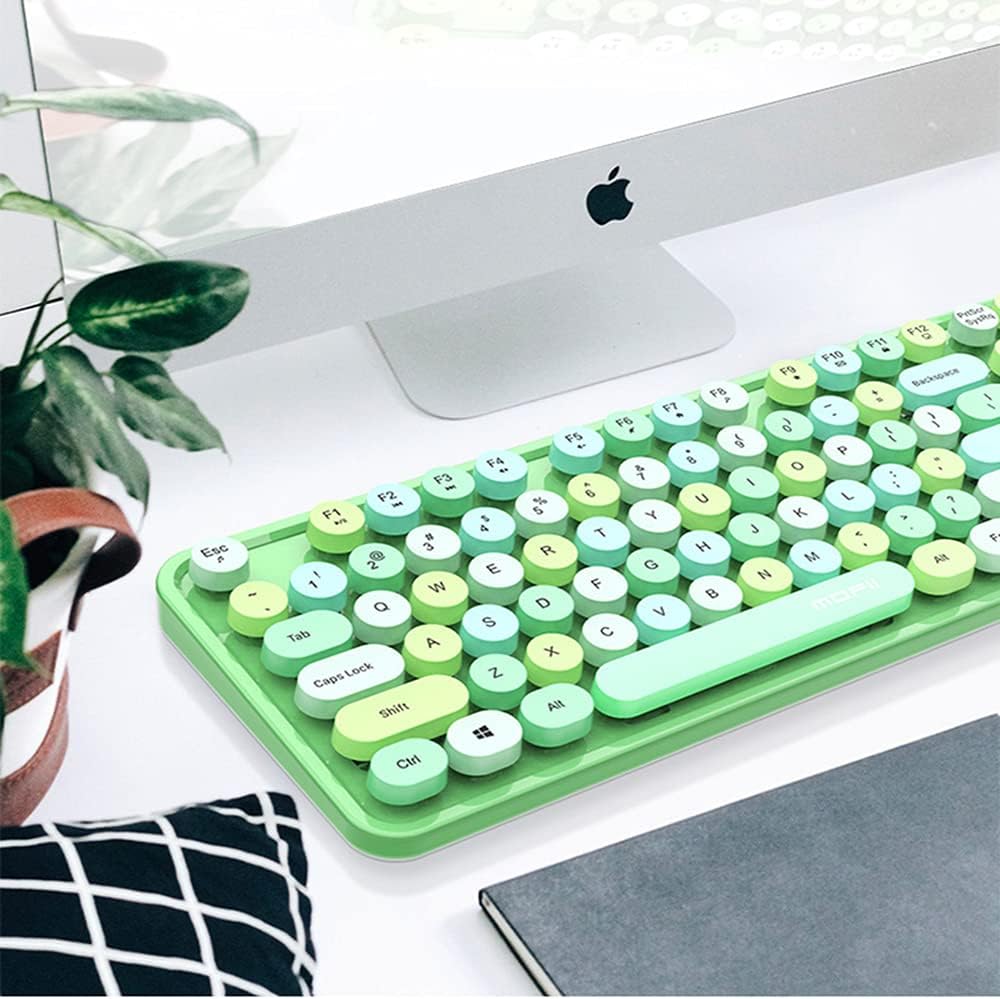
Image: The MOFII Sweet wireless keyboard positioned on a desk next to a computer monitor, demonstrating a typical usage scenario.
మౌస్ వినియోగం
The MOFII Sweet mouse provides precise cursor control and comfortable navigation.
- ఎడమ బటన్: ప్రాథమిక క్లిక్ ఫంక్షన్.
- కుడి బటన్: సెకండరీ క్లిక్ ఫంక్షన్ (సందర్భ మెనూ).
- స్క్రోల్ వీల్: పత్రాల ద్వారా పైకి లేదా క్రిందికి స్క్రోల్ చేయండి మరియు web పేజీలు. మిడిల్ క్లిక్ బటన్గా కూడా పనిచేయగలదు.
నిర్వహణ
క్లీనింగ్
To maintain the appearance and functionality of your MOFII Sweet set:
- ఉపరితలాలను తుడవడానికి మృదువైన, పొడి, మెత్తటి బట్టను ఉపయోగించండి.
- మొండి ధూళికి, కొద్దిగా dampనీరు లేదా తేలికపాటి, రాపిడి లేని క్లీనర్తో గుడ్డను తుడవండి. అధిక తేమను నివారించండి.
- కఠినమైన రసాయనాలు, ద్రావకాలు లేదా రాపిడి పదార్థాలను ఉపయోగించవద్దు, ఎందుకంటే ఇవి ముగింపును దెబ్బతీస్తాయి.
- కీబోర్డ్ కోసం, కీల మధ్య నుండి చెత్తను తొలగించడానికి కంప్రెస్డ్ ఎయిర్ను ఉపయోగించండి.
బ్యాటరీ భర్తీ
When the keyboard or mouse performance degrades (e.g., delayed response, intermittent connection), it may be time to replace the batteries. Follow the battery installation steps outlined in the "Setup" section.
నిల్వ
If storing the device for an extended period, remove the batteries to prevent leakage and potential damage.
ట్రబుల్షూటింగ్
| సమస్య | సాధ్యమైన కారణం | పరిష్కారం |
|---|---|---|
| కీబోర్డ్/మౌస్ స్పందించడం లేదు |
|
|
| Delayed response or intermittent connection |
|
|
| నిర్దిష్ట కీలు పనిచేయడం లేదు |
|
|
స్పెసిఫికేషన్లు
- బ్రాండ్: MOFII
- మోడల్: తీపి
- కనెక్టివిటీ టెక్నాలజీ: 2.4G వైర్లెస్ (రేడియో ఫ్రీక్వెన్సీ)
- అనుకూల పరికరాలు: Personal Computer, Laptop, Tablet
- ఆపరేటింగ్ సిస్టమ్ అనుకూలత: Windows (and generally compatible with other OS that support standard USB HID devices)
- శక్తి మూలం: బ్యాటరీ ఆధారితమైనది
- బ్యాటరీ రకం: AA (2 included)
- కీబోర్డ్ లేఅవుట్: QWERTY
భద్రతా సమాచారం
- పరికరాన్ని తీవ్రమైన ఉష్ణోగ్రతలు, తేమ లేదా ప్రత్యక్ష సూర్యకాంతికి బహిర్గతం చేయవద్దు.
- పరికరాన్ని వదలడం లేదా బలమైన ప్రభావాలకు గురి చేయడం మానుకోండి.
- పిల్లలకు దూరంగా ఉంచండి.
- స్థానిక నిబంధనల ప్రకారం బ్యాటరీలను పారవేయండి. బ్యాటరీలను అగ్ని ప్రమాదంలో పారవేయవద్దు.
- Do not attempt to disassemble or repair the device yourself. This will void any potential warranty.
వారంటీ మరియు మద్దతు
MOFII products are designed for reliability and performance. For warranty information or technical support, please refer to the documentation provided at the point of purchase or contact your retailer. Keep your proof of purchase for warranty claims.


