1. పరిచయం
This manual provides essential information for the safe and efficient use of your ExpertPower 100W Flexible Solar Panel. Please read these instructions carefully before installation and operation to ensure optimal performance and longevity of your solar panel.

Figure 1: ExpertPower 100W Flexible Solar Panel
The ExpertPower 100W Flexible Solar Panel is designed for various applications, including RVs, boats, camping, and generator charging. Its flexible and lightweight design makes it suitable for curved surfaces and portable use.
2. ఉత్పత్తి లక్షణాలు
- అధిక సామర్థ్యం: Utilizes Maxeon Monocrystalline solar cells, offering 22-25% efficiency for maximum power output.
- ఫ్లెక్సిబుల్ డిజైన్: Constructed with top-grade, lightweight polymer materials, allowing flexibility up to 30 degrees for adaptation to various surfaces.
- తేలికపాటి: Weighs approximately 4.4 lbs (2 kg), enhancing portability and ease of handling.
- మన్నికైన నిర్మాణం: Built on a solid copper foundation, resistant to power loss from cracking and corrosion. Features a Micro Junction box with IP67 protection for robust weather resistance.
- సులభమైన కనెక్టివిటీ: Equipped with MC4 cable connectors for simple plug-and-play connection to solar generators and other compatible systems.
- సాధారణ మౌంటు: Pre-drilled holes facilitate secure mounting on vehicles, boats, RVs, or other desired locations.

Figure 2: Key Features - MC4 Cables, Grommets, and IP67 Waterproofing
The panel includes MC4 connectors for universal compatibility, reinforced grommets for secure attachment, and an IP67 rated junction box for environmental protection.
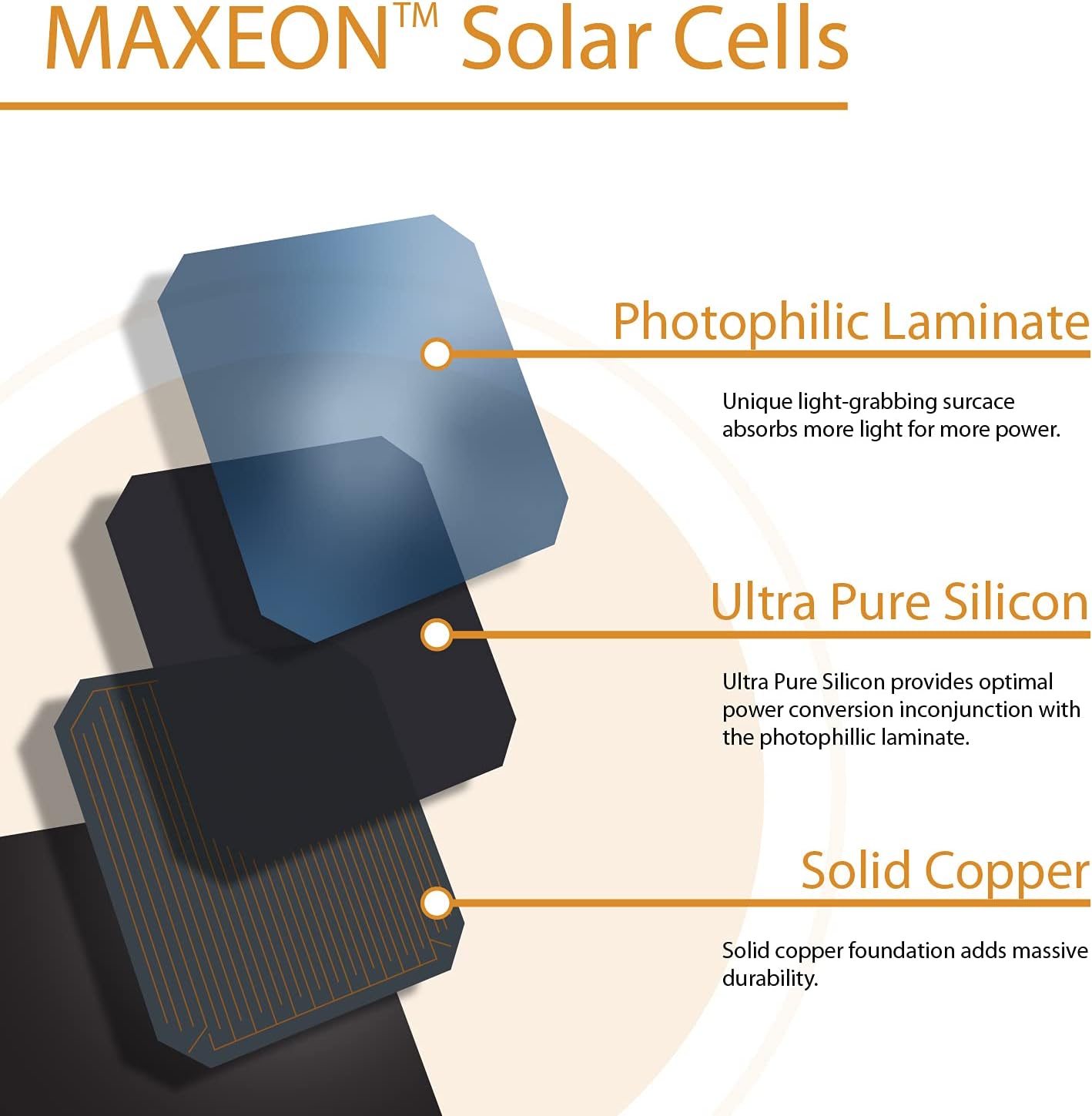
Figure 3: Maxeon Solar Cell Construction
Maxeon cells feature a photophilic laminate for enhanced light absorption, ultra-pure silicon for optimal power conversion, and a solid copper foundation for durability.
3. భద్రతా సమాచారం
- Severe Electrical Hazard: Solar modules generate electricity when exposed to light. Always treat the panel as a live electrical component.
- క్వాలిఫైడ్ ఇన్స్టాలేషన్: Installation should only be performed by a qualified technician to prevent electrical shock or damage to the product.
- నిర్వహణ: Avoid dropping, bending excessively, or placing heavy objects on the solar panel.
- వైరింగ్: Ensure all wiring connections are secure and correctly polarized. Refer to local electrical codes for proper grounding and wiring practices.
- పర్యావరణ పరిస్థితులు: Do not immerse the panel in water. While weather-resistant, extreme conditions may require additional protection.
4. సంస్థాపన
- ప్యానెల్ను అన్ప్యాక్ చేయండి: Carefully remove the solar panel from its packaging. Inspect for any visible damage.
- ఒక స్థానాన్ని ఎంచుకోండి: Select a location that receives maximum direct sunlight throughout the day. Consider the panel's flexibility for curved surfaces.
- మౌంటు: Use the pre-drilled holes on the panel to securely mount it to your desired surface (e.g., RV roof, boat deck). Ensure the mounting is robust enough to withstand environmental factors like wind.
- Connect MC4 Cables: Connect the MC4 connectors from the solar panel to your solar charge controller or compatible solar generator. Ensure correct polarity (positive to positive, negative to negative).
- సిస్టమ్ ఇంటిగ్రేషన్: Integrate the solar panel with your existing solar charging system, ensuring all components (charge controller, battery, inverter) are compatible and correctly connected.

చిత్రం 4: ఉదాample Installation on a Vehicle
The flexible design allows for installation on various surfaces, such as vehicle hoods or roofs, for mobile power generation.
5. ఆపరేషన్
Once installed and connected, the ExpertPower 100W Flexible Solar Panel will begin generating electricity when exposed to sunlight. The power generated will be regulated by your solar charge controller before being stored in a battery or used directly by connected devices.
- సూర్యకాంతి బహిర్గతం: Ensure the panel is positioned to receive maximum direct sunlight. Shading, even partial, can significantly reduce power output.
- పర్యవేక్షణ: If your system includes a charge controller with a display, monitor the charging status and battery voltagమరియు క్రమం తప్పకుండా.
- కోణ సర్దుబాటు: For stationary setups, adjusting the panel's angle seasonally can optimize power generation.
6. నిర్వహణ
- శుభ్రపరచడం: సోలార్ ప్యానెల్ ఉపరితలాన్ని మృదువైన, డి-క్లాత్తో క్రమం తప్పకుండా శుభ్రం చేయండి.amp cloth to remove dust, dirt, and debris. Avoid abrasive cleaners or harsh chemicals.
- తనిఖీ: Periodically inspect the panel for any physical damage, such as cracks, delamination, or loose connections. Check the MC4 connectors for corrosion or wear.
- షేడింగ్: Ensure no new obstructions are casting shadows on the panel. Trim nearby foliage if necessary.
- జంక్షన్ బాక్స్: Verify the Micro Junction box remains securely sealed and free from moisture ingress.
7. ట్రబుల్షూటింగ్
| సమస్య | సాధ్యమైన కారణం | పరిష్కారం |
|---|---|---|
| పవర్ అవుట్పుట్ లేదు | No sunlight; Panel shaded; Loose connections; Faulty charge controller/battery | Move panel to direct sunlight; Remove shading; Check all cable connections; Test charge controller/battery. |
| తక్కువ పవర్ అవుట్పుట్ | Partial shading; Dirty panel surface; Incorrect panel angle; Overcast weather | Remove shading; Clean panel surface; Adjust panel angle for optimal sun exposure; Output is naturally lower in overcast conditions. |
| Panel not charging battery | Charge controller issue; Battery fully charged; Incorrect wiring polarity | Check charge controller status; Verify battery is not already full; Recheck wiring polarity. |
8. సాంకేతిక లక్షణాలు

Figure 5: Panel Dimensions and Specification Label
The product label provides detailed electrical characteristics and safety warnings. The model shown on the label is SPR-E-Flex-100.
| స్పెసిఫికేషన్ | విలువ |
|---|---|
| మోడల్ | Q16SPSFL100 |
| Rated Power (Pmax) | 100 W (+/-3%) |
| వాల్యూమ్tagఇ (Vmp) | 17.5 వి |
| ప్రస్తుత (IMP) | 5.80 ఎ |
| ఓపెన్-సర్క్యూట్ వాల్యూమ్tagఇ (వోక్) | 21.0 వి |
| షార్ట్-సర్క్యూట్ కరెంట్ (Isc) | 6.20 ఎ |
| గరిష్ట సిరీస్ ఫ్యూజ్ | 15 ఎ |
| ఉత్పత్తి కొలతలు (L x W x H) | 45.9" x 21.9" x 0.8" (1165మిమీ x 556మిమీ x 20మిమీ) |
| వస్తువు బరువు | సుమారు 4.4 పౌండ్లు (2 కిలోలు) |
| మెటీరియల్ | మోనోక్రిస్టలైన్ సిలికాన్ |
| సమర్థత | 22-25% (Maxeon cells) |
| రక్షణ రేటింగ్ | IP67 (జంక్షన్ బాక్స్) |
Note: Standard Test Conditions: 1000 W/m², AM 1.5, 25°C. Suitable for ungrounded, positive, or negative grounded DC systems. Field Wiring: Cu wiring only, min. 12 AWG/4 mm², insulated for 90°C min.
Patent information: Patented as shown at www.sunpower.com/patents (Reference: 524085)
9. వారంటీ మరియు మద్దతు
ExpertPower provides a 1 సంవత్సరాల వారంటీ for this product, covering defects in materials and workmanship under normal use. For warranty claims or technical assistance, please contact ExpertPower customer service.
Our dedicated customer service team is available to assist you with any questions or concerns regarding your solar panel.
For more information about ExpertPower and our products, visit our official store: ExpertPower Store on Amazon.


