ఉత్పత్తి ముగిసిందిview
The DYNAVIN D9-DF56 Premium Flex is an advanced Android car radio system designed for seamless integration with VW Sharan and Seat Alhambra models from 2010 onwards. It features a 9-inch high-resolution touchscreen, integrated GPS navigation, a powerful DSP amplifier, and supports wireless CarPlay and Android Auto.

Image: The DYNAVIN D9-DF56 Premium Flex unit seamlessly integrated into a car's dashboard, displaying its user interface with various application icons. This image highlights the large 9-inch display and its modern aesthetic within the vehicle's interior.
కీ ఫీచర్లు
- వాహన అనుకూలత: Perfectly compatible with VW Sharan and Seat Alhambra models from 2010 onwards.
- ఆడియో సిస్టమ్: ఇంటిగ్రేటెడ్ క్లాస్ D DSP amplifier (4 * 60 W RMS) with adjustable crossover and speaker gain. Vehicle-specific sound configuration fileలు అందుబాటులో ఉన్నాయి.
- ప్రదర్శన: 9-inch high-resolution (1280x720) anti-glare capacitive touchscreen.
- ఆపరేటింగ్ సిస్టమ్: Android 11 OS with Quad-Core CPU and 4GB RAM.
- హెడ్-అప్ డిస్ప్లే (HUD): Shows navigation information (Dynaway, Apple Maps, Google Maps), vehicle speed, and speed camera alerts (Blitzer.de data).

Image: A split image showing the Head-up Display (HUD) unit mounted on the dashboard, projecting navigation directions and speed onto the windshield. This illustrates how the HUD provides essential driving information directly in the driver's line of sight.
- ఇంటిగ్రేషన్: Supports steering wheel controls, multifunctional display (MFD+), Climatronic control status, and virtual parking lines.
- స్మార్ట్ఫోన్ కనెక్టివిటీ: Compatible with wireless CarPlay, Android Auto, and Smartphone Mirroring (31-day free trial, activation code required).
- మైక్రోఫోన్: Compact digital dual microphone with noise suppression for clear call quality.

చిత్రం: క్లోజప్ view of the compact Dynavin digital dual microphone, typically installed near the dashboard or steering column. This microphone features a unique noise suppression algorithm for excellent voice quality during calls.
- నావిగేషన్: Integrated GPS navigation with Blitzer.de database (31-day trial, included in Dynapp pack).
- డైనాప్-ప్యాక్: Includes Dynaway navigation app, Google Playstore access, third-party app installation, and speed limit display on HUD.
ప్యాకేజీ విషయాలు
ఇన్స్టాలేషన్ ప్రారంభించే ముందు, దయచేసి క్రింద జాబితా చేయబడిన అన్ని భాగాలు మీ ప్యాకేజీలో ఉన్నాయని ధృవీకరించండి.
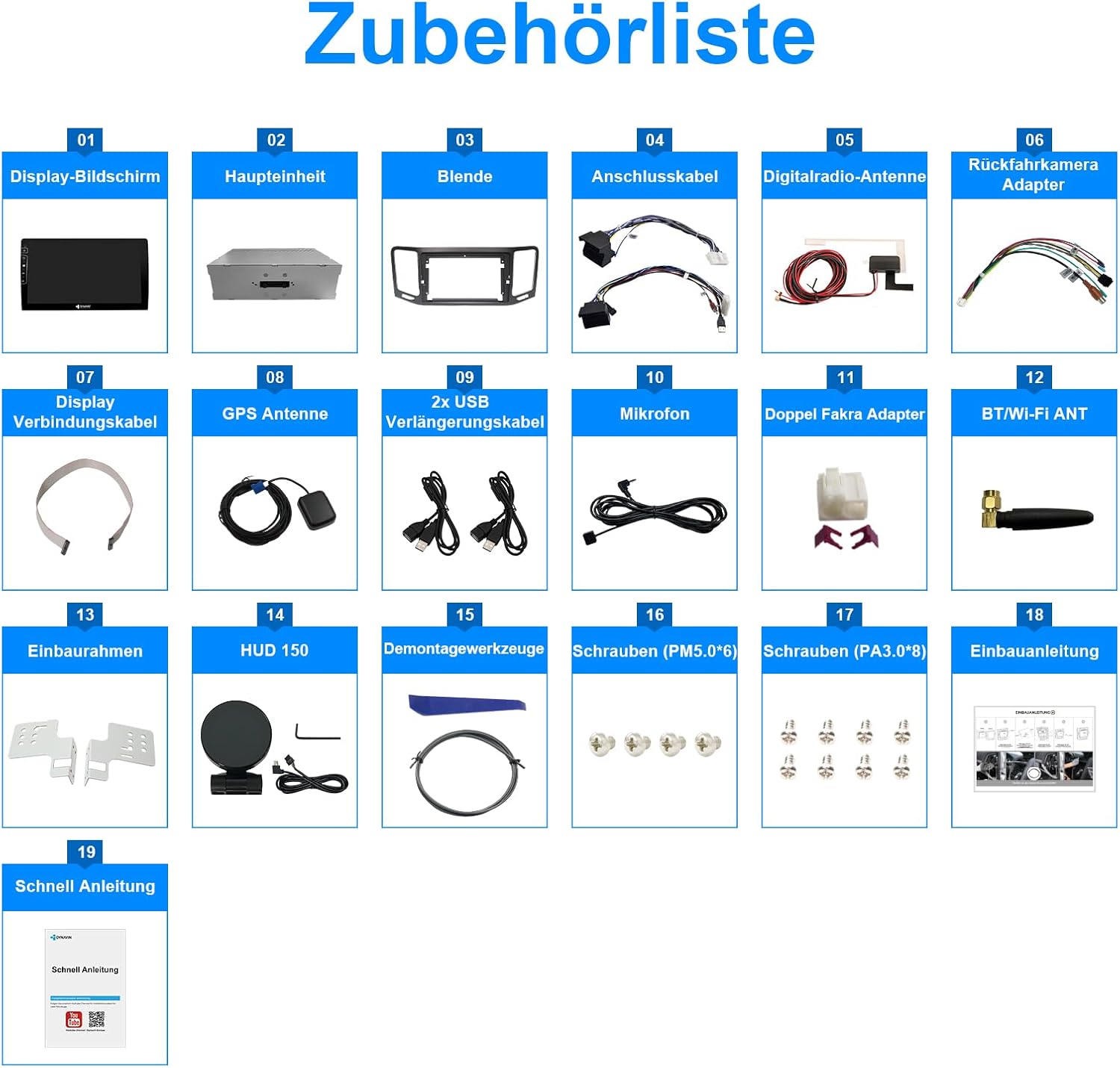
Image: A comprehensive diagram illustrating all components included in the DYNAVIN D9-DF56 Premium Flex package. Each item is numbered and labeled, providing a visual checklist for users to confirm package completeness before installation.
- డిస్ప్లే స్క్రీన్
- ప్రధాన యూనిట్
- నొక్కు
- కనెక్షన్ కేబుల్స్
- Digital Radio Antenna
- Rear Camera Adapter
- డిస్ప్లే కనెక్షన్ కేబుల్
- GPS యాంటెన్నా
- 2x USB ఎక్స్టెన్షన్ కేబుల్
- మైక్రోఫోన్
- Dual Fakra Adapter
- BT/Wi-Fi యాంటెన్నా
- ఇన్స్టాలేషన్ ఫ్రేమ్
- HUD 150 (Head-up Display unit)
- వేరుచేయడం సాధనాలు
- Screws (PM5.0*6)
- Screws (PA3.0*8)
- ఇన్స్టాలేషన్ మాన్యువల్
- త్వరిత గైడ్
సంస్థాపన
Professional installation is recommended for this product. Refer to the included installation manual (Item 18 in Package Contents) and quick guide (Item 19) for detailed instructions specific to your vehicle model.
ప్రీ-ఇన్స్టాలేషన్ చెక్లిస్ట్:
- Ensure the vehicle's ignition is off and the battery is disconnected before starting.
- ప్యాకేజీలోని అన్ని విషయాలు ఉన్నాయని మరియు అవి పాడవకుండా ఉన్నాయని ధృవీకరించండి.
- Gather necessary tools (e.g., screwdrivers, trim removal tools). Disassembly tools are included (Item 15).
కీ ఇన్స్టాలేషన్ దశలు:
- Remove the original car radio unit using the provided disassembly tools.
- Connect the main unit (Item 02) to the vehicle's wiring harness using the connection cables (Item 04). Ensure all connections are secure.
- Install the GPS antenna (Item 08) in a location with clear sky view, typically on the dashboard or under the windshield.
- Connect the digital radio antenna (Item 05) and BT/Wi-Fi antenna (Item 12).
- Mount the display screen (Item 01) into the bezel (Item 03) and secure it using the installation frame (Item 13) and screws (Items 16, 17).
- Connect the display screen to the main unit using the display connection cable (Item 07).
- Install the compact digital dual microphone (Item 10) in an optimal location for voice pickup, typically near the driver's sun visor or rearview అద్దం.
- If using, connect the rear camera adapter (Item 06) and any optional accessories.
- Reconnect the vehicle battery and test the unit's functionality.
ఆపరేటింగ్ సూచనలు
ప్రాథమిక ఆపరేషన్:
- పవర్ ఆన్/ఆఫ్: Press and hold the power button on the unit or use the vehicle's ignition.
- వాల్యూమ్ నియంత్రణ: Adjust using the physical buttons on the unit or steering wheel controls.
- టచ్స్క్రీన్ నావిగేషన్: Tap icons to open applications, swipe to navigate menus.
Radio (FM RDS):
- Access the "Radio" application from the main screen.

Image: The main user interface of the DYNAVIN D9-DF56 Premium Flex, displaying a grid of application icons such as Media, Navigation, Spotify, and YouTube. This image demonstrates the intuitive layout for accessing various functions.
- అందుబాటులో ఉన్న స్టేషన్లను కనుగొనడానికి లేదా ఫ్రీక్వెన్సీకి మాన్యువల్గా ట్యూన్ చేయడానికి స్కాన్ ఫంక్షన్ను ఉపయోగించండి.
- Save up to 15 preset stations for quick access.
Navigation (GPS):
- Open the "Navigation" application.
- ఆన్-స్క్రీన్ కీబోర్డ్ ఉపయోగించి మీ గమ్యస్థానాన్ని నమోదు చేయండి.
- Follow turn-by-turn voice instructions and on-screen guidance.
- The system includes the Blitzer.de database for speed camera alerts.
కార్ప్లే / ఆండ్రాయిడ్ ఆటో:
- మీ స్మార్ట్ఫోన్లో Wi-Fi మరియు బ్లూటూత్ ప్రారంభించబడ్డాయని నిర్ధారించుకోండి.
- Connect your phone to the unit via Bluetooth or Wi-Fi.
- Follow the on-screen prompts to activate Wireless CarPlay or Android Auto.
- Note: A 31-day free trial is included; an activation code may be required for continued use.
DSP Ampలైఫైయర్ సెట్టింగ్లు:
- Access the sound settings menu.
- Adjust crossover frequencies and speaker gain for optimal audio performance.
- Download vehicle-specific sound configuration files from the Dynavin website for enhanced sound tuning.

Image: The DYNAVIN D9-DF56 Premium Flex unit displaying a music video, with text overlays highlighting its "100W X 4 CLASS-D High Power Amplifier" capabilities. This image emphasizes the unit's audio performance and multimedia playback features.
నిర్వహణ
- శుభ్రపరచడం: Use a soft, dry cloth to clean the display screen and unit. For stubborn marks, a slightly damp యూనిట్లోకి ద్రవం ప్రవేశించకుండా చూసుకోవడానికి తేలికపాటి, రాపిడి లేని క్లీనర్ ఉన్న వస్త్రాన్ని ఉపయోగించవచ్చు.
- సాఫ్ట్వేర్ అప్డేట్లు: Periodically check the official Dynavin website for software updates to ensure optimal performance and access to new features. Follow the instructions provided with the update files.
- ఉష్ణోగ్రత: యూనిట్ను తీవ్రమైన ఉష్ణోగ్రతలు, ఎక్కువసేపు ప్రత్యక్ష సూర్యకాంతి లేదా అధిక తేమకు గురిచేయకుండా ఉండండి.
ట్రబుల్షూటింగ్
| సమస్య | సాధ్యమైన కారణం | పరిష్కారం |
|---|---|---|
| యూనిట్ పవర్ ఆన్ చేయదు. | Loose power connection; Vehicle battery low/disconnected; Blown fuse. | Check power cables and connections; Verify vehicle battery charge; Inspect and replace fuses if necessary. |
| స్పీకర్ల నుండి శబ్దం లేదు. | Speaker wires disconnected; Volume too low; Mute function active; DSP settings misconfigured. | Check speaker connections; Increase volume; Deactivate mute; Reset DSP settings or load default profile. |
| GPS సిగ్నల్ బలహీనంగా ఉంది లేదా పోయింది. | GPS antenna improperly installed or obstructed; Software issue. | Ensure GPS antenna has clear sky view; Check antenna connection; Restart unit; Update navigation software. |
| CarPlay/Android Auto కనెక్ట్ కావడం లేదు. | Bluetooth/Wi-Fi off on phone/unit; Software activation required; Incompatible phone. | Enable Bluetooth/Wi-Fi; Ensure activation code is entered; Check phone compatibility; Restart phone and unit. |
| స్టీరింగ్ వీల్ నియంత్రణలు పనిచేయడం లేదు. | CANBUS integration issue; Incorrect wiring. | Verify CANBUS connections; Check unit settings for steering wheel control configuration. |
If the problem persists after attempting these solutions, please contact Dynavin customer support.
స్పెసిఫికేషన్లు
- మోడల్: D9-DF56 Premium Flex
- బ్రాండ్: డైనవిన్
- ప్రదర్శన పరిమాణం: 9 అంగుళాలు
- ప్రదర్శన రిజల్యూషన్: 1280x720
- ఆపరేటింగ్ సిస్టమ్: ఆండ్రాయిడ్ 11
- ప్రాసెసర్: Quad-Core CPU
- RAM: 4GB
- Ampజీవితకాలం: Class D DSP, 4 * 60 W RMS
- కనెక్టివిటీ: Bluetooth, Wi-Fi, 2x USB ports, RCA
- ప్రత్యేక లక్షణాలు: DAB+ Radio, Wireless CarPlay, Android Auto, Smartphone Mirroring, Integrated GPS Navigation (Blitzer.de), Head-up Display support, CANBUS Integration (Steering Wheel Control, MFD+, Climatronic, Parking Sensors), Digital Dual Microphone.
- రంగు: నలుపు
వారంటీ మరియు మద్దతు
Dynavin products are covered by a manufacturer's warranty. For specific warranty terms and conditions, please refer to the documentation included with your purchase or visit the official Dynavin website. For technical support, troubleshooting assistance beyond this manual, or warranty claims, please contact Dynavin customer service through their official channels.
అధికారిక Webసైట్: www.dynavin.com ద్వారా మరిన్ని


