పరిచయం
This manual provides detailed instructions for the installation, operation, and maintenance of your NC SWM 9702 Car Radio 1 Din MP5 Player. Please read this manual thoroughly before using the product to ensure proper functionality and safety. Keep this manual for future reference.
ఉత్పత్తి లక్షణాలు
- 7-Inch HD Retractable Screen: Provides a clear and intuitive display for navigation, video playback, and system controls.
- ఆండ్రాయిడ్ ఆపరేటింగ్ సిస్టమ్: Offers a familiar interface and access to various applications.
- బ్లూటూత్ 4.0 కనెక్టివిటీ: Supports hands-free calling and audio streaming for safe driving.
- మిర్రర్ లింక్ ఫంక్షన్: Seamlessly projects your smartphone screen (iOS/Android) onto the player's display via USB or WiFi.
- GPS నావిగేషన్: Built-in GPS with support for offline maps (Europe) and real-time traffic updates.
- వెనుక View కెమెరా ఇన్పుట్: Enhances parking safety with automatic display when reversing (camera optional/included with this model).
- FM రేడియో: High-quality radio tuner with a frequency range of 87.5~108MHz.
- USB & AUX Input: Multiple connectivity options for media playback from USB drives and external audio devices.
- స్టీరింగ్ వీల్ కంట్రోల్ సపోర్ట్: Allows integration with your vehicle's steering wheel controls for convenient operation.
- Lossless Audio Support: Compatible with APE/FLAC and other popular audio formats.
- 4-Core CPU: Ensures smooth performance and faster operation.
పెట్టెలో ఏముంది
క్రింద జాబితా చేయబడిన అన్ని భాగాలు మీ ప్యాకేజీలో ఉన్నాయని ధృవీకరించండి:
- 1 x Android Head Unit (SWM 9702)
- 1 x GPS యాంటెన్నా
- 2 x Disassembly Keys
- 2 x Power Cords (Wiring Harnesses)
- 1 x వెనుక View Camera (4LED)
- 1 x USB కేబుల్

Figure 1: All components included in the NC SWM 9702 package.
సెటప్ మరియు ఇన్స్టాలేషన్
ఈ ఉత్పత్తికి ప్రొఫెషనల్ ఇన్స్టాలేషన్ సిఫార్సు చేయబడింది. ఇన్స్టాలేషన్ ప్రారంభించే ముందు వాహనం యొక్క పవర్ డిస్కనెక్ట్ చేయబడిందని నిర్ధారించుకోండి.
ప్రీ-ఇన్స్టాలేషన్ చెక్లిస్ట్
- Ensure your vehicle's dashboard has a 1-DIN slot.
- Gather necessary tools (screwdrivers, wire strippers, electrical tape, multimeter).
- Identify your vehicle's wiring harness for power, speakers, and accessories.
వైరింగ్ కనెక్షన్లు
Refer to the provided wiring diagram (usually on the unit or in a separate sheet) for precise connections. Below are general guidelines:
- Yellow Wire (B+): స్థిరమైన 12V పవర్కి కనెక్ట్ చేయండి.
- రెడ్ వైర్ (ACC): స్విచ్డ్ 12V పవర్ (ఇగ్నిషన్) కి కనెక్ట్ చేయండి.
- Black Wire (GND): వాహన చట్రం గ్రౌండ్కు కనెక్ట్ చేయండి.
- Blue Wire (ANT): పవర్ యాంటెన్నాకు కనెక్ట్ చేయండి లేదా ampలైఫైయర్ రిమోట్ టర్న్-ఆన్.
- స్పీకర్ వైర్లు: సంబంధిత వాహన స్పీకర్ వైర్లకు కనెక్ట్ చేయండి (ఉదాహరణకు, ముందు ఎడమకు తెలుపు/తెలుపు-నలుపు, ముందు కుడికి బూడిద/బూడిద-నలుపు, వెనుక ఎడమకు ఆకుపచ్చ/ఆకుపచ్చ-నలుపు, వెనుక కుడికి ఊదా/ఊదా-నలుపు).
- Reverse Input Wire: Connect to the vehicle's reverse light signal for automatic camera display.
- GPS యాంటెన్నా: Connect the GPS antenna to the dedicated port on the back of the unit and mount it in a location with a clear view of the sky (e.g., dashboard, A-pillar).
- వెనుక View కెమెరా: Connect the camera's video output to the "CAM IN" or "REVERSE VIDEO" input on the unit. Power the camera from the reverse light circuit.
యూనిట్ మౌంట్
- Carefully slide the head unit into the 1-DIN mounting sleeve until it clicks into place.
- Secure the unit using the provided mounting brackets or screws.
- Reassemble the dashboard trim panels.
ఆపరేటింగ్ సూచనలు
ప్రాథమిక ఆపరేషన్
- పవర్ ఆన్/ఆఫ్: Press the power button (usually VOL knob) to turn the unit on or off.
- వాల్యూమ్ నియంత్రణ: Rotate the VOL knob or use the on-screen controls.
- స్క్రీన్ ఉపసంహరణ: The screen automatically retracts when the unit is turned off or can be manually retracted/extended via a dedicated button.
- హోమ్ స్క్రీన్: Tap the Home icon to return to the main menu.
Bluetooth Hands-free and Audio
- Go to the Bluetooth menu on the head unit.
- మీ మొబైల్ ఫోన్లో బ్లూటూత్ను ప్రారంభించి, అందుబాటులో ఉన్న పరికరాల కోసం శోధించండి.
- Select "SWM 9702" (or similar name) from the list and pair.
- Once connected, you can make/receive calls and stream audio directly through the car speakers.
మిర్రర్ లింక్ ఫంక్షన్
This feature allows you to display your smartphone's screen on the head unit.
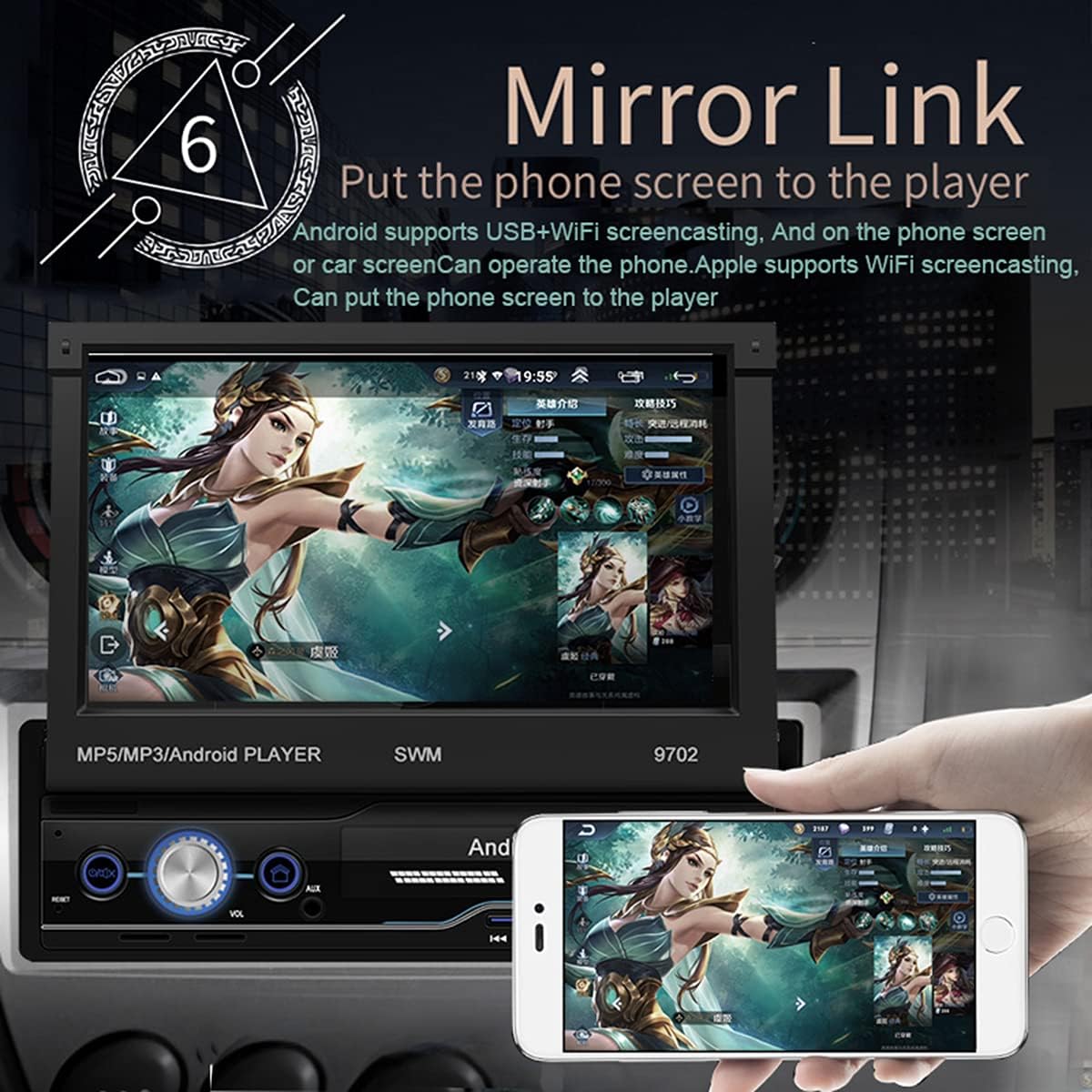
Figure 2: Mirror Link in action, showing a smartphone screen duplicated on the car radio display.
- Android కోసం: Connect your phone via USB or WiFi. Follow the on-screen prompts to enable USB debugging or WiFi mirroring. You can control the phone from the car screen.
- For iOS (Apple): Connect via WiFi. The phone screen will be mirrored to the player. Control is typically from the phone itself.
GPS నావిగేషన్
The unit comes with pre-installed offline maps for Europe and supports online navigation.

Figure 3: GPS Navigation interface showing map data and route details.
- Tap the "Navigation" or "GPS" icon on the home screen.
- Select your preferred navigation application (e.g., Google Maps, Waze, or the pre-installed offline map).
- Enter your destination and follow the voice and visual prompts.
వెనుక View కెమెరా ఫంక్షన్
When properly installed, the unit automatically displays the rear view వాహనాన్ని రివర్స్ గేర్లో ఉంచినప్పుడు.
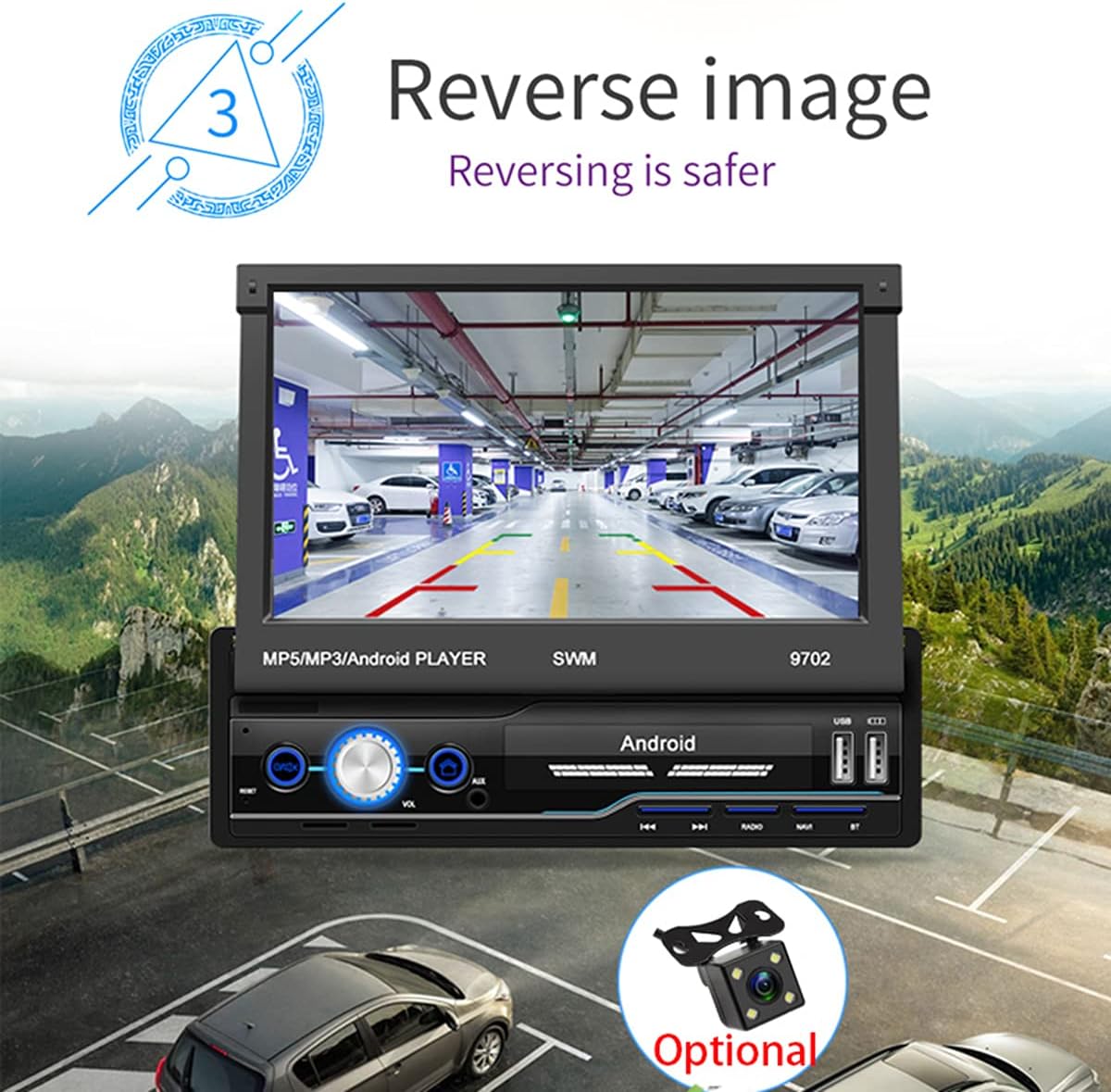
చిత్రం 4: వెనుక view camera display for safer reversing.
- వెనుక నిర్ధారించుకోండి view camera is correctly wired to the unit and the vehicle's reverse light circuit.
- When shifting into reverse, the screen will automatically switch to the camera view.
FM రేడియో
- Tap the "Radio" icon on the home screen.
- అందుబాటులో ఉన్న స్టేషన్లను స్వయంచాలకంగా శోధించడానికి మరియు సేవ్ చేయడానికి స్కాన్ ఫంక్షన్ను ఉపయోగించండి.
- Manually tune by frequency or select from saved presets.
USB and AUX Playback
- USB: Insert a USB flash drive into the USB port. The unit will automatically detect and allow you to browse and play audio/video/picture files.
- AUX: Connect an external audio device (e.g., MP3 player) to the AUX input using a 3.5mm audio cable. Select "AUX" as the source.
స్టీరింగ్ వీల్ కంట్రోల్ లెర్నింగ్
If your vehicle has steering wheel controls, you can configure them to operate the head unit.
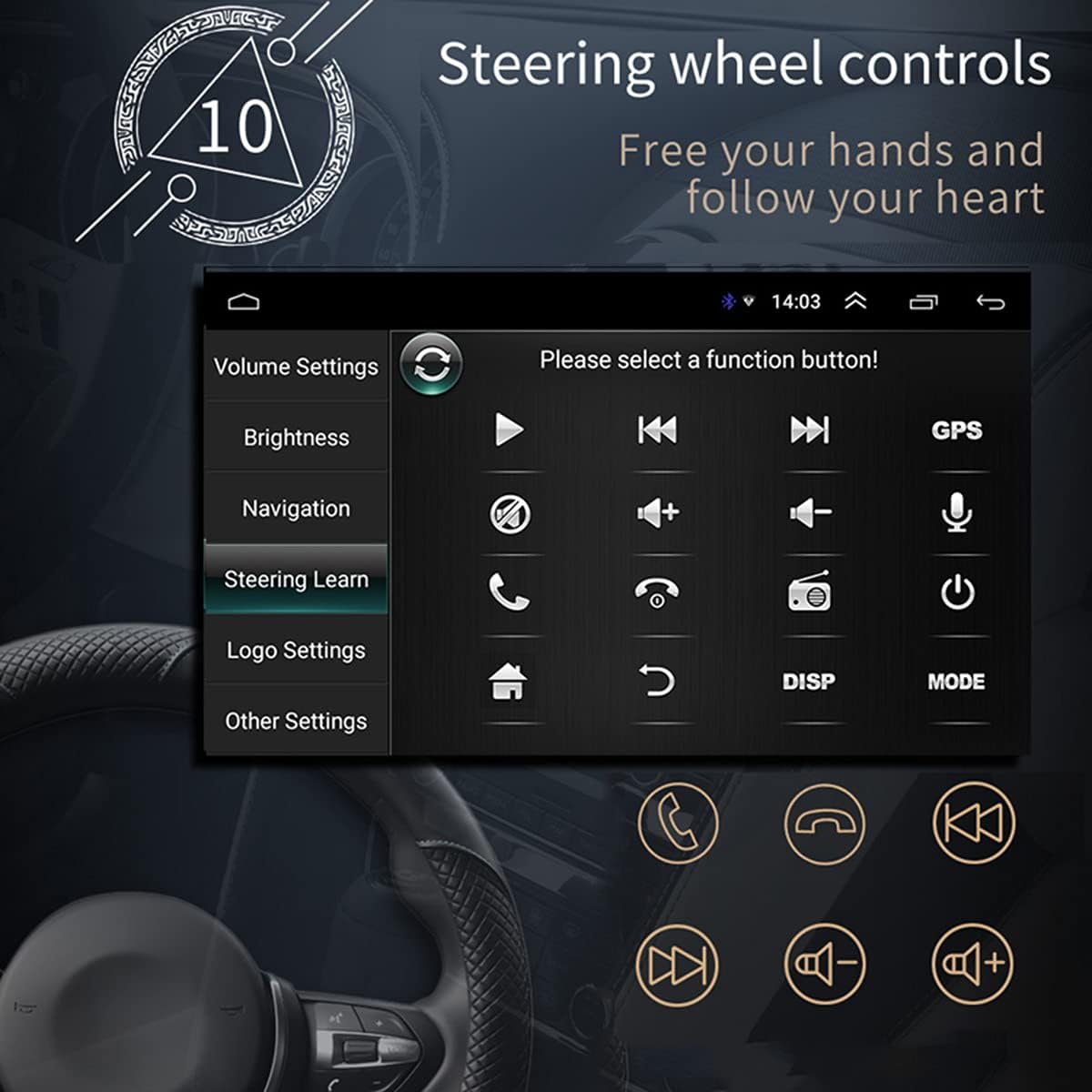
చిత్రం 5: స్టీరింగ్ వీల్ కంట్రోల్ లెర్నింగ్ ఇంటర్ఫేస్.
- Go to "Settings" > "Steering Wheel Learning" or "SWC".
- Follow the on-screen instructions to assign functions to your steering wheel buttons. This typically involves pressing a button on the screen, then pressing the corresponding button on your steering wheel.
WiFi కనెక్షన్
Connect the unit to a WiFi hotspot for online features and app downloads.

Figure 6: WiFi connection enables access to online applications.
- Go to "Settings" > "Network & Internet" > "Wi-Fi".
- Wi-Fi ని ఆన్ చేసి, జాబితా నుండి మీకు కావలసిన నెట్వర్క్ను ఎంచుకోండి.
- ప్రాంప్ట్ చేయబడితే పాస్వర్డ్ను నమోదు చేసి కనెక్ట్ చేయండి.
APE/FLAC Lossless Audio Playback
The unit supports high-quality audio formats for superior sound experience.

Figure 7: Music player interface demonstrating APE/FLAC support.
- మీ ఆడియోను నిర్ధారించుకోండి files are in supported formats (MP3, WMA, WAV, APE, FLAC).
- Play them from a USB drive or other connected media.
నిర్వహణ
- స్క్రీన్ క్లీనింగ్: స్క్రీన్ను సున్నితంగా తుడవడానికి మృదువైన, మెత్తటి బట్టను ఉపయోగించండి. రాపిడి క్లీనర్లను లేదా ద్రావకాలను ఉపయోగించవద్దు.
- సాధారణ శుభ్రపరచడం: Keep the unit free from dust and debris. Use a soft brush or compressed air for vents and buttons.
- సాఫ్ట్వేర్ అప్డేట్లు: తయారీదారుని కాలానుగుణంగా తనిఖీ చేయండి website or the unit's settings for available software updates to ensure optimal performance and new features.
ట్రబుల్షూటింగ్
If you encounter issues, refer to the following common problems and solutions before contacting support.
| సమస్య | సాధ్యమైన కారణం | పరిష్కారం |
|---|---|---|
| యూనిట్ పవర్ ఆన్ చేయదు. | Incorrect wiring (B+ or ACC), blown fuse, vehicle battery issue. | Check power connections (Yellow and Red wires), inspect fuses, ensure vehicle battery is charged. |
| స్పీకర్ల నుండి శబ్దం లేదు. | Speaker wires incorrectly connected, volume too low, mute enabled, incorrect audio source. | Verify speaker wiring, increase volume, check mute setting, select correct audio source (FM, USB, AUX, BT). |
| GPS signal weak or not found. | GPS antenna improperly installed or obstructed, unit not receiving satellite signals. | Ensure GPS antenna is mounted in a clear location (e.g., dashboard), check antenna connection. |
| Mirror Link not working. | Incorrect USB cable, USB debugging not enabled (Android), incompatible phone. | Use original or high-quality USB cable, enable USB debugging in phone developer options, check compatibility list. |
| వెనుక view కెమెరా ప్రదర్శించబడటం లేదు. | Camera not powered, video input wire disconnected, reverse trigger wire not connected. | Check camera power supply, verify video cable connection, ensure reverse trigger wire is connected to reverse light. |
స్పెసిఫికేషన్లు
| ఫీచర్ | వివరాలు |
|---|---|
| మోడల్ | SWM 9702 |
| వాల్యూమ్tage | 12V |
| వ్యవస్థ | ఆండ్రాయిడ్ |
| ఆకృతీకరణ | 1G RAM + 16G Storage |
| స్క్రీన్ పరిమాణం | 7 Inches (HD Retractable) |
| స్క్రీన్ రిజల్యూషన్ | 1024*600 |
| ప్యానెల్ పరిమాణం | 188*58మి.మీ |
| ప్యానెల్ లైటింగ్ | నీలం |
| పవర్ అవుట్పుట్ | 60W |
| పని ఉష్ణోగ్రత | -10-60 డిగ్రీల సెల్సియస్ |
| బ్లూటూత్ వెర్షన్ | 4.0 |
| శక్తి Ampలిఫైయర్ చిప్ | TDA7388 |
| రేడియో ఫ్రీక్వెన్సీ | FM 87.5 ~ 108MHz |
| GPS నావిగేషన్ | Support (Built-in offline map: Europe) |
| Wireless WIFI | మద్దతు |
| మొబైల్ ఇంటర్నెట్ | Support (Apple/Android) |
| USB ఇంటర్ఫేస్ | 2 rear tail cable plus front |
| RCA Terminal Introduction | 2 audio outputs, 2 audio inputs, 2 video inputs, 1 reversing input, 1 video output |
| Front AUX Audio Input | అవును |
| DVR ఫంక్షన్ | మద్దతు |
| Car Logo Replacement | మద్దతు |
| Supported Picture Format | JPG |
| ఫ్యాక్టరీ సెట్టింగ్ పాస్వర్డ్ | 1111 |
వారంటీ మరియు మద్దతు
For warranty information, technical support, or service inquiries, please refer to the purchase documentation or contact the retailer/manufacturer directly. Keep your proof of purchase for warranty claims.
Manufacturer: N\\C
Date First Available: July 29, 2021