పరిచయం
Muse M-195 BT అనేది 1-DIN కార్ రేడియో, ఇందులో ముందు USB పోర్ట్ మరియు మల్టీ-ఫంక్షన్ MCD డిస్ప్లే ఉన్నాయి. ఈ కార్ రేడియోలో ఇంటిగ్రేటెడ్ బ్లూటూత్ మరియు SD/MMC కార్డ్ రీడర్ ఉన్నాయి, ఇవి ల్యాప్టాప్లు, టాబ్లెట్లు లేదా స్మార్ట్ఫోన్ల వంటి అనుకూల పరికరాల నుండి ఆడియో స్ట్రీమింగ్ను అనుమతిస్తాయి. ఇంటిగ్రేటెడ్ హ్యాండ్స్-ఫ్రీ సిస్టమ్ సులభంగా కాల్ నిర్వహణను అనుమతిస్తుంది. అవుట్పుట్ పవర్ 4 x 40 W.
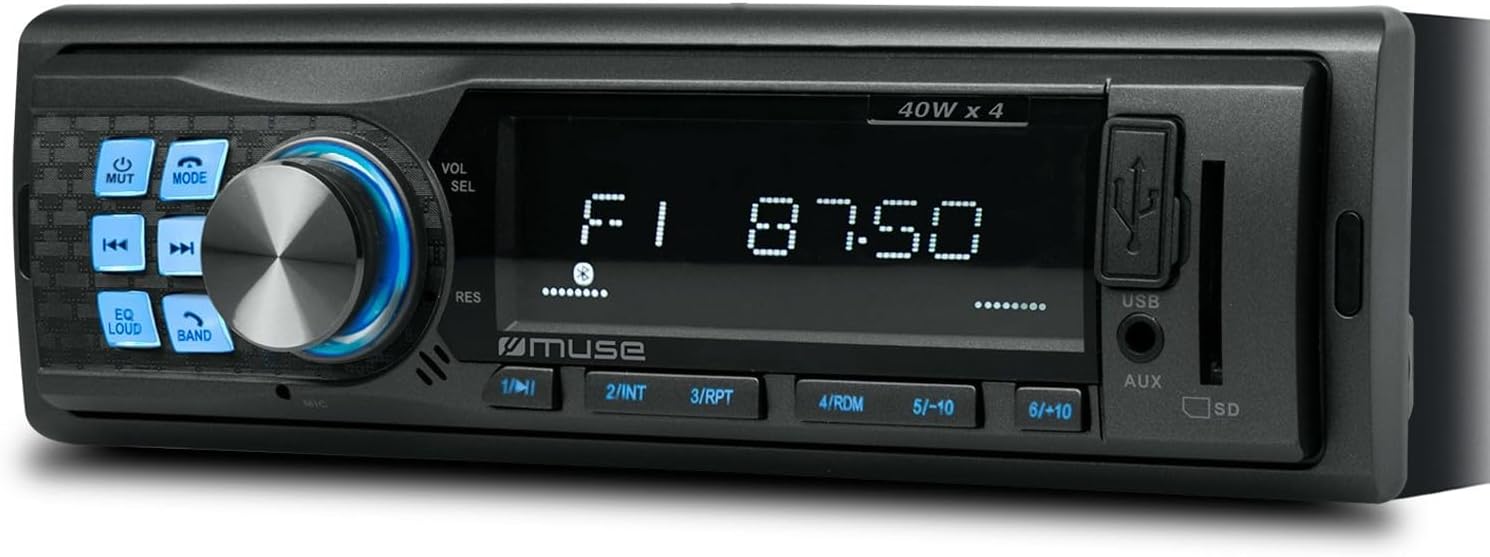
మూర్తి 1: ముందు view మ్యూస్ M-195 BT కార్ రేడియో యొక్క ఈ చిత్రం ప్రధాన యూనిట్ను దాని సెంట్రల్ డిస్ప్లే, వాల్యూమ్ మరియు ఎంపిక కోసం పెద్ద రోటరీ నాబ్, వివిధ ఫంక్షన్ బటన్లు (మ్యూట్, మోడ్, EQ, లౌడ్, బ్యాండ్, స్కిప్) మరియు ముందు వైపు USB మరియు AUX ఇన్పుట్లతో పాటు SD కార్డ్ స్లాట్ను ప్రదర్శిస్తుంది.
భద్రతా సమాచారం
- సంస్థాపన మరియు ఆపరేషన్ ముందు అన్ని సూచనలను జాగ్రత్తగా చదవండి.
- షార్ట్ సర్క్యూట్లు లేదా నష్టాన్ని నివారించడానికి సరైన వైరింగ్ను నిర్ధారించుకోండి. మీకు ఖచ్చితంగా తెలియకపోతే ఒక ప్రొఫెషనల్ని సంప్రదించండి.
- డ్రైవింగ్ నుండి మీ దృష్టి మరల్చే విధంగా పరికరాన్ని ఆపరేట్ చేయవద్దు.
- యూనిట్ను తీవ్రమైన ఉష్ణోగ్రతలు, ప్రత్యక్ష సూర్యకాంతి లేదా తేమకు గురికాకుండా ఉండండి.
- యూనిట్ను విడదీయడానికి లేదా సవరించడానికి ప్రయత్నించవద్దు. ఇది వారంటీని రద్దు చేసి నష్టాన్ని కలిగించవచ్చు.
- అత్యవసర వాహనాలు వంటి బయటి శబ్దాలను వినడానికి వీలుగా వాల్యూమ్ను ఉంచండి.
ప్యాకేజీ విషయాలు
దయచేసి ప్యాకేజీలో అన్ని అంశాలు ఉన్నాయో లేదో తనిఖీ చేయండి:
- మ్యూస్ M-195 BT కార్ రేడియో యూనిట్
- మౌంటు స్లీవ్
- వైరింగ్ హార్నెస్ (ISO కనెక్టర్)
- తొలగింపు కీలు (2x)
- వినియోగదారు మాన్యువల్ (ఈ పత్రం)
సెటప్ మరియు ఇన్స్టాలేషన్
1. సంస్థాపన
M-195 BT ప్రామాణిక 1-DIN డాష్బోర్డ్ ఓపెనింగ్ (180x50mm) కోసం రూపొందించబడింది. వైరింగ్ మరియు వెంటిలేషన్ కోసం డాష్బోర్డ్ వెనుక తగినంత స్థలం ఉండేలా చూసుకోండి.

చిత్రం 2: మ్యూస్ M-195 BT కార్ రేడియో యొక్క కొలతలు. రేఖాచిత్రం ప్రామాణిక 1-DIN పరిమాణాన్ని వివరిస్తుంది, దీని వెడల్పు 185mm మరియు ఎత్తు 58mm, ఇది వాహనం యొక్క డాష్బోర్డ్లో సరైన అమరికకు కీలకమైనది.
- డాష్బోర్డ్ ఓపెనింగ్ను సిద్ధం చేయండి: 1-DIN స్లాట్ నుండి ఇప్పటికే ఉన్న కారు రేడియో లేదా బ్లాంకింగ్ ప్లేట్ను తీసివేయండి.
- మౌంటింగ్ స్లీవ్ను ఇన్స్టాల్ చేయండి: సరఫరా చేయబడిన మెటల్ మౌంటింగ్ స్లీవ్ను డాష్బోర్డ్ ఓపెనింగ్లోకి చొప్పించండి. స్లీవ్లోని ట్యాబ్లను గట్టిగా భద్రపరచడానికి స్క్రూడ్రైవర్తో బయటికి వంచండి.
- వైరింగ్ కనెక్ట్ చేయండి: కారు వైరింగ్ హార్నెస్ను సరఫరా చేయబడిన ISO కనెక్టర్కు కనెక్ట్ చేయండి. పవర్ (స్థిరమైన 12V, ఇగ్నిషన్ 12V, గ్రౌండ్), స్పీకర్ అవుట్పుట్లు మరియు యాంటెన్నా కోసం సరైన కనెక్షన్లను నిర్ధారించుకోండి.
- పసుపు వైర్: స్థిర 12V (బ్యాటరీ)
- రెడ్ వైర్: జ్వలన 12V (ACC)
- బ్లాక్ వైర్: గ్రౌండ్
- బ్లూ వైర్: పవర్ యాంటెన్నా / Ampలైఫైయర్ రిమోట్ (అవుట్పుట్)
- స్పీకర్ వైర్లు: సంబంధిత వాహన స్పీకర్లకు కనెక్ట్ చేయండి (ఉదాహరణకు, ముందు ఎడమకు తెలుపు/తెలుపు-నలుపు, ముందు కుడికి బూడిద/బూడిద-నలుపు, వెనుక ఎడమకు ఆకుపచ్చ/ఆకుపచ్చ-నలుపు, వెనుక కుడికి ఊదా/ఊదా-నలుపు).
- యూనిట్లోని స్లయిడ్: M-195 BT యూనిట్ను మౌంటు స్లీవ్లోకి జాగ్రత్తగా జారండి, అది స్థానంలో క్లిక్ అయ్యే వరకు.
- పరీక్ష కార్యాచరణ: కారు ఇగ్నిషన్ ఆన్ చేసి, రేడియో యొక్క అన్ని విధులను (పవర్, రేడియో, USB, బ్లూటూత్, సౌండ్ అవుట్పుట్) పరీక్షించండి.
2. ప్రారంభ పవర్-ఆన్
విజయవంతమైన సంస్థాపన తర్వాత, నొక్కండి POWER / MODE యూనిట్ను ఆన్ చేయడానికి బటన్. డిస్ప్లే వెలుగుతుంది. యూనిట్ సాధారణంగా చివరిగా ఉపయోగించిన మోడ్లో ప్రారంభమవుతుంది (ఉదా., FM రేడియో).
ఆపరేటింగ్ సూచనలు
1. ప్రాథమిక నియంత్రణలు
- పవర్/మోడ్ బటన్: యూనిట్ను ఆన్/ఆఫ్ చేయడానికి నొక్కండి. మోడ్ల ద్వారా సైకిల్ చేయడానికి షార్ట్ ప్రెస్ చేయండి (FM, USB, SD, AUX, బ్లూటూత్).
- వాల్యూమ్ నాబ్ (VOL/SEL): వాల్యూమ్ సర్దుబాటు చేయడానికి తిప్పండి. మెను సెట్టింగ్లను నమోదు చేయడానికి నొక్కండి (ఉదా., బాస్, ట్రెబుల్, బ్యాలెన్స్, ఫేడర్, EQ).
- మ్యూట్ బటన్: ఆడియో అవుట్పుట్ను మ్యూట్ చేస్తుంది/అన్మ్యూట్ చేస్తుంది.
- EQ బటన్: ప్రీసెట్ ఈక్వలైజర్ సెట్టింగ్ల ద్వారా సైకిల్స్ (ఉదా., పాప్, రాక్, క్లాసిక్, ఫ్లాట్).
- లౌడ్ బటన్: తక్కువ వాల్యూమ్లలో మెరుగైన బాస్ మరియు ట్రెబుల్ కోసం లౌడ్నెస్ పరిహారాన్ని సక్రియం చేస్తుంది/నిష్క్రియం చేస్తుంది.
- బ్యాండ్ బటన్: FM మోడ్లో, FM బ్యాండ్ల ద్వారా (FM1, FM2, FM3) సైకిల్స్ అవుతాయి.
- స్కిప్ బటన్లు (◀◀ / ►►): రేడియో మోడ్లో, మునుపటి/తదుపరి స్టేషన్ను చూడటానికి షార్ట్ ప్రెస్ చేయండి. మాన్యువల్ ట్యూనింగ్ కోసం ఎక్కువసేపు ప్రెస్ చేయండి. USB/SD/BT మోడ్లో, మునుపటి/తదుపరి ట్రాక్ కోసం షార్ట్ ప్రెస్ చేయండి.
- సంఖ్యా బటన్లు (1-6): రేడియో మోడ్లో, ప్రీసెట్ స్టేషన్లను రీకాల్ చేయడానికి షార్ట్ ప్రెస్ చేయండి. ప్రస్తుత స్టేషన్ను ప్రీసెట్కు సేవ్ చేయడానికి ఎక్కువసేపు ప్రెస్ చేయండి.
2. రేడియో ఆపరేషన్ (FM)
- నొక్కండి మోడ్ "FM" ప్రదర్శించబడే వరకు.
- నొక్కండి బ్యాండ్ FM1, FM2 లేదా FM3ని ఎంచుకోవడానికి.
- షార్ట్ ప్రెస్ ◀◀ మాగ్నిఫికేషన్ or ►► తదుపరి బలమైన స్టేషన్ను స్వయంచాలకంగా వెతకడానికి.
- లాంగ్ ప్రెస్ చేయండి ◀◀ మాగ్నిఫికేషన్ or ►► ఫ్రీక్వెన్సీని మాన్యువల్గా ట్యూన్ చేయడానికి.
- స్టేషన్ను సేవ్ చేయడానికి: కావలసిన స్టేషన్కు ట్యూన్ చేయండి, ఆపై డిస్ప్లే సేవ్ చేయడాన్ని నిర్ధారించే వరకు సంఖ్యా బటన్లలో ఒకదాన్ని (1-6) ఎక్కువసేపు నొక్కండి.
3. USB / SD కార్డ్ ప్లేబ్యాక్
- ముందు USB పోర్ట్లోకి USB ఫ్లాష్ డ్రైవ్ను లేదా SD కార్డ్ స్లాట్లోకి SD/MMC కార్డ్ను చొప్పించండి.
- యూనిట్ స్వయంచాలకంగా USB/SD మోడ్కి మారుతుంది మరియు అనుకూల ఆడియోను ప్లే చేయడం ప్రారంభిస్తుంది. files (MP3). లేకపోతే, నొక్కండి మోడ్ ఎంచుకోవడానికి.
- ఉపయోగించండి ◀◀ మాగ్నిఫికేషన్ or ►► ట్రాక్లను దాటవేయడానికి.
- 1/►►I (ప్లే/పాజ్), 2/INT (ఇంట్రో స్కాన్), 3/RPT (రిపీట్), 4/RDM (రాండమ్) వంటి నిర్దిష్ట ఫంక్షన్ల కోసం సంఖ్యా బటన్లను ఉపయోగించండి.
4. బ్లూటూత్ ఆపరేషన్
M-195 BT ఆడియో స్ట్రీమింగ్ మరియు హ్యాండ్స్-ఫ్రీ కాలింగ్ కోసం బ్లూటూత్కు మద్దతు ఇస్తుంది.
- జత చేయడం:
- మీ మొబైల్ పరికరంలో బ్లూటూత్ ప్రారంభించబడిందని నిర్ధారించుకోండి.
- నొక్కండి మోడ్ "BT" లేదా "బ్లూటూత్" ప్రదర్శించబడే వరకు కారు రేడియోలో. యూనిట్ జత చేసే మోడ్లోకి ప్రవేశిస్తుంది.
- మీ మొబైల్ పరికరంలో, అందుబాటులో ఉన్న బ్లూటూత్ పరికరాల కోసం శోధించండి. జాబితా నుండి "M-195 BT"ని ఎంచుకోండి.
- పిన్ కోసం ప్రాంప్ట్ చేయబడితే, "0000" (డిఫాల్ట్) నమోదు చేయండి.
- జత చేసిన తర్వాత, డిస్ప్లే "కనెక్ట్ చేయబడింది" లేదా అలాంటి నిర్ధారణను చూపుతుంది.
- ఆడియో స్ట్రీమింగ్ (A2DP):
- జత చేసిన తర్వాత, మీ మొబైల్ పరికరంలో సంగీతాన్ని ప్లే చేయండి. ఆడియో కారు స్పీకర్ల ద్వారా ప్రసారం అవుతుంది.
- ఉపయోగించండి ◀◀ మాగ్నిఫికేషన్ or ►► ట్రాక్లను దాటవేయడానికి కారు రేడియోలో.
- హ్యాండ్స్-ఫ్రీ కాలింగ్ (HFP):
- కాల్ వచ్చినప్పుడు, రేడియో డిస్ప్లే "CALL" లేదా కాలర్ ID ని చూపుతుంది.
- నొక్కండి సమాధానం సమాధానం ఇవ్వడానికి బటన్ (తరచుగా ప్లే/పాజ్ బటన్ లేదా అందుబాటులో ఉంటే ప్రత్యేక కాల్ బటన్) ఉపయోగించండి.
- నొక్కండి కాల్ ముగించు హ్యాంగ్ అప్ చేయడానికి బటన్.
- సంభాషణల కోసం అంతర్నిర్మిత మైక్రోఫోన్ ఉపయోగించబడుతుంది.
5. AUX ఇన్పుట్
ఆడియో కేబుల్ ఉపయోగించి ముందు 3.5mm AUX ఇన్పుట్కు బాహ్య ఆడియో పరికరాన్ని (ఉదా. MP3 ప్లేయర్, స్మార్ట్ఫోన్) కనెక్ట్ చేయండి.
- మీ పరికరం నుండి ఆడియో కేబుల్ను కారు రేడియోలోని AUX పోర్ట్కు కనెక్ట్ చేయండి.
- నొక్కండి మోడ్ "AUX" ప్రదర్శించబడే వరకు.
- మీ బాహ్య పరికరం నుండి ప్లేబ్యాక్ని నియంత్రించండి.
నిర్వహణ
- శుభ్రపరచడం: యూనిట్ ఉపరితలాన్ని శుభ్రం చేయడానికి మృదువైన, పొడి వస్త్రాన్ని ఉపయోగించండి. మొండి ధూళి కోసం, dampగుడ్డను నీటితో కొద్దిగా తుడవండి. రాపిడి క్లీనర్లు లేదా ద్రావకాలను ఉపయోగించవద్దు.
- ద్రవాలను నివారించండి: ద్రవాలు యూనిట్లోకి ప్రవేశించడానికి అనుమతించవద్దు, ఎందుకంటే ఇది నష్టాన్ని కలిగిస్తుంది.
- ఉష్ణోగ్రత: యూనిట్ను తీవ్రమైన ఉష్ణోగ్రతలు, ప్రత్యక్ష సూర్యకాంతి లేదా అధిక తేమకు గురికాకుండా ఉండండి.
- USB/SD స్లాట్ కేర్: USB మరియు SD కార్డ్ స్లాట్లను దుమ్ము మరియు చెత్త లేకుండా ఉంచండి.
ట్రబుల్షూటింగ్
| సమస్య | సాధ్యమైన కారణం | పరిష్కారం |
|---|---|---|
| శక్తి లేదు | తప్పు వైరింగ్; ఎగిరిన ఫ్యూజ్; వదులుగా ఉన్న కనెక్షన్. | పవర్ (పసుపు, ఎరుపు) మరియు గ్రౌండ్ (నలుపు) వైర్ కనెక్షన్లను తనిఖీ చేయండి. వాహనం యొక్క ఫ్యూజ్ బాక్స్ మరియు యూనిట్ యొక్క ఫ్యూజ్ను తనిఖీ చేయండి. కనెక్షన్లు సురక్షితంగా ఉన్నాయని నిర్ధారించుకోండి. |
| శబ్దం లేదు | వాల్యూమ్ చాలా తక్కువగా ఉంది; మ్యూట్ యాక్టివేట్ చేయబడింది; తప్పు స్పీకర్ వైరింగ్; దెబ్బతిన్న స్పీకర్లు. | వాల్యూమ్ పెంచండి. MUTE బటన్ నొక్కండి. స్పీకర్ వైర్ కనెక్షన్లను తనిఖీ చేయండి. వీలైతే వేరే స్పీకర్లతో పరీక్షించండి. |
| పేలవమైన రేడియో రిసెప్షన్ | యాంటెన్నా కనెక్ట్ కాలేదు; బలహీనమైన సిగ్నల్; దెబ్బతిన్న యాంటెన్నా. | యాంటెన్నా సరిగ్గా కనెక్ట్ చేయబడిందని నిర్ధారించుకోండి. బలమైన స్టేషన్కు ట్యూన్ చేయడానికి ప్రయత్నించండి. యాంటెన్నా దెబ్బతింటుందో లేదో తనిఖీ చేయండి. |
| USB/SD ప్లే కావడం లేదు | అననుకూలమైనది file ఫార్మాట్; USB/SD కార్డ్ పాడైంది; తప్పు మోడ్ ఎంచుకోబడింది. | నిర్ధారించండి fileలు MP3 ఫార్మాట్లో ఉన్నాయి. వేరే USB/SD కార్డ్ని ప్రయత్నించండి. USB/SDని ఎంచుకోవడానికి MODE నొక్కండి. |
| బ్లూటూత్ జత చేయడం విఫలమైంది | పరికరంలో బ్లూటూత్ ప్రారంభించబడలేదు; పరికరం చాలా దూరంగా ఉంది; తప్పు పిన్; మునుపటి కనెక్షన్ అంతరాయం. | మీ పరికరంలో బ్లూటూత్ ఆన్లో ఉందని నిర్ధారించుకోండి. పరికరాన్ని దగ్గరగా తీసుకురండి. పిన్ "0000"ని తిరిగి నమోదు చేయండి. మీ పరికరంలోని మునుపటి జతలను తొలగించి, మళ్లీ ప్రయత్నించండి. |
స్పెసిఫికేషన్లు
- మోడల్: M-195 BT
- పవర్ అవుట్పుట్: 4 x 40 W
- ప్రదర్శన: MCD మల్టీ-ఫంక్షన్
- కనెక్టివిటీ: బ్లూటూత్, USB, SD/MMC, AUX (3.5mm జాక్)
- మద్దతు ఉన్న ఆడియో ఫార్మాట్లు: MP3
- రేడియో ట్యూనర్: FM (18 ప్రీసెట్లు)
- హ్యాండ్స్-ఫ్రీ కాలింగ్: ఇంటిగ్రేటెడ్ మైక్రోఫోన్
- కొలతలు (L x W x H): 14 x 18.5 x 5.8 సెం.మీ (సుమారుగా 1-DIN ప్రమాణం)
- బరువు: 550 గ్రా
- ముందు-ampలిఫైడ్ అవుట్పుట్లు: 1 జత (RCA ఆడియో వెనుక లేదా ఉప)
వారంటీ మరియు మద్దతు
ఈ ఉత్పత్తి ప్రామాణిక తయారీదారు వారంటీతో వస్తుంది. వివరణాత్మక వారంటీ నిబంధనలు మరియు షరతుల కోసం, దయచేసి మీ కొనుగోలుతో చేర్చబడిన వారంటీ కార్డును చూడండి లేదా అధికారిక మ్యూజ్ని సందర్శించండి. webసైట్. సాంకేతిక మద్దతు, ఈ మాన్యువల్కు మించిన ట్రబుల్షూటింగ్ సహాయం లేదా సేవా విచారణల కోసం, దయచేసి మీ రిటైలర్ లేదా మ్యూస్ కస్టమర్ సర్వీస్ విభాగాన్ని సంప్రదించండి.
వారంటీ క్లెయిమ్ల కోసం దయచేసి మీ కొనుగోలు రుజువును ఉంచుకోండి.


