1. పరిచయం
The Aokin ESP32 ESP-32S NodeMCU-32S ESP-WROOM-32 Development Board is a versatile microcontroller designed for various applications requiring Wi-Fi and Bluetooth connectivity. It integrates antenna switches, RF balun, power amplifiers, low noise amplifiers, filters, and power management modules, all within a compact form factor. This board is ideal for IoT projects, smart home devices, and other embedded systems due to its dual-core processor and low-power 40nm technology.
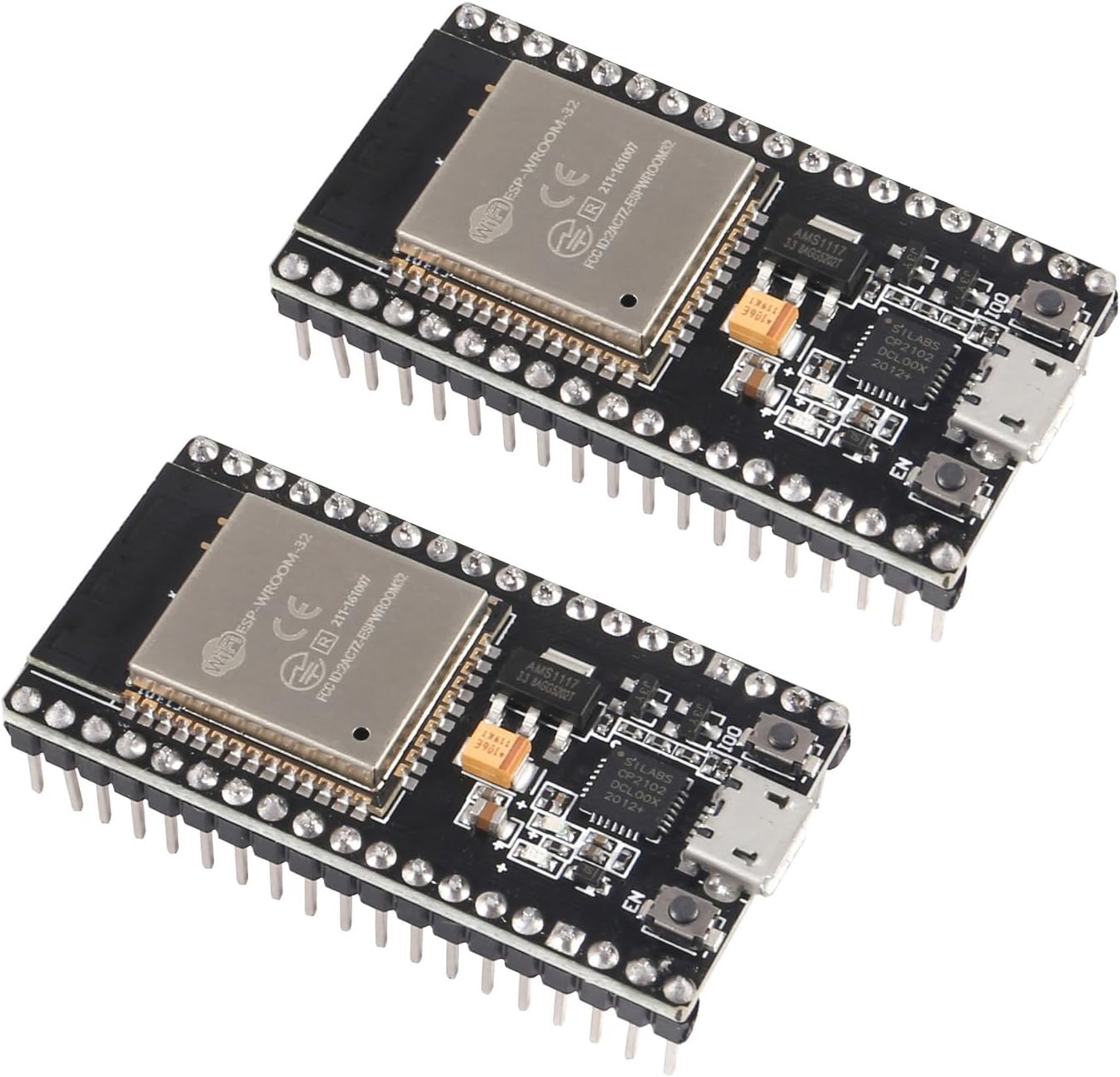
Figure 1: Two Aokin ESP32 ESP-32S NodeMCU-32S Development Boards.
2 కీ ఫీచర్లు
- డ్యూయల్-మోడ్ కనెక్టివిటీ: Features 2.4 GHz Wi-Fi and Bluetooth for versatile wireless communication.
- Integrated Flash Memory: Equipped with 4 MB of flash memory for program storage.
- కాంపాక్ట్ డిజైన్: Small volume and powerful capabilities, designed to fit on a solderless breadboard.
- ప్రోటోకాల్ మద్దతు: Supports LWIP protocol and FreeRTOS.
- ఆపరేటింగ్ మోడ్లు: Supports three modes: Access Point (AP), Station (STA), and AP+STA coexistence mode.
- Programming Compatibility: Compatible with Arduino, NodeMCU, and MicroPython. Can be programmed using the Arduino IDE and Lua.
- తక్కువ విద్యుత్ వినియోగం: Utilizes low-power 40nm technology for optimal power efficiency and RF performance.
3. ఉత్పత్తి లక్షణాలు
| స్పెసిఫికేషన్ | విలువ |
|---|---|
| బ్రాండ్ | Aokin |
| మోడల్ పేరు | ESP32 ESP-32S NodeMCU-32S Development Board |
| కనెక్టివిటీ టెక్నాలజీ | బ్లూటూత్, వై-ఫై |
| మెమరీ స్టోరేజ్ కెపాసిటీ | 4 MB |
| వస్తువు బరువు | 0.634 ఔన్సులు |
| ప్యాకేజీ కొలతలు | 4.57 x 3.07 x 0.67 అంగుళాలు |
| మొదటి తేదీ అందుబాటులో ఉంది | సెప్టెంబర్ 8, 2021 |
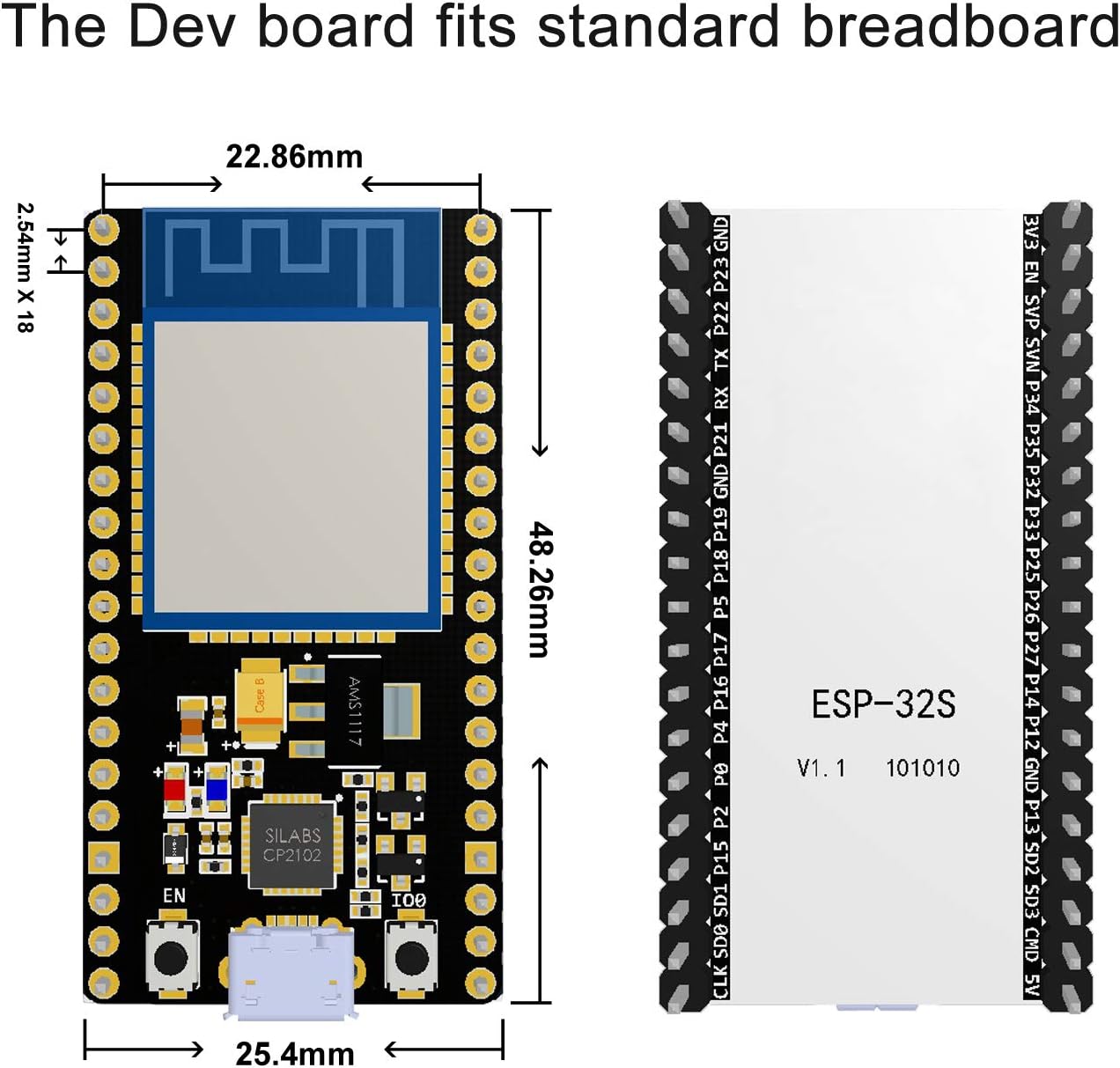
Figure 2: Dimensions of the ESP32 Development Board, indicating its compact size suitable for breadboards.

మూర్తి 3: వివరంగా view of the ESP32 board's key components.
4. సెటప్ గైడ్
Before using your Aokin ESP32 development board, follow these steps to ensure proper setup:
4.1 డ్రైవర్ ఇన్స్టాలేషన్
The board uses a CP2102 USB to UART bridge. You may need to install the appropriate drivers for your operating system. Drivers can typically be found on the Silicon Labs webసైట్:
4.2 Connecting the Board
Connect the ESP32 board to your computer using a micro-USB cable. The board is designed to fit on a standard solderless breadboard, making prototyping convenient.

చిత్రం 4: ఎగువ మరియు దిగువ views of the ESP32 board, highlighting pin labels on the underside.
4.3 Initial Program Download (Important Tip)
When downloading a program to the development board, it is often necessary to manually put the board into programming mode. This typically involves pressing and holding the IO0 button for 1-2 seconds during the upload process, especially when the Arduino IDE or similar tools indicate the start of the upload sequence.
5. ఆపరేటింగ్ సూచనలు
The Aokin ESP32 board offers flexible operating capabilities for various embedded projects.
5.1 Programming Environments
The board is compatible with popular development environments:
- ఆర్డునో IDE: Widely used for its simplicity and extensive library support.
- NodeMCU (Lua): For Lua-based scripting and rapid prototyping.
- మైక్రోపైథాన్: For Python-based programming on microcontrollers.
5.2 Wi-Fi and Bluetooth Modes
The ESP32 supports three primary Wi-Fi operating modes:
- స్టేషన్ (STA) మోడ్: The ESP32 connects to an existing Wi-Fi network (e.g., your home router).
- యాక్సెస్ పాయింట్ (AP) మోడ్: ESP32 దాని స్వంత Wi-Fi నెట్వర్క్ను సృష్టిస్తుంది, ఇతర పరికరాలను దానికి కనెక్ట్ చేయడానికి అనుమతిస్తుంది.
- AP+STA సహజీవన మోడ్: The ESP32 operates as both an Access Point and a Station simultaneously.
5.3 పిన్అవుట్ రేఖాచిత్రం
Understanding the pinout is crucial for connecting external components and sensors. Refer to the diagram below for the pin assignments.

Figure 5: ESP32 Development Board Pinout Diagram.
6. నిర్వహణ
The Aokin ESP32 development board is designed for durability and requires minimal maintenance. Keep the board clean and free from dust and moisture. Avoid exposing it to extreme temperatures or static electricity. No user-serviceable parts are inside the module itself.
7. ట్రబుల్షూటింగ్
If you encounter issues with your ESP32 development board, consider the following common troubleshooting steps:
7.1 Program Upload Issues
- IO0 Button: If your program fails to upload, ensure you are pressing and holding the IO0 button (sometimes labeled "BOOT" or "FLASH") during the upload process, especially when the IDE indicates it's attempting to connect or upload. Release the button once the upload begins.
- USB Cable/Port: Try a different USB cable or a different USB port on your computer. Faulty cables or insufficient power from a USB port can cause upload failures.
- డ్రైవర్ సమస్యలు: Verify that the CP2102 drivers are correctly installed and recognized by your operating system.
- బోర్డు ఎంపిక: In your IDE (e.g., Arduino IDE), ensure you have selected the correct board model (e.g., "ESP32 Dev Module" or similar) and COM port.
7.2 Physical Defects
- బెంట్ పిన్స్: Carefully inspect the pins on the board. If any are bent, gently straighten them.
- Solder Bridges: In rare cases, small solder bridges between pins can occur during manufacturing. Visually inspect the pins for any unintended connections and carefully remove them if found (e.g., with a fine soldering iron tip).
8. మద్దతు మరియు వనరులు
For further assistance and detailed technical documentation, please refer to the following resources:
- CP2102 డ్రైవర్: silabs.com/products/development-tools/software/usb-to-uart-bridge-vcp-drivers
- ESP32-WROOM-32 Datasheet: espressif.com/sites/default/files/documentation/esp32-wroom-32_datasheet_en.pdf
- NodeMCU Firmware (ESP32): github.com/nodemcu/nodemcu-firmware/tree/dev-esp32
- NodeMCU Lua (Nicholas3388): github.com/Nicholas3388/LuaNode
- తయారీదారు: Aokin
Note: This board has pin labeling on the bottom side. The product package may include a printed sheet with additional information and pin labels.


