1. పరిచయం
Thank you for choosing the DEXTER 1500W SDS Plus Hammer Drill. This manual provides essential information for the safe and effective operation, maintenance, and troubleshooting of your new tool. Please read this manual thoroughly before first use and keep it for future reference.

Figure 1: The DEXTER 1500W SDS Plus Hammer Drill, showcasing its robust design and ergonomic features.
2. భద్రతా సూచనలు
అగ్ని ప్రమాదాలు, విద్యుత్ షాక్ మరియు వ్యక్తిగత గాయాల ప్రమాదాన్ని తగ్గించడానికి విద్యుత్ సాధనాలను ఉపయోగిస్తున్నప్పుడు ఎల్లప్పుడూ ప్రాథమిక భద్రతా జాగ్రత్తలను అనుసరించండి.
- పని ప్రాంత భద్రత: మీ పని ప్రదేశాన్ని శుభ్రంగా మరియు బాగా వెలుతురు వచ్చేలా ఉంచండి. మండే ద్రవాలు, వాయువులు లేదా ధూళి వంటి పేలుడు వాతావరణాలలో విద్యుత్ ఉపకరణాలను ఆపరేట్ చేయవద్దు.
- విద్యుత్ భద్రత: పవర్ టూల్ ప్లగ్లు అవుట్లెట్కు సరిపోలాలి. ప్లగ్ను ఎప్పుడూ ఎట్టి పరిస్థితుల్లోనూ సవరించవద్దు. మట్టితో లేదా నేలతో కప్పబడిన ఉపరితలాలతో శరీర సంబంధాన్ని నివారించండి.
- వ్యక్తిగత భద్రత: Always wear eye protection, hearing protection, and suitable work gloves. Dress properly; do not wear loose clothing or jewelry.
- సాధన వినియోగం మరియు సంరక్షణ: పవర్ టూల్ను బలవంతంగా వాడకండి. మీ అప్లికేషన్ కోసం సరైన పవర్ టూల్ను ఉపయోగించండి. ఏవైనా సర్దుబాట్లు చేయడానికి, ఉపకరణాలను మార్చడానికి లేదా పవర్ టూల్స్ నిల్వ చేయడానికి ముందు పవర్ సోర్స్ నుండి ప్లగ్ను డిస్కనెక్ట్ చేయండి.
3. ఉత్పత్తి ముగిసిందిview మరియు భాగాలు
Familiarize yourself with the various parts of your DEXTER Hammer Drill and its included accessories.
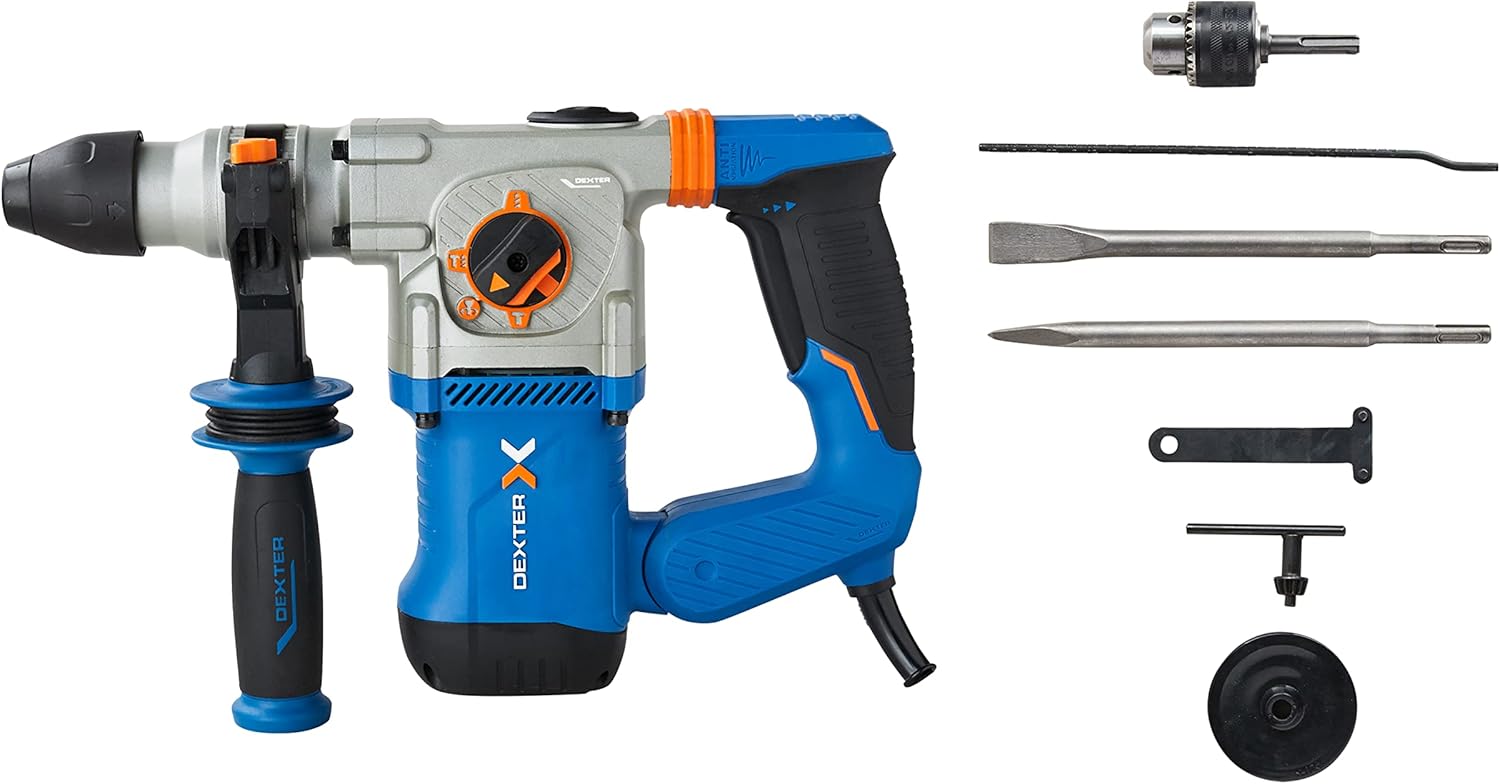
Figure 2: The hammer drill along with its standard accessories, including the SDS Plus chuck, pointed chisel, flat chisel, side handle, key, and depth gauge.
ముఖ్య భాగాలు:
- SDS ప్లస్ చక్: త్వరిత మరియు సురక్షితమైన బిట్ మార్పుల కోసం.
- మోడ్ సెలెక్టర్ స్విచ్: Allows selection between drilling, hammer drilling, chiseling, and chiseling with free accessory adjustment.
- వేరియబుల్ స్పీడ్ ట్రిగ్గర్: For precise control over drilling and chiseling speed.
- Anti-Vibration Handles: Designed to absorb shocks and reduce user fatigue.
- సైడ్ హ్యాండిల్: ఆపరేషన్ సమయంలో అదనపు పట్టు మరియు నియంత్రణను అందిస్తుంది.
- లోతు గేజ్: For setting precise drilling depths.
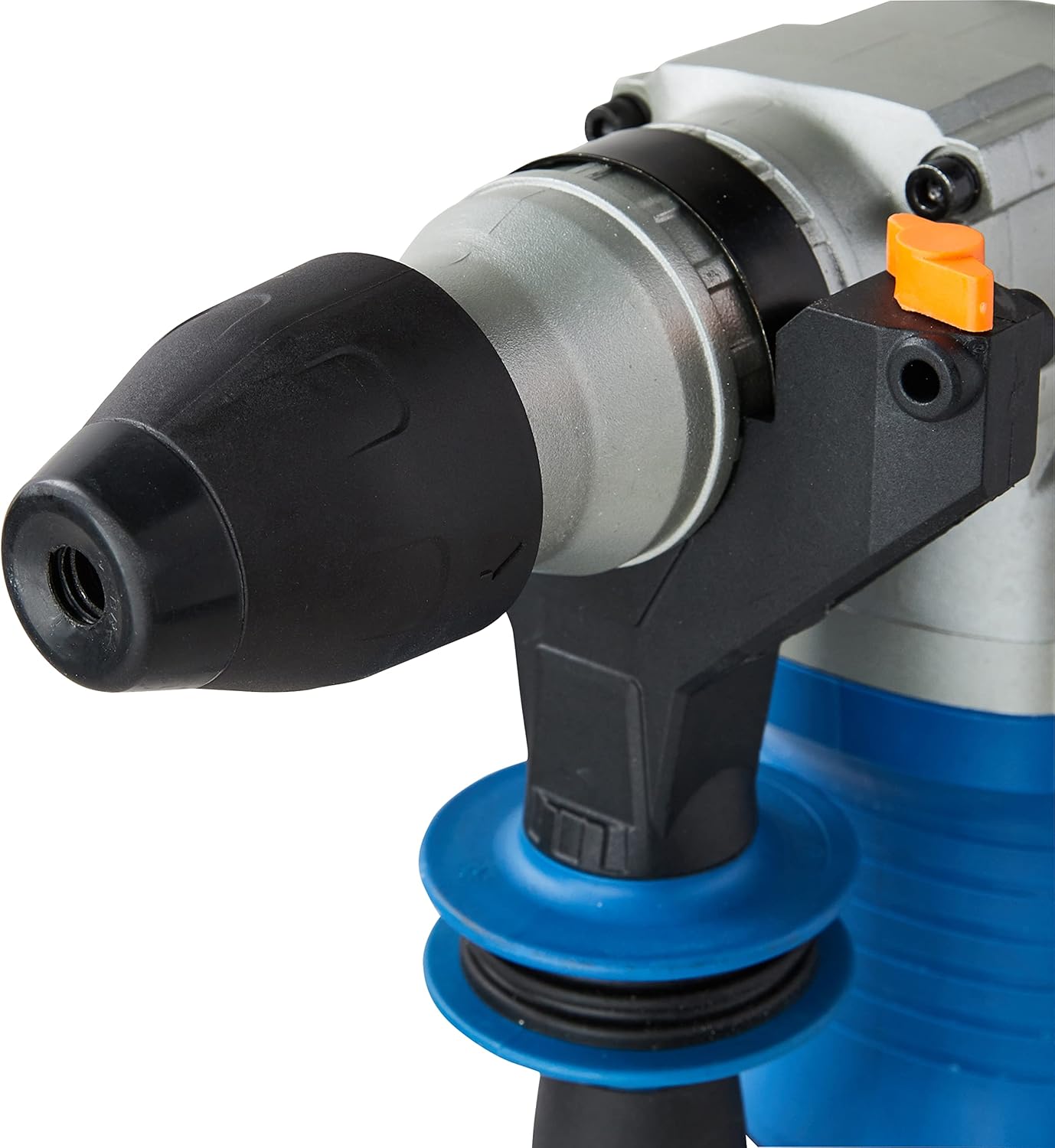
మూర్తి 3: వివరంగా view of the SDS Plus chuck, designed for quick and secure bit insertion.

Figure 4: Close-up of the mode selector switch, indicating the different operational modes of the hammer drill.

మూర్తి 5: View of the anti-vibration handle, highlighting its design for improved user comfort and reduced fatigue.
4. సెటప్
4.1 సైడ్ హ్యాండిల్ను అటాచ్ చేయడం
- సైడ్ హ్యాండిల్ను అపసవ్య దిశలో తిప్పడం ద్వారా దాన్ని విప్పు.
- Slide the handle onto the front of the tool until it is in the desired position.
- Rotate the handle clockwise to tighten and secure it.
4.2 Inserting and Removing SDS Plus Bits
- SDS ప్లస్ బిట్ యొక్క షాంక్ను శుభ్రం చేయండి.
- బిట్ చక్ లోకి చొప్పించి, అది సరిగ్గా తగిలే వరకు ఉంచండి. బిట్ సురక్షితంగా లాక్ చేయబడిందని నిర్ధారించుకోవడానికి దాన్ని లాగండి.
- తొలగించడానికి, చక్ కాలర్ను వెనక్కి లాగి బిట్ను బయటకు లాగండి.
4.3 Attaching the Key Chuck (for standard drill bits)
For drilling with standard, non-SDS bits (e.g., for wood or metal), attach the included key chuck adapter to the SDS Plus chuck.
- Insert the key chuck adapter into the SDS Plus chuck as described in 4.2.
- Insert the desired standard drill bit into the key chuck.
- Tighten the key chuck using the provided chuck key to secure the bit.
4.4 డెప్త్ గేజ్ సెట్టింగ్
- Insert the depth gauge into the hole on the side handle.
- కావలసిన డ్రిల్లింగ్ లోతుకు గేజ్ను సర్దుబాటు చేయండి.
- Tighten the side handle to secure the depth gauge in place.
5. ఆపరేటింగ్
Your DEXTER Hammer Drill offers four primary functions for various applications.
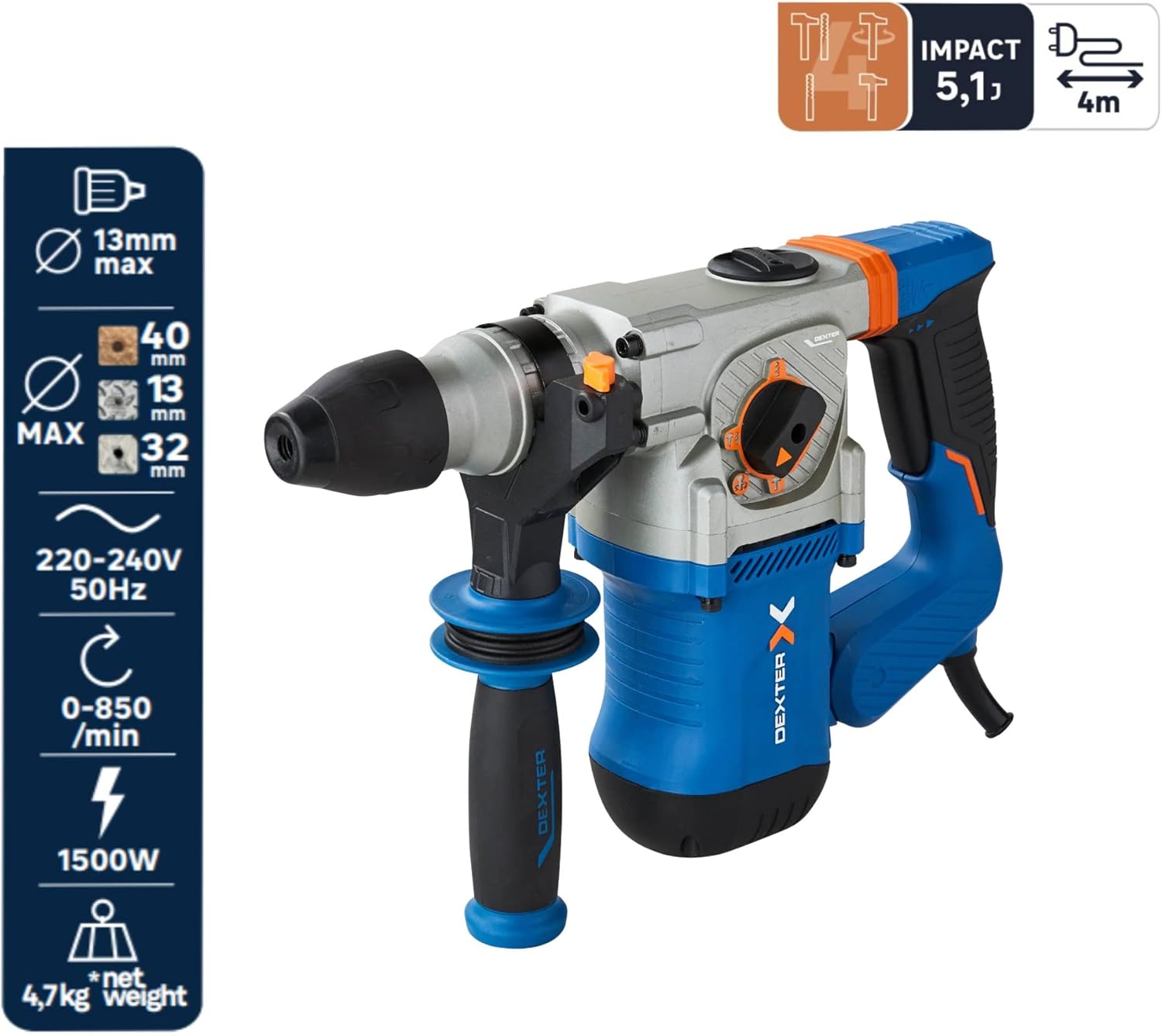
చిత్రం 6: పైగాview of the hammer drill's capabilities, including maximum drilling diameters and power specifications.
5.1 ఆపరేటింగ్ మోడ్ను ఎంచుకోవడం
Rotate the mode selector switch to choose the appropriate function:
- డ్రిల్లింగ్ మోడ్ (డ్రిల్ బిట్ సింబల్): For drilling in wood (up to 40mm) and metal (up to 13mm). Use with the key chuck and standard drill bits.
- Hammer Drilling Mode (Drill Bit + Hammer Symbol): For drilling in concrete or brick (up to 26mm). Use with SDS Plus drill bits.
- Chiseling Mode (Hammer Symbol): For chiseling applications, such as breaking concrete or removing tiles. The accessory is fixed in position.
- Chiseling with Free Accessory Adjustment (Hammer + Rotating Arrow Symbol): Allows the chisel to rotate freely, useful for adjusting the angle when removing tiles or similar tasks.
5.2 వేరియబుల్ స్పీడ్ కంట్రోల్
The trigger features variable speed control. Press the trigger lightly for lower speeds and press harder for higher speeds. This allows for precise control depending on the material and application.
5.3 నిరంతర ఆపరేషన్
For extended use, the tool can be set to continuous operation. Press the trigger and then engage the lock-on button (if present, typically on the handle). To disengage, press the trigger again.
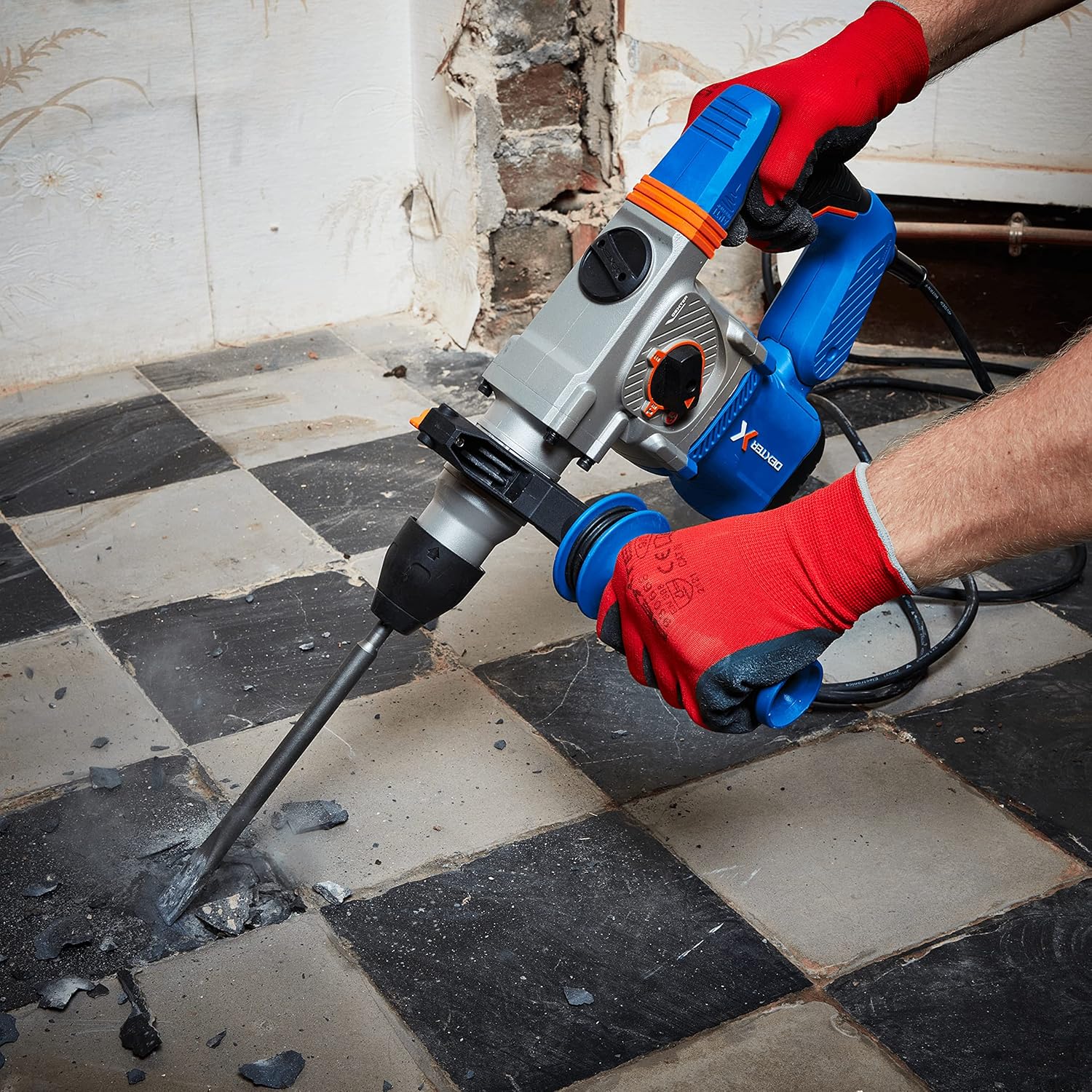
Figure 7: The hammer drill being used to chisel and break up a concrete floor, demonstrating its power in demolition tasks.

Figure 8: An operator using the hammer drill to efficiently remove floor tiles, utilizing the chiseling function.

Figure 9: The hammer drill in action, drilling into a brick wall, showcasing its capability for masonry work.
6. నిర్వహణ
క్రమం తప్పకుండా నిర్వహణ మీ సాధనం యొక్క దీర్ఘాయువు మరియు సరైన పనితీరును నిర్ధారిస్తుంది.
- శుభ్రపరచడం: ప్రతి ఉపయోగం తర్వాత, ఉపకరణాన్ని మృదువైన, డి-రబ్బరు వస్త్రంతో శుభ్రం చేయండి.amp వస్త్రం. కఠినమైన రసాయనాలు లేదా రాపిడి క్లీనర్లను ఉపయోగించవద్దు. వెంటిలేషన్ ఓపెనింగ్లను దుమ్ము మరియు శిధిలాలు లేకుండా శుభ్రంగా ఉంచండి.
- చక్ నిర్వహణ: Periodically clean and lightly lubricate the SDS Plus chuck to ensure smooth bit insertion and removal.
- కార్బన్ బ్రష్లు: If the tool experiences reduced power or excessive sparking, the carbon brushes may need inspection or replacement. This should ideally be done by a qualified service technician.
- నిల్వ: పిల్లలకు అందుబాటులో లేని పొడి, సురక్షితమైన ప్రదేశంలో సాధనాన్ని నిల్వ చేయండి.
7. ట్రబుల్షూటింగ్
Below are common issues and their potential solutions.
| సమస్య | సాధ్యమైన కారణం | పరిష్కారం |
|---|---|---|
| సాధనం ప్రారంభం కాదు | విద్యుత్ సరఫరా లేదు; తప్పు విద్యుత్ తీగ/ప్లగ్ | Check power outlet and connections; Inspect power cord for damage. |
| తగ్గిన శక్తి/పనితీరు | Worn carbon brushes; Overload; Incorrect mode selection | Have carbon brushes checked/replaced; Reduce load; Ensure correct mode is selected. |
| బిట్ చక్లో లాక్ అవ్వడం లేదు | Chuck dirty; Bit shank damaged | Clean chuck and bit shank; Use a new bit if damaged. |
| విపరీతమైన కంపనం | Damaged bit; Internal issue | Replace bit; If problem persists, seek professional service. |
8. స్పెసిఫికేషన్లు
| ఫీచర్ | స్పెసిఫికేషన్ |
|---|---|
| మోడల్ సంఖ్య | 3276007131802 |
| పవర్ ఇన్పుట్ | 1500 W |
| ఇంపాక్ట్ ఎనర్జీ | 5.1 జౌల్స్ |
| గరిష్ట ప్రభావ రేటు | 4500 bpm |
| నో-లోడ్ స్పీడ్ | 0-850 rpm |
| చక్ రకం | SDS ప్లస్ |
| డ్రిల్లింగ్ సామర్థ్యం (కలప) | 40 మి.మీ |
| డ్రిల్లింగ్ సామర్థ్యం (లోహం) | 13 మి.మీ |
| Drilling Capacity (Concrete/Brick) | 26 మి.మీ |
| వాల్యూమ్tage | 230 వి |
| ఉత్పత్తి కొలతలు | 12 x 12 x 32 సెం.మీ |
| వస్తువు బరువు | 8.2 కిలోలు |
| కేబుల్ పొడవు | 4 మీ |
9. వారంటీ మరియు మద్దతు
DEXTER products are manufactured to high-quality standards. For warranty information, please refer to the warranty card included with your purchase or contact DEXTER customer support. Keep your proof of purchase for any warranty claims.
For technical assistance, spare parts, or service, please contact your local DEXTER authorized service center or visit the official DEXTER webసంప్రదింపు వివరాల కోసం సైట్.


